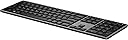
โจ๏ธ Elevate your desk game with HP 975 โ where style meets unstoppable productivity!
The HP 975 Wireless Keyboard offers versatile connectivity with Bluetooth and USB-A, allowing seamless switching between three devices. Featuring a rechargeable battery lasting over six months, quiet ergonomic keys, and adaptive smart backlighting, itโs designed for professionals seeking comfort, customization, and long-lasting performance in a sleek, modern package.
| ASIN | B09YZ4947H |
| Antenna Location | Business |
| Box Contents | HP Wireless Keyboard |
| Brand | HP |
| Brand Name | HP |
| Button Quantity | 19 |
| Colour | Black |
| Compatible Devices | PC |
| Connectivity Technology | Bluetooth |
| Customer Reviews | 4.4 out of 5 stars 34 Reviews |
| Enclosure Material | Plastic |
| External Testing Certification | Nรฃo aplicรกvel |
| Hand Orientation | Ambidextrous |
| Item Type Name | Keyboard |
| Item Weight Unit of Measure | 454 g |
| Keyboard Backlighting Color Support | Single Color |
| Keyboard Description | Wireless |
| Keyboard Layout | QWERTY |
| Manufacturer | Hewlett Packard |
| Manufacturer Part Number | 3Z726UT#ABA |
| Model Name | 975 Wireless Keyboard |
| Model Number | 975 |
| Number of Batteries | 1 |
| Number of Keys | 104 |
| Number of Sections | 3 |
| Power Source | Battery Powered |
| Product Features | Backlit, Rechargeable |
| Recommended Uses For Product | Business |
| Series Number | 975 |
| Special Feature | Backlit, Rechargeable |
| Style Name | Modern |
| Switch Type | Scissor |
| Theme | Sustainability |
| UPC | 196068132095 |
| Water Resistance Level | Not Water Resistant |
C**Z
It's a great keyboard
This is a real buyers review of this keyboard and it's probably the best "chiclet" scissor switch style keyboard there is. I've tried them all. Pros: Material quality feels great. Has legs which a lot of them don't. The keys are bigger than most as well which helps a lot, hands don't feel too squished when typing. The switches have a tactile feel, but it isn't too heavy, great for typing endurance. The auto backlighting is nice because you don't have to turn it on and off to use. The letters on the keys are a nice size, making them easier to see. The typing is as quiet as any other chiclet scissor switch keyboard. Has FN lock, which some don't have for some reason. And the overall look of it in person, is very nice. High quality appearance. Way nicer than what a picture shows. Cons: The backlighting is nice, but the light is a little slow to activate when your hands go over the keyboard. And it takes a little too long to turn off, which might drain the battery faster. This might be adjustable in the programming, but not sure, haven't tried. Some might not like how close all the keys are. They have space but because the keys are bigger, it looks like less space between the keys. The white color of the key characters is very light. Meaning without the lighting on, it's not super visible like most would be. That's a little disappointing because I don't typically care to use the back lighting if not needed. Seems like they were really banking on the idea that people would use that backlighting every time they use the keyboard. In final: It's great and you should buy it, but buy it used. No chiclet keyboard is worth a 100 dollars lol. Spend half on a used one. The used ones are still brand new basically. No real difference. Sellers won't like that, but that is the truth. If you are interested in a chiclet scissor switch, there is no other option that is better than this one.
A**Y
Like the Microsoft Surface keyboard, but with a couple nice additional features
I have the Microsoft Surface line of keyboard and ergonomic mouse on my main desk. It has been a pleasant, reliable pair for several years now. I now have a second desk, however, and use USB-C docks to plug my devices into the peripherals with just one cable. Unfortunately the Microsoft keyboard/mouse don't have a dongle that I'm aware of to avoid having to pair all the devices separately. I bought this keyboard (and accompanying mouse) because the discrete device switching (USB/BT1/BT2) can handily solve this problem. I am very pleased with the keyboard. Of course if you prefer squishy keys with long travel, I doubt if any of these thin keyboards will be to your liking, but as I've grown accustomed to using laptop keyboards for most of my life (to the point where I prefer a fairly shallow, snappy key travel), this along with the Surface keyboard are right up my alley. And compared to the Surface, this is very similar from the design, feel, and layout, but with a couple bonuses that I like. The first bonus, as I mentioned, is the discrete switching functionality. I'm not a fan of bluetooth multipairing. It just seems messy sometimes. What I like about this is that you'll never have to fuss with being paired with mutliple devices at once, or re-establishing priority. Doubly, since it has a wireless dongle, I can plug that in to my USB-C dock and never have to worry about pairing if I want to connect other devices at all. It all automatically works, including connecting my Motorola Android phone. This is what I ultimately wanted. I feel like we're finally at the point where your whole desk experience can be achieved from just one cable. It's a nice feeling. The other bonus that this has over the Surface keyboard is the backlighting. I understand why wireless keyboards don't usually have it, but it can be done intelligently as HP seems to have here. It times out after several seconds of inactivity and must have a proximity sensor that lights up the keys when your hand hovers. The backlighting quality itself is also very good. Uniform, no significant light bleed, pleasant white color. If Microsoft had chosen to backlight the Surface keyboards, I think it would behave just like this, which is to say, very well thought out and dependable. While I was aware and okay with the fact that the Surface keyboard didn't have backlighting, I did end up missing it in a fair few instances. So all in all, I think this compared actually favorably to the Surface keyboard. I initially thought that the key stop was slightly more jarring on the HP (leading to eventual fatigue), but if it is worse, it's barely noticable even after an hour of typing. I wholeheartedly recommend this keyboard if you're happy with slim keyboards' snappier travel.
O**O
Great Keyboard
I have enjoyed using this KB since it arrived. I love the fact that I can program the buttons. However, I seem to have gotten addicted to mechanical KBs so the switches on this KB make me feel underwhelmed. I would highly recommend it to those who'd love something sturdy.
W**A
HP Excutive Style Keyboard
I recently upgraded my computer from a alienware to an HP Omen 45L, unfortunately it doesn't come with a keyboard or even mouse. So I had to hunt for one on Amazon, while researching many I wanted a full size keyboard, backlit, and slimline, with soft touch buttons. This keyboard checked all my boxes on what I was looking for and I wanted it to match my computer, so I decided to order it. Now its not cheap at all, but once it arrived the quality is first class you can expect from HP, and I am very please with it. I love the soft keys and backlit keyboard which was a must for me. The Bluetooth is easy to use, but i prefer the usb connection since i have them built into my monitor. For the money, yes it was worth it. It caters more to an executive that wants a premium keyboard. Only complaint is there there inst a print screen button and I haven't been able to use the supposedly software that configures it.
K**T
Soft keys
Love this low profile keyboard. Very easy setup and clean look.
Trustpilot
3 weeks ago
2 weeks ago