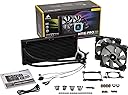
🌬️ Cool in silence, shine in style — the ultimate RGB water cooler for pros who demand more.
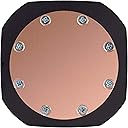
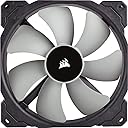
The Corsair H115i PRO RGB is a high-performance liquid CPU cooler featuring dual 140mm magnetic levitation fans that deliver 55.4 CFM airflow at an ultra-quiet 20 dBA. Its dynamic RGB pump head lighting is fully customizable via CORSAIR LINK software, which also enables precise control over fan and pump speeds, including a zero RPM mode for silent operation at low temperatures. Compatible with a broad range of Intel and AMD sockets, this sleek black cooler balances powerful thermal management with stylish, customizable aesthetics.


| ASIN | B077G3C6HH |
| Air Flow Capacity | 75 Cubic Feet Per Minute |
| Best Sellers Rank | 285,355 in Computers & Accessories ( See Top 100 in Computers & Accessories ) 3,571 in Fans & Cooling |
| Brand | Corsair |
| Compatible Devices | PC |
| Compatible devices | PC |
| Cooling Method | Water |
| Cooling method | Water |
| Customer Reviews | 4.7 out of 5 stars 5,892 Reviews |
| Global Trade Identification Number | 00843591026505 |
| Item Dimensions L x W x H | 31.5L x 14.3W x 2.9H centimetres |
| Item Type Name | All-in-one water cooling |
| Item Weight | 4.94 Pounds |
| Manufacturer | CORSAIR HOLDINGS HONG KONG LTD |
| Manufacturer Part Number | CW-9060032-WW |
| Material | Aluminium |
| Max Rotational Speed | 1200 RPM |
| Model Number | CW-9060032-WW |
| Noise Level | 20.4 Decibels |
| Number of Items | 1 |
| Power Connector Type | SATA (pump), 4-pin (fans) |
| Power connector type | SATA (pump), 4-pin (fans) |
| Product Warranty | 5 Year Warranty |
| Product dimensions | 31.5L x 14.3W x 2.9H centimetres |
| UPC | 843591026505 |
| Unit Count | 1.0 count |
| Voltage | 12 Volts |
L**K
Keeps the system nice and cool with hardly any noise
You can tell the fans are good (the well-regarded ML 140s fro Corsair) because you can more often than not hear the faint sound of the pump over the sound of them. One thing to bear in mind with this AIO is case compatibility, you may not be able to fit it in something like the NZXT H500. In my Corsair 275R it's had to go in the front which has hampered airflow very slightly in my case. With the stock blower cooler my GPU was definitely heading into thermal throttling territory, but after sticking a Morpheus II on it temps are much more reasonable. The one negative is the number of cables that come off the pump/coldplate combo - 1 fan splitter, 1 USB cable (for controlling via Link/iCue) 1 SATA cable and a PWM sensor cable. I've managed to route these so they are not visible, but it took some lateral thinking and liberal use of adhesive. The main selling point of this cooler is silent running, which the combination of a large radiator and low RPM fans manage very well. Load temps on my 2700x when running synthetic loads like OCCT or Prime 95 top out at 55c after 1 hour, which is amazing.
B**N
Wow, Unbelievable performance, build quality and easy to install
If you are looking for a robust CPU cooler, then look no further. I upgraded from a Corsair h80i and there is definitely a performance improvement. My CPU temps have dropped and are more consistent. I'm running an i7-8700k OC to 5.1ghz and it's golden. The included fans I replaced with white LL120s and they look great on it. The supplied fans are high performance and more than suitable but cosmetically I wanted LL120s. I have put on cablemods AIO sleeves I. White so the pipes "pop" in my build but the standard sleeves are of a very high quality. The product comes well boxed and is easy to install, the full 360mm radiator looks great at the front of the machine but I wish Corsair would release a white version of this radiator! Overall, a great AIO(all-in-one) CPU water cooler with great performance and excellent build quality.
L**E
Quiet cooling without compromising on performance
While installation for me wasn't quite as easy as it should have been, I can't fault the cooler for that, instead the Corsair 460x I was installing it in. Considering there is space for fans at the top, Corsair really should have added some extra space up top in order to fit a radiator there. I instead ended up installing the radiator on the exterior of the case, at the top. Regardless, this isn't the fault of the cooler, and when I initially attempted to install it with the motherboard out of the case it went very smoothly, far easier than installing a high end air cooler. The included instructions were sufficient, but nothing special. Not everything was as clear as it could have been, however the installation itself is pretty intuitive and so this is a non-issue. When I initially powered on my computer for the first time after installing it I was shocked at how quiet it was. I actually ended up peering into my case to ensure that the two included ML140 fans had been connected properly. It really is dead silent, even on the default profile, and my three Corsair SP120 RGB case fans make significantly more noise than this cooler. After tweaking the fan profiles of everything and leaving the pump on the 'balanced' preset I cannot hear my computer (~0.75 metres away from me on my desk) when gaming with my speakers. With my 8600k on stock settings idle temperatures, while insignificant, were sitting around 32C in my room with an ambient temperature of 19C. What was really impressive was the temperatures I was seeing under load - in Aida64 Extreme on stock settings temperatures barely exceeded 60C after half an hour on the stress test, and all the while my system remained dead silent. After over-clocking my i5 8600k to 5Ghz at 1.350V I reach 68C under the same test. This is all with the included thermal paste on the cooler, and on a non-delidded processor. This performance is really impressive to me coming from air cooling. In terms of negatives, the only thing I can think of is the USB cable coming from the cooler. To control the RGB this must be plugged in, however the way that it comes out of the cooler can make it somewhat difficult to cable manage. I tried to route it underneath the VRM heatsink, however it comes out some distance from the motherboard, meaning that it is still very visible from the exterior of my case. An integrated solution for this would be more appealing than the mini USB cable utilised here, as it would make it easier to hide the cable coming out from the waterblock. On the plus side this cable is black, and so does not stand out too badly. Overall this cooler is superb, and does everything it needs to very well. The mix of performance and aesthetics cannot be faulted, and the 360mm offerings from both Corsair and other brands do not pose a significant enough bump in performance to justify the increase in performance in my opinion. This is a five star product.
T**Y
Amazing!
This was the first AIO i have installed and must say it was a breeze, i started off having just pull config and decided to upgrade to push pull in my 220T to fill out the space even more and make it look more compacted as i like that, lovely tasteful RGB and quiet performance, next upgrade is getting rid of this spinning rust i can now hear in my system. The ICUE software has come a long way and is very easy to use for controlling RGB on both your motherboard, any corsair controllers you may have and this cooler. It also controls the pump speed and fan speed, which is easy to do and relatively customisable with different presets so you can have one of your fans on say balanced and the other on 0rpm for whatever reason if you find it would be advantageous. The ML120's provided are amazing, very quiet and move good air. It keeps my Ryzen 5 2600 at 39 degrees C Idle and maybe 60 max playing games,
R**D
Good cooling, annoying pump noise
This is quite a reasonably priced 280mm AIO cooler, so it definitely gets marks for that. The cooler, like all AIO's is very easy to install. It comes with pre applied thermal paste, and the pre installed fans are aggressively mediocre. I've changed the pre installed fans for some Nocuta P14 fans, and that did improve fan noise levels and cooling. I'm running a Ryzen 9 3900X, and it idle it runs at about 30-40 degrees (dependant on amibent temperature, and hardly ever goes above 60 degrees celcius during extended gaming sessions. However, I do have one thing I don't particularly like about this AIO. The fans and pump are controlled by Corsair's iCUE software. The software itself is ok, however, the pump noise is extremely annoying. No matter what speed you set it at (quiet, balanced or extreme) the pump speed changes between two values every couple of seconds, this is completely intended behaviour, however, it makes the pump sound like it's 'hooting' every second or two. It's a highly annoying sound, and sadly there's nothing you can do about it. Overall this is a pretty good cooler (pump noise aside), however, if this did break, I would probably buy something different, either a different brand AIO, or a Noctua nh d15, just to avoid the pump noise
C**G
Excellent cooling for my overclocked i7 - Easily configurable using Corsair software
I was fed up having my Windows machine crash with heat issues when transcoding video using Handbrake so I decided to upgrade my Noctua fan to this water cooler. Glad I did. The unit is easy to install as long as you have a basic understanding of your case and motherboard. Carefully check which risers you need for your board (Have a look in your motherboard manual if unsure on type to use). Comes with pre applied thermal paste which is great although I suggest you make sure of position over the cpu so as to avoid moving it about after fitting and smearing the paste. Under normal load the pump and fans are barely audible provided you download and configure the iCUE software from Corsair. This software allows you to set custom fan and pump performance based on heat of various sensors, I use the CPU sensor to drive the power of the fans and pump which seems to work well however you can adjust according to many other sensors too. The same software can be used to adjust the lighting on the unit although there is no lighting on the fans or radiator (Which suits me fine). Other Corsair hardware can be configured using the same software which is useful as I have a Corsair keyboard. At full load and in the height of the hot weather we have had my CPU was peaking at 63 degrees which is way lower than the temps with the fan cooler. Be warned though, the noise level is significant when the fans and pump are running full speed to keep the CPU cool in hot weather however there isn't really any way to avoid this. The only gripe I have is that the fans are set according to current user so if I am running an intensive heat generating process and someone else logs into their account on the same machine, it sets the fan according to their usage which can lead to overheating the CPU. If anyone knows a way of getting round this would love to hear - As a workaround I set the same iCUE settings in everyone's account on the same machine however would prefer if the setting could be made globally rather than on a per user setting. You will need a spare USB header on your board to use this unit and I had to disconnect one of the leads from my front of case USB units however not a big deal if you have a spare.
G**K
Great cooler - attractive, quiet and cool.
Got 5degC cooler at default settings compared to my air cooler (Arctic Cooling Freezer 13) and more importantly for me, I got equivalent cooling but at a damn-near silent setting. This unit sells itself as quiet and it certainly can be. I have the fans set at a constant 500rpm at which speed they are inaudible. The pump on the "quiet" profile is slightly audible (nothing compared to an air cooler) but I have quite an open case sitting on my desk. If you have your PC under the desk I doubt you'd hear it. The CUE software works okay. I find you have to press the "Apply" button many times for it to actually apply the settings but it works in the end. It's not that obvious how to make your settings the default settings.
J**M
good bit of kit
firstly id like to confirm this is in fact AM4 compatible, dont let previous reviews confuse you. they now provide a selection of brackets that you can easily switch to suit your rig the unit is well made and just feels good quality i am happy that the fans arent glowing rgb colours, its only the pump that lights up and thats just right for me, rgb fans on top of the rig will put me off gaming for sure also it is worth noting, if you are looking at this cooler because its one of the quieter ones... the fans are mag-lev fans and are supersilent...however the noise level of the pump itself is the nosiey bit... all in all much more tolerable noise level than the wraith prism cooler it replaced. whilst its one of the best cpu fans... it was quiet enough until the computer knew i had beaten it then it would spin like crazy! this cooler is just gently working away at a steady pace nice and quiet. no problems with temperature whatsoever. cool and quiet. fitted to a Ryzen 7 2700x on asus prime x470 pro mobo with 64gb ram
W**Y
Silencioso e potente.
Pra ser bem sincero acho caro esse equipamento, por outro lado se for pensar na vida útil que vou ter a mais por conta das baixas temperaturas com esse cooler, a conta acaba ficando equilibrada, sem contar que ele é super silencioso, fiz um push and pull jogando o ar quente todo pra fora, no verão aqui no meu apartamento é bem quente mas ainda assim acho que vai cravar nos 70 graus quando em uso nas tarefas pesadas no restante do tempo não vai passa de 45 graus, o vendedor entregou dentro do prazo.
J**N
Refigera de 10.
Me encanta la refigeracion que tiene, hace que mi procesador baje bastante la temperarura, y no se oye casi. Excelente producto. Lo que menos me ha gustado es que no tengo paciencia para atornillar tantos tornillos que si une los ventiladores al radiador y luego a la caja.
A**O
Me encanta
Cambie de un h60 a este enfriamiento líquido y la verdad me encanta, mantiene en perfectas temperaturas a mi i7 7700k lo recomiendo al 100% sin decir que el aire caliente de todo el gabinete lo saca muy rápido y en verdad me encanta no es difícil ensamblarlo y sobre todo no requiere un hud para conectar los ventiladores, el software Corsair link o el IQ son muy buenos y muy fácil de manejar en verdad amo este presunto
A**ー
とてもよかった
初めて簡易水冷に挑戦しましたが、とても静かで、夏場でもよく冷えます。 装着もしやすかったので、次のPCでも使用したいと思えるパーツのひとつです。
C**E
Chegou bem e funcionando perfeitamente
O Produto chegou em perfeita ordem e depois de instalado está funcionando como deveria estar. Não foi difícil de instalar, mas o manual é muito simples e não fala nada do soft para utilização. Minha sorte é que o teclado, que é da mesma marca, vem com instruções de qual soft utilizar e este reconheceu o cooler de imediato. Por lá você controla o que quer do mesmo. Recomendo com tranquilidade.
Trustpilot
3 weeks ago
1 month ago