Buy anything from 5,000+ international stores. One checkout price. No surprise fees. Join 2M+ shoppers on Desertcart.
Desertcart purchases this item on your behalf and handles shipping, customs, and support to Croatia.
๐๏ธ Digitize your nostalgia with pro-level polishโbecause your memories deserve the spotlight!
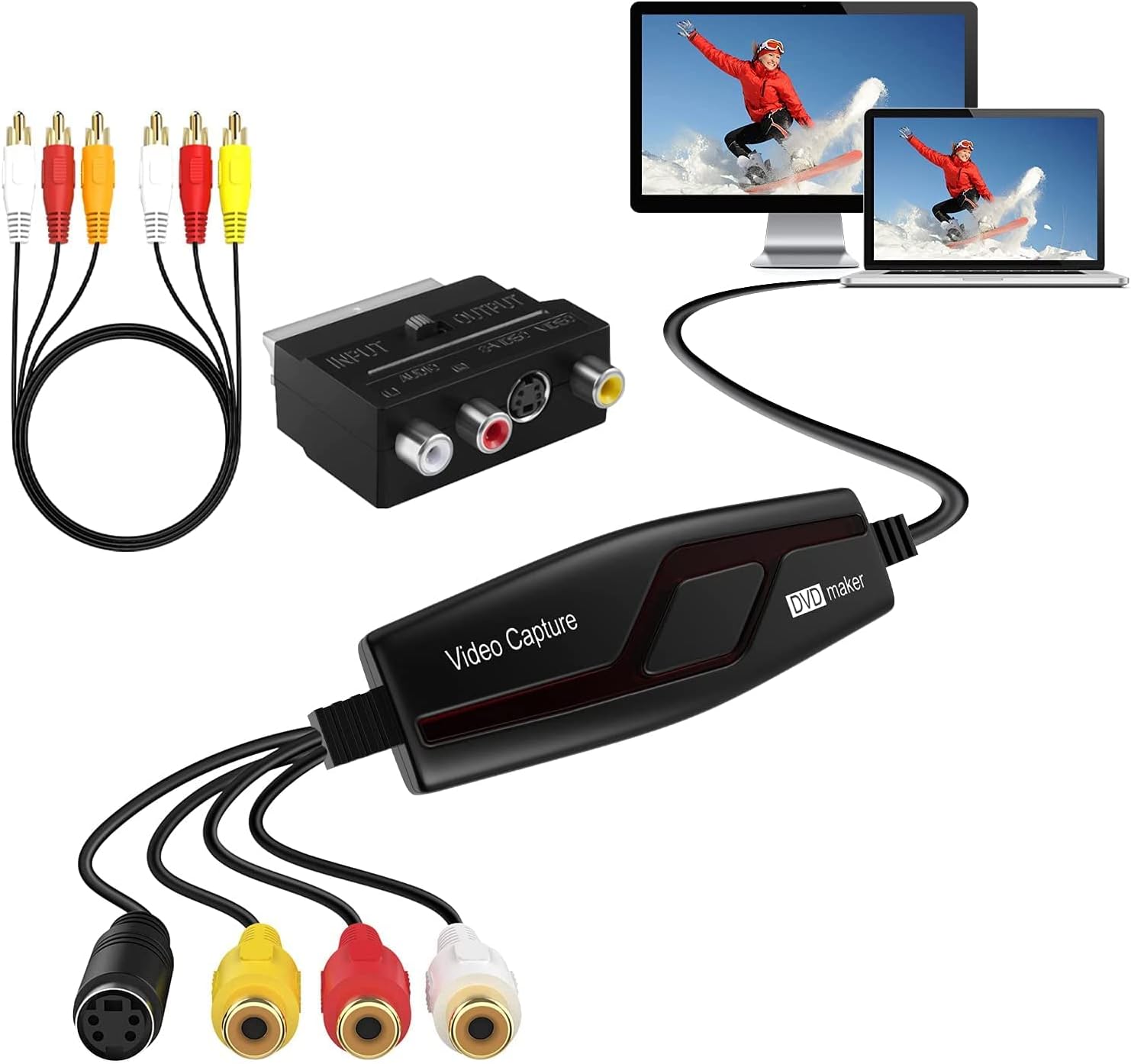
The DIGITNOW! Video Capture Card is a compact, polished USB device designed to convert analog video sources like VHS, Hi8, and DVD players into high-quality H.264 digital files. Compatible across Windows XP to Windows 10 and Mac OS 10.5.8+, it supports NTSC, PAL, and PAL/60 formats. Bundled with essential cables and adapters, plus ArcSoft ShowBiz software for video enhancement and DVD burning, it offers a professional-grade, plug-and-play solution for preserving and sharing your treasured home movies.


| ASIN | B078H54QDR |
| Best Sellers Rank | 3,599 in Electronics & Photo ( See Top 100 in Electronics & Photo ) 26 in Video Converters |
| Brand | DIGITNOW |
| Brand Name | DIGITNOW |
| Colour | Black |
| Compatible Devices | Gaming Console |
| Compatible devices | Gaming Console |
| Connector Type | usb |
| Connector type | usb |
| Current Rating | 2 Amps |
| Customer Reviews | 3.8 out of 5 stars 1,893 Reviews |
| Input Voltage | 240 Volts |
| Item Dimensions | 11.1 x 3.5 x 1.3 centimetres |
| Item Weight | 0.15 Pounds |
| Item dimensions L x W x H | 11.1 x 3.5 x 1.3 centimetres |
| Manufacturer | DIGITNOW! |
| Manufacturer Part Number | BR117 |
| Model Number | BR117 |
| Nominal Power | 480 Watts |
| Number of Items | 1 |
| Number of Ports | 4 |
| Package Quantity | 1 |
| Power Plug Type | No Plug |
| Product Finish Type | Polished |
| Product Warranty | 1 year |
| Specific Uses For Product | VHS Recorder, Hi8, DVD Player, TV Box, LP Player, Audio Cassette Player |
| Specific uses for product | VHS Recorder, Hi8, DVD Player, TV Box, LP Player, Audio Cassette Player |
| UPC | 190835701644 |
| Unit Count | 1.0 count |
| Warranty Type | Limited |
S**8
A Must Have for Digitising your Home Movies
I donโt usually write reviews, but I had to give this a 5-star rating. Iโm seriously impressed by the amazing video quality and how easy it is to set up โ itโs literally plug and play. The package includes everything you need: the converter, RCA cables, and the capture device. All you need is your VHS player or DVD player and a laptop, and youโre good to go. I set up OBS Studio to capture both audio and video simultaneously, allowing me to watch the film while I record, which made the process so much more enjoyable. Thanks, DigitNow!, for making digitising my old tapes so simple and effective. Highly recommended!
C**N
Requires Potplayer or OBS
I wrongly assumed it worked straight out of the box, it don't you need to download either PotPlayer or OBS, I downloaded both and felt that Potplayer worked better for me. Also a few boxes to tick for those as well. Other than that it worked fine and have used it a few times with no issues. I had VLC already but did not play nice with it.
A**S
Tricky to understand but got there
I found this product a little hard to use especially as at first I could get no picture from my VHS (recording old camcorder tapes). After hours of googling and resigning myself to thinking it was useless I tried putting the usb end into another usb socket on my laptop and like magic it worked. Don't know what that was about but was just happy to get it working. I could not work out the editing part of it but maybe that's just me. I'm ok with technical stuff and I probably could have googled a bit more but I didn't really feel like I needed it. I managed to burn all the videos onto dvd although sometimes I got a dud one (checked each one played in a dvd player after burning) so I had to do another copy. It takes a lot of memory on your hard drive to create the temp file so I had to do some clearing out of old files and pictures to get the GB needed. Also, when it asked after burning "keep clip on your HDD?" choose yes or it will delete it from your laptop/pc! I had to re-record several videos as I was making two copies of each for my two children.
S**4
DO NOT BUY!
I purchased this Video Capture Device to convert my VHS tapes to mp4 video. The device itself (hardware) seems ok, however the supplied software "Honestech VHS to DVD 3.0SE" (a VERY old version) has a MAJOR bug that can make the video preview screen suddenly turn grey, this means you cannot see the video playing making recording a nightmare. Doing an uninstall and reinstall of the software it does NOT get rid of the problem either unless you are willing to go into your PCs registry and remove all traces of it. But once you do get the software working again, its only a matter of minutes before it gets corrupted again and the grey screen comes back. I must also point out that the video quality recorded by Honestech VHS to DVD 3.0SE is EXTREMELY poor, this makes and already poor and dated VHS video look much worse! As the Honestech website no longer exists, buyers cannot even contact any technical support or ask for an alternative software! I recommend that this product is completely AVOIDED!!!
P**H
Better the PC the better the result
This is a great piece of kit, which comes with software and cables to attach the VHS to the PC via usb. The cable is a 3 piece composite phono cable and a SCART adapter is provided if needed. I found that the direct connection from the phono provided a slightly better picture. You must do these things in order: 1 install drivers. 2. install software. This is straightforward with the enclosed CD. 3 plug in usb And that's it! Its very intuitive after that. Press play on your VHS and choosing the source "USB 2861 Device" you will see and hear from your PC (Audio device select: Line (Masster AVCap) what is playing. Press "Capture" and that's it. One thing I have learned is that the better the pc the better the capture. I started first on my 8-year-old PC and the recording stuttered a little, enough to make it seem like a 30-year-old VHS might stutter. I was happy enough. But before I threw away the tapes, I decided to have a try on my newer, 1-year-old PC. The playback and capture were flawless! So I ended up re-doing everything. That was a slight pain but I can't fault the device.
A**R
Captures video, but no how you would expect
I wasn't expecting super high quality from this device as I live in PAL land - and in many ways I was right... TL;DR: It does what it says, but not in very high quality. OK at a pinch. First of all, the process of getting it to work was problematic to say the least. Try as I might I could not get it to work on my AMD PC, the default windows drivers, the ones included with the device on CDROM, or one downloaded from various places on the internet just would not work. The interface to control the capturing would appear, but it could not render any output using any software including GraphEdit which is a manual way of building direct show filters. I tried it on my Intel Surface Pro, and it worked with the default windows 10 drivers! I have Premiere on this, so I started to capture using that, but because there is no control on how the video is capture it was using a mode that ended up being useless again thanks to compression and frame rate. It presents itself as a webcam and the audio seperately as a usb microphone. I tried using the supplied software, but the software key would not work with the version on the disk, or a downloaded version, so could not try it. In the end I connected it to my Intel gaming laptop, and using ffmpeg I could get more control over the capture. The settings offered are: ffmpeg -f dshow -list_options true -i video="AV TO USB2.0" [dshow @ 000001775f829980] DirectShow video device options (from video devices) [dshow @ 000001775f829980] Pin "Capture" (alternative pin name "0") [dshow @ 000001775f829980] vcodec=mjpeg min s=640x480 fps=10 max s=640x480 fps=50 [dshow @ 000001775f829980] vcodec=mjpeg min s=640x480 fps=10 max s=640x480 fps=50 [dshow @ 000001775f829980] vcodec=mjpeg min s=480x320 fps=30 max s=480x320 fps=30 [dshow @ 000001775f829980] vcodec=mjpeg min s=480x320 fps=30 max s=480x320 fps=30 [dshow @ 000001775f829980] vcodec=mjpeg min s=720x480 fps=10 max s=720x480 fps=50 [dshow @ 000001775f829980] vcodec=mjpeg min s=720x480 fps=10 max s=720x480 fps=50 [dshow @ 000001775f829980] pixel_format=yuyv422 min s=480x320 fps=30 max s=480x320 fps=30 [dshow @ 000001775f829980] pixel_format=yuyv422 min s=480x320 fps=30 max s=480x320 fps=30 Selecting 720x480 at 50 fps gives more picture at the side and isn't quite the correct aspect ratio, so in the end 640x480 at 50fps was used. The interface automatically deinterlaces the image, but sometimes gets it wrong resulting in flickering. One of the most annoying 'features' is an auto-gain on the video which causes the image to suddenly brighten or darken which is annoying. The fact there isn't a direct one to one relationship with the field structure results in soft images (even with lots of post production in FFMPEG when trying to recombine film captured footage which should give a full 576 full resolution progresive output but it soft thanks to it's own deinterlacing). In dark images and areas the MJPEG compression fails badly producing blocks in the image. Sound seems OK, though captures a little low in volume - havent checked stereo however. After capturing hours of footage thinking it might be OK I'm now purchasing a Firewire card so I can use my camcorder (which has analogue input) to do the conversion as it will provide a 720x576 DV image as close to the original as is possible. Watching footage I've previously converted this way and the footage captured via this card is like night and day. You might get better results in NTSC land, but again I suspect you'll have the same autogain issues. FFMpeg command used (NVidia hardware compression used, crop to remove head switching noise, scale to 720 for less loss in compression): ffmpeg -hwaccel cuda -f dshow -rtbufsize 100M -video_size 640x480 -framerate 50 -i video="AV TO USB2.0":audio="Microphone (USB2.0 MIC)" -vf "crop=632:468:4:4,scale=-1:720" -c:v h264_nvenc -preset slow -preset p6 -tune hq -b:v 10M -bufsize 5M -maxrate 15M -rc-lookahead 20 "%1.mp4"
B**E
Successfully converted Old Camcorder (with no LCD screen) footage !!
Successfully converted but VHS-C panasonic NV-RZ10 (with no LCD screen) footage to my computer. I didnt even know if this would work! This product works great for the price. If you dont see your footage on OBS or quicktime, dont use the original camera coloured wires use the coloured wires (AV adapters i think they are called) that are provided with the product! Would definitely recommend.
I**T
Pleasantly Surprised
I was asked to copy VHS tapes from the mid-2000s by my granddaughter's school and needed a video capture device quickly. I use a lot of Elgato kit and hoped to buy their unit, but it appears to no longer be available. I bought the DIGITNOW costing a sixth of the Elgato unit and was not expecting much. However, I have been very pleasantly surprised and have obtained very good results from the first few tapes I have copied. I use a Mac. The drivers install from the video capture unit to the hard drive when the device is plugged-in to the USB port. When the VHS is connected to the video capture device, its output can be recorded using Quicktime. Create a new movie recording and from the drop down menu in the Quicktime window next to the record button select the AV TO USB2.0 "camera" and USB 2.0 mic audio. Press record in the Quicktime window and off you go. Initial installation is not intuitive, but once the drivers are in place the rest is very simple. I have given picture quality 4 stars, but that is due to the VHS tapes rather than the video capture device. Very good value, easy to use, and perfectly acceptable results
Trustpilot
1 month ago
2 months ago