


Desertcart purchases this item on your behalf and handles shipping, customs, and support to Croatia.
๐ Quadruple your NVMe speed and storageโbecause one SSD is so last decade!
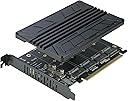
The RIITOP Quad NVMe PCIe Adapter transforms a single PCIe 4.0/3.0 x16 slot into four high-speed M.2 NVMe SSD connections, delivering up to 4x 32Gbps throughput. Designed with a space-saving 0.32-inch heatsink and individual LED status indicators, it supports multiple SSD sizes (2280/2260/2242/2230) and requires motherboard PCIe x16 bifurcation. Ideal for professionals demanding scalable, high-performance storage expansion with reliable thermal management.


| ASIN | B0CBYVG91Z |
| Best Sellers Rank | #22 in Computer Memory Card Adapters |
| Brand | RIITOP |
| Compatible Devices | Motherboards with PCIe 4.0 or 3.0 x16 Slot and PCIe x16 Bifurcation support |
| Customer Reviews | 4.3 out of 5 stars 94 Reviews |
| Hardware Interface | PCI |
| Item Dimensions L x W x H | 6.19"L x 4.74"W x 0.32"H |
| Item Weight | 0.36 kg |
| Manufacturer | RIITOP |
| Mfr Part Number | 4P-NVTPCE16HN |
| Model Number | 4P-NVTPCE16HN |
| Operating System | Windows 10 |
| Product Dimensions | 6.19"L x 4.74"W x 0.32"H |
| Style | Classic |
| Style Name | Classic |
| Unit Count | 4 Count |
| Warranty Description | 1 Year manufacturer |
K**B
Good quality, works as expected
Worked well, used on a Dell server and was able to see all 4 connected NVMe drives. Make sure your motherboard supports bifurcation. Install was easy. Heatsink helps a lot.
A**X
Make sure it is compatible
Works exactly as expected. Good heft on the heatsink, keeps everything cooled. No issues on speed, honestly great product! Note: you'll need PCIe bifurcation for this to work properly. And a compatible CPU with x16 lanes for all 4 NVMe SSDs to show up in the system.
R**S
Good way to improve an older computer.
Make sure your computer supports PCIE bifurcation (8x8 or 4x4x4x4). Otherwise you need a card that only has one NVME slot. Works a treat! Easy to install. So far I got 2 NVME cards installed on a PCIE slot in my HP Z640 lab. After much reading, it seems like I donโt really need the heat sink, but as I understand, itโs because the PCIE is version 3(I think higher PCIE version generate the heat, IDK). Nice to have though if itโs needed. I can always put a temp sensor nearby to see if I need the heat sink.
B**S
Works and is cheap
You may be surprised by the weight of this thing when you get it. The big aluminum slab is hefty and solid. The fins for cooling are not very prominent, so it doesn't radiate heat away all that well, but it gives the SSDs something large and massive to soak their heat into. Interesting idea....? I'm using this with 4x 2230 SSDs, the little ones, and since there's not a very large contact patch for each SSD, I imagine the cooling is not super effective. Using the supplied thermal pads on my single-sided SSDs, when I clamp down the aluminum heatsink, the card bows just a bit, and the center two SSDs don't get as good of contact as the outer two. Not a terribly impressive design, but for my use, I don't hit the disk hard enough for them to get crazy hot. At first my computer, an older Precision 5820, would only enumerate 3 of the 4 disks. The word "bifurcation" is nowhere to be found in the BIOS, nor is anything to the effect of 4x4x4x4 or anything of the like. It turns out, disabling Thunderbolt support allows for the re-allocation of PCI bus numbers per PCI socket. Using the automatic setting fixed the issue. You may run into something similar if you have a non-enthusiast, but high end style motherboard. With a Xeon's MANY PCI lanes, I knew it had to be just some kind of config issue and not an actual limitation. With some tinkering you could probably run 2 or even 3 of these boards fully populated in one computer. I ended up mixing and matching different thickness thermal pads to minimize warping. NOT an impressive piece of hardware, but it does the job.
W**D
Check your mobo manual
Only works correctly in the top PCIe x16 slot of a Gigabyte X570 Aorus Elite Wifi. The lower PCIe x16 slot is only x4 so only one drive will show up. Check your motherboard documentation to make sure the x16 slot you want to install it in is actually running x16 and not x4 or x8. can't actually complain about the product. Great packaging with all hardware you need to install.
J**N
Works perfect
There are no directions with this thing. Not super hard to figure out but there is a larger case screw and what would be a mobo stand off that I can't see why I would use, I think they also make one of these with a fan, maybe they just include the same screws with them all. If you are using full size 2280 drive then the standoffs are built into the PCB however if your using smaller ones they are not. I want to explain this cause I saw some ppl complain that it was unclear. In the bag you get 4 normal size screws which are used to hold the heatsink on and then 8 smaller screws which are used to hold the nvme drive down. Now if you're wondering why 8 screws when only 4 nvme drives that's where the 4 little silver stand offs come in. The standoffs have a flat side and a concave side. If you're using any other size other than 2280 then put the concave side down on the PCB and put one of those little screws in through the back to hold it to the card. Then put ur nvme drive in and put another small screen through the top to hold the drive down. Hope that helps. Also I need bifurcation support on ur mobo, if you don't have it will not work. Do ur research not the products fault.
S**E
Bed design
Didn't fit correctly in 2 pcs I tried it in. The card was too short to fit the back of the machine correctly and couldn't be attached properly by being screwed it. Made it useless.
R**L
Excellent Purchase
I installed this in my PC and it was easy. Great value for the money. Speeds are great. The heat sinks keep them cool. The quality is great. I have been using them for a year now or so.
Trustpilot
1 month ago
5 days ago