Buy anything from 5,000+ international stores. One checkout price. No surprise fees. Join 2M+ shoppers on Desertcart.
Desertcart purchases this item on your behalf and handles shipping, customs, and support to Croatia.
🚀 Elevate Your Desk Game: Triple Displays, Turbo Charging, Total Control!
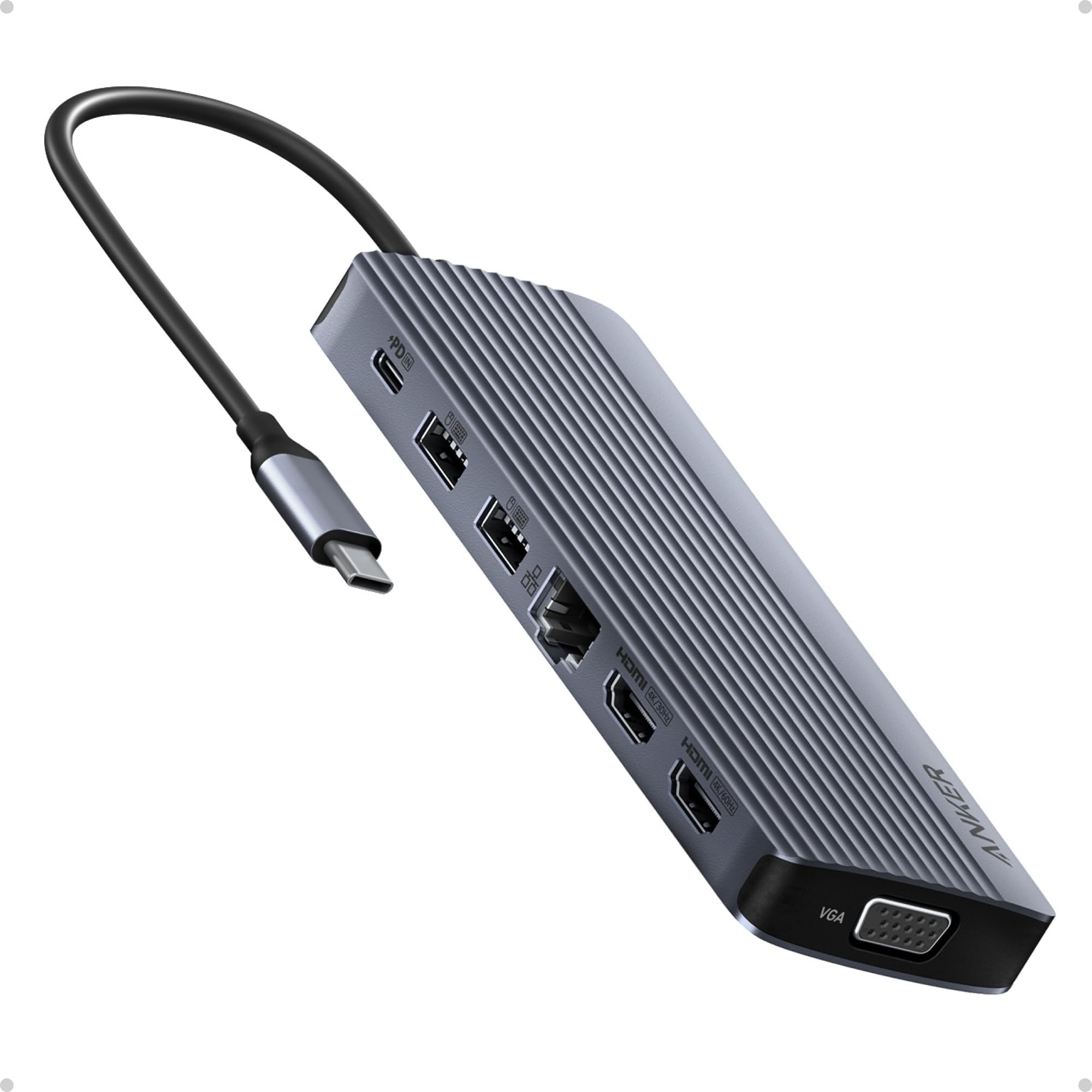
The Anker 14-in-1 USB-C Docking Station transforms your laptop into a powerhouse workstation with triple display support (dual 4K HDMI + 1080p VGA), 80W pass-through charging, and 14 versatile ports including USB-A/C, Ethernet, and SD card slots. Designed for seamless plug-and-play use across major OS platforms, it’s the ultimate productivity booster for professionals craving a clean, efficient, and connected workspace.


| ASIN | B0CF52HF6D |
| Best Sellers Rank | #3,904 in Electronics ( See Top 100 in Electronics ) #46 in Laptop Docking Stations |
| Brand | Anker |
| Color | Grey |
| Compatible Devices | Laptops |
| Customer Reviews | 4.2 out of 5 stars 1,278 Reviews |
| Global Trade Identification Number | 00194644155513 |
| Hardware Interface | USB 3.0 Type C |
| Item Weight | 134 Grams |
| Manufacturer | Anker |
| Mfr Part Number | A83890A1 |
| Minimum Required Operating System Version | Windows 10 |
| Model Number | A8389 |
| Number of Ports | 14 |
| Smart Home Compatibility | Not Smart Home Compatible |
| Total Number of HDMI Ports | 2 |
| Total USB Ports | 6 |
| Total Usb Ports | 6 |
| UPC | 194644155513 |
V**T
Excellent Dock for a Clean, Powerful Workstation Setup
The main reason I purchased the Anker 14-in-1 USB-C Docking Station was to create a single workstation where I can easily swap between my home and work laptops while using the same peripherals—two monitors, keyboard and mouse, audio headset, and several external storage devices. It met all my needs and has exceeded my expectations. It instantly transformed my laptop into a full desktop workstation with just one cable. Setup was completely plug-and-play—no drivers needed—and everything worked right out of the box. Power delivery has been excellent. It charges my laptop while driving all connected accessories without any problems. The build quality is exactly what I expect from Anker—solid, well-designed, and premium-feeling—and it remains stable even under heavy use. That said, there are a few important things to note. Without a power input connected to the hub, only one HDMI output can be used for an external monitor, and the second display must remain on the laptop. I also use a Logitech USB-A Unifying receiver through the hub, and occasionally the keyboard and mouse performance is not as responsive as when plugged directly into the laptop. The dock can also get warm to the touch, which is expected with higher workloads, current, and power draw. Since the beginning of the pandemic, I’ve been working from home and do everything I can to preserve the life of my equipment, including running a small USB-A fan 24/7 to keep things cool—and I’ve had no issues so far. This dock has been a huge productivity boost and keeps my desk clean and organized with a simple single-cable connection. For the price, it offers excellent value compared to many other docks that cost much more and offer less.
S**G
Good dock
I only need output to two external 4K monitors. Another Anker docking station with "dual display" support did not work for me but Anker is generally a good brand and I decided to try this one with triple monitor support. This dock works well. Just plugged it in and it did the job. Stable images, no flicker or resolution issues. USB ports work, laptop charges. This dock is good.
S**A
FANTASTIC for using multiple VGA displays with PC that doesn't support VGA
I have DUAL VGA monitor setup that I could no longer use when a bought a new laptop with HDMI ports only. The hub was a perfect solution plus providing several handy additional USB ports for earbuds, phones etc. I never turn my new laptop off because its cooling fans never run when I am not using it . . . so the laptop has no moving parts when not in use. I had to replace my older Thinkpads that were running for several years without turning them off because they couldn't be upgraded to the current version of Windows 11 so NO MORE UPDATES from Microsoft. My only concern with the Anker docking station is that it runs fairly warm when the computer is ON but not in use. Wondering if it will last for several years at its elevated temperature. OVERALL, THIS ANKER PRODUCT IS FANTASTIC.
E**D
Good overall with one flaw…
EDIT: Anker customer service reached out after seeing my review and offered a replacement. Great customer service, so raising my review from 3 to 4 stars! Overall it works pretty good. Bought it because I’ve always had good luck with Anker. However I have 2 monitors hooked up to it via HDMI and after the return window closed, the second monitor started going black for a few second randomly. It comes back on, but it blanks out very randomly. No way to predict when it will do it. Sometimes it’s a lot, sometimes it doesn’t happen all day. Very strange. Overall it’s very handy though and use it daily at work.
B**R
High Quality, Highly Functional
This docking station is well built, compact, and provides lots of connectivity options. Anker makes high quality products, and this one lives up to its name.
A**M
A lot of bugs to fix in future releases.
I was excited to see Anker sell a laptop docking station as it was so much cheaper than other brands. I have several Anker products and can usually rely on them so it was even more disappointing that after a few months, this docking station has several issues. At first, my headset worked fine, but now it doesn't. I tried different headsets and none of them work. When I plug it directly into my laptop it works fine. Every morning when I try to use my laptop, the keyboard & mouse work but the two screens don't display what it should. I have to unplug and plug it back in to make the displays show. It's a small thing, but something I shouldn't have to do at all. Luckily, this docking station/hub didn't cost very much or I'd be upset with the overall quality.
S**O
Good dock
I was gifted 2 nice monitors when covid forced our office to close. I got this dock and HDMI cables to set them up. As luck would have it the monitors had every input but HDMI. I ordered 2 HDMI out to DVI in convertor cables, plugged them in and both monitors are working fine. I also have speakers, printer switch and a 1TB portable drive plugged in, all working well with my Dell laptop.
P**3
Works but having issues with powering a laptop
Bought this to setup a new laptop for my sister. The plan was to keep the laptop lid closed as she has a small space to setup the laptop in an amoire with an external monitor in another section. So happy that it had a VGA connector as she had a older monitor that was connected to her previous machine with VGA. All her peripherals worked great in including her mouse, keyboard, printer, external HD, and speakers. Unfortunately, when first booting up the laptop with the laptop power supply plugged into the PD USB C port on the dock, the computer will say that there isn't enough wattage and to use a higher wattage power supply. Not sure why it is saying that as the product description says it will pass through 100W and the laptop power supply is 65Wa. To be fair, in the product description they do say, "elect a wall charger that is at least 20W more powerful than your device's original charger." Now being that is a brand new laptop, I just used the power supply that came with the laptop. Be forewarned. Most users are not looking to purchase another power supply if they already have the one that came with their laptop. This is a show stopper because if my sister needs to reboot the machine because of an update which did happened yesterday, she will just get a black screen. She has to undock the machine, hit ESC to get past the message, log into the machine, then close the lid and redock to get her display to come up on the external monitor. It will wake up from sleep just fine but if she turns off or reboots the laptop, she has to do the whole disconnect, open the lid, get into the machine and then redock. She is not very technical so don't want to put her through this. I'm sure if we are able to leave the laptop open or was using a small desktop machine, the dock will work fine. We use OWC powered docks at work and they work fine so will probably swap out the Anker dock with a spare Lenovo dock I have that supplies up to 135W of power. So for our particular needs, the dock will not work for us but should work for most folks.
M**R
Anker USB C Hub
It is an excellent product and works very well.
D**E
ok
En temps et en heure, Ok.
N**K
I'd give it 6 stars if I could
Home worker. Dual hdmi screen. Usb-c headset. Usb power. Plugged another usb hub into this. It just worked. No fuss, no nonsense with drivers. What was particularly impressive was when I detached it from my work windows 10 machine and plugged into my fedora laptop. It just worked. Very pleased. All my expensive cherry and Logitech peripherals and screen can all be used elsewhere. I moved 1 cable - spent £50 but saved hundreds. Great work Anker
C**O
Perfekt fürs Homeoffice und unterwegs…
Für mein Home-Office genau das Richtige: Zwei externe Bildschirme laufen problemlos, und auch Webcam, Kopfhörer etc. lassen sich gleichzeitig anschließen. Alles funktioniert zuverlässig ohne Aussetzer. Besonders praktisch: Der Hub ist kompakt genug für den Rucksack und damit ideal für unterwegs. Für mich eine klare Kaufempfehlung – ersetzt problemlos eine klassische Dockingstation.
M**L
Great quality and very light
It was surprisingly light, whilst also feeling very premium
Trustpilot
3 days ago
2 weeks ago