Desertcart purchases this item on your behalf and handles shipping, customs, and support to Croatia.
โก Empower your space, save energy, and stay connectedโsmart living made simple!
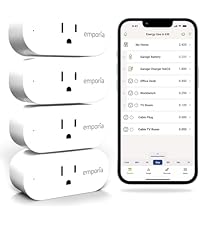
The Emporia Energy Monitoring Smart Plug 4-pack offers 15A peak load capacity with 10A continuous support, enabling precise control and energy monitoring of your home devices. Compatible with Alexa and Google Home, it features remote app control via 2.4GHz WiFi, smart scheduling, and real-time energy tracking to optimize power usage and convenience.


| ASIN | B0CLVRZ2QL |
| Actuator Type | Push Button |
| Best Sellers Rank | #15,278 in Tools & Home Improvement ( See Top 100 in Tools & Home Improvement ) #28 in Electric Plugs |
| Brand | EMPORIA |
| Brand Name | EMPORIA |
| Circuit Type | 1-way |
| Color | White |
| Connectivity Protocol | Wi-Fi |
| Connector Type | Plug In |
| Contact Material | Brass |
| Contact Type | Normally Open |
| Control Method | App, Remote, Touch, Voice |
| Controller Type | Amazon Alexa, Google Assistant, Android, iOS, Push Button |
| Current Rating | 10 A |
| Customer Reviews | 4.1 out of 5 stars 682 Reviews |
| Included Components | 4 Energy Monitoring Smart Plugs |
| International Protection Rating | IP20 |
| Item Dimensions | 1.97 x 3.31 x 1.5 inches |
| Lower Temperature Rating | 14 ยฐF |
| Manufacturer | Emporia Corp. |
| Material Type | Plastic |
| Model | EMSO1-4 |
| Mounting Type | Plug In Mount |
| Number of Items | 4 |
| Number of Positions | 2 |
| Operating Voltage | 120 volts |
| Operation Mode | ON-OFF |
| Part Number | EMSO1-4 |
| Specification Met | ETL, FCC |
| Switch Type | Push Button |
| Terminal | Solder |
| UPC | 850019360332 |
| Unit Count | 4 Count |
| Upper Temperature Rating | 140 ยฐF |
| Warranty Description | 1 year warranty |
| Wattage | 1200 watts |
S**E
Very good product
great, easy to use product.
B**N
Excellent smart plugs, but can be difficult to set up
These smart plugs are perfect for using with my existing Emporia energy monitoring system so I can narrow down which devices on a specific circuit are consuming the most power. You can nest them under an existing circuit in the Emporia app so that you can see what percentage the plug is using versus the entire branch circuit. I did have some frustrations getting two of these to connect to WiFi using the app to set them up (both in access point mode and direct/Bluetooth mode). The issue ended up partially being my own fault, as I have some DIY access points for WiFi set up that I didn't realize were way too close together and it was causing the smart plug to either not connect at all since there were two overlapping signals with the same SSID or it would flip-flop between the two APs and fail to connect. I moved my APs to be about 30 feet apart (as opposed to 15 previously) and the plugs were immediately able to connect. So if you have any issues getting these set up in the app/connected to WiFi, check the following points below: - Make sure you don't have multiple access points (wireless repeaters, routers, etc) - Check your firewall rules on your router to make sure devices on the network can discover each other - ONLY use 2.4 GHz WiFi (should be obvious) - If you have band steering set up (one SSID/network name for both 5 GHz and 2.4 GHz bands), that *could* cause issues and should probably be disabled temporarily during setup if you have problems connecting a switch
B**H
Great plugs, not easy to connect with.
I wanted some smart plugs that would be visible and controllable through the Emporia app. These were difficult to connect with. I first had experience with the Emporia Vue3 and that connected easily. The Emporia Smart Plugs were not as easy. I use a mesh wireless system (multiple Ruckus access points). Per the troubleshooting guide, I had to shut off all but one of them and re-try. After multiple attempts and re-boots of the Smart Plug it connected. Overall I like the plugs, but I don't understand the difficulty installing.
R**H
Still Not working yet
Update, Day One of Zero Connection: It's a saturday and late at night. So I've had a long conversation with Emporia's AI assistant. What AI discovered is that I need to speak with a live agent. I disagree. Given the sophistication of the Ai, I doubt their programmers are being paid to keep the product updated, and I laugh at any prospect a third party IT Crowd agent has to resolve it. I see zero chance this product will magically work with my eero mesh network. There is no bluetooth onboarding, and the most likely scenario is that the plugs need an update to become compatible with the mesh but can't because it won't connect. I think even this is a far fetched theory. Ai promises the other expensive energy monitoring kit has Bluetooth onboarding, but this will in no way help to fix the "smart" plug issue. As it stands, this product is now the worst that I've tried, simply due to the fact it has zero connection. The former worst actually formed a connection after a few hours of trying, and sustained that connection, but their software did not deliver their promised energy monitoring. I expect that Emporia actually has some great monitoring features. I have formulated a plan to visit with an older router to form an initial connection to these Emporia "smart" plugs and will update the score then. So consider this one star review as tentative. Original review: One star because it's been over an hour and the device simply won't connect through its own emporia energy app. Keep in mind I have successfully connected several other brands of "smart" plugs. Attempts have included all 4 plugs in the kit on both Android and iOS. I also purchased the $200 energy monitoring kit so I WILL get this thing to work. Until then, having nothing to report on this product... I highly recommend Kasa and Meross for working right away, and working brilliantly with gorgeous information saturated interfaces. Govee rates highly and has a sortof useful control function from its hygrometers. Sonoff took me a year just to win the registering speed competition. Last place deserves no mention. Seriously guys, if it can't work as soon as you plug it in, don't sell it yet. I mention all these as proof that I am no stranger to selecting weirdly required fields on so called "smart" devices to just get them to freakin work. I also take issue with having to type in my email password into the Emporia app on a pop up to connect through google, so this will keep at least one minus star. It's very confusing to be asked to create a log in, then be confronted with your email nickname, then be asked for your explicit email password. One has to wonder if any changes will erase vital email log in info, or if it will fail to log in using my nickname (so why did it autofill with it???) Google's popup to log in to apps is deeply flawed.
K**.
These Double As Power Usage Analysis Tools
I've used a ton of different brands of smart plugs over the past 5+ years and these units by far have the best energy monitoring and stats I've seen. I primarily have TP-Link Kasa now (which have good Matter support, small, good app/settings, cheap on sale) if I need to do detailed by-second analysis of power usage I deploy these Emporia plugs -- I even have one setup specifically to be a wattage monitor on the go in my electronics toolbag. It should be noted that Emporia is focused more on energy monitoring at the home level than smart devices, so these tend to serve primarily as a way to get more data points into their Vue system that just happen to have smart features. Compared to other "energy monitoring" plugs these are the only units I've found that allows you to get fine datapoints down to the second (there's also live, min, hour, day, etc.), which gives you the ability to do decent power usage tracing or trigger Home Assistant tasks based on the current power draw (for example, determining the state/progress of a Laundry Washer by the power draw for the current mode it is in). Competitive units, even those much newer with the power monitoring feature, tend to bin their data into 5 min or 1 hour chunks, or just provide the max/min/average values and cost more. The Emporia app does allow you to export the raw data to CSV. With that flexibility comes a few tradeoffs -- the app isn't the nicest (a tad dated), but does have decent charting tools, and there is no Matter support. The installation/join sequence can sometimes be cumbersome if you lock your network down for IoT devices because of how they have you configure it. The physical hardware has never failed on me, but they are the older larger style, still fitting one socket (so you can put two on one US outlet), but wider. Given the abundance of options in the market, your choice can be simplified by what you need -- if you want really fine details in the power monitoring, these are great. If you want simplified on/off scheduling and an "nicer looking" app UI, competitors do that side better. I gave it 5/5 stars because even with the some of the shortcomings, their ability to act as great data analysis tools makes then a high value for me.
S**.
good
These have been fairly reliable.
C**R
Only last 1-2 years or so
These are nice to have, but they dont last for very long. Maybe 1-2 years under normal use on average. The app is nice, but could use a manual price setting for electricity cost. The visual indicator lights on them are nice, the scheduling works; however, i wish it was a bit more simplified or had a different view that let you schedule blocks of time rather than on/off switches.
R**R
Amazing tracking!
I want to give 10 stars!! Be aware, this will only function with 2.4 not 5.0 from your wifi. Right now it's running on my hot spot off my cell because that is solid 2.4. But the information this thing reports is incredible! Be patient setting it up, it's straight forward but slow, each plug is a baby router, so not fast. Easy to use and understand, even calculates cost. And customizes to your rate in your area after set up! Shows you actual use and fuel adjustments! Gives you a degree of control over your use and displays it in easy toread graphics. I bought 4 to start but I need more! Buying again!!
C**N
Tres utile
Parfait pour mes besoins
F**D
An essential to monitor your consumption
I was able to target high consumption devices at home and reduce my bill significantly. I love them, I had to buy more than one kit to cover most of the outlet in the house with permanent appliances on them. Worth the price.
R**N
Excelente proveedor ya hay pocos como Eporia
Los felicito pocos proveedores quedan con tanta calidad de servicio, tuve un problema con dos de los dispositivos explique el problema y sin tantas vueltas me cambiaron los dispositivos muchas gracias ojala sigan existiendo empresas como estas
J**O
Really well done.
These work well. I really like how I can nest these plugs inside my wider emporia network. So for example, if you put the plug on a circuit that is already being tracked at the panel, it is smart enough to subtract your plug from that nested total, and not double count that device/receptacle. See my screenshot where my Denon amp is nested inside of a wider circuit that includes the remainder of the home theatre system. You can also setup subroutines on each one of these. For example - disable every night. I use this plug to force the amp off each day, as it has a standing 100 watt draw. Effectively, these plugs allow you to get more than the 16 circuits in the standard emporia panel system, and I like that. You can also nest plugs in the Main circuit, such that it also doesn't mess up your totals.
J**Z
Funcionan perfectamente con su propio dispositivo
Excelente producto muy recomendable
Trustpilot
2 months ago
5 days ago