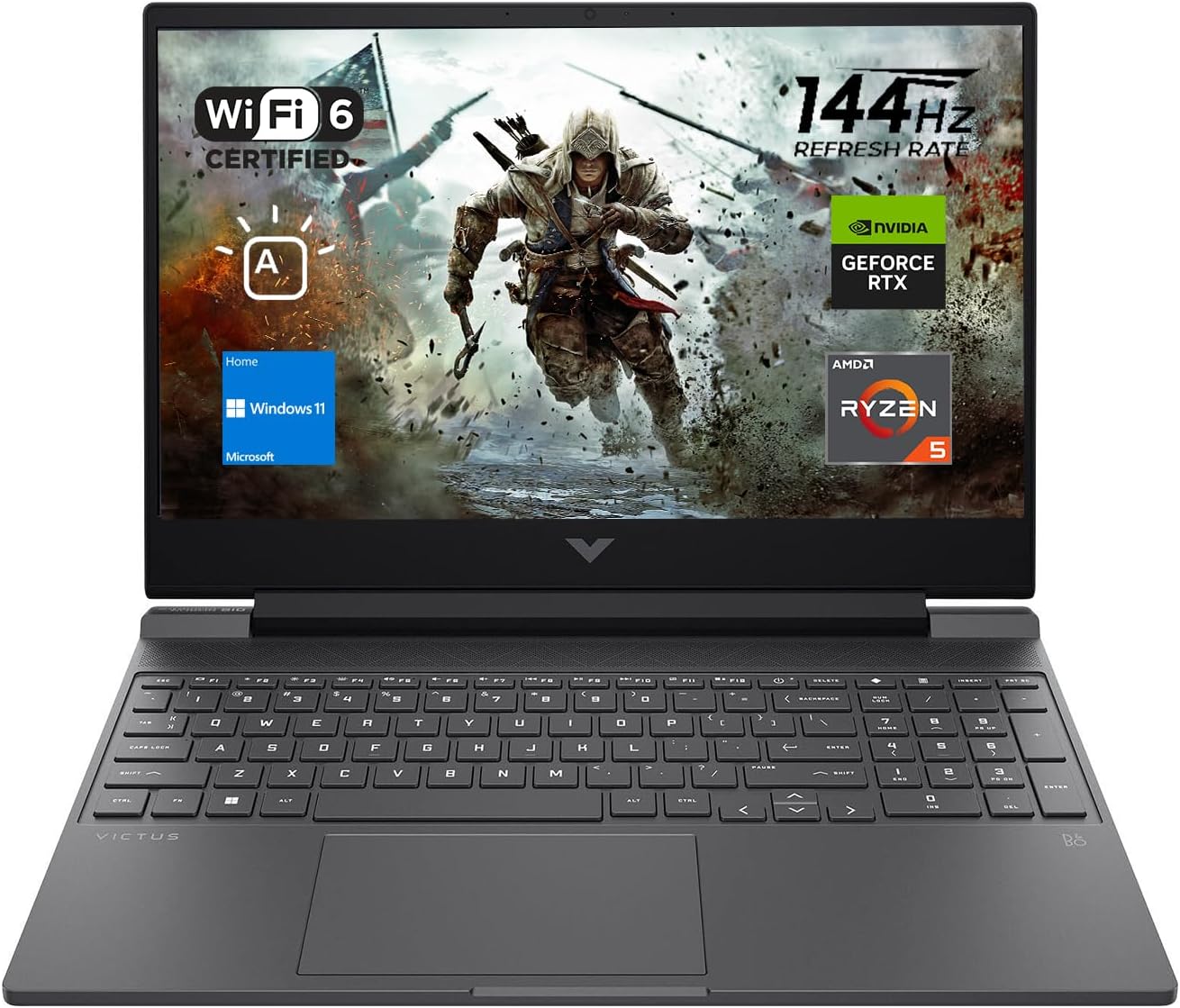
🎯 Elevate your game and grind with HP Victus — where power meets precision.
The HP Victus 15 is a sleek, silver 15.6-inch gaming laptop powered by an AMD Ryzen 5 7535HS processor and 16GB DDR5 RAM, featuring a 144Hz Full HD anti-glare display and NVIDIA GeForce RTX 2050 graphics. It offers fast PCIe M.2 SSD storage (512GB), advanced connectivity with Wi-Fi 6 and Bluetooth 5.2, and runs Windows 11 Home, making it a versatile choice for professionals and gamers seeking high performance on a budget.
| ASIN | B0CFSBT85B |
| Are Batteries Included | Yes |
| Audio Details | Headphones |
| Average Battery Life (in hours) | 8.45 Hours |
| Batteries | 1 Lithium Ion batteries required. (included) |
| Best Sellers Rank | #107,832 in Computers ( See Top 100 in Computers ) #4,347 in Traditional Laptops |
| Brand | HP |
| Color | Silver |
| Computer Memory Type | DDR5 RAM |
| Connectivity Type | Wi-Fi |
| Customer Reviews | 4.3 4.3 out of 5 stars (1,284) |
| Date First Available | 22 September 2023 |
| Form Factor | Clamshell |
| Graphics Card Description | Dedicated |
| Graphics Card Interface | PCI Express |
| Graphics Card Ram Size | 4 GB |
| Graphics Chipset Brand | NVIDIA |
| Graphics Coprocessor | NVIDIA GeForce RTX 2050 |
| Graphics RAM Type | GDDR6 |
| Hard Disk Description | SSD |
| Hard Drive Interface | PCIE x 4 |
| Hard Drive Size | 512 GB |
| Hardware Platform | PC |
| Item Weight | 2.31 Kilograms |
| Item model number | TPN-Q279_598U1AV |
| Lithium Battery Energy Content | 52.5 Watt Hours |
| Lithium Battery Packaging | Batteries contained in equipment |
| Lithium Battery Weight | 0.45 Kilograms |
| Manufacturer | HP Inc. |
| Maximum Memory Supported | 16 GB |
| Memory Technology | DDR4 |
| Number Of Lithium Ion Cells | 3 |
| Number of Ethernet Ports | 1 |
| Number of HDMI Ports | 1 |
| Number of USB 3.0 Ports | 3 |
| Operating System | Windows 11 Home |
| Optical Drive Type | No Optical Drive |
| Power Source | AC & Battery |
| Processor Brand | AMD |
| Processor Count | 6 |
| Processor Speed | 3.3 GHz |
| Processor Type | Ryzen 5 |
| Product Dimensions | 35.79 x 25.5 x 2.36 cm; 2.31 kg |
| RAM Size | 16 GB |
| Resolution | 1920x1080 Pixels |
| Screen Resolution | 1920 x 1080 pixels |
| Series | TPN-Q279_598U1AV |
| Standing screen display size | 15.6 Inches |
| Wireless Type | 802.11ax |
S**N
This is my 1st review and a month has past since the laptop was purchased. Prior, it has been over two years since I last owned a gaming laptop and even then, I was in need of an upgrade. While searching for a new laptop, I came across this interesting device. At first, I was a bit skeptical after reading the reviews and comparing the specs of other gaming laptops. But since I was purchasing other items as well, I decided to go with this one. It was purchased on the 18th and it arrived on the 24th, which was sooner than expected. Once I booted the laptop, I was blown away on the speed of this device. It loads applications at the snap of a finger, very quick boot time to where I can shut down and turn on within 1 minute, and the display is gorgeous. Now to check and see how the games will behave. All of my games, whether they're emulators or from Steam, looks stunning graphic-wise and runs near-perfectly. The Bluetooth feature was a blessing as my older laptop did not have that and I have old PS4 controllers laying around since I now have a PS5. The only cons I will point out is the battery life and the fans. The battery life is short when unplugged and it drains faster if running high-demanding games, only allowing roughly an hour and a half of game time unplugged. Also, the fans get loud when running certain games from Steam. I only know two of the games I play (Dead by Daylight & Civilization 5) that kicks the fans into high gear. The fan con, however, does not apply to my other games. I will throw in of the fact that there are only two USB ports, which is not a big deal considering the price of the laptop. Overall, this laptop does exactly what it needs to do and then some. If you are in the market for a gaming laptop while on a budget, this is a excellent choice. Although I've heard stories of this laptop not being as advertised, it is best to do your homework before making that decision.
A**O
Me gusto, una buena lap optima para todo, me llego con el cargador y todo eso, realmente ante especificaciones me rinde y me sorprende por el precio que lo agarre, realmente si vale la pena, ya llevo 3 meses con la lap y el unico problema que me presento fue que parpadeo pero fue porque inicie una aplicación corrupta xddd, pero dejando eso, es buena para usarlo para tareas o cualquier otra cosa, y si, si puede ser usada para juegos, en mi caso lo uso para jugar Overwatch y tambien es muy buena para uso de programación, si nos vamos a calidad fisica, se siente muy buena(ya se me callo :v) pero resistio el golpe(aunque no fue de gran altura he de destacar, hasta el momento todo bien, todo chido.
A**Z
Originalmente la compré para hacer multistreaming en Twitch y Tiktok (y me ha servido bastante bien para streamear con calidad 1920x1080 a 60fps usando una capturadora para mostrar mi juego desde mi ipad/xbox) y descargué algunos juegos como Fortnite, Valorant y LOL, y verdaderamente estoy impresionada con la fluidez y calidad. Si quieres jugar con la maxima calidad, fps ilimitados, etc probablemente esta laptop no sea para ti pero si es tu primera laptop gamer (como en mi experiencia) es más que excelente. El único inconveniente que le he encontrado es que la batería casi no le dura, siempre tengo que jugar con la lap conectada si no se me apagaría a medio juego yo creo. En cuanto a todo lo demás, estoy encantada. No suelo comprar dispositivos HP pero este supero mis expectativas por mucho!
D**A
Let me start off with the screen. It’s a 144hz full hd screen and it doesn’t look and feel too bad. The weight of the laptop is more on the heavy side but it is a gaming laptop so. The speakers are also very nice and the performance is very good for the price. The heat does get very high but it is a gaming laptop. If you want to cool it down, the omen gaming hub app that you get preinstalled has the option to set the fans on max speed for the best cooling. There’s also a quiet mode for those late night video game sessions or if you just want to play games quietly. The battery life is pretty good, however like most gaming laptops, the performance is heavily reduced when unplugged, which is why you should consider plugging this in when playing games. The keyboard is also really nice with a backlit mode. The material on the laptop is also really nice. FPS TESTS (all are with optimized computer settings, no gpu overclocking): Fortnite: All low performance: 180 FPS AVG in game Call of Duty: All low (not the lowest possible) performance: 120 FPS AVG in game Forza Horizon 4: All maxed out settings (highest possible): 43 FPS AVG in game Rocket League: All maxed out (highest possible settings): 160 FPS AVG in game Minecraft: Lowest settings possible: 1k FPS AVG in game Medium settings: 250 FPS (stable 170 FPS AVG when capped at 170) Overall best gaming laptop on the markets for people on a budget. I highly recommend you spend $100-200 more on a gaming pc for future proofing.
S**Z
Les voy a poner una reseña completa, para que los indecisos sobre comprar esta laptop o no, hagan su propio juicio con base en mi experiencia y notas. Si no les interesa, vayanse a los pros y cons que puse abajo. - Tuvimos la necesidad de una nueva computadora para la casa (la de uso no empresarial, la familiar, vaya), que no le damos la carrilla al 100% y se llega a usar para funciones generales, de un administrativo o un uso en general ligero (quiero decir, nada muy exigente) pero nos damos cuenta que los specs influye mucho en la longevidad de una laptop - los programas cada dia son mas pesados y tener una computadora robusta te permitira usar las futuras aplicaciones, versiones de sistema operativo, etc.. Es aqui donde tomamos la decision de comprar esta "Victus". La linea para mi era desconocida, jamas habia escuchado "victus" como gama de hp gaming- habia escuchado de la linea Omen para gaming (compitiendo vs alienware) y para mi era algo nuevo (o no probado aun), asi que nos hizo dudar un poco la compra. Revisando las caracteristicas me llamo la atencion que trae una GPU decente para una laptop y por el precio, buen procesador y configurable con buen nivel de memoria RAM, tiene un drive de estado solido y un monitor con una velocidad de actualizacion bastante buena. Para los que no saben de compus: El procesador es el que orquesta como va a resolver las tareas y mucho de la rapidez de una compu es dictada por el procesador, La memoria RAM es la cantidad de informacion que puede trabajar o dejar en el fondo (poniendolo en terminos reales "la cantidad de pestañas de chrome que puedes tener abiertas"), la unidad del estado solido antes le deciamos disco duro pero ahora ya no son discos y es la cantidad de archivos que puedes guardar, y la GPU es un procesador que se utiliza para las funciones graficas y hoy en dia tener una GPU dedicada hace que los graficos que presenta sean mas fluidos o rapidos. Al revisar los specs, veo que tiene como base 16 GB de memoria, los cuales son mas que suficientes para las aplicaciones generales de hoy en dia, tiene 512 GB de espacio local (SSD), que en terminos generales son muchos (mas hoy en dia por el uso de servicios cloud) excepto si te dedicas al desarrollo grafico o multimedia pudiera quedarse muy corto y el hecho que sea SSD en lugar de un disco duro hace que sea mucho mas rapida. La GPU para una laptop de uso basico esta mucho mas que decente; se le pueden conectar hasta tres monitores (no he hecho la prueba) pero si he probado con dos monitores y la pantalla de la laptop y funciono sin problema (Nota personal: Quien no ha trabajado con 2 monitores, en serio no se como vive), se que es una GPU un tanto vieja y no destaca para correr los juegos mas modernos (pero si se pueden jugar solo con settings un poco mas bajos), pero no es el uso de esta laptop, asi que al contrario es una GPU mucho mas que suficiente para el uso que le vamos a dar. En cuanto a memoria, la escogi con 64 (y eso aumento el SSD a 2 TB) y en particular esto siempre habia sido un tema para mi en las laptops, el ponerle mas memoria siempre habia sido caro. No es el caso aqui, aunque si aumenta el precio, aumento unos 1000 (55 USD), los cuales los pago con gusto con tal de poder abrir mas programas para que corran al mismo tiempo (o finalmente abirr mas de 4 pestañas en chrome jeje). Esta laptop viene a remplazar en casa una Dell inspiron que milagrosamente nos ha durado (aun funciona) mas de 11 años y la vara en cuanto a durabilidad esta muy alta, pero eso ya lo calificare mas delante. En general a mi me parece una laptop que tiene vista "Meh" , pero no me interesa tener la laptop mas bonita, para eso me compraria una de arriba de 40k MXN. Pros: 1 - Los specs estan buenos para el precio que tiene. Para mi, destacan Procesador, GPU y memoria RAM. 2 - Escogi la de 64GB y no aumento el precio de sobremanera. 3 - La pantalla es buena, no parece porque tiene efecto antireflejante (que las hace ver mas piñatonas) pero es muy comoda. 4 - Muy buena conectividad 5 - El material, plastico, se siente duro. Pareciera que si aguanta una caida (no la quiero poner a prueba). Contras: 1 - La busque comprar en MX con distribucion de teclado LA , pero no la encontre - solamente en el sitio de HP y costaba mas cara, 2 - Las bocinas suenan bastante chafas. 3 - El bisel de la pantalla es demasiado grande para mi gusto. 4 - La bisagra se siente debil, no tiembla pero siento que se va a tener que remplazar eventualmente. 5 - Es HP , trae bloatware :/ Cosas curiosas que le encuentro: 1 - El boton de power esta a medio teclado, siento que la voy a suspender por error. 2 - El teclado es retroiluminado, aunque es normal hoy en dia, no deja de sorprenderme que hay aun laptops que no lo tienen. 3 - Que la tapa tiene el logo de "Victus" en lugar de HP. Me hace querer comprarle stickers 4 - Se siente en general portatil, no es una maquina que sea cansado transportar. Recomendaciones si compras este producto. 1 - Asegurate de no extrañar la Ñ en el teclado o comprate un teclado externo (deberias hacer lo segundo, siempre). 2 - No la pongas en un lugar con mucho movimiento porque la bisagra, al no ser muy firme hace que baile un poco. 3 - Al comprar una computadora americana, le tienes que dedicar tiempo para cambiar las distribuciones de teclado, idioma del OS, etc. 4 - Compra un "USB C Docking", a este podras conectarle todos tus perifericos y monitores, y funcionara de maravilla 5 - Ponle unas bocinas externas. En general recomiendo mucho esta compra a pesar de los contras, ya que el ofrecimiento es muy bueno para el precio. Espero este review le ayude a alguien si esta pensando comprar esta computadora.
Trustpilot
2 weeks ago
1 month ago