Desertcart purchases this item on your behalf and handles shipping, customs, and support to Croatia.
🔌 Power, control, and speed — all in one sleek hub!
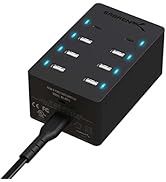
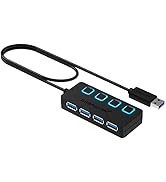
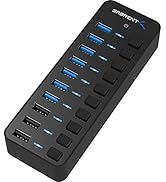
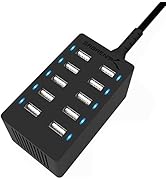
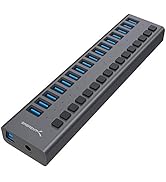
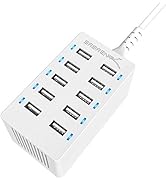
The SABRENT 36W 7-Port Powered USB 3.0 Hub (HB-BUP7) offers seven high-speed USB 3.0 ports with individual power switches and blue LED indicators. Powered by a 36W 12V/3A adapter, it delivers up to 900mA per port, ensuring stable charging and data transfer up to 5Gbps. Its compact, mirrored design complements any professional workspace, while broad compatibility with Windows, Mac, and Linux systems makes it a versatile solution for managing multiple USB devices efficiently.


| ASIN | B079GT1ZVS |
| Additional Features | Fast Data Transfer, Indicator Light, Plug and Play |
| Best Sellers Rank | #20 in USB Hubs |
| Brand | SABRENT |
| Built-In Media | 12V/3A power adapter, 7-Port USB 3.0 Hub |
| Color | Black |
| Compatible Devices | Desktops, Laptops, & most USB compatible devices |
| Customer Reviews | 4.4 out of 5 stars 2,732 Reviews |
| Data Transfer Rate | 5 gigabits_per_second |
| Enclosure Material | Aluminum |
| Global Trade Identification Number | 00819921013804 |
| Hardware Interface | USB 3.0 |
| Item Dimensions L x W x H | 4.2"L x 1.9"W x 0.94"H |
| Item Type Name | USB-HUBS |
| Item Weight | 14 ounces |
| Manufacturer | SABRENT |
| Mfr Part Number | HB-BUP7 |
| Minimum Required Operating System Version | Windows 10 |
| Model Number | PS36A120K3000UD |
| Number of Items | 1 |
| Number of Packs | 1 |
| Number of Ports | 7 |
| Operating System | Windows/Mac /Linux |
| Special Feature | Fast Data Transfer, Indicator Light, Plug and Play |
| Total USB Ports | 7 |
| Total Usb Ports | 7 |
| UPC | 819921013804 |
| Unit Count | 1 count |
| Warranty Description | 1 year |
S**E
Works OK
Sabrent 36W 7-Port USB 3.0 Hub I use this for writing backup files from my desktop computer to a flash drive every night. All 7 of the ports work. I wrote a script to compare the speed of file transfer between ports on this hub and the native USB 3.0 ports on the front of the computer. It's a very fast computer with an ASUS ROG Crosshair VIII Dark Hero motherboard, and those native ports are connected directly to that motherboard. The file source was an internal RAM disk, infinitely fast compared to USB. There was no difference in speed between the ports, whether the destination flash drive was a fast one or a slow one. Once a month I write five flash drives at once, and I expect this hub to handle that perfectly. If it doesn't, I will update this report. I don't need 36 watts or individual port switches, but maybe some day? OOPS - Now it's not so good. I make most of my flash drives bootable, using Macrium Reflect, so the images on the drives can be restored easily. But the ASUS ROG Crosshair VIII Dark Hero motherboard does not find those flash drives. As if they are not connected at all. The USB cable length doesn't matter, nor does the port that I use on the 7-port Sabrent hub, nor does the brand or type of flash drive. Tried 'em all. And all of the flash drives will boot up just fine when plugged in directly to the front of computer, where a short cable within the computer connects to the mobo. This not a huge problem, because I would use a front or back connection if I really needed to restore a drive. It's more of an inconvenience, because it makes it a little harder to test a flash drive. I need to get to Sabrent and see what they have to say. SERIOUS UPDATE: The review changes from 5 stars to 1 star (preferably zero). Elated and angry. Elated because I finally discovered why my computer was exhibiting so many sudden "Black Screen of Death" reboots. Angry because the cause was this Sabrent 7-Port USB Hub which was doing nothing when the reboots occurred. The reboots seemed to be random, so I had no idea what might cause them and spent good money on three (very nice) Tripp-Lite surge suppressors. I was already using a UPS for the computer itself. More important, I spent hours upon hours trying to find the problem, never imagining that it could be a device that was plugged in but not even in use when the reboots happened. I wrote scripts, attempting to repeatedly exercise non-microsoft software (VeraCrypt, 7-Zip, ImDisk) to produce the error reliably, to no avail. I kept a log of the black screens, and that did help. Finally my little brain connected the start of the black screens to the time that I purchased the Sabrent 7-Port USB Hub. Since disconnecting that, no such reboots have occurred. I do need a hub during certain procedures, but the replacement ikuai 11-Port hub has not caused reboot problems. It has other problems, and it's going back, but that's a separate review. The Sabrent hub was unquestionably the cause. However, in my opinion, the ASUS ROG Crosshair VIII Dark Hero motherboard is also partly at fault, because it should be designed well enough to prevent a USB-connected device from bringing down the computer. 2024 03 05 Another update. Maybe the Sabrent isn't the problem after all. It's definitely not "unquestionably" the cause. I replaced it with a new RSHTech 7-port USB hub, and the black-screen reboots continue. I'm stumped right now, actually starting to suspect my UPS of spikes or momentary cutouts. Anyway I think the Sabrent is OK.
M**N
Great product.
Product is well made, functions as it should. Just what was needed for all our connections. Great value for price. Expect it to hold up over time! Would definitely recommend.
J**S
Works!
I've tried many USB 3.0 hubs over the last years. This one works best. Has it's own power supply. Large easy to use buttons next to each connector to easily turn it on or off. Ports aren't so tight so it easily accepts USB connections of all types.
C**N
Works now - needed tech support
I didn't read all the reviews closely, but when I went back I realized most of the 5-star reviews were for the 4-port hub. There were more than a few reviews of the 7-port hub where the computer would not see the device being attached; messages like "USB Device needs power - plug in to the computer directly" and things like that. It also occurred that three or four of the ports would work correctly but the others would not. That was my experience, although initially I believed all the ports were not acting correctly. I contacted Sabrent and their support people answered quickly. We traded information back and forth and I made it clear my Sabrent 4-port hub worked flawlessly, as did an Orico 7-port hub. After several days of information-swapping, they pointed me to a site with downloads. First problem was that the download site was for Windows computers, so I had to go to a different computer to upgrade the hub. Second problem was that the instructions were in Chinese. Since I couldn't read them, I tried following the pictures, and after about 10 tries, got the firmware update to complete. Now the hub works correctly on all 7 ports. The device is excellent, and I would give it 5 stars if it hadn't been a hassle to get it to work. I can even understand that sometimes there are glitches and updates are necessary; however at least the instructions should be in English! And furthermore, the upgrade instructions should run on a Mac since they advertise the device as compatible with Macintosh. Kudos to the support team for their prompt and thorough investigation of this issue, and for having a way to fix the device, but I think there are a lot of people who will not be able to install the firmware update because it is a complex process. This is definitely a five-star device when it finally gets to working.
G**S
Better than what I had before
Addenda 2021 0701 Recently a problem or rather a mysterious phenomena as arisen. I keep getting Microsoft's code 43 error: USB device (hub) is not recognized. Windows Notifications and Device Manager report that there is a USB device that is not recognized. Notifications is worthless and Device manage is wrong in some way. It never reports exactly what device they are talking about, but I determined it was the Sabrent 7 port hub. The anomaly is that the drives plugged into the hub (one 10tb, two 8tb, and one 4tb) are all recognized and work flawlessly; flash drive data transfers work as well in the midst of the data transfers. I just accomplished a six day back up (7tb of data) without a hitch except for the time it took. After which Microsoft insisted and started installing some sort of updates without bothering to ask; from what I could see they were, as usual, cosmetic. That's when the "problem" appeared. Not one web support site offered a solution that worked (I tried several). Since then I have had this wrinkle. I have no reason to blame Sabrent, and every reason to blame Microsoft except their support is completely opaque. It is not a driver problem. I still stand by my original opinion (see below) it is a good hub it has not wrecked anything yet. The hub still operates as well as it has been, even though Windows can't bring itself to recognize its presence. End addenda (2021 This hub works so much better than the one I used to use it is hard to find any downside. Only a couple minor complaints the on/off buttons work really well except for their color they are hard to see in dim light being a dark gray against a black background. I put a small usb night light in one of the unused ports. That works well. The other complaint, space at my end is tight, I wish the power cable were a little longer so I could run both the data cable and the power cable into the hub from the same direction. The power source to my former hub was in two parts and was not a problem; except designed with weaker output. Anyway I get sufficient power to run three disk drives (two 8tb, one 4tb drives) a BluRay burner, an occasional docking station , and the night light. It's a much better design. I can now switch on and off individual units as needed. But wait, that's not all... it has a considerably smaller foot print on my already over crowded desk.
B**9
Bought Two (Six Months Apart) - Both Defective In Exact Same Way - Three Dead Ports
I bought one of these in March of 2024 for a project I was planning, but life happened, and I didn't get around to using it until September of 2024. I really trusted the reviews and all the good hyper around Sabrent hubs, so I wasn't worried about keeping it past the return window. Well, when I connected everything up, I noticed that some of my devices didn't work at all, and some were causes windows to pop a "not enough power" toast message. But some devices were fine. After troubleshooting I figured out - counting from the end where the power plugs in - the first three ports did not provide the power required for any of my devices. If I plugged the same devices into any of the last four ports it would work fine. I did some reading and others had reported this. From what I read it appeared Sabrent had a firmware patch that would fix, but when I went to the Sabrent site to download it I could not find it. More reading and it turns out that Sabrent pulled the patch because it was likely infected with a virus. Did more reading and Sabrent seems to have claimed that the issue has been resolved in later shipments of the device, so I ordered another one. It arrived today and has the exact same problem: first three ports (counting from the end where the power plugs in) don't provide the needed power to my devices and the last four ports work just fine. Now I have two defective units. Obviously the one I received today will be returned. I guess I am out $40 and stuck with the one I bought in March. Pretty frustrating. I will now try to order the Anker version of this, though the Anker one doesn't have discreet power switches for each port which was definitely a feature I thought would be great about the Sabrent. Get your act together, Sabrent! This problem should not exist for 6+ months with no solution.
T**.
Solid.
So far so good. Really no problems at all. My motherboard on my computer has nothing but very high speed USB ports but it doesn't have a lot of ports. So this gets the job done without problem. Kind of wish I would have gotten something with more ports tho but that's a me problem.
J**P
Make sure to test all the ports, some hubs need a firmware update
2024-02-24 update: I got a replacement unit, which also had the issue of the top 3 of the 7 ports failing to work properly. After contacting Sabrent through their official website, I was sent a tool to update the firmware of the hub (your anti-virus will throw a fit, as unsigned firmware update software needs to do the same unusual things that malware wants to do). They did need the serial number of the hub, which is actually found on the box it came in, not the hub itself, curiously. After updating the firmware of both hubs, all ports are now working correctly. I am now very happy with these hubs. I would also like to add that the blue indicator lights that denote the power status for each port, are surprisingly well designed. They aren't eye searing, but are suppressed within the unit, with the light barely defusing out. Enough to be visible, but won't cast light at night unless you have absolute darkness. Previous Post: I got my unit in a bit ago, and was happy with it. However I initially had only used the bottom 4 ports. As it turns out, mine had kind of defect with the top 3 ports the resulted in power being supplied, but something was wrong with the data connection which resulted in windows declaring there is "Not enough power on the USB hub" when I tried to connect a gamepad. After initial confusion, some testing revealed the problems with the top 3 ports. Discovered this literally the last day the return window closes, so I recommend you check functionality when you get the unit it. I've opted to replace the unit, as hopefully this is just a rare defect. Currently, I rate this 4/7 stars, hopefully the next one will be higher. Note that I am using the correct power supply which came with my 36W 7 port unit. The power adapter supplies 12V and 3A ("3000mA"), so that isn't the issue.
J**L
Hub efficace
Enfin trouvé un connecteur de disque ou clé usb efficace. Très bien
K**S
product ok
product ok
S**H
Good product.
It works well, just as the seller described.
N**T
Bardzo wygodny hub
Idealny i jakościowy wybór jako USB hub. Nie spodziewałem się, że przyciski to taka wygoda – podłączyłem i nie trzeba ciągle wyjmować kabli. Jedyny minus to konieczność ręcznego przedłużania gwarancji. Jeśli potrzebujesz po prostu więcej portów, to w zupełności wystarczy.
A**H
Purfectly Working Product
This is exactly what I needed, and works purfectly. I now need to buy another one.
Trustpilot
1 month ago
2 months ago