🚀 Elevate your network game with lightning-fast, pro-grade fiber switching!
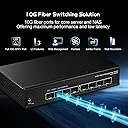
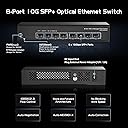
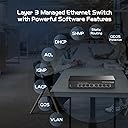
The Binardat 8 Port 10 Gigabit SFP+ Managed Switch delivers enterprise-level performance with 8 versatile 10G SFP+ ports supporting multiple speeds, a massive 160Gbps switching capacity, and comprehensive L3/L2 web-based management. Its fanless metal design ensures silent, reliable operation ideal for professional environments requiring high-speed, stable fiber connectivity.


| ASIN | B0CCNVXJFX |
| Case Material | Metal |
| Customer Reviews | 4.3 4.3 out of 5 stars (180) |
| Data Transfer Rate | 10 Gigabits Per Second |
| Date First Available | July 24, 2023 |
| Interface Type | SFP |
| Item Weight | 1.72 pounds |
| Item model number | 8x10G SFP Managed |
| Manufacturer | Binardat |
| Product Dimensions | 6.6"L x 3.7"W x 1.25"H |
| Upper Temperature Rating | 55 Degrees Celsius |
| Voltage | 12 Volts (DC) |
B**N
Absolutely amazing! (2) 10Gigabyte speed ports and (4) 2.5gb ports
GREAT EASE OF USE . SETUP IS EASY! I learned so much about my server. This thing has been bulletproof! Functionality is great ! 2 10Gigabyte ports and 4 2.5 gigabyte ports! It has jumbo packet size! I use 15,000 packet size transfers with my server (supermicro server plugged into 10g port on this switch) I have 2.5 gigabyte ports on archer BE9300 router plugged into 2.5g port on switch. Brightness on the lights are great! Green and yellow tells me the connection. Using Cat6a cable (10gb/persecond transfer speed) Server is a finally wifi 120Tb server! This switch has port config you use and internet browser, type in the IP of the switch into the web address, and it opens the software. GREAT EASE OF USE . SETUP IS EASY! TO SET UP ON A WINDOWS COMPUTER GO TO CONTROL PANEL GO TO YOUR NETWORK ADAPTERS AND IT WILL SHOW YOU EACH ETHERNET ADAPTER. Plug in your Cat6a cable to the switch to your computer. In control panel network adapter settings right click the Ethernet That pops up in adapter settings when you plug it into the computer. Right click it go to properties , Then find IPv4 click it then click configure change the IP address to the IP address that is in the instructions of the switch. Then go to the internet browser type in that IP address in the instructions in the switch. Then change the IP address to whatever you want it to be so that you can go into your router and go to DCHP and reserve that IP address so it doesn't bounce around and change on its own basically you manually assign it an IP address like 192.168.0.5 ( router is on IP 192.168.0.1) So if you go to your router settings go to DCHP reserve, you can make a static IP address and make it so that it is permanently at the IP address that you tell it to be at by typing in the IP address under DCHP reserve. So many things that are amazing about this. When you are all finished go back to control panel network adapters right click the adapter properties IPv4 selected configure Change back to automatic. Now you are done!
C**J
A great, low cost, L3 managed router/switch
There is no management port, but Telnet and HTTP are both live at 192.168.2.1. The OS is a stripped down version of Cisco's CLI. If you know how to configure a Cisco, you can configure this switch. There are differences, but they don't affect this as a switch. This is my third router/switch from Binardat and I expect to buy more. Note! If you are going to use a DAC, you must set the media type of the Ethernet interface.
C**R
4x2.5G + 2x10G unmanaged switch - works well
There weren't any reviews for this particular switch, so here you go. This switch is for those that need to convert a couple SFP+ 10G connections to a small number 2.5G or 1G RG45 connections, and are okay with an unmanaged switch. It's a good way to start experimenting with speeds beyond 1Gbps without spending too much. Construction is all metal, and it will take a few minor bumps without issue. It comes with a wall-wart style power supply for North American outlets, four rubber feet one can stick on, and an unhelpful quick start guide. This is an unmanaged switch so don't expect anything fancy. It does do what it is supposed to for a reasonably price (as far as these devices go). For my purposes, it's a win. I tested all the ports using iperf3 and they performed as expected. Testing from 2.5G to 2.5G (or to SFP-10G) I saw rates between 2.3 and 2.4Gbps; and going from SFP+ to SFP+, I saw rates around 9.4Gbps. Diving deeper....the switch passes VLAN tags just fine, even though it doesn't understand them. For SFP/SFP+ compatibility, I tried a generic 10G DAC cable, a generic SFP-10G-SR transceiver (coded as Intel), a generic SFP-10G-LR (coded as OEM), and a QSFPTEK SFP-1G RJ45 transceiver. All worked just fine. It supports both 1G SFP and 10G SFP+, and has an LED indicating which is detected. It has a small switch on the front labeled "Default or VLAN". This doesn't have anything to do with 802.1Q VLANs, this is a port isolation switch to prevent traffic between 2.5G ports. I did not test it, and most people will want to leave it at the default position. If this fits your needs, it's worth consideration. I'm happy with it so far.
P**.
Great switch
Fanless design. Runs warm. So far so good
B**U
8-port SFP Switch Does Not Work & Slow to Boot
This review is for the 8-Port 10G L3 Managed Fiber Switch 10G08-0800GSM. I have 3 different 10G SFP switches and this is the only one I didn't get to work. Pros: * Very compact Cons: * Does not properly boot up. I can't access the web portal on 192.168.2.1 with a direct connection to the laptop which is not connected to any other network. Arp -a doesn't show the switch. The SFP module and Ethernet cable are known to be good as they work on other switches. * Gets very hot, probably because it is so compact. * Out of 4 different SFP+ ETH modules only one worked (though other switches had the same issue). Only the 10Gtek ASF-10G-T worked. I have a feeling the switch doesn't work with Broadcom chips. The following SFP+ modules didn't work: 10Gtek ASF-10G-T80, tp-link SM5310-T, ASFPTEK AT-SFP-10G-T-80 * It takes 28 seconds for the SYS LED to start blinking. This is very consistent. According to the manual, a blinking SYS LED means "Starting". So that means it does not start booting for 28s. Every other switch starts booting as soon as it gets power. * It takes 52 seconds for the connected SFP ports to be recognized. The second worst switch took 36 seconds, i.e. 16 seconds faster. * The status LEDs are below the ports. If you want to check the LEDs and the switch is not above eye level, you have to tilt it up or lift it up to see the LEDs.
C**.
Good managed 10/2.5G switch.
Why did you pick this product vs others?: Works as designed, 10G uplink and 10G local connection connect at real 10G. The managed switch web UI is simple but functional. I use it as a leaf switch for my 10G core switch with VLANs configured. Build is solid. It gets warm but not hot.
T**P
Genial pour le prix
L**N
8 Port 10 Gigabit SFP Managed Switch Impressions: The unit is tiny, metal good overall construction. Background: I already had a 6 port 2.5\10Gb switch with 2 RG45 10Gb SFP+'s using that to allow 2 computers of mine to copy large back up files at the highest speed & used 2.5Gb NIC's & USB Adaptors for less important machines for the last year over existing domestic network cabling. So far so hoopy (Apart from occasional drop outs - More of which later) Intention: I decided that I'd like to increase my speed to other units & bought this unit as the principle hub with 2 more RG45 10Gb SFP's & put the original unit to replace a existing 1Gb switch. So now I have 3 10Gb links initially this was great. Issues: Then the dropouts returned faster & faster & with longer periods of network coming back online. After much playing about the root cause was revealed. 10Gb SFP's run f**king hot, fact of life no matter the brand (Intentional pun as that's how hot they get), the original unit had 2 SFP's happily next to the other both playing a game of chicken to see which one could get the hottest & by extension heating its neighbour at the same time without dropping the network. Solution: I spaced out the 10Gb SFP's into alternate slots (Something that couldn't be done on the original switch), they still get hot, but not having "three in a row", means they are no longer collectively cooking the other two & performance has remained stable if not better than before. Conclusions: Obviously the switch is marketed for use with cheaper SFP's for Fibre Optic media so I can't speak for their performance, those type of SFP's would run (probably) cooler. If I add machines to the faster home network, I will require more SFP's & these will get hot if they get to a point of having to be installed next to the other as I don't intend to rewire the home with fibre cable, so I will need to add some form of forced airflow for cooling or buy another switch). I hope its obvious, but you do need network cards or USB adaptors to make use of the faster speeds of 2.5 or 10Gb to connect PC's to each other resulting in faster connectivity between these machines, it will not increase the speed of your ISP connection, that said there does seem to be a subliminal impression of faster response when internet browsing on devices with the faster connections.
Q**N
Great little unit. Works great, and can confirm, 10G works on the sfp ports too.
E**X
Marche très bien. Gros intérêt pour moi qui possède une freebox delta ça me permet de amener la fibre jusqu'au bureau ( pc gaming +PC de madame + ma station de travail.)
神**谷
気に入ったところ 熱も持たない、スペース取らないコンパクト。範囲も10Gまで対応してるところ 欠点、 ケーブルが短いので配置場所が限られる事。仮に伸ばすなら延長ケーブルが必須。 ハブ数が足りなければ多いのを選べばいいところもポイント高いところ。ただハブ数増えるとコンパクトとは言えなくなるところもあるので一長一短。 私の使い方ですがゲーム機、PC その他な感じで繋げてます。1番驚いたのがやはりコンパクトなのにハブに熱持つ感じが無いところです。 結論 このハブ数で足りるなら本当に色んな人にオススメ出来る程のハブだと感じます。
Trustpilot
2 months ago
4 days ago