![[Gaming/Business] Mini PC Intel Core i9-11900H(up to 4.9GHz),Gaming Computer 16GB DDR4 512GB SSD,24 MB Cache,WiFi6/BT5.2/Multi-Mode/Dual Fans/RGB](https://m.media-amazon.com/images/I/61eTKdH2SlL.jpg)


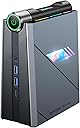
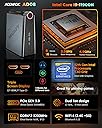
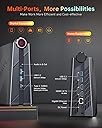
desertcart.com: [Gaming/Business] Mini PC Intel Core i9-11900H(up to 4.9GHz),Gaming Computer 16GB DDR4 512GB SSD,24 MB Cache,WiFi6/BT5.2/Multi-Mode/Dual Fans/RGB : Electronics Review: A powerful mini-PC with unique features - My review is for the Acemagic AD08 system using the Intel i9-11900H CPU. Wow. That's my one-word summary of this system. This mini-PC uses the Intel i9-11900H CPU which has 8 cores and 16 threads. That makes this Mini PC uniquely fit for far more demanding tasks than would be typical for a mini-PC. In this review, I'll try to focus mainly on the details specific to the unique features of this system and hopefully answer questions that might come up regarding this system. Internal Expansion This system includes 16 GB of RAM, using 2 x 8 GB 3200 DDR4 SODIMMs. The system can be expanded to a total of 64 GB by replacing the existing memory modules. While you can replace these with any standard memory modules, be aware that the lighting of the side panel is provided by these memory modules as they are RGB illuminated memory modules. As a result, if you replace them with standard memory modules, you will lose the RGB lighting on the side panel. While there are plenty of RGB memory modules for desktop computers, I have not been able to find any in the SODIMM form factor used by this system. As a result, my suggestion would be to consider purchasing the system with the full amount of RAM that you plan to have and not plan to expand it later. The system includes a 512 GB NVMe SSD, but you can replace that with a larger SSD if you wish. In addition, you can add a 2.5-inch SATA SSD if you wish. The side panel that is removed to get to the inside requires no tools to remove. It is held in place by magnets, so it literally takes under 5 seconds to remove or put back into place. External Expansion The system includes 2 HDMI ports, and a full feature USB-C port that includes DP Alt mode support, which means that it can support video output. This allows for up to three 4K monitors. In addition to the USB-C port, there are four USB-A ports available, 2 on the front, and 2 in the back. One thing that I find to be unique about this system is that all of these ports are USB 3.2. On most mini-PCs at least some of the USB ports are usually USB 2 ports. Because these are all USB 3.2, you have a lot more versatility which would be especially helpful if you plan to attach multiple high-speed devices. The system also includes gigabit Ethernet, and an audio jack. WiFi This system includes a WiFi 6 / Bluetooth adapter so you can expect excellent performance even if you are using WiFi rather than Ethernet. Performance Adjustments One very unique feature of this system is the dial that allows you to choose between quiet operation, higher performance, or balanced operation. In my testing I found that even in the highest performance mode, the system runs near silent unless you are doing something that requires more performance. Normally, you could go into Windows settings to adjust performance between settings such as balanced, performance, etc. but I find it so simple to just turn a dial and be done with it. Lighting Surround the dial that allows adjustment of the performance and across the top of the system you will RGB lighting. A simple app for changing the behavior of the lighting is included. If you turn off the lighting completely or ypu select "auto" mode, the lighting surrounding the dial will stay lit in either green, blue, or red to indicate the current setting of the dial. In any of the other lighting modes, the dial will follow the same RGB lighting scheme as the lights across the top of the system with one exception that that when you change the setting of the dial, the light will change to green, blue, or red for a few seconds before reverting back to the selected color scheme. Another thing that I really like is that when you make a change to the lighting, this change is persistent and does not require the lighting software to keep running. This means that there is no software running in the background to use up memory or CPU resources. Very nicely implemented! One other note in this regard: As shipped from the factory, the lighting control software runs automatically every time you log on to the system and is displayed on the screen. I'm not a fan of this, but since you don't need the software to run in the background, you can simply stop the lighting control app from running at startup and only run it on those rare occasions where you want to change the lighting settings. Windows This system ships with the latest version of Windows, Windows 11. It's also worth noting that you get Windows 11 Pro, not just the home edition. This makes sense on a more powerful system like this because it gives you access to some of the advanced features like Remote Desktop, BitLocker drive encryption, and more. Final Thoughts It used to be that laptops and mini-PCs had some really pathetic performance when compared to desktop machines. But these days, the big makers AMD and Intel have focused intensely on mobile CPUs so you can get some really amazing performance from these processors. Mini PCs benefit greatly from this, allowing you to get great performance in a very compact system. Review: You might want to read before you buy - From Windowscenteral website, "Stay away from this mini-pc brand" author Rebecca Spear "After some investigating, I found that the Chrome default settings had been altered so that something called "naviwithus" was the actual search engine, and opening a new tab actually brought up something called "UpSearches" rather than Google. I did a quick Bing search and saw that UpSearches is flagged as a virus software. My repulsion at these settings turned to disgust when I found that attempting to change these defaults didn't do anything; the original defaults would just come back. I even uninstalled Google Chrome and reinstalled it, but the defaults remained". As a reminder, you may want to read her story before you purchase from this company . I have no idea if this information in the story is true or not, but my opinion is to read story before you buy. I have nothing to do with this company or its products. Do your own due diligence before you buy.


| ASIN | B0CNRDKMGF |
| Best Sellers Rank | #147,880 in Computers & Accessories ( See Top 100 in Computers & Accessories ) #4,602 in Mini Computers |
| Brand | ACEMAGIC |
| Card Description | Integrated |
| Chipset Brand | Intel |
| Computer Memory Type | DDR4 SDRAM |
| Customer Reviews | 3.2 3.2 out of 5 stars (8) |
| Date First Available | December 5, 2023 |
| Flash Memory Size | 512 GB |
| Graphics Coprocessor | Intel UHD Graphics 630 |
| Hard Drive | 512 GB |
| Hard Drive Interface | Solid State |
| Hardware Platform | PC |
| Item Weight | 4.77 pounds |
| Item model number | AD08 |
| Max Screen Resolution | 3840x2160 |
| Number of Processors | 8 |
| Operating System | OS |
| Package Dimensions | 11.65 x 9.96 x 5.67 inches |
| Processor | 4.9 GHz core_i9 |
| Processor Brand | Intel |
| RAM | 16 GB DDR4 |
| Screen Resolution | 3840 x 2160 |
| Series | AD08 |
| Standing screen display size | 1 Inches |
| Wireless Type | 802.11ax |
P**N
A powerful mini-PC with unique features
My review is for the Acemagic AD08 system using the Intel i9-11900H CPU. Wow. That's my one-word summary of this system. This mini-PC uses the Intel i9-11900H CPU which has 8 cores and 16 threads. That makes this Mini PC uniquely fit for far more demanding tasks than would be typical for a mini-PC. In this review, I'll try to focus mainly on the details specific to the unique features of this system and hopefully answer questions that might come up regarding this system. Internal Expansion This system includes 16 GB of RAM, using 2 x 8 GB 3200 DDR4 SODIMMs. The system can be expanded to a total of 64 GB by replacing the existing memory modules. While you can replace these with any standard memory modules, be aware that the lighting of the side panel is provided by these memory modules as they are RGB illuminated memory modules. As a result, if you replace them with standard memory modules, you will lose the RGB lighting on the side panel. While there are plenty of RGB memory modules for desktop computers, I have not been able to find any in the SODIMM form factor used by this system. As a result, my suggestion would be to consider purchasing the system with the full amount of RAM that you plan to have and not plan to expand it later. The system includes a 512 GB NVMe SSD, but you can replace that with a larger SSD if you wish. In addition, you can add a 2.5-inch SATA SSD if you wish. The side panel that is removed to get to the inside requires no tools to remove. It is held in place by magnets, so it literally takes under 5 seconds to remove or put back into place. External Expansion The system includes 2 HDMI ports, and a full feature USB-C port that includes DP Alt mode support, which means that it can support video output. This allows for up to three 4K monitors. In addition to the USB-C port, there are four USB-A ports available, 2 on the front, and 2 in the back. One thing that I find to be unique about this system is that all of these ports are USB 3.2. On most mini-PCs at least some of the USB ports are usually USB 2 ports. Because these are all USB 3.2, you have a lot more versatility which would be especially helpful if you plan to attach multiple high-speed devices. The system also includes gigabit Ethernet, and an audio jack. WiFi This system includes a WiFi 6 / Bluetooth adapter so you can expect excellent performance even if you are using WiFi rather than Ethernet. Performance Adjustments One very unique feature of this system is the dial that allows you to choose between quiet operation, higher performance, or balanced operation. In my testing I found that even in the highest performance mode, the system runs near silent unless you are doing something that requires more performance. Normally, you could go into Windows settings to adjust performance between settings such as balanced, performance, etc. but I find it so simple to just turn a dial and be done with it. Lighting Surround the dial that allows adjustment of the performance and across the top of the system you will RGB lighting. A simple app for changing the behavior of the lighting is included. If you turn off the lighting completely or ypu select "auto" mode, the lighting surrounding the dial will stay lit in either green, blue, or red to indicate the current setting of the dial. In any of the other lighting modes, the dial will follow the same RGB lighting scheme as the lights across the top of the system with one exception that that when you change the setting of the dial, the light will change to green, blue, or red for a few seconds before reverting back to the selected color scheme. Another thing that I really like is that when you make a change to the lighting, this change is persistent and does not require the lighting software to keep running. This means that there is no software running in the background to use up memory or CPU resources. Very nicely implemented! One other note in this regard: As shipped from the factory, the lighting control software runs automatically every time you log on to the system and is displayed on the screen. I'm not a fan of this, but since you don't need the software to run in the background, you can simply stop the lighting control app from running at startup and only run it on those rare occasions where you want to change the lighting settings. Windows This system ships with the latest version of Windows, Windows 11. It's also worth noting that you get Windows 11 Pro, not just the home edition. This makes sense on a more powerful system like this because it gives you access to some of the advanced features like Remote Desktop, BitLocker drive encryption, and more. Final Thoughts It used to be that laptops and mini-PCs had some really pathetic performance when compared to desktop machines. But these days, the big makers AMD and Intel have focused intensely on mobile CPUs so you can get some really amazing performance from these processors. Mini PCs benefit greatly from this, allowing you to get great performance in a very compact system.
Z**Y
You might want to read before you buy
From Windowscenteral website, "Stay away from this mini-pc brand" author Rebecca Spear "After some investigating, I found that the Chrome default settings had been altered so that something called "naviwithus" was the actual search engine, and opening a new tab actually brought up something called "UpSearches" rather than Google. I did a quick Bing search and saw that UpSearches is flagged as a virus software. My repulsion at these settings turned to disgust when I found that attempting to change these defaults didn't do anything; the original defaults would just come back. I even uninstalled Google Chrome and reinstalled it, but the defaults remained". As a reminder, you may want to read her story before you purchase from this company . I have no idea if this information in the story is true or not, but my opinion is to read story before you buy. I have nothing to do with this company or its products. Do your own due diligence before you buy.
J**Y
Powerful for its size.
I bought this mini pc because of it's size. I have a tight space and needed something small. As far as the power, i got surprised by it's performance. It has i9 11th gen processor and 16gb of ram. Another cool feature about this pc is the look of it. It got a unique shape and nice led colors. You can customize the lighting from the control center app that came pre installed.
A**R
Beware of malware
Known to ship services with malware…stay away
C**H
Setting up a plex media server tv box. Works well so far.
I picked this up to setup as a plex server and tv box. I've added a 4tb ssd and have upgraded to 64gb ram. Later today I'm swapping the m.2 to a 2tb drive. I'll just added 16tb of mirrored raid storage with a Maiwo box and 2x16tb enterprise drives. I am not using it for gaming. For people having problems with it freezing and not booting up try the reset pinhole on the side toward the top. People with Bluetooth problems grab the driver packs on the acemagic forums. There are also windows setup packs to reload the os.
B**.
Beware the pre-installed back door Trojan and virus
The machine comes with back door Trojan pre-installed. Watch YouTube the net guy review.
Z**E
Fast browser, good deal
Super fast at browsing Very good discount coupons ($150) Haven't tried games but it says it's good
P**H
Good Mini PC i have used so far !
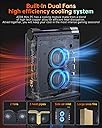
The mini PC boasts impressive specs, featuring a Core i9 processor, 16GB of RAM, and a 512GB SSD. It supports Wi-Fi 6, Bluetooth 5.2, and includes a convenient toggle switch button on the top for switching between silent, auto, or performance modes. Additionally, it provides two HDMI ports, one Ethernet port, one power supply port, four USB 3.0 ports, one AUX port, and one USB Type-C port. Running Windows 11 Professional, the PC also comes with an app for controlling its lighting. I appreciate its performance, sleek design, and the inclusion of a cooling fan. However, the only drawback is the fan's noise level; it could have been made quieter. I have tried playing games and have done coding and it works seamlessly. Overall, if priced under $500, this PC is a great deal.
Trustpilot
5 days ago
2 months ago