Desertcart purchases this item on your behalf and handles shipping, customs, and support to Croatia.
🔥 Elevate your PC build with real-time clarity and style!
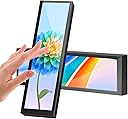
The AISHICHEN 8.8 Inch Small Touchscreen Monitor is a sleek, high-resolution 1920x480 IPS display designed as a secondary monitor for PC cases. It offers real-time monitoring of CPU, GPU, RAM, and temperature data via seamless AIDA64 integration. With a 60Hz refresh rate, adjustable brightness up to 600 cd/m², and flexible mounting options, it fits most gaming and custom PC builds. The touchscreen supports Windows systems and powers through USB-C, making it a must-have for tech-savvy professionals seeking both functionality and aesthetic upgrade.


| ASIN | B0C5CJSM3B |
| Aspect Ratio | 16:9 |
| Best Sellers Rank | #111,986 in Computers & Accessories ( See Top 100 in Computers & Accessories ) #1,241 in Monitors (Computers & Accessories) |
| Box Contents | 8.8 inch Touchscreen Monitor x 1, Hdmi to mini hdmi cable x 1, USB cable x 1 |
| Brand | AISHICHEN |
| Brand Name | AISHICHEN |
| Color Gamut | 100 |
| Colour | Touch |
| Compatible Devices | Desktop |
| Contrast Ratio | 800:1 |
| Customer Reviews | 3.9 out of 5 stars 63 Reviews |
| Display Technology | LCD |
| Display Type | LCD |
| Hardware Connectivity | USB |
| Has Color Screen | Yes |
| Image Brightness | 600 candela_per_square_meter |
| Image Contrast Ratio | 800:1 |
| Item Dimensions D x W x H | 25.4D x 5.1W x 7.6H Centimeters |
| Manufacturer | AISHICHEN |
| Maximum Display Resolution | 1920 x 480 |
| Model Name | 8.8-Metal Boby |
| Model Number | P-81124 |
| Mounting Type | Wall Mount |
| Native Resolution | 1920 x 480 |
| Network Connectivity Technology | USB |
| Number of Height Positions | 10 |
| Picture Quality Enhancement Technology | FHD |
| Pixel Pitch | 0.23 |
| Product Features | Touchscreen |
| Refresh Rate | 60. |
| Resolution | 1920 x 480 |
| Response Time | 3 Milliseconds |
| Screen Finish Type | Matte |
| Screen Size | 8.8 Inches |
| Screen Surface Description | Matte |
| Shape | Rectangular |
| Specific Uses For Product | Gaming |
| Total HDMI Port | 1 |
| Total USB 2.0 Ports | 1 |
| Total USB Ports | 1 |
| Total Video Out Ports | 1 |
| Unit Count | 1 Count |
| Viewing Angle | 170 Degrees |
D**E
Sharp, Reliable, and Perfect for System Monitoring
The 8.8 Inch 1920x480 Touchscreen PC Sensor Panel Display has been a great addition to my computer build, and it’s still going strong without a single issue. The first thing that stands out is the resolution. The 1920x480 display is sharp and crisp, making system stats easy to read at a glance. Whether it’s CPU temps, RAM usage, or custom AIDA64 layouts, everything looks clean and well-defined—no blurriness or washed-out visuals. The IPS panel does a solid job with brightness and viewing angles, which is important when it’s mounted inside a case. Colors look good, and the screen remains visible from different angles without distortion. Setup was straightforward, and it integrates nicely into a custom build. Once configured, it becomes a seamless part of the system—displaying real-time data without lag or glitches. Reliability has been excellent. No flickering, no connection issues, no drop-offs. It just runs consistently every time the system is on. If you’re looking to add a clean, functional display to your PC build for monitoring temps and performance, this is a solid choice. Sharp visuals, dependable operation, and a great way to elevate the overall look and functionality of your setup. Highly recommended.
I**R
Awesome little device
This little thing is pretty amazing. I used HWiNFO64 and a piece of software called Rainmeter to build a PC monitoring app. I'm still fiddling with it, but it works very well. I've only been using it about 3-4 months, so I can't speak on long term reliability. Tips: 1) For completely free software use HWiNFO64 and Rainmeter to make your user interface. Use the HWiNFO gadget that writes data to your registry and Rainmeter can read this information and display it. It's not as easy to use as AIDA64, but it's free! Aida64 will cost you $60 for the software and updates. After a year, Aida64 will still run, but if you want updates you'll have to fork over more $$$. The paid version of HWiNFO64 is over twice as expensive as Aida64 or you have to pay $30/year to use it on a subscription model. The paid version of HWiNFO64 is necessary if you want to use the shared memory feature and don't want to have to re-enable the feature every 12 hours). Shared memory is a bit easier to use when designing your user interface than their registry method. 2) Configure the touch screen to use this monitor go to Control Panel->Tablet PC Settings and you can set this monitor as the touchscreen. 3) Buy a 180° adapter for the USB-C and a 180° mini-HDMI adapter so that the cables can be tucked behind the monitor instead of shooting off to the side. The only real cons I've found are: 1) It's hard to find a tablet stand for this thing. I bought one, but found out the lip on the bottom was too small because the mfr assumed you'll only put a thin+flat tablet on it. I'll end up designing and printing a stand that makes this hover over my keyboard eventually. 2) DPI is very small and windows doesn't support different DPI settings on different monitors. The only place this has really affected me are the tooltips on some of my items on my user interface. You have to use a magnifying glass to read them because it's using the normal DPI from my main 2K monitor. 3) (total nitpick) No monitor driver that I've found. I like my monitors in device manager to say what the monitor is instead of "Generic PnP Monitor". I've attached a pic of the rainmeter user interface (still a work in progress as I learn how to do this)
J**P
Busted at 66 days of use
Worked great until it didn't. It was a bit annoying to set up and I had to buy a few adapters since the included cable wasn't long enough for my set up, but otherwise happy with the funtionality and quality. However, 6 days after the return window, this screen is unusable. There's a weird burn-in of the exact image that was displayed at 9:38 AM on Sep 30 (it's not actually burn-in, since the "burned in" image is specific to one time--it's clearly something with the display adapter, not the screen itself). The screen is still connected to my PC and still responds, even if the image burn-in wasn't a problem, the color is off, it's blurry, and the motion is all stuttered. I've unplugged and plugged. Restarted the PC. Reinstalled drivers. No apparent solution.
J**S
Good product
The monitor looks great and is bright. If youre using it with AIDA64 it's perfect. Seems like a waisted though. I use it with macrodeck since it is a touch sensitive monitor. I place my macros on it and can easily switch between tasks. Very cool product. It doesnt turn off automatically so if you plug it into a source that stays powered during sleep or even when the computer is off, it will stay on. That's easy to fix, just dont do that. I'll buy some more when I build the other systems. Great product.
Z**H
Deceptively small
Can’t fault it for the size really since the dimensions are there but the images and videos make it seem larger. This works pretty well. I’m using it with windows 10. This is better than the other ones that need specific software because I had one of those before this and once the software stopped working it was as good as a brick. This thing is at the very least an extra monitor. The screen peel was like hard plastic which doesn’t seem like the best first impression to give. Got the touch screen version and it’s fine. Don’t expect it to feel like a smart phone or tablet but it’s at least interactable. Screen is plenty bright but the colors look a bit off. Surprisingly though this helps me to see data better on the backgrounds.
Trustpilot
3 weeks ago
1 month ago