Buy anything from 5,000+ international stores. One checkout price. No surprise fees. Join 2M+ shoppers on Desertcart.
Desertcart purchases this item on your behalf and handles shipping, customs, and support to Croatia.
🎨 Elevate your digital art game — don’t just create, captivate!
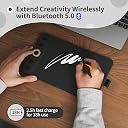
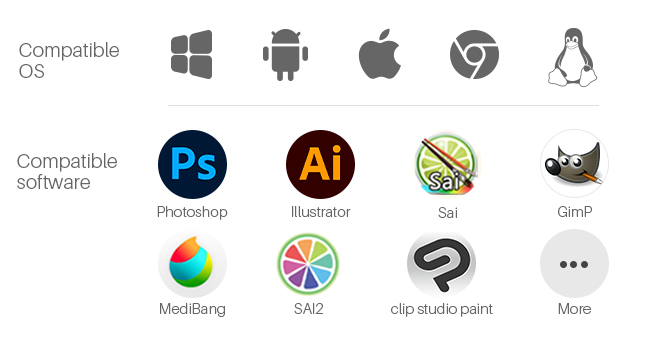
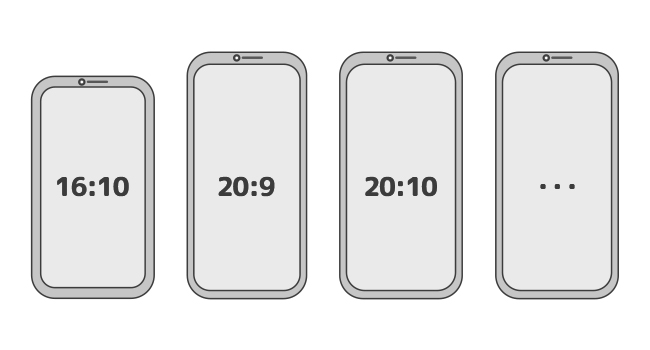
The GAOMON WH851 is a versatile 8x5 inch Bluetooth-enabled drawing tablet featuring an industry-leading 16,384-level pressure-sensitive battery-free pen, an intuitive dial with 8 customizable shortcut keys, and an 18-hour battery life. Compatible across Windows, Mac, Android, and more, it offers smooth, precise drawing with minimal pen sinking and adjustable aspect ratios, making it the ultimate tool for digital artists, designers, and professionals seeking a premium yet affordable creative experience.


| ASIN | B0CN6NQ8DQ |
| Active Surface Area | 8 inches |
| Best Sellers Rank | 614 in Computers & Accessories ( See Top 100 in Computers & Accessories ) 1 in Graphic Tablets |
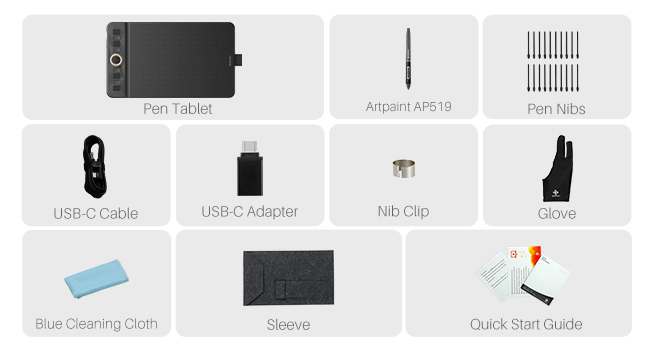
| Box Contents | AP519 Digital Pen, Pen Holder, Wireless Kit |
| Brand | GAOMON |
| Brand Name | GAOMON |
| Colour | dark grey |
| Compatible Devices | laptop, desktop |
| Connectivity technology | Bluetooth |
| Country of Origin | China |
| Customer Reviews | 4.3 out of 5 stars 23,024 Reviews |
| Item Dimensions L x W | 20.3L x 20.3W centimetres |
| Manufacturer | GAOMON |
| Model Name | GAOMON WH851 |
| Model Number | WH851(Grey) |
| Model name | GAOMON WH851 |
| Native Resolution | 5080 LPI |
| Network Connectivity Technology | Bluetooth |
| Operating System | Windows, MacOS, ChromeOS, Android, HarmonyOS, Linux |
| Operating system | Windows, MacOS, ChromeOS, Android, HarmonyOS, Linux |
| Pressure Sensitivity | 1024 Levels |
| Pressure sensitivity | 1024 Levels |
| Product Features | Wireless Bluetooth Connection、16384 Pressure Levels Battery-free Pen、Extended Battery Life |
| Screen Size | 8 Inches |
| Special feature | Wireless Bluetooth Connection、16384 Pressure Levels Battery-free Pen、Extended Battery Life |
| Specific Uses For Product | digital art creation, design, studying |
| Target Audience | Digital Artists, Designers, Students |
| Unit Count | 1.0 count |
D**9
Better than the competition, and cheaper!
Wow. I'm pleasantly surprised. I previously owned a much more expensive Wacom tablet. After years of frustrations with that one in relation to drivers and glitchy behaviour I finally decided to chance a different brand. I have to say I'm blown away. For the price point it's excellent. I don't know why anybody would need to spend more money than this. It does everything I want and does it well. The software is great too. Nice and simple, works well without clutter. Very happy with my purchase.
B**A
Impressive signature tablet!
Very impressed with this signature tablet!! Compatible on Windows 11, very to install. Just download the driver from their website. (Tip: Run As Administrator when installing the driver for all users to use on a PC). The tablet is light weight, decent, practical sized. The stylus is lovely to grip and responsive on the tablet. Easy to use and setup.
A**S
Pretty good, but not really for my needs in particular
I own a MacBook Pro 14” with an M5 chip, and mainly use this product in the preview app to add annotations. It was very easy to set up and works as described, though since I’m using the preview app there isn’t a shortcut for the brush/pen though a shortcut can be added. It does get a little bit confused every now and then and seems to not be able to properly replicate the delete button. There is no more usb port on a MacBook so I had a little scare that I wouldn’t be able to use but the converter meant for the phone works just fine. Seems pretty smooth but I tend to write with a lot of pressure and can not figure out how to change that. Though if you’re using the recommended applications this will be easily customisable for you. Comes with everything for described and for 20 pounds is an excellent alternative to a iPad
R**S
Affordable tablet that just works
Affordable tablet that just works My experience with the tablet has been great, it’s a nice and affordable bit of kit, may not be an artist or an OSU player, but for my use of teaching online, it’s been great. Using it The pen glided well, nice bit of resistance, not as much as paper but enough to make it comfortable to write with. The button mapping was useful and easily reprogrammable in the app, my main use being switching brushes and tacking screenshots. The pressure sensitivity, yeh nice and responsive with smooth size changing. It made my writing look much more natural. So enjoyed it. Use in MS white board Once you get the screen ratio right it is great and improves your ability to teach as you can show live examples and easily annotate. The reprogrammable buttons have been more useful than I thought, switching between brushes and screenshots made easy. Pen The pen, honestly was the best. Much better than the pen you get with other budget tablets like the Wacom One. The pen being battery free was a good convenience as you have it ready when ever you need it, but bear in mind that there is a limit to how far up you can hold the pen being roughly 0.7 cm when you just lifted it off the pad. So you will want to hold the pen a bit higher up but that’s not really an issue. Holding it was realy comfortable esspecialy with the grip. Connectivity This is where it starts of strong, this is one of them rare occasions where there is support for Linux. This off the bat was surprising. This ment I could use it with my workstation. However, my main use was on windows, so regarding that it was great. Basic plug and play. App The app responsive, and simple. Plug in the tablet, it does the rest. With the UI, it was very clean, making it easy to remap buttons and screen ratio which was nice and intuitive. Didn’t like that it was on start-up, but the tablet works best with the app so that’s fine. But personally, I leave start-up disabled and open as needed. Overall I have loved using it and in my opinion for its price it is the best and possibly only thing you need as 10 replacement nibs will last you a while and given your not doing anything extreme it ticks most boxes and is better than similar priced alternatives like Wacom one. Warning The app drivers conflict with Asus armoury crate to the point I had weird issues. Please ensure if you have an asus computer or motherboard to disable this dumb app.
K**D
Overall fantastic product
Order came quickly, lovely packaging, product works very well and its very easy to use (plug and play basically) !! I have no complaints
W**P
Great alternative for wacom
Very good quality for the price, it works very well on my laptop and i have recommended to others as im so happy with it, i use it for college and i was originally looking at wacom but not for the price and found this brand instead and decided to try and i much prefer this brand, the buttons are great as i can change them to open which app i want through this brands app
M**S
Good for Windows/OSU, but struggles with newer MacBooks (Poor Drivers)
I bought this tablet a few years back, mainly buying into the hype that you “need” a tablet to be good at OSU! On Windows, it’s a decent, cheap device. It works fine for gaming and the input is responsive. If you use a Windows PC, it’s a solid choice. Recently, I tried using this with my new MacBook for College work, writing notes and answering practice questions as it is advertised as an “Online-Learning Device”. It was a nightmare. Despite downloading drivers from the Gaomon website, I couldn’t get the pressure sensitivity to work properly, nor could my Mac recognise the device. The cursor moves, but you have to press down incredibly hard for it to register, making it useless for writing. The active area is quite small, so if you have large hands you might find it quite cramped. It uses Micro-USB, and the pen is comfortable enough, but a little thick. In short, it’s great on Windows (aside from the fact that the software is quite clunky), but I cannot recommend it for Mac Users or students wanting to take notes.
M**D
Great Drawing Tablet with Customisable Pressure and Good Value
it's good for drawing. The buttons are useful. There is no battery life connects to USB. The value for money is good when it has discounts. you can customise the pressure and sensitivity to however you like. To improve it can be a big bigger to be perfect. Overall the quality is great.
A**A
Ottima
Molto buona, usata poco. In maniera esperte sono sicura che sarebbe il top
I**A
Encantada con ella
Esta tableta GAOMON S620 es una opción muy sólida si estás buscando una tableta gráfica compacta, ya sea para dibujo digital, edición de fotos o para juegos como OSU!. El tamaño de 6,5 x 4 pulgadas es ideal para escritorios pequeños o para llevarla contigo, sin sacrificar demasiada área activa. El lápiz sin pilas es un gran punto a favor, ya que es ligero y no necesita carga. La compatibilidad es muy amplia (Android, Windows, Mac, Linux), y los 4 botones exprés son muy útiles y personalizables. El producto llegó en perfecto estado. El embalaje era seguro y todos los accesorios estaban incluidos e intactos. Es una compra muy recomendable por su relación calidad-precio. Funciona perfectamente y es muy fácil de configurar.
A**.
Gayet kaliteli ve kullanışlı.
Ben m10k pro sürümünü aldım. Türkiye'de aynı ürün iki katından fazlaya geliyor. Paketten 10 tane yedek uç, bunları koyabileceğiniz küçük bir çanta, kalem, tablet, eldiven, bağlantı kablosu, 2 tane çevirici (usb to typec - usb to micro usb), kullanım kılavuzu, garanti belgesi, tableti koyabileceğiniz bir de kılıf çıkıyor. Programını kurmanız için bir yönerge kartı da çıkıyor. Birkaç tıkla kurabilirsiniz. Çok zor bir olay değil. Program içinde, kalemdeki 2 tuşu ve tabletteki tüm tuşları istediğiniz gibi değiştirebiliyorsunuz. Enable wheel seçeneği seçiliyken, tabletteki orta tuş çalışması lazım ama seçili değilken çalışıyor :) Programın sonraki sürümünde güncellenir büyük ihtimal. Büyük bir olay değil. Tablette tuşlar da kalemdeki tuşlar da çıt çıt ses çıkarıyor. Sessiz değiller. Fare tıklaması gibi. Rahatsız etmiyor. Tabletteki orta tuşa bastığınızda birden çok işlevden birini seçip, kaydırma kısmını ona göre kullanıyorsunuz. Kaydırma kısmı dokunmatik. Dönen bir tuş yok. Tablet üzerinde iki ışık var. Birisi kalem işlem yapacak kadar yaklaşınca yanıyor. Diğeri orta tuşu kaydırırsanız yanıyor. Orta tuşun yanında. İkisi de yeşil, küçük, nokta kadar bildirim ışıkları. Kalem baskı değerini de programdan ayarlayabilirsiniz. Alt eşiği biraz artırmakta fayda var gibi. Kalemi fazla bastırmanıza gerek kalmadan daha iyi bir çizim yapabiliyorsunuz. Hem kalem hem tablet kullanım ömrü için yapılabilir. Program üzerinden çalışma alanını da ayarlayabiliyorsunuz. Varsayılan olarak tüm ekranı kullanıyor. Yine program üzerinden her program için tek ayar ya da her program için ayrı ayar yapabiliyorsunuz. Windows ve Mac desteği var. Programı Linux'a kuramıyorsunuz. Telefonda da çevirici aracılığıyla çalışıyor. Çalışma alanını ayarlamanız gerekebilir. İlk taktığınızda tabletin tamamını, telefonun çalışma alanı olarak görüyor. Çizim yapmaya yeni başlayacaklar için bir iki program da önerebilirim: 1 - Krita (Ücretsiz): Photoshop alternatifi. Bazı konularda daha iyi. Her türlü çizimi yapabilirsiniz. (Fotoğraf manipülasyonu, manga-anime çizimi vb.)(manga-anime çizimleri için hazır şablonla geliyor.) Windows, Mac, Linux ile kullanabilirsiniz. Android için tablette de kullanabilirsiniz. Telefon uygulaması yok. 2 - MediBang Paint Pro (Ücretsiz/Ücretli): Manga çizimine yönelik bir program. Sitesinde, hatta programın içinde çizim eğitimleri bulabilirsiniz. Ücretsiz sürümde 3GB bulut alanı veriyor. Neredeyse tüm özellikleri kullanabiliyorsunuz. Windows, Mac, Linux, iOS, Android, Telefon-Tablet... Her yerde kullanabileceğiniz bir program. Ücretli sürümü de yıllık abonelik üzerinden çalışıyor. Japon Yeni ile fiyatlandığı için çok pahalıya gelmiyor ama ücretliye gerek duyar mısınız bilmiyorum. Ücretsiz sürümde, telefon uygulamasında reklam çıkıyor. 3 - Adobe Fresco (Ücretsiz): Karita ve MediBang Paint Pro varken gerek duyar mısınız bilmem ama, Windows, Mac ve iOS ile kullanabileceğiniz bir program. Android desteği yok.
H**A
So far I would recommend
Generally speaking great product for digital drawing. Smooth and comfortable to use with the 12 programmable buttons. The pen is light with a good grip and calibration the pad with my laptop was an easy. The only issue I have come across is that the pad sometimes doesn’t react to the pens movement when I try to draw something, even if the green dot is lighting up. It tracks the pen but refuses to actually make the lines when I press down. The way to fix this however is pretty simple. I just open the driver and go into the pen settings - without pressing anything in the driver itself i go back to my drawing software the pen magically works again. I have no idea if I just accidentally press something in my drawing software that makes the pen slightly uncooperative but it works again so I guess it’s an non issue
P**E
Den fungerar jättebra och jag ger högsta betyg och rekommendationer.
Den är lätt att använda och rolig att rita med.
Trustpilot
3 days ago
1 week ago