Desertcart purchases this item on your behalf and handles shipping, customs, and support to Croatia.
❄️ Dominate your thermals, silence your rivals.
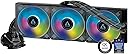
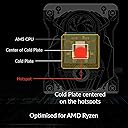
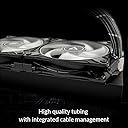
The ARCTIC Liquid Freezer III 420 A-RGB is a premium 420mm all-in-one water cooling solution featuring a high airflow 140mm fan array (200-1700 RPM), a unique 5mm AMD hotspot offset, and an integrated VRM fan for enhanced voltage regulator cooling. Designed for Intel LGA1700/1851 and AMD AM4/AM5 sockets, it offers superior thermal performance with ultra-quiet operation and smart cable management, making it the ultimate choice for high-performance, visually sleek PC builds.


| ASIN | B09CKW8LJ6 |
| Air Flow Capacity | 68.9 cfm |
| Best Sellers Rank | #531 in Water Cooling Systems |
| Brand | ARCTIC |
| Brand Name | ARCTIC |
| Compatible Devices | 1150, 1151, 1155, 1156, 1200, 1700; AMD: AM5, 2011(-3), AM4, Intel: 2066 |
| Cooling Method | Water |
| Customer Reviews | 4.4 out of 5 stars 563 Reviews |
| EU Spare Part Availability Duration | 6 years |
| Global Trade Identification Number | 04895213703406 |
| Included Components | Liquid Freezer II 420 A-RGB |
| Item Dimensions L x W x H | 17.13"L x 5.71"W x 11.81"H |
| Item Weight | 2019 g |
| Manufacturer | ARCTIC |
| Material Type | Aluminum, Copper, Rubber |
| Maximum Rotational Speed | 1700 rpm |
| Model | ACFRE00109A |
| Noise Level | 0.3 sones |
| Number of Items | 1 |
| Number of Packs | 1 |
| Part Number | ACFRE00109A |
| Power Connector Type | 4-Pin |
| Product Dimensions | 17.13"L x 5.71"W x 11.81"H |
| UPC | 840033401210 |
| Unit Count | 1 Count |
| Voltage | 12 volts |
| Warranty Description | 6 years |
| Wattage | 2.04 watts |
L**Z
An absolute unit!
First thing I want to say is to check the dimensions of your case because this thing is HUGE! My editing system is running a Ryzen 9 5950x that is heavily overclocked, so I needed something to cool it properly. I have tried high-end air coolers and basically every AIO from 120mm and up. After reading reviews and watching some YouTube videos, I decided to grab the Arctic cooler. I have an old Thermaltake Core P3 and it technically has mounting for a 420mm radiator, but I can tell you from experience that you can't actually put all the screws in because the slots on the case aren't long enough. Mounting the pump/cold plate was pretty easy and the inclusion of the ability to offset it for Ryzen chips was one of the reasons I bought this particular cooler. The VRM fan does help though it's not really needed on the Asus X570 dark hero because the heatsinks work quite well. Temps never get above 65C when running Aida64 and never get above ~45C when gaming. The fans are quiet and push enough air so that I can run them at a minimum. The RGB is bright and easily controllable using motherboard software. If you have the room for this cooler and have a CPU that needs it then this is a must buy. I am 100% happy with this purchase and will be putting Arctic coolers in my builds from now on.
R**.
Artic Chiller FTW - Insane Performance for Unbelievable Value
First of all - Check the Compatibility with your processor and get the newer version of this if you can. I am using an older I7 6950X and its uses the 2011-V3 CPU Socket. Unboxing was easy and super user friendly. Got the manual on the web via a scanned code. Watched the installation videos and what NOT to do. Installed following the online user manual. I used a Corsair 900D case that supports a 420MM Radiator and fan setup at the top of the case. Hoses and the CPU cooler were a bit of a pain to squeeze into the case, I had to remove my front cover; remove all my 5.25" bays and was able to slide in both the radiator (fans come pre-installed), CPU cooler and hoses with a couple of inches to spare. Check the fan orientation if you need to change your push/pull configuration. Fans are amazing, but the lighting isn't compatible with my motherboard. So you'll need to get a separate Aura lighting controller ($10 on Amazon). The thermal paste is top notch and they provide you at least enough for 2 applications. Fan speed is all controlled via Bios, and performance decimates my legacy Corsair AIO cooler that was 280MM and 3 years old. Temperatures on my I7 6950X while overclocked from 3.0ghz to 4.4ghz are lower than running my previous cooler at stock speeds. It used to be 49º C under load before and now its a chilling 38º C under load. This cooler definitely works well if you can fit it. Overall, my original go to wasn't compatible with my CPU Socket, it was the Asus ProArt 420MM since it didn't support my older CPU, this Artic Cooler was $160 cheaper, and had better lighting features. Overall, I'm extremely satisfied with the following features: 1) packaging and installation 2) compatibility and video content for support 3) performance and value What can be improved? 1) Include a controller for the lights for those users that don't have the Artic Controller or the compatible plug on their motherboard.
B**B
Top notch performance but CPU fan settings tweaks required.
Edit 2: The AIO pump/40mm pump fan needs to be spinning at about ~31% RPM minimum to avoid the noise. Under about ~31% the noise is present but becomes silent above it. This may not be set by default in your BIOS or if you use the Fan control program. Adding 2 stars. This AIO replaced a Corsair h115i (280mm) that I have mounted to a i9-12900k Per numerous reviews, it was said that Arctic AIOs are the quietest out there. Yeah, no. Not even close. The tiny VRM fan on the pump head is LOUD. Not as high pitched but as if there's some friction going on. Installing it is a pain. I ended up having temporarily tape the back plate of the motherboard, thread the standoff screws then remove the tape. Wasn't happening otherwise. Now once it's installed? An absolute monster. On idle Corsair : 30-32C Arctic: 25-28C Cinebench 23 multicore Corsair: 95-98C Arctic: 86-88C While this is a 420mm (140mm x3) vs a 280mm (140 x2), the 10C is pretty huge. That said, Cinebench can and will eat all the horsepower you can throw at it and unless you're a content creator, you're never going to hit that. General use + gaming? Get something like the Corsair. Easy to install and great temps. For content creation or overclocking? The Arctic.
S**M
ARCTIC Liquid Freezer II 420 A-RGB AIO: pretty good, almost perfect AIO
There isn't much I could say about this that hasn't been said already about the good regarding this thing. But to, in short, repeat what others have already said: its pretty much the best (for 2022 and early 2024 so far) over all AIO because it gives you FANTASTIC cooling while also keeping the noise levels very low and has a wonderful 6yr warranty and a good price. My previous heatsink was a Ice Giant Thermosiphon (old all aluminum one), which while pretty good, is absolutely whipped by this thing. My idle temps (with a 7800x3D) with the Ice Giant were around the high 30's while load temps tended to be around the high 70's (in C). With this AIO, with the same settings, now my idle temps are around 18-21C and load temps around 58-62C. Its also quieter by a fair margin to due to the 140mm fans. What I will say that I disliked was how flimsy the mounting hardware felt for the block itself. The metal is very thin and flexy. Also seems to screw into the plastic housing of the pump block which IMO is, while not terrible, is also not very good. Its very easy to strip out a plastic hole with a metal screw so be careful with that! There are good online directions for installing this thing but I wish it also came with decent paper directions too. There was nothing in the box! Just a link QR code on the outside of the box. Other thoughts: ---the install is pretty simple and while I'm disappointed with the mounting hardware I don't think the block is going to come loose or whatever, just be careful with it ---the LED fans look great but aren't very bright, I don't mind this but YMMV a whole lot here ---airflow is great while the noise is lower than most 120mm fans! At full blast all you hear is a low pitch muted whooshing sound. Love this! ---you NEEEEED a big case for this, I have a old Thermaltake Core X9 so it was easy for me to mount but in anything less than a large full tower it WILL be obnoxious to mount, will largely be a no go (without modding) in most mid tower cases ---the tiny 40mm fan on the waterblock does basically nothing for VRM temps (7800x3D's when properly tuned typically use around 90w at peak load on avg. so the VRM on even cheap mobos will NOT be getting stressed, you need something that pulls 150w+ to stress even cheap AM5 VRM's, the good ones don't get stressed until you get over 300w) but is also basically silent and doesn't hurt anything so I don't care ---included thermal paste appears to be Arctic's MX-5 which is decent stuff, better stuff (Kryonaut, PK-3, metal, etc) can drop the temps a degree C or 2 more though ---the tubing is actually a lil' on the short side IMO, would be great if it was a few inches longer, as is there is some lateral stress placed on the waterblock from the tubing pulling on it in my case, could be a quirk of how large it is (Thermaltake Core X9) ---pump/fans use a 4 pin PWM connector, the RGB fan connector is a 3 pin 5v "VDG" type ---Gamers Nexus has a vid doing a teardown on the internals if you want a good review, its definitely a "cost optimized" unit but its not badly made either, and does actually sell for a low price so its fine IMO ---some RGB on the waterblock would be cool
A**R
Even keeps a Ryzen 9 7950x nice and cool
I've had this for about 2 years now and it has been working fantastic. It's been really quiet for me and has been doing a great job with keeping my CPU nice and cool even under intense loads. It was very easy for me to install and the RGB has been good as well. Definitely really good for bigger cases.
S**N
Good luck stuffing it into a mid-tower, fantastic performance though
Replaced my motherboard, which moved the "main" PCIe slot (for my graphics card) one slot higher, and my Thermalright Le Grand Macho air cooler no longer fit. Replaced that otherwise faultless air-cooler with this triple-fan closed-loop cooler, and I've had no issues. Keeps my core i9-9900k slightly cooler (~3-5°C) during normal workloads (gaming), and idle temps are now around ambient vs ~5-8°C over ambient. No noticable difference in sound levels under heavy load, but all fans on both the old air cooler and the new liquid cooler are spinning so slow they're not noticeable over my home HVAC anyway. Both the radiator and the pump/coldplate/vrm cooler assembly (the chunk that mounts to the CPU itself) "feel" really high quality and durable. The braided hoses' sheathing feel cheap as hell, but that's entirely subjective and doesn't affect performance. Hoses are a little stiff, and more than long enough to put the radiator anywhere in the case. Installing into a Lian-Li Lancool III is an absolute nightmare to get the radiator mounted, but the coldplate/backplate/wiring is all entirely painless. Looks decent in my case, but it'd be properly gorgeous if it was offered in white. Speaking of white, the ARGB white balance is crap, but is fine for me in my system. The default "rainbow" display looks cool. Got it for a steal (~$99 at time of purchase) as Arctic seems to be trying to liquidate their old stock with the release of the Liquid Freezer III. At that price, it's a solid unit - IF you have the room for it.
R**T
The item is Awesome if not broken!
I already bought one of these for my son's motherboard it works great so I rolled the dice on this one and bought one for my motherboard from warehouse deals and it was broken when I got it. One of the shrouds around the fans's was cracked so the fan wouldn't spin therefore it wouldn't cool so it had to go back. I only did the review so the Is picture of the broken fan could be shown. But other than that I can assure you this is a top-notch unit my son's motherboard has been running with it for probably about 8 months it runs cool it runs silent this is a good company and a good product.
S**✅
AMD CPU Hot Spot Offset Optimization = 30° C improvement swapping out another OEM's AIO!
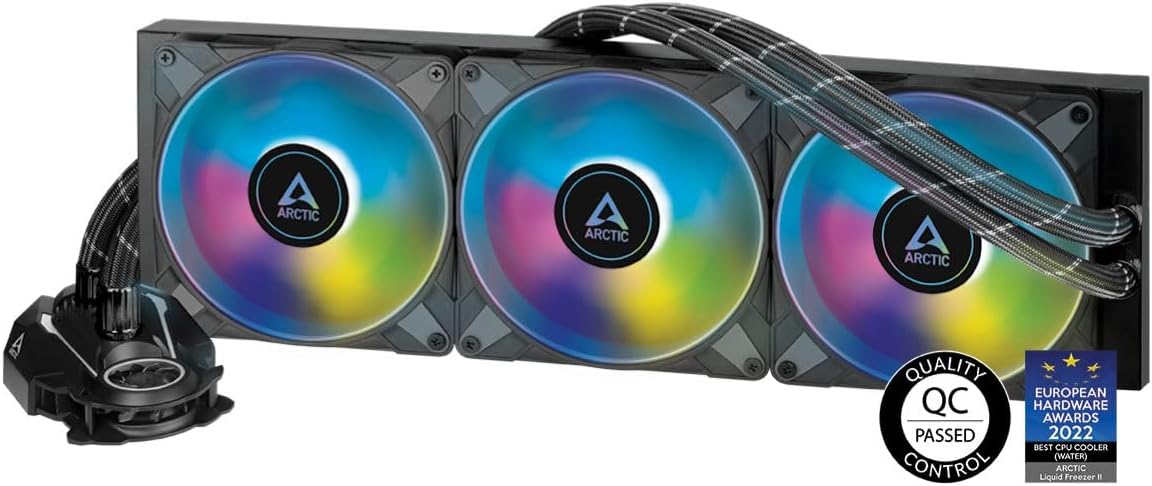
Fed up after 18 months with another OEM's 360mm AIO inability to efficiently cool a non-overclocked Ryzen 5950x CPU; it struggled to maintain a CPU temp in the high 70°s without load, but worse, shot up to just below or even frequently at the 90° safeguard cap under load. I did try a few intermittent troubleshooting tactics on old AIO, such as reapplying thermal paste and ensuring secure mount, etc., but to no avail, so I finally elected to seek out and replace with a new cooler by purchasing this unit. Immediately after install into my preexisting build, the Arctic LF-II 420 proved amazing cooling improvement out-of-the-box, logging sustained very low 40°s no load, and no more than high 50°s / low 60°s under load. Granted that's moving from 360mm previously installed, to this 420mm, but nevertheless, I hadn't expected such gains, and would have been satisfied with half as much, particularly for a high-performance 16-core CPU. In addition to swapping in the larger Arctic rad, which is not only 420mm, but a very brawny 38mm thick, I believe the massive cooling improvement after installing this AIO, may be equally, if not more so attributed to Arctic's LF-II optional "offset" mounting feature that addresses the AM4's 5000 series chiplet based CPU construction which shifts the CPU hot spots from center to bottom 3rd of CPU top surface. In turn, the offset mounting bracket (included) centers the cooling plate on the hot chiplets, not the lower temp non-hot spot center of the CPU. Simple but ingenious innovation. There may be other AIO OEM's that offer this offsetting feature for respective AM4/AM5 Ryzen series, but it wasn't offered by the outgoing AIO I had installed, which provided a very compelling comparison. Very highly recommended for AMD Ryzen CPU's series with offset hotspot areas. Other notes: If going the 420mm rad like me, be sure to account for not only the supersize length and width, but also the increased height too (including fans). I have a very large ATX-E case and knew that I could schematically accommodate the 420 size and mounting format, but due to the rad's height, I had make several unforeseen adjustments to placement of a few other components in my setup as well as offset from the case's dedicated 420 screw mounts, giving up use of 4 of the twelve screw mounting points. This meant more time for the install, but not a product issue at all, and using only 8 of 12 screw mounting points still ensured very solid and stable install. Also, it's difficult to determine by the included pic alone, but I'm utilizing a 'push' air INTAKE top-mounted configuration (vs pre-assembled 'pull' air EXHAUST setup), and a 6-fan double push setup (3 above and 3 below rad). Inside the case (shown top of case in pic) are 3 non-Arctic 140mm RGB fans mounted to bottom of rad, as well as (not visible) the 3 included Arctic static pressure 140mm fans, which are mounted in the case's top compartment to the top of the rad / case rad mounting bracket. The Arctic140 fans produce excellent airflow and are sturdy build quality.
A**N
Recomendado 100%
Perfecto, pasé de una refrigeración AIO de Aorus de 240mm a esta y he bajado la temperatura de mi PC más de 20 grados jugando, al final es un tamaño mucho mayor y los ventiladores también son bastante mejores.
K**L
LGA 1700 support - compatible
Please be aware that you can get version without LGA 1700 mounting kit! You will need to request it through support which is a bit silly. As you can not finish PC set up and need to wait additional 5 days to get it. Update: I was confused by the old guide on arctic youtube, after to phone consultation with support I was assured that I have the right one :-) so all good
A**Z
çok büyük
ürün çok güzel mükemmel çok beğendim ama çok büyük kasanız büyük değilse sığmıyor bende bu yüzden iade etmek zorunda kaldım
J**A
Una bestia
Una bestia como cooler Necesitas tomar en cuenta que está bastante alto, casi 70mm y que mide 460 mm en total A cambio de esas medidas, es una excelente compra Los rgb, muy buenos Fácil de usar con el pwm de la motherboard Super silencioso Ideal para procesadores grandes, de gama alta El ventilador qué trae justo encima del plate ayuda con los vrm y las memorias,aunque sólo ayuda a enfriar una memoria, es mejor que nada. Recomendable si tienes un procesador grande que tiene el riesgo de hacer thermal throttling Please, usa el offset recomendado, te ahorras unos cuantos grados
S**T
Massive cooling for toasty processors
The 420mm rad prevents your CPU from getting baked. VRM fan built into the cooler is quite nice, pump is nice and quiet, fans are nice and quiet on the default curves. ARGB looks nice and is compatible with third party software to get the effects you want and take full advantage of the addressable LEDs. The absolutely monstrous rad has more thermal mass to smooth out those spikes under quick burst workloads. The massive rad also has way more surface area to cool down faster during longer and heavier workloads. My case is barely compatible, I had to put more thought into the order of assembly to make sure the rad could fit in along with everything else.
Trustpilot
1 month ago
3 weeks ago