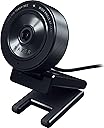
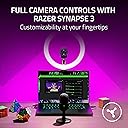

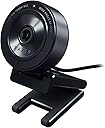
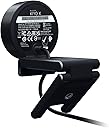
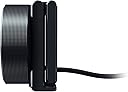


🎥 Elevate your stream game with ultra-crisp 4K brilliance — don’t just broadcast, captivate!
The Razer Kiyo Pro Ultra is a premium 4K webcam featuring a Sony STARVIS 2 sensor with an ultra-large 2.9μm adaptive light sensor for exceptional low-light video quality. It supports 4K at 30FPS and 1080p at 60FPS, offers AI-powered autofocus and advanced live face tracking, and includes a fast f/1.7 aperture lens for natural bokeh effects. Designed for effortless plug-and-play use, it delivers DSLR-level image quality tailored for content creators and streamers seeking professional-grade visuals.
| ASIN | B09DGQHV87 |
| Antenna Location | video conferencing, live streaming, online learning, remote work |
| Are Batteries Included? | No |
| Best Sellers Rank | 23,237 in Computers & Accessories ( See Top 100 in Computers & Accessories ) 143 in Webcams |
| Box Contents | Camera |
| Brand | Razer |
| Brand Name | Razer |
| Camcorder Type | Webcam |
| Colour | Black |
| Compatible Devices | Personal Computer, Laptop, Desktop, Smartphone, Tablet |
| Customer Reviews | 4.3 out of 5 stars 1,155 Reviews |
| Digital Zoom | 3 x |
| EU Spare Part Availability Duration | 2 Years |
| Effective Still Resolution | 2.1 MP |
| Effective Video Resolution | 1080 Pixels |
| Exposure Control Type | Automatic |
| File Format | MP4 |
| Flash Memory Bus Interface Type | USB |
| Flash Memory Installed | 128 GB |
| Flash Memory Speed Class | 2 |
| Flash Memory Type | SDHC, SDXC |
| Flash Memory UHS Speed Class | Classe 2 |
| Flash Memory Video Speed Class | V2 |
| Flash memory type | SDHC , SDXC |
| Focus Type | Auto Focus |
| Form Factor | Compact |
| Has Image Stabilization | No |
| Image Aspect Ratio | 16:9 |
| Image Capture Speed | 60 fps |
| Image Stabilization Type | Optical |
| Item Dimensions D x W x H | 20.6D x 21.6W x 16.5H centimetres |
| Item Weight | 0.34 Kilograms |
| Lens Type | Zoom |
| Log Gamma Curve | log |
| Lower Temperature Rating | 1 Degrees Celsius |
| Manufacturer | Razer |
| Maximum Aperture | 3.5 Millimetres |
| Maximum Display Resolution | FHD |
| Maximum Focal Length | 1 Millimeters |
| Maximum aperture | 3.5 Millimetres |
| Maximum focal length | 1 Millimeters |
| Minimum Aperture | 22 f |
| Minimum Focal Length | 1 Millimeters |
| Model Name | RZ19-04170100-R3M1 |
| Model Number | RZ19-04170100-R3M1 |
| Network Connectivity Technology | USB |
| Operating System | Windows, Linux |
| Optical Zoom | 3 x |
| Photo sensor technology | CMOS |
| Product Features | Low Light |
| Product Warranty | 1 |
| Screen Size | 2.7 |
| Sensor Type | CMOS |
| Shooting Modes | 1080P 30FPS, 720P 60FPS |
| Style Name | Kiyo X |
| Supported Audio Format | AAC, MP3 |
| Supported Image Format | JPEG |
| Unit Count | 1.0 count |
| Upper Temperature Rating | 1 Degrees Celsius |
| Video Capture Format | MP4 |
| Video Capture Resolution | 1080p |
| Video capture resolution | 1080p |
| Viewing Angle | 82 Degrees |
| Water Resistance Level | Not Water Resistant |
| White Balance Settings | Auto |
| Zoom | Optical and Digital |
R**A
A great budget webcam
The camera is good quality, gives off a great picture. I used it to go on video with friends and loved ones often and it replaced my extremely old Logitech cam. The only issue with it is that you need to uninstall the driver in order for your pc to pick it up as the razer kiyo, otherwise it's registered as a usb webcam only. I have mine on a tripod clipped on to my monitor stand as I don't like webcams hanging over my monitors.
P**N
Excellent webcam, good inbuilt mic, but no sideways tilt or lens cover.
After years using this now, zero problems. Excellent microphone for a webcam and decent enough picture quality. Reliable firmware/software. Couple of downsides - only tilts up and down, no side to side movement. And doesn't have a cover on it meaning it is an all-seeing eye. I tilt it up to the ceiling when not in use, but a built in cover seems like it should be a must in this day and age. Does its job well though.
O**O
Decent
It's a very decent camera for a work set up. Autofocus is pretty good, mic quality is decent for calls and it sits well on my monitor. you can play around with settings to tailor it a bit too. The only downside is the image quality goes down when the light isn't very good but that's to be expected given the price
T**E
Fantastic, great value webcam
Brilliant picture quality in a well-made device. Built-in microphone is bobbins but they always are. Pair this with a decent quality mic (I recommend the Marantz Pod Pack 1 setup as an all-in-one solution that will get you up and running) and you have yourself a great setup for YouTubing or streaming without breaking the bank.
S**H
Great quality for the price
Great quality, used at my second work station. Comparable to the Logi Capture camera I also use. The built quality is excellent, the mic on the webcam is great, and so is the quality of the video. Highly recommended for WFH!
S**G
Low light let down
Great for the value. Has a low profile and sits nicely on monitors. My main issue is the quality lacks in low light or coloured light environments without many tweaks within the app
V**K
The quality is very good but problems long term
The quality is very good on the camara way better than expected and amazing for YouTube videos. how ever their is some issues with it as it does die after 6-12 months so be careful as it appears to be a problem with this model having issues. how ever the sound quality is great and I love that I can mount it using camara mount as well as the built in stand.
A**.
Affordable and good quality
Video quality is beyond compare. Perfect for streaming, video calls and all. Price wise, it was ok considering the video quality.
G**E
Ottima
Fa il suo lavoro ,la uso come handcam per la tastiera e il mouse e si vede molto bene.
S**R
A noticeable improvement in image quality
Until now, I have been using a cheap Chinese camera for all my video conferences. It did an OK job. But since I'm now 100% home office based, I decided to invest in a 'professional' camera so that I can come across clearly. After thorough research, I opted for the Razor Kiro, vs. Logitech C920. It is not disappointing. Setup was plug & play (no need for the Razer SW in my opinion), and the image quality of top-notch, several of my colleagues have already commented on the massive improvement. Highly recommend this camera not just for gaming, but if you are spending many hours of your day on video conferences.
B**Z
Razer Yapıyor Bu Sporu
Markası Razer olmasına rağmen fiyat/performans ürünü bence. Yayıncılık olsun, görüntülü konuşma olsun 1080p kaliteli uygun fiyatlı bir kamera arıyorsanız alınır.
R**O
Rapport qualité prix top
Je suis vraiment satisfait de cette webcam Full HD. L’image est claire et nette, même en faible luminosité, et les couleurs sont naturelles. Parfait pour les visioconférences, les cours en ligne ou le streaming. La mise au point est rapide et le micro intégré restitue bien la voix sans trop de bruit de fond. L’installation est ultra simple : branchée en USB et reconnue immédiatement, sans besoin de pilotes supplémentaires. Elle est stable sur l’écran grâce à son support, et le design est discret. Excellent rapport qualité-prix, je recommande sans hésiter !
X**R
Preis - Leistung lohnt sich
Die Webcam verbindet sich anstandslos auch mit Linux. Das Razer-Tool ist unnötig. Liefert scharfe Bilder, stellt sehr gut scharf und die automatische Belichtung funktioniert sogar mit Anpassung des Farbtons, prima.
Trustpilot
2 weeks ago
4 days ago