Buy anything from 5,000+ international stores. One checkout price. No surprise fees. Join 2M+ shoppers on Desertcart.
Desertcart purchases this item on your behalf and handles shipping, customs, and support to Croatia.
⚡ Power Your Productivity, Switch Like a Pro!
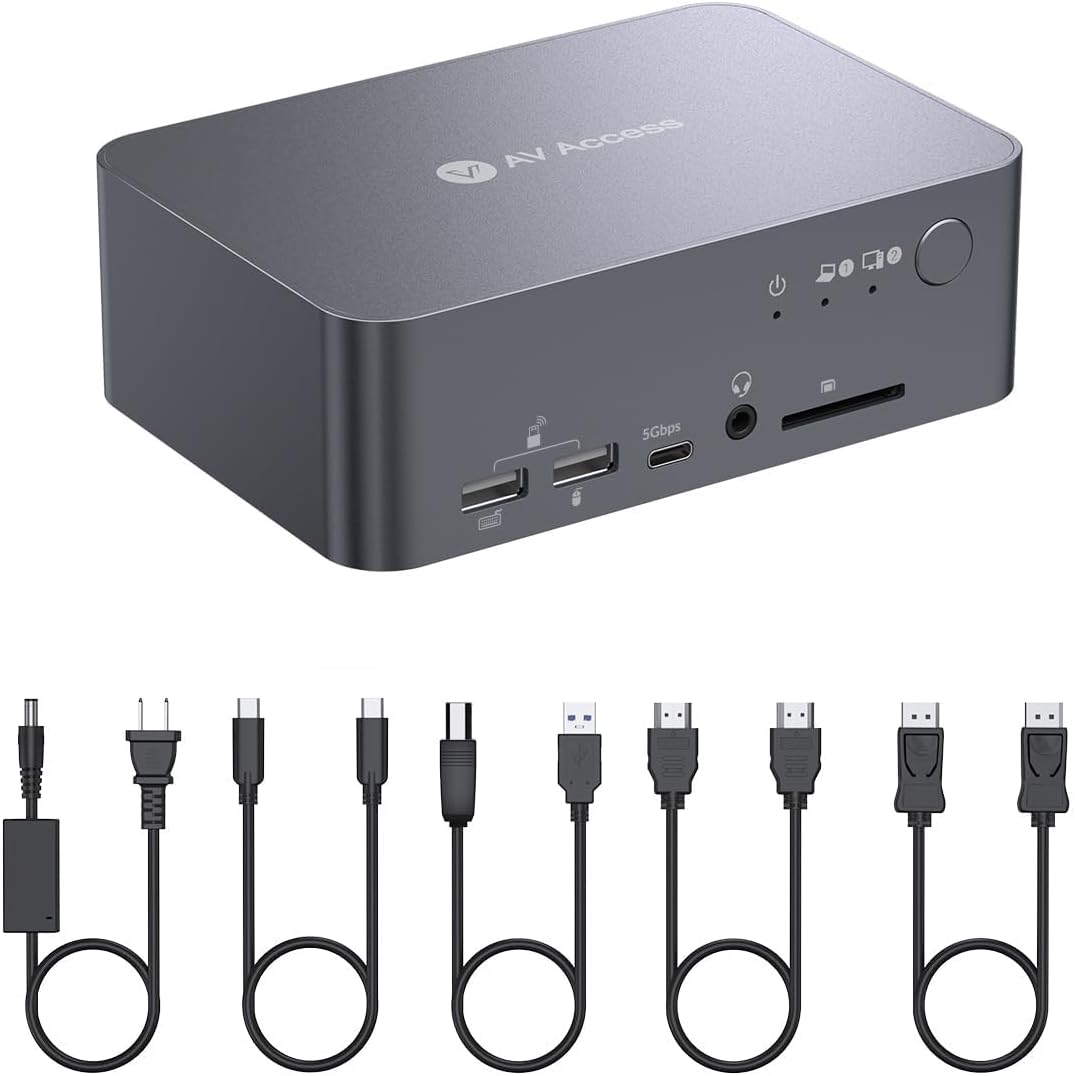
The AV Access Dual Monitor KVM Docking Station (iDock C10) is a premium 12-in-1 USB-C hub designed for professionals managing both laptop and desktop setups. It supports dual 4K@60Hz HDMI outputs (mirrored on macOS), 60W power delivery, and stable Gigabit Ethernet connectivity. Featuring EDID emulation for smooth, flicker-free switching and an all-aluminum chassis for durability, it consolidates peripherals and charging into a single streamlined device—perfect for hybrid workstations seeking efficiency and desk minimalism.


| ASIN | B0CW2JGRN4 |
| Best Sellers Rank | #21 in KVM Switches |
| Brand | v AV Access |
| Color | 4K 2 monitors 1 desktop & 1 laptop(iDock C10) |
| Compatible Devices | ASUS, Dell, HP, Lenovo, Microsoft Surface Book |
| Customer Reviews | 4.0 out of 5 stars 208 Reviews |
| Hardware Interface | DisplayPort , Ethernet, HDMI |
| Input Voltage | 20 Volts (DC) |
| Manufacturer | AV Access |
| Mfr Part Number | iDock C10-US |
| Model Number | iDock-C10-US |
| Number of Ports | 16 |
| Smart Home Compatibility | Not Smart Home Compatible |
| Total Number of HDMI Ports | 2 |
| Total USB Ports | 5 |
| Total Usb Ports | 5 |
| Unit Count | 1.0 Count |
| Wattage | 120.0 |
I**T
Perfect for my needs, finally a great switch/dock/hub for my mixed OS set-up.
The AV Access iDock-C10 has been a practical solution for managing my dual-system setup. I regularly switch between an M1 MacBook for work and a Windows gaming workstation, and finding a KVM switch that supports both consistently has been challenging. After trying several other options with limited success, I had resorted to using two keyboards and mice alongside switching inputs on my main display. The real challenge always seems to be passing the EDID for the Mac through a peripheral, and this dock just hasn't had that issue, and consistently passes accurate display information to the Mac. The iDock-C10 has made a noticeable difference and freed up a lot of space on my desk. The setup was straightforward, and it works reliably with both machines. The USB-C connectivity is particularly convenient for the MacBook, allowing for video, power, and data transfer through a single cable. Even though the Apple silicon machines reintroduced an dedicated HDMI out, it's nice to just have one cable to dock it. Switching between devices is quick, and I haven’t experienced any connectivity issues or delays beyond the an expected brief moment for the keyboard and mouse to re-engage when being accessed by the alternative machine. I do appreciate the fun trick of being able to mount an external drive to one, eject it, and then have it show up on the other. A little thing that I wasn't even looking for. I will mention that I use a single display externally, and I believe this might not support two separate displays (from my mac at least) from the documentation. So keep this in mind. My set-up actually calls for a duplicated display because I send it to a projector to do video/media work in my home studio. So, the way this outputs from the mac is a feature for me, not a limitation! I really appreciate the compact design, which keeps my workspace organized, and the device handles peripherals like my keyboard and mouse without issue. I really prefer a full mechanical keyboard, and this has allowed me to keep only one out... with a little special key remapping on my Mac, I use the one I got with my tower. While no device is perfect for everyone, the iDock-C10 has been a solid addition to my setup and has streamlined my workflow significantly. It’s definitely worth considering if you’re looking for a reliable KVM switch for a mixed Mac and Windows environment. For me it's been a five-star experience, and a real relief to have found something that does what I need without a lot of consternation. Would get again.
A**R
Mostly Great Dock
Alright, my new Docking Station, I had some pretty high hopes for this one, and while it didn't quite solve all my problems, it definitely made a significant dent in my desktop chaos. So, here's my honest take. My Background & What I Was Hoping For: My setup before this dock was a bit of a Frankenstein's monster: a 4-year-old ASUS laptop and a shiny new Mac Mini. I loved my Mac Mini for most things, but sometimes I just had to use Windows. I had two monitors, each connected to both computers, and I'd painstakingly switch inputs using the buttons on the back of the monitors. Let me tell you, that got old fast. So, usually, one monitor was for the Mac, the other for the ASUS. And don't even get me started on the chargers – separate ones for each, plus I was constantly plugging and unplugging my external speakers unless I wanted to suffer through the built-in laptop/Mac Mini speakers. When I stumbled upon this docking station, I thought, "YES! This is it!" I envisioned charging both my computers through it, a super tidy desk, and seamless switching between machines. Oh, the dream! Where My Dream Met Reality (and it's not the product's fault): Okay, here's where my bubble burst a little, but honestly, it's more about my old tech and my own oversight than the dock itself. Charging: My old ASUS laptop doesn't charge via TYPE-C, and neither does my Mac Mini (whoops, totally missed that detail when buying). So, the dream of one-cable charging for both vanished pretty quickly. That's on me, not the dock. Port Confusion: This is where it got a bit tricky. The "Computer 1" port on the dock is TYPE-C, and "Computer 2" is HDMI, DP, and USB-B (yes, USB-B, and it came with a cable that needs a USB-A end). My Mac Mini and ASUS both lack DP ports. ASUS as Computer 1: Working fine. Mac Mini as Computer 1: It only recognized one monitor. I guess because it's Apple. Mac Mini as Computer 2: No DP connection, and no USB-A port... The Good Stuff (Because There's Plenty!): Despite these hiccups, I'm genuinely happy with some aspects: Switching is FAST! Seriously, the KVM switching between computers is lightning quick. My Desk is Cleaner: Even without universal charging, getting rid of those extra cables connecting directly to my monitors is a huge win. It's definitely tidier. Still Usable (with a workaround): Thanks to my Logitech wireless keyboard and mouse! Future Proofing: I've ordered a USB-A to TYPE-C adapter for that USB-B cable, so once that arrives, I should be able to make my setup even tidier. Final Thoughts: This docking station isn't a magic bullet that solves all my specific legacy tech issues, but it's a very solid piece of hardware. The rapid switching is a joy, and it's brought a much-needed level of organization to my workspace. Just make sure you double-check your computer's port compatibility and charging capabilities before diving in! If your computers are more up-to-date with their TYPE-C and DP ports, I imagine this would be an absolute dream come true.
H**N
Not for hot switch. Fine to use it for sharing monitor/keyboard/mouse on reboot
I have two laptops (HP and Lenovo) and one desktop (Linux). I use a Viewsonic 32" monitor as external monitor. I don't have space for extra monitors. So I purchased this KVM switch, which I have been using for three and half months. It does not support hot switch for me. This means, when both a laptop and a desktop are plugged in and turned on, if I press the switch button, this monitor will "switch" but is often flickering, sometimes just blank. Occasionally, it works as expected. Switching from a laptop to desktop works, almost always. But most times hot switch from desktop to laptop does not work, with various possible behaviors: flickering screen is most often. sometimes the screen size is not correct (smaller with black filled the rest region of the monitor), sometimes just a white noise screen, sometimes a frozen picture. And sometimes the ethernet does not work after the switch. The worst inconvenience is some weird problem occasionally (average once a day), even though when I did not switch. I was using only my HP laptop with double screens (one external monitor connected through the switch, and the laptop's native screen). The external monitor suddenly went blank with all GUI moved to the laptop native monitor, with an alarming sound. Then after three seconds, everything went back to the way it should be. Initially I thought it was due to some other reasons. Now I am confirmed that this switch is the culprit since I only see this when I use this switch -- I have three docking stations and never experienced such a problem when connect external monitor using a docking station. However, if you don't do hot switch, it work fine (except as described above -- the sudden blank screen for a few seconds before things resume to normal) This mean, if I want to "switch" from desk top to laptop, I need to power off the desktop first. Press the switch button. Then power on the laptop. It is not convenient. But it solves my issue on limited space. I don't see its competitors. So the price is high (comparing with many cheap docking stations, yet with fairly good quality, available at Amazon). But I did not have another option if I want to have laptop (USB type C connector) and a desktop (HDMI or DP). Hope some switch manufacturers see my review and enter into this market :) --------------------------- Added comments after the above initial review ----------- I purchased the switch in April 2024. I wrote the initial review after several months of use. I got a message from the manufacturer who would like to understand more. I provided the debug info on my two laptops and one PC. Later I got a newer version of the switch with comments from the manufacturer that the newer version might fix my problems. Now I have used the new version for a couple of months and would like to provide some updates. I initially gave 3 stars. Now I would upgrade to 4 stars. Many weird issues are indeed gone. However, "hot" switch can be still a problem. I have used the switch for 2 PCs (one Windows 10 and one Linux) and 2 laptops (both Windows 11). I saw "grey" screens occasionally. I also saw unresponsive screens (both PC side and laptop side). It happens maybe 20% percent of time. Furthermore, the newer version of the switch is less "damaging". I had to power off both PC and laptop sometimes using the old switch since neither was responsive. But for the newer version, I experienced much less (still I had to power off to solve the "freeze" issue very occasionally). Here are some lessons I learned: 1. Keep the laptop open. This may make the chance of failed switch less frequent. Earlier I usually closed the laptop since my laptop screen is small and I would just use the external monitor. But now I realized this might make the switch not functioning well. 2. On the laptop, configure the display to see the laptop monitor as the "primary screen". This seems to improve the chance of switch functioning. Since the problems happen at random, I cannot say the above conclusion are the result of "scientific" tests. They are just my impression after months of use. In summary, if you use the switch as a "cold" switch, this product works perfect. But for "hot" switch, it is not that stable, but usable. I once talked with someone who knows this area and learned that with so many kinds of PCs and laptops, making a switch work is a hard business. I think I should give at least 4 stars to be fair.
J**E
THE solution for your laptop/PC seamless connection. ~PLEASE READ IF YOU PLAN ON USING 1 MONITOR~
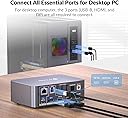
After thoroughly testing out this product after serval days, I am beyond happy to leave a very positive review of the iDoc C10 as well as share something VERY HELPFUL IF YOU PLAN ON USING THIS PRODUCT WITH ONE MONITOR (caps are for emphasis!). The product works exactly as described- seamlessly connecting your monitor(s) and peripherals to a single KVM switch that can easily swap between each other. It does not limit FPS at all (for all my gamers out there) and it even lets my use my Logitech peripherals with my Mac Laptop when I previously wasn't able to. While navigating between both computers and charging a phone the switch itself becomes moderately hot to the touch, but that is not a big concern as it does a lot. I LOVE the LED indicator letting me easily tell which computer is hosted. For everything this product does for you, for someone like me who works from home and needed a work laptop/gaming computer solution to seamlessly connect my monitor and peripherals, this perfectly fit that bill, while also not breaking the bank! PLEASE READ IF YOU ONLY HAVE ONE MONITOR (picture attached for reference as well!): I have my Mac work laptop plugged into the iDoc via USB-C into the clearly marked "USB-C in" input on the back (that even has a laptop logo above it just for confirmation!), I have my Desktop PC plugged into the iDoc via a Display cord and USB-B cord into the clearly marked inputs that are also SECTIONED OFF clearly so you can see they are for that device (again, for someone who is not very technically savvy, this was VERY easy to set up!). This is the important part: I ONLY have a SINGLE HDMI cable connected to the "HDMI 1" input and that to my one monitor which allows me to switch them back and forth. Please do not (like me) put two HDMI's into the 1 and 2 inputs into a single monitor, that will not work! (Again, not technically savvy!). This product is phenomenal and I look forward to using it every single day!
C**S
Monitors don’t work with laptop.
Screens don’t work with laptop. It works fine with my desktop but it doesn’t matter what I do I can’t get it to display the screens with my laptop. It shows that it is connected but won’t show up. I have tried changing cords, unplugging the monitor and then plugging it back in, disconnecting HDMIs and then reconnecting but nothing works. I have got it to show up twice the entire time I have had it. Very disappointing and am going to be sending this back. I expected better from a switch of this price.
J**O
KVM Perfection!
Stop looking at other KVMs, this is the one! My CAD workstation only has DP out and my laptop USB3. I also use a space mouse, digital 2.1 amp, usb mic, insta360 web cam, LG 55” oled tv for a monitor, and a wireless keyboard/mouse combo. All of these things work flawlessly and switch seamlessly with a push of a button. No crazy cable adapters, no flickering, no setting reversion, just perfection. Click buy now, you won’t regret it!
H**G
Great concept for multi-device usage. But….
I bought this unit prior to any reviews being made on it. Unfortunately it didn’t meet my expectations for the use of the equipment. Currently, my setup is a kvm switch with a laptop/desktop and dual monitor combination. I have to connect the kvm switch onto my laptop’s docking station, then attach the usb ‘c’ cable directly to the laptop itself. This new item would eliminate some space for me, as I won’t need the extra cabling from the kvm switch and having a docking station at the same time. While still being able to utilize the use of the same peripherals of my dual monitors, keyboard, and mouse for both devices. First off: Appearances: - Nice and compact and seems to have worked without a hitch. - Setup was super easy and straight forward. Value: - Great if it works for your setup, they seem to have several other options. Compatibility: - It connected b/t my windows pc and windows laptop pretty easily Speed: - Seems to transition between both monitors within a few seconds Noises: - None, the item seems to have stationary parts The results after using it for about 1+month(s): I did purchase insurance on the item in case if it ran into any issues, even with the supposed 24/7 support they advertised. Soon to run into several issues. The device then ran hot, and started disconnecting my peripherals. I have a Steel series keyboard and mouse, they do have software compatibilities/apps to customize them more. But I didn’t need it for the laptop, so they were only installed onto my PC. Mainly the disconnects would occur with the keyboard the most, and would disconnect once every hour with my mouse. I thought it was just my Dell laptop/dock, but it didn’t have the same initial issue with my dock/kvm switch setup, which was more complex. I swapped over to my PC for use, and the same issue eventually occurred. Troubleshooting: - Stopped swapping between devices, and kept use to only one device(my computer, or laptop) running at a single time. - Tried all (and I mean all of them) of the usb ports configurations for the device. I even tried to just use bluetooth only to the AV dock/kvm with a dongle. - Swapped usb connector of my mouse to a usb c connector, it worked but still experienced disconnections. - Toggled between my two device options to disconnect/reconnect the two peripherals (I can tell it’s happening because of the computer audio pings) - Called the AV Company’s supposed 24/7 support, which failed to be of use. So I escalated it to the Amazon insurance support I purchased. - They went through the same troubleshooting steps and eventually tried to resolve it by replacing the item. - I then informed Amazon to have the item reported for false representation of their 24/7 support and to post an accurate statement of their hours of operation for support. Which until today, has not been updated. Company: - I finally got ahold of their support during their OPEN business hours, which to be frank (sounded like an offshore worker, I have nothing against it, since several companies seems to be taking this approach for support nowadays). He seemed to be aware of the issue and stated for me to try the front usb ports, because per quote “it works better v.s. the back ones. Since their engineers are still working out a resolution to the known issue.” - I was not amused by the response I’ve received and zero take on their end to try to resolve the issue of their item coming up short on performance. Final verdict: Pros: -It works (if it’s compatible with your setup) - Idea is nice, fresh and seems to be a unique dock/kvm switch solution to multiple devices - Device is compact - Uses the new usb c connection for laptops/pcs, it has one additional port in the front. - Has several options for different connections Cons: - Keyboard/mouse disconnects frequently. (It’s worse when it starts heating up). I only disconnected about once or twice from my monitors v.s. how frequent I disconnected with the keyboard and mouse. I eventually gave in and directly connected my mouse/keyboard to open usb slots to my laptop or pc when in use. - Windows recognition of positions of apps seems to be somewhat close, it does move around my apps from time to time. - Hardware runs hot with zero way of cooling itself down, and it’s disconnected before when it ran cooler Verdict: Great concept, but it isn’t for me, I don’t know if I will give it another chance. I will wait longer until another company produces a product with the same, but better performance/quality. Would I recommend this device to others? No. It would be one star, but the concept for ingenuity itself would suffice for a two star since no other company, that I see yet. Has made a KVM switch device with a direct USB C connection option for laptop and desktops.
B**4
My Screens Now Bicker for Attention!
My desk was a mess of cables, a hopeless tangle of USBs and HDMI ports that had me constantly unplugging and re-plugging throughout the day. The iDock C10 arrived not as a gadget, but as a liberator. The all-aluminum body, compact as it is, felt strong enough to be a weapon. Installation was simple. I plugged in my desktop, laptop and monitors, and peripherals. All are clearly labeled so even a novice can figure it out. Iv had more compatibility issues in my personal life then this device can possible have. It was its functionality that truly made this shine. It’s the KVM equivalent of a bouncer at an exclusive club, only it lets everyone in. Suddenly, my two monitors were working together, running at high refresh rates, and switching between my work laptop and personal desktop was as easy as pressing a button. Value for money is apparent. The cable mess is gone, replaced by an organized command center, and it's easy to focus on work instead of the cable management. For the price of a fancy dinner, a one-button press controls the fast and smooth transition thanks to EFIF technology. The iDock C10 isn't just a switch; it's a productivity superpower.
I**O
Very good stuff
Quite expensive, but it is very good...no issue at all
に**餅
.
初めてkvmスイッチ購入したけど、切り替え時のラグが少し気になるけど、こんなものかな?頻繁に切り替えるような用途で使わないなら許容範囲
M**O
Fast switching between two devices, as described
It works perfectly. Exactly as described, fast switching between my usb-c laptop and my "legacy" connection desktop with two monitors.
A**2
最高
会社用ノートpcと個人用デスクトップpcを切り替えるために購入しました。どちらもwin11です。 この手の製品を色々試した中で、1番良い感触です。ハブを使用するとciscoのWEBカメラ(USB3.2)がよく動かなくなったり、画面の画質劣化やノイズが発生しますが、この製品は一切問題ありませんでした。 WQHD2画面でしっかり映像も映ります。 切り替えも4秒ほどですぐ操作可能になり、usb接続しているマウスやキーボード、マイクも問題なしです。 気になる点を挙げると、ノートpc出力映像のリフレッシュレートが120から60に下がってしまいました。デスクトップの映像は144でます。 業務に使ううえではリフレッシュレートを必要としていないので問題ありませんが、ちょっと残念です。 また、本体の物理ボタンではなくホットキー(ctl-ctl-enterのような)に対応してたらありがたかった。本製品はおそらく未対応。 色々なkvm付きハブに苦しめられてきたので、思い切って3万円払いましたが、ちゃんと動きます。正解でした。 ---3か月経過後追記 本製品を介してのモニター接続時、G-Syncが使用できないことに気づきました。私の目は節穴なのか、まったく気づきませんでした。 また、そこそこの頻度で、Windows版Apple Musicの起動と停止時にモニター①の映像だけ2秒ほど途切れるという不思議な事象も発生するようになりました。 この製品を使用しないと途切れませんし、Apple Musicを除くソフトの起動停止では発生しないので、とても不思議です。 このような事象が発生しても、他社製品と比較すれば圧倒的にマシなので、不満はないです。
M**U
Almost perfect
99% of work perfectly, but the 1% where I need to turn on/off the monitor or plug/unplug the laptop is bit annoying
Trustpilot
3 weeks ago
2 weeks ago