Buy anything from 5,000+ international stores. One checkout price. No surprise fees. Join 2M+ shoppers on Desertcart.
Desertcart purchases this item on your behalf and handles shipping, customs, and support to Croatia.
🎮 Elevate your setup: HDMI power meets USB-C clarity for next-level AR & multi-display mastery!
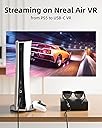
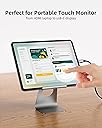
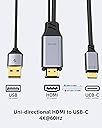
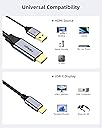
The fairikabe HDMI to USB-C Adapter Cable (3.3ft) enables uni-directional 4K@60Hz video transmission from HDMI sources like laptops, gaming consoles, and PCs to USB-C input displays including AR glasses (Xreal, Nreal) and portable monitors. Featuring plug-and-play ease, rugged aluminum housing, and gold-plated connectors, it requires USB-A power for stable operation and supports touch functionality on compatible portable monitors. Designed exclusively for HDMI output to USB-C input, it’s the perfect tool for professionals and gamers seeking seamless multi-screen or AR experiences.


| ASIN | B0CM32LFCH |
| Best Sellers Rank | #320 in HDMI Cables |
| Brand | fairikabe |
| Brand Name | fairikabe |
| Cable Type | HDMI |
| Color | Black |
| Compatible Devices | HDMI Source Devices Such as Steam Deck Dock, PS4, PS5, Xbox, PC, Laptop, USB-C Display Including AR Glasses Xreal one, Xreal Air 2 Pro, Nreal, RayNeo etc. Portable Monitors, USB-C Monitors Compatible Devices HDMI Source Devices Such as Steam Deck Dock, PS4, PS5, Xbox, PC, Laptop, USB-C Display Including AR Glasses Xreal one, Xreal Air 2 Pro, Nreal, RayNeo etc. Portable Monitors, USB-C Monitors See more |
| Compatible Phone Models | Not for Phone |
| Connectivity Technology | HDMI, USBC DP Alt Mode |
| Connector Gender | Male-to-Male |
| Connector Type | HDMI, USB Type C |
| Customer Package Type | certified |
| Customer Reviews | 4.3 out of 5 stars 119 Reviews |
| Frequency | 60 Hz |
| Indoor Outdoor Usage | Indoor, Outdoor |
| Item Shape | Round |
| Manufacturer | fairikabe |
| Model | a78a3518-e3e0-4ebc-9056-79d27c1bfced |
| Model Name | fairikabe |
| Number of Pins | 24 |
| Other Special Features of the Product | HDMI Source to USBC Display Cable |
| Outer Material | Aluminum |
| Part Number | HTC1M160-1-EU |
| Recommended Uses For Product | Connect HDMI System to USB-C Displays |
| Special Feature | HDMI Source to USBC Display Cable |
| Unit Count | 1.0 Count |
A**R
Works absolutely perfect for my needs.
Trying to connect the HI-DEF HDMI *OUTPUT* of a 4K NVR to a spare USB C video INPUT port on my monitor. Most of these cables don't work BECAUSE THE BUYER DID NOT READ THE DESCRIPTION! This is for HDMI OUT to USB-C IN whereas the vast majority of (the much lower priced) others are for USB-C OUT of a computer to HDMI IN of a monitor (reverse of what I am doing). This does require power to the cable which is received from a USB-A male connector on the cable. I plugged the USB cable into a spare port on a powered USB hub and it worked fine. You can also use a USB Wall power block I'm sure. The adapter runs lightly warm to the touch which is not a problem.
M**.
Exactly what I needed!
I had to get a new laptop and when I did, my new one only had one USB-C port making it impossible for me to use both of my MaxFree screen extensions. This cord worked perfectly and I now have 4 working screens again! The extensions require a USB-C while I had to use the USB-A and HDMI in the laptop. The only thing I don't love about it is how far out the HDMI sticks out from the computer, but that's such a minor issue.
L**N
Great replacement.
Who knew that different C cables actually work differently….not me! I purchased a dual screen off FB marketplace, it came with 1 cable but when I got it home it didn’t work. Chopped it up as a loss and ordered a $120 new one. When it came, it came with multiple cables, thought hmmm let me try these cables with my used screen, it worked! Ordered cables from Amazon, sent the $120 screen back. Originally ordered some cheapies….long story short the cheapies didn’t work, turns out there are different types…..these work!!! :)
C**E
Did not work for portable monitor
Did you know that pretty much all HDMI<->HDMI cables are bidirectional (ie; doesn't matter which side you plug into the source vs. destination), but nearly all HDMI<->USB-C cables are unidirectional (ie; one end is for the source of the video, while the other is for the destination/display)? It turns out that USB-C to HDMI are common, but HDMI to USB-C is not. That is because most monitors have HDMI as an input, not USB-C, so the cables are meant to have the USB-C end plugged in the PC (source) and the HDMI end plugged into the monitor (Destination/Display). Portable monitors, on the other hand, often just have USB-C ports for power and input, and no HDMI ports. In my case, my laptop only has one USB-C thunderbolt port, which I need for a hub to plug all of my other periferal devices in (thumb drive, ring light, webcam, external speaker, etc.). Therefore, I could only use the HDMI port on either my hub or my laptop to attach my portable monitor. This requires either a bidirectional HDMI<->UCB-C cable, or a unidirectional "HDMI to USB-C", which is the opposite of most cables on the marketplace. I chose this cable because it CLEARLY states that it is unidirectional "HDMI to USB-C", and it even has a picture of the usage (HDMI end plugs into PC, and USB-C end plugs into the monitor). The video travels FROM the PC (HDMI) *TO* the monitor (USB-C). It also states that it must be a direct connection (ie. not through a hub), so it didn't surprise me when plugging the HDMI end into my hub didn't work (no ding for that). However, even when I plug the HDMI end directly to the PC, it DOES NOT WORK (see pic). This cable is clearly a dud. Sigh...
R**N
Works!!!
Went back and forth based on reviews - made the determination a lot of people simply don’t read and purchased this for a use case that doesn’t work - I have a portable monitor that connects via usb-c - I wanted to connect my Xbox and or ps5 to it - both work without any issues - if your looking to do something like this, it works fine
S**M
It didn't work for me, thinking of re-testing
Purchase to add a second monitor to my laptop. It didn't work at the time I tried it. It my have been operator error. Will re-test again
K**N
Works
Works
I**E
Plug in all three connectors
I bought this to work with my portable monitor. For those that said it didn't work. I can see it in another reviews picture what they didn't do. You have to plug the USB C into the portable monitor, you have to plug the HDMI into the laptop, you also have to plug in the USB A into the computer as well. Once I had all three plugged in worked like a charm and it works great. My laptop is older and does not have a USB C plug in so this worked perfectly.
A**R
Worked with xreal air 2 pro
I have checked with xreal air 2 pro and pc and its working fine for pc user i have initially have issue with pc but after changing usb power to red usb port then it worked. I have tested with pc, ps5 and xreal air 2 pro also no issue with audio in xreal air 2.
R**.
Câble écran
Très bon produit
L**N
Werkt perfect met mijn xreal one pro
T**A
recomendable
lo utilizo con mis gafa's VITURE Pro y de mi experiencia funciona como debería.
J**S
AR Glasses need this
It is perfect for connecting AR Glasses to PS5 also many Tvs.
Trustpilot
2 weeks ago
1 month ago