


🚀 Elevate your desk game with power, speed, and style — all in one sleek dock!
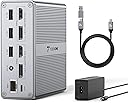
The TobenONE DisplayLink Docking Station is a versatile 18-in-1 hub designed for MacBook, Windows, and ChromeOS laptops. It supports dual 4K@60Hz monitors via HDMI and DisplayPort, delivers 65W power to charge your laptop, and offers multiple USB ports including ultra-fast 10Gbps USB-C and USB 3.1. With gigabit Ethernet, SD/TF card readers, and a premium aluminum build, it streamlines your workspace with a single USB-C cable connection, perfect for professionals seeking a clutter-free, high-performance setup.


| ASIN | B0BK3GCHBM |
| Best Sellers Rank | 353,752 in Computers & Accessories ( See Top 100 in Computers & Accessories ) 2,083 in Docking Stations |
| Brand | Tobenone |
| Brand Name | Tobenone |
| Colour | Grey |
| Compatible Devices | Windows 10/11 & macOS 10.15.x and later, ChromeOS 100.x and later Supports full-featured USB-C, USB 3.0, and Thunderbolt 3/Thunderbolt 4 systems, including M1/M2/M3-based MacBook Pro/Air (Original M1/M2/M3, M1 Pro, M1 Max, M2 Pro, M2 Max, M3 Pro, M3 Max); Intel-based Thunderbolt 3 MacBooks(late 2016+); Dell XPS 13/15, Dell Latitude, Dell Inspiron series; Microsoft Surface Pro/ Go/ Book/ Laptop mod… |
| Compatible devices | Windows 10/11 & macOS 10.15.x and later, ChromeOS 100.x and later Supports full-featured USB-C, USB 3.0, and Thunderbolt 3/Thunderbolt 4 systems, including M1/M2/M3-based MacBook Pro/Air (Original M1/M2/M3, M1 Pro, M1 Max, M2 Pro, M2 Max, M3 Pro, M3 Max); Intel-based Thunderbolt 3 MacBooks(late 2016+); Dell XPS 13/15, Dell Latitude, Dell Inspiron series; Microsoft Surface Pro/ Go/ Book/ Laptop models; HP ProBook, HP EliteBook, HP Spectre x360 series; Lenovo ThinkPad, Lenovo IdeaPad, and Lenovo Yoga; LG Gram; thousands of other laptops which are compliant with USB-C ports, USB 3.0 or USB 4.0 ports Compatible devices Windows 10/11 & macOS 10.15.x and later, ChromeOS 100.x and later Supports full-featured USB-C, USB 3.0, and Thunderbolt 3/Thunderbolt 4 systems, including M1/M2/M3-based MacBook Pro/Air (Original M1/M2/M3, M1 Pro, M1 Max, M2 Pro, M2 Max, M3 Pro, M3 Max); Intel-based Thunderbolt 3 MacBooks(late 2016+); Dell XPS 13/15, Dell Latitude, Dell Inspiron series; Microsoft Surface Pro/ Go/ Book/ Laptop models; HP ProBook, HP EliteBook, HP Spectre x360 series; Lenovo ThinkPad, Lenovo IdeaPad, and Lenovo Yoga; LG Gram; thousands of other laptops which are compliant with USB-C ports, USB 3.0 or USB 4.0 ports See more |
| Customer Reviews | 4.3 out of 5 stars 259 Reviews |
| Hardware Interface | 3.5mm Audio, DisplayPort, Ethernet, HDMI, USB 2.0, USB 3.0, USB 3.1 Type C |
| Hardware interface | 3.5mm Audio, DisplayPort , Ethernet, HDMI , USB 2.0, USB 3.0, USB 3.1 Type C |
| Item Dimensions L x W x H | 33L x 104W x 104H millimetres |
| Item Type Name | Universal USB 3.0 and USB C docking station |
| Item Weight | 19.63 Ounces |
| Manufacturer | Tobenone |
| Manufacturer Part Number | UDS030 |
| Model Number | AS048-2003250D1 |
| Number of Ports | 18 |
| Product dimensions | 33L x 104W x 104H millimetres |
| Total HDMI Port | 2 |
| Total USB Ports | 8 |
| Total USB ports | 8 |
| Wattage | 57 |
M**O
Another Solid Product from TOBENONE
Earlier this year I purchased the USB C Docking Station Dual Monitor for MacBook Pro for my home office. What got me was the price and the functionality offering. Compared to the other options out there the cost was on target. I refuse to $300 - $500 for s docking station. Needless to say its been a total success and I love the device. I have had zero issues with it. Unlike my home office, at work I have two monitors and I have to use one on a display port and one on the native HDMI port on my MAC, I have cables everywhere. TOBENONE came out this unit and I could not resist. Based on my success of the device for home it's a no brainer. This one is more expensive but you get more with it, including a dedicated power supply. So when I get to the office its one cable and I am up and running. It has ports galore eliminating the need for any additional devices. Here is what you get for a few bucks more. • Dedicated power supply • Dual Monitor support for both HDMI and Display Port • Ethernet port • Headphone port • 3 USB 2.0 ports • 3 USB 3.0 ports • Micro SD slot • Standard SD Slot • 10Gbps USB Standard Port • 10Gbps USB C Port • Sturdy Aluminum Case • Universal USB C Cable Yes these might be listed in the details but it's worth mentioning here for the doubters as I am one of those. After installing the DisplayLink Manager driver the unit came to life with both displays. Please note that you have to Authorize the DisplayLink Manager in the MAC Security Settings under Screen Recording (see image). That's an apple requirement. I have been using it for a week and to date no functionality or compatibility issues what so ever. I have tried both HDMI and Display Port connections and there too, no issues. While there are too many ports to test all of them I have used most and all worked and worked well. I don’t have sophisticated speed testing but my simple test showed the performance was there also. I do video capture and recording from an external microphone. Being in an office environment I do a lot of virtual meetings. The hub keeps up. The port connections are solid and snug. The case is 100% aluminum, solid with finished edges and clean lines. Will not be an eyesore on your desk. will make for that clean minimalist look. There are no drawbacks to this device but I did notice one thing basically a nit ( I am very picky). The universal cable has an adapter from USB to USB C. The rubber holder prevents the port sitting flush to the dock. It worked fine but being an engineer I notice that stuff.
K**S
So far it has been good.
Been using it for 5 days and I am not seeing flickers or sudden disconnection which I was experiencing from my other docking station.
J**Y
Broken product and worst customer service
The dock doesn't work and when I returned the item, is till haven't gotten the refund. Horrible customer service
B**Q
Works out of the box with ease.
VALUE Compared to the other stuff on the market, this Tobenone 65w docking station is excellent value. Quality product. Good physical feel to it. COMPANY SUPPORT Company responds to emails within 24 hours which is more than I can say for most companies. QUALITY and DESIGN Built-in heat sink keeps it cool. The driver to run this is the legitimate Displaylink - not some unknown thing you download off the internet with questionable reliability. Can be mounted vertically or horizontally. SETUP I was surprised it included a USBC cable to connect it to your computer. It’s a quality one too. One end can convert between USB-C and USB-A. Download of the driver was super easy and literally took just a couple minutes. No other setup required. It just works! COMPATIBILITY Works with my MacBook Pro M3 base model that just like the Air M1 and Air M2, does not support external dual monitors natively. This Tobenone product was the solution I was looking for and at the same time gave me a power source for charging my laptop and multiple inputs and outputs.
A**R
Compact, working fine
I am using this with a MacBook Pro 2022 and a single external Samsung-brand monitor. I've only been using it a short time but have had few issues. Installation of the Display Link software was a bit confusing, including a typo in the URL on the installation guide — which also was in a PDF format without copiable text. When I finally found the software download site, it wasn't entirely clear what to do because the language was a little different between the DisplayLink site and the Tobenone documentation. The Amazon product page had some helpful instructions however. Once I got the software installed things went pretty smoothy. The colors on my external monitor were strange at first but I was able to fix that by adjusting the settings on the monitor itself. One ongoing issue is that when my system sleeps, the monitor behaves as if it's been disconnected. This interferes with a screen management utility I rely on as it loses some of my custom keyboard shortcuts whenever a monitor is disconnected and it is impractical to redo that daily. This is frustrating and I will have to change how I use that tool. I have only used one peripheral USB device so far but it worked perfectly. As for the docking station itself, I appreciate that only one USB-C port is used on the laptop for both power and connection, leaving the second one free. I would have liked it if there were more native USB-C ports, or at least one in the "back". The gray color is versatile and discreet.
Trustpilot
1 month ago
1 month ago