Desertcart purchases this item on your behalf and handles shipping, customs, and support to Croatia.
🚀 Elevate your workspace with style and performance—because your screen should work as hard as you do.
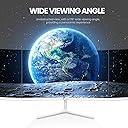
The CRUA 24 Inch Curved Monitor features a 23.8-inch VA panel with FHD 1920x1080 resolution and a fast 100Hz refresh rate, delivering smooth visuals and reduced screen tearing. It covers 99% of the sRGB color gamut with a 3000:1 contrast ratio for vibrant, accurate colors. Designed with a 2800R curve and 178° viewing angle, it offers immersive, consistent image quality from any seat. Eye-care technologies like blue light filtering and flicker reduction ensure comfort during extended use. Its ultra-slim, white chassis with narrow bezels is ideal for stylish, space-saving dual-monitor setups. Connectivity includes HDMI and VGA ports, making it versatile for home, office, or dorm use.


| ASIN | B0CD3C2C4Z |
| Adaptive Sync | FreeSync |
| Additional Features | Blue Light Filter, Curved Screen |
| Aspect Ratio | 16:9 |
| Aspect ratio | 16:9 |
| Best Sellers Rank | #80,621 in Computers ( See Top 100 in Computers ) #2,111 in Computer Monitors |
| Brand | CRUA |
| Brightness | 250 |
| Color | White |
| Color Gamut | 120 |
| Compatible Devices | Desktop, Gaming Console, Laptop |
| Connectivity Technology | HDMI |
| Contrast Ratio | 3000:1 |
| Customer Reviews | 4.3 out of 5 stars 602 Reviews |
| Display Resolution Maximum | 1920 x 1080 Pixels |
| Display Technology | LCD |
| Display Type | LCD(LED-back light) |
| Hardware Connectivity | HDMI, VGA |
| Has Color Screen | Yes |
| Image contrast ratio | 3000:1 |
| Included Components | 24 inch monitor, Bases and Bracket, HDMI cable, Power adapter, User manual |
| Is Electric | Yes |
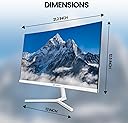
| Item Dimensions D x W x H | 53.3D x 96.5W x 124.5H centimeters |
| Manufacturer | CRUA |
| Model Name | CR240QA |
| Model Number | CR240QA |
| Mounting Type | Desk Mount |
| Native Resolution | 1920x1080 |
| Number of Component Outputs | 1 |
| Picture Quality Enhancement Technology | Blue Light Filter, Wide Viewing Angle |
| Pixel Pitch | 0.275 |
| Refresh Rate | 100 Hz |
| Resolution | FHD 1080p |
| Response Time | 3 Milliseconds |
| Screen Finish | Curved |
| Screen Size | 24 Inches |
| Screen size | 24 Inches |
| Screen surface description | Curved |
| Series Number | 240 |
| Shape | Curved |
| Specific Uses For Product | Office, Business,Desktop |
| Total Number of HDMI Ports | 1 |
| Unit Count | 1.0 Count |
| Viewing Angle | 178 Degrees |
| Voltage | 120 Volts (AC) |
M**T
Amazing monitor for the price
I have only had this for about a week now, but I am really impressed. Trying to find a good white monitor for under $100 is no easy task. I am very happy with this monitor and I plan to order another soon. The picture quality is amazing. The colors are vibrant and there is different colors modes to fit your preference. I really love how the top and side edges are basically seamless. I feel like it makes it look more expensive. The only thing i don’t like about it is it is just a little wobbly. I’m sure this could be fixed by actually using a screwdriver to tighten the screw instead of the attached twisty thing. I don’t usually make reviews, but I had to let people making the same decision I was trying to make know to do it. Also I got the 24 inch and it’s literally the perfect size.
V**E
Serves its purpose
Great monitor! I use it just for studying and it’s perfect. Very aesthetic, simple, and minimalist. The screen quality is great for what I need. It’s a nice starter monitor, but I probably wouldn’t recommend it for very high graphic performance games but it truly does the job. I also like that it’s not toooo curved. I have the 24inch and the curve is not noticeable when looking head on.
V**.
Absolutely fine second monitor for the money - but that's all
Needing a second monitor for my PC for work purposes, I noticed this one had a good price point, and thought I'd give it a shot, as it had the same physical color scheme as my Dell all-in-one (white surround, silver stand) to avoid tripping my OCD. And also it was cheap. First impressions: The Good What you get is exactly what it says on the box, and nothing else. It's a perfectly adequate second monitor for the money. Dead space around the image area is surprisingly narrow for an unknown brand. It's barely wider than the Dell. If you're willing to spend 20 minutes playing with the brightness/contrast/color settings (blind, mind you, as the buttons are all on the back and you'll need the manual as a roadmap at first), you can...kind of? almost? get it to match your primary monitor's settings. Granted, it's a blast from the 90s with all of the physical buttons and pop-up menus, but it works. Just takes awhile. An HDMI cable is included. Moreover, it looks rugged as hell, almost to the point that it doesn't want to play ball on under-desk cable management. Did I mention that it was cheap? It's a decent value at 90 bucks. And the price fluctuates - I got one for 85, which is even better. Packing material is robust and looks to be easily reusable during a move if you bury it in a closet and don't pitch the Styrofoam inserts. The Bad: The "curved" feature is wishful thinking. Seriously, once this thing is on your desk, you'll need a straightedge to discern any curve whatsoever, and your brain keeps telling you it's dead flat at a glance. The Amazon product photo may have been shot with a fisheye lens, or Photoshopped, but that's NOT what it looks like in person. It's...maybe? ok for a dual-monitor setup with Windows applications - the jury's still out on that - but if you're expecting an actual noticeable curve to try to maintain a similar distance between your eyes and both the center and edges of a 2-monitor setup, or at least minimize the difference, this isn't the monitor you want. The manual is what you might expect from a completely unknown manufacturer. It was clearly not written in English, and was trans-literated instead of translated. Some rather creative verbiage. Fortunately it won't be an issue after initial setup, and common sense and Windows will get you through almost everything there except for the button descriptions and menu interface. Per the notes under "The Good," getting the colors to match your existing display is a time-consuming adventure. No speakers. Not an issue if you're using it as a second monitor but worth pointing out. It isn't the sharpest image in the world, noticeable with text. Still totally readable, but compared to the Dell, it's noticeable. The Neutral: I'm not trying this thing as a gaming monitor, so no clue about the refresh rate under gaming conditions. It appears to top out at its default 1920 x 1080, so some power gamers might not even be happy with the resolution. So...for the money, it's totally adequate.
M**S
Hood
Very good monitor
A**A
Internal Hardware Issue in Less Than A Year
I bought this monitor a year ago to use for simple tasks such as assignments for school and entertainment, nothing crazy. Recently small white bars have started to appear on the screen and regardless of having changed the source and HDMI cable, it seems to be an internal hardware issue. If you are looking for a monitor that will last you at least over a year, I would not recommend choosing this one at ALL. Even if you are not using it for anything crazy or for long periods during the day, there is still a high chance of it failing on you. I would recommend saving your time and investing your money elsewhere.
Trustpilot
2 weeks ago
1 month ago