Buy anything from 5,000+ international stores. One checkout price. No surprise fees. Join 2M+ shoppers on Desertcart.
Desertcart purchases this item on your behalf and handles shipping, customs, and support to Croatia.
🎮 Dominate your desk with precision, power, and style.
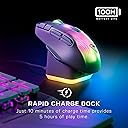
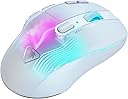
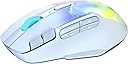
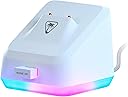
The Turtle Beach Kone XP Air Wireless RGB Gaming Mouse combines cutting-edge 19,000 DPI optical tracking with an ergonomic design and 29 programmable inputs, delivering unmatched precision and customization. Featuring dual wireless connectivity (2.4GHz and Bluetooth), a 100-hour rechargeable battery with a stylish RGB Rapid Charge Dock, and TITAN Optical Switches for ultra-fast response, it’s engineered for professionals and gamers who demand performance and flair in one sleek package.


| ASIN | B0D1CT6QHZ |
| Additional Features | LED Lights, Programmable Buttons, Rechargeable, Wireless |
| Antenna Location | Gaming |
| Are Batteries Included | Yes |
| Are Batteries Required | Yes |
| Battery Average Life | 100 Hours |
| Brand | Turtle Beach |
| Built-In Media | Charging Dock, Kone XP Air, PhantomFlex Charging Cable, Wireless Dongle |
| Button Quantity | 10 |
| Color | White |
| Compatible Devices | Personal Computer |
| Connectivity Technology | Bluetooth, Radio Frequency |
| Customer Reviews | 3.9 out of 5 stars 309 Reviews |
| Enclosure Material | Plastic |
| Global Trade Identification Number | 00731855711017 |
| Hand Orientation | Right |
| Item Dimensions L x W | 7.09"L x 4.92"W |
| Item Weight | 3.52 ounces |
| Manufacturer | Turtle Beach |
| Mfr Part Number | TBM-1101-15 |
| Model Name | Kone XP Air White |
| Model Number | TBM-1101-15 |
| Mouse Maximum Sensitivity | 19000 Dots per Inch |
| Movement Detection | Optical |
| Movement Detection Technology | Optical |
| Number of Batteries | 1 Lithium Polymer batteries required. (included) |
| Number of Buttons | 10 |
| Operating System | Windows 10, Windows 11 |
| Power Source | Battery Powered |
| Range | 10.0 meters |
| Special Feature | LED Lights, Programmable Buttons, Rechargeable, Wireless |
| Style Name | Modern |
| Theme | Video Game |
| UPC | 731855711017 |
| Unit Count | 3.4921 Ounce |
| Warranty Description | 1 year manufacturer |
A**R
Reasonable alternative to Logitech G700s and G604
I am a long time user of the Logitech G700s and the G604. I never want to use another mouse, but they are getting more and more expensive to find on ebay, refurbished etc.... and so for years I have had a long term search for a potential replacement. I looked at this mouse many times when it was made under Roccat. Recently, when my G604 began having sticky clicking issues again, I knew it was time to at least try this mouse out. I've only had this mouse for a few days, but will update if this changes. Out of the box I found it very comfortable in my hand and familiar to the grip of the Logitech mice. Initially, I had a lot of trouble with the setup and almost returned it within the first 30 minutes. I connected the mouse via Bluetooth and I found I couldn't access any of the customization options in the Swarm II software. Several YouTube videos later, I decided to try the USB dongle connection - this instantly unlocked all of the customization options in the software. I have not switched back to bluetooth yet to see if the USB connection is necessary for this to stay in place. I prefer Bluetooth since computers have fewer and fewer USB ports. Once I was able to customize the mouse - learning that the 'Hot Key' and not 'Macro' option was a better setting for my needs (I just want to be able to click a button and have something specific happen, usually tied to a keystroke) It took some experimenting but I think I have it the way I like it. The switches feel much better on this mouse - I know the quality of them is higher than Logitech which is why those mice keep dying. I do find the side switches on the scroll wheel to be a little stiffer and require more force to wheel click left and right - but this is likely only an issue for some people. If you are a die hard Logitech G700 or G604 lover and are searching for a future alternative, I would consider this a very reasonable alternative. The form and function are similar enough. I wish it had 6 side buttons instead of 4. I still haven't put the side 'shift' button to the test and while I appreciate the expanded functions, I'm not convinced it will be useful for my work or play style. I don't want to have to think about what mode I'm in or what a button will do now. Like many people, I rely on muscle memory. I still hold out hope that Logitech will someday recreate these mice with the quality they deserve. The number of used, refurbished mice from those models and they prices they sell for should tell Logitech that there is a group of consumers with very strong preferences for those mice and features. MMO keypads and 20 buttons on the side does not work for me. My thumb doesn't have time or energy for that many blind buttons to navigate. I am hopeful that this mouse will last longer than Logitech does for me, and I am pleased that after years of searching, I have found something close.
B**S
Overall great, but some minor issues
After using it a week or two I’m pretty happy with how it works. I was using the older version of this from roccat (they name changed) before and thought I’d just upgrade. Works the same way just not corded. Battery life seems fine, I just set it on the charger each night. I have forgotten and it’s taken me through more than one day. There’s a few things I don’t like however, and is why I opted to give 4 stars instead of 5. 1. The top button behind the wheel is super easy to accidentally click, and since this is a profile button, switching mid game when things get fast paced is a potential issue. I decided to just make every profile work the same way, don’t need different ones.. that was the work around for me. 2. I have had an instance where the keys assigned seem to not register it’s been pressed, but another does. Once the other was pressed it started registering again. 3. Sometimes the buttons seem to get stuck? This has happened enough times that I do see it being a legitimate concern down the road. I’m not hard on my mouses, I only upgraded because I upgraded everything else and figured why not. The problems happen so randomly and seldomly that it has not been an issue that made me go back to my previous mouse. I think the price makes sense, it remains one of the most comfortable mouse’s I’ve ever used, and the easy shift key is a game changer (I changed mine to be literally “shift” so I get more easily reached/casted spells for my game.) If you feel like you need a mouse with side buttons but two isn’t cutting it and 6-12 feels absurd.. perfect mouse.
D**N
The best mouse I have ever purchased!
This has slowly become one of my favorite mice. I use this for everyday use and gaming. Mostly for gaming. This mouse gives me a ton of button options. It has great light effects and the ability to switch from wired to wireless seamlessly. The charging dock has its weird moments with loss of connection when I switch from wired to wireless, but it's probably a software or user issue. In some cases, I lose the ability to "click" things after I disconnect from wired to wireless (using the dock). A simple sign out of my window fixes this issue. This mouse is amazing if you play MMO, FPS, or RPG games with its many button options.
S**R
Worst piece of crap ever
Worst “premium” piece of crap mouse I have ever used. I’ve given it every benefit of the doubt. I’ve let it update constantly, which whenever it does so it erases all of your created profiles within the mouse. So every time it updates, which is all the time, it erases your programmed maps buttons for all your profiles within the mouse. The auto switch feature also does not work half the time. A good portion of the time when I try to play a game I get frustrated with the mouse and end up not playing at all. Will never buy anything turtle Beach again.
H**Y
Kone XP Air SLAYS Razer!
Beats Razer in every aspect! I got a Razer Basilisk Ultimate with charging base for my birthday, however it wouldn't charge most night on the dock, and would drain down to 0% overnight (even with USB power on). I returned it and got this Turtle Beach Kone XP Air, and I am BLOWN AWAY! The software is so much better than the Razer Synapse (Swarm II), the lighting modes are fun and easy to use. It feels great in my hand, glides easily, and the base is easy to get the mouse on and charges up nicely! Overall I would highly recommend this to anyone looking for a decently priced rechargeable mouse with dock, you won't be disappointed!
W**S
Great mouse
I honestly wasn't sure how I would feel about this mouse, coming from a heavy Steelseries Rival 650 with all of the weights attached. I personally like a heavier mouse, and was hoping this mouse was at least similar, and couldn't be happier! Its handled everything I've thrown at it with no issues so far. I will say, however, that if you have big hands/thick thumbs, you WILL click side-buttons that you didn't mean to. I've done it a good bit so far, but am getting the hang of where to keep my thumb without hitting buttons.
M**L
Horrendous battery life
If this mouse kept a charge for longer than 4 days then maybe I'd change my opinion. Unfortunately, this mouse does not stay charged that long. Yes, it includes a docking station but I don't want to keep it on the station all the time. I want to treat it like every other mouse that I've ever owned. Set it up and forget about it. If It wasn't for the battery life this probably would have been my favorite mouse ever. I love all the buttons, the size, the clicking sounds and the right sensitivity. Overall, it is a very good mouse....that doesn't stay charged. I use it for work and gaming, and I just cannot have it die on me during work. I've had cheap non-gaming mice that last me over 6 months on 1 battery. I decided to try out the Kone Air II. The box says that one lasts over 350 hours. Over 350 hours is better than 4 days. The Kone Air II is a little bigger and it's missing 2 buttons, but I'll take that sacrifice if the battery life is better.
S**K
Easy-Shift must be held down to use.
I had high hopes for this mouse, but was let down quickly. The 4 buttons under the thumb are easily reached as well as the two up by the left click. The Easy-Shift button sounds like a great idea to allow additional macros to be set for each button. What isn't made clear is that you must hold it down to use it. So using it and any of the side buttons is an absolute chore. If it worked like a Caps-Lock button, that would be a great improvement. The scroll wheel for me is just too ratched/clicky. The lift-off distance, or Distance Control Unit/DCU as Turtle Beach calls it, is either 1mm or 2mm. Which is less than what I'm used to with my previous mice. The lighting shut off completely after using the mouse for about 10 minutes. The only way for it to come back on was powering off/on the mouse. Once powered back on, it was stuck on a solid color and could no longer be changed via the Swarm II app. No idea on battery life, I'm sending it back at 96% battery.
A**N
⭐ Excellente souris gaming sans fil 🎮
J’ai installé la Turtle Beach Kone XP Air sur mon PC gaming et j’en suis vraiment très satisfait 🎮👍 Le design est ergonomique et confortable, même après plusieurs heures de jeu. La prise en main est excellente, ce qui améliore vraiment le confort pendant les sessions longues. La connexion sans fil est stable et réactive, et l’autonomie est impressionnante — 🔋 Le capteur optique 19 000 PPP est précis et performant, parfait pour les jeux FPS comme pour les titres plus techniques. La personnalisation RGB avec l’éclairage AIMO est un plus esthétique qui s’intègre bien à mon setup ✨ La station de charge est pratique et évite d’avoir à brancher la souris à chaque fois, ce qui rend l’utilisation encore plus fluide. Très bon rapport qualité/prix pour une souris gaming sans fil haut de gamme 👌 Je recommande sans hésiter cette souris si tu veux un combo confort, performance et autonomie 💯
N**S
Instabil mjukvara
Mycket trevlig mus men mjukvaran är lite ostabil så spara alla inställningar till backup så det är lätt att återställa då dessa försvinner emellanåt utan anledning
)**)
Nice shape
I am alright with the weight, shape is nice, hope the software would improve in the future.
F**E
WOw
This is to me the best mouse you can look for, 13 programmable buttons, three ways to connect wireless, wired and bluetooth, can't ask for anything better.
P**X
Excellent
Très bonne souris RGB rechargeable via USB ou base
Trustpilot
2 months ago
2 days ago