Desertcart purchases this item on your behalf and handles shipping, customs, and support to Croatia.
🚀 Elevate your screen game — sharper, faster, and more vibrant than ever!
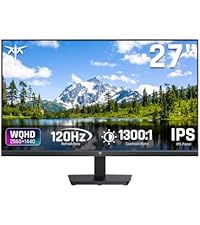
The KTC 27 Inch QHD Monitor delivers a professional-grade 2560x1440 resolution with a blazing 144Hz refresh rate and 4000:1 contrast ratio. Featuring 129% sRGB color accuracy and Adaptive Sync, it’s engineered for seamless gaming and productivity. Its sleek 3-side frameless design, ergonomic tilt, and multiple connectivity options (HDMI & DisplayPort) make it a versatile centerpiece for any modern workspace or casual gaming setup. Backed by a 3-year warranty, it’s a smart investment for millennials who demand performance and style without compromise.


| ASIN | B0D4QVHWPJ |
| Adaptive Sync | FreeSync, G-Sync |
| Additional Features | 144Hz Refresh Rate with HVA Panel, 27 Inch QHD Computer Monitor, Adaptive Sync, 129%sRGB, 4000:1 Contrast, Anti Glare Screen, Blue Light Filter, Flicker-Free, Tilt Adjustment, VESA Mount |
| Aspect Ratio | 16:9 |
| Best Sellers Rank | #1,690 in Electronics ( See Top 100 in Electronics ) #54 in Computer Monitors |
| Brand | KTC |
| Brightness | 300 cd |
| Built-In Media | 27 inch QHD 144Hz PC Monitor*1, Adaptor*1, Base*1, HDMI Cable*1, UG*1 |
| Color | Black |
| Color Gamut | 129 |
| Compatible Devices | Desktop, Gaming Console, Laptop, Speaker |
| Connectivity Technology | DisplayPort |
| Contrast Ratio | 4000:1 |
| Customer Reviews | 4.4 out of 5 stars 1,738 Reviews |
| Display Resolution Maximum | 2560 x 1440 |
| Display Technology | LCD |
| Display Type | LCD |
| EU Spare Part Availability Duration | 3 years |
| Hardware Connectivity | DisplayPort, HDMI, Headphone |
| Image Contrast Ratio | 4000:1 |
| Item Dimensions D x W x H | 7.68"D x 24.25"W x 17.76"H |
| Manufacturer | KTC |
| Model Name | H27T27S |
| Model Number | H27T13 |
| Mounting Type | Wall Mount |
| Native Resolution | 2560x1440 |
| Number of Component Outputs | 1 |
| Picture Quality Enhancement Technology | HDR |
| Power Consumption | 36 watts |
| Processor Count | 1 |
| Refresh Rate | 144 hertz |
| Resolution | QHD Wide 1440p |
| Response Time | 0.5 milliseconds |
| Screen Finish | Matte |
| Screen Size | 32 inches |
| Screen Surface Description | Matte |
| Shape | Flat |
| Specific Uses For Product | Gaming |
| Total Number of HDMI Ports | 2 |
| Total USB 2.0 Ports | 1 |
| Total USB 3.0 Ports | 3 |
| Total Usb Ports | 1 |
| Unit Count | 1 Count |
| Viewing Angle | 178 degrees |
| Voltage | 12 volts_of_direct_current |
| Warranty Description | 3-Year Manufacturer Warranty |
| Warranty Type | 3 Years Manufacturer Warranty |
C**C
I'm Not A Gamer And I'll NEVER Spend A Lot Of Money On A Monitor
I've been using this Viewsonic VX2778-SMHD 27 inch monitor since Jan, 2017, Very nice monitor! But, then I built a dream machine. i7-14700K on an ASRock Z790 Riptide motherboard with lots of SSD's and NVME drives. 48 gigs of very fast RAM and two DVDRW's. I'm pretty good at this and I did my very best not to allow any bottlenecks and not spend money on silly things. It absolutely screams; it gets stuff done fast! I also have an older Intel computer, an AMD computer, and a Raspberry Pi in here. So I have an HDMI KVM switcher and an HDMI audio extractor (audio goes straight to a competent home stereo). So, I don't play any games anymore, but I do want to get stuff done! There came a point where I wanted to make use of this somewhat better video card that's better than anything I've ever used. (Still not for gaming, tho.) I scoured Amazon. I ended up getting an NVidia GeForce GTX 1660 used, that was DIRT cheap! I chewed my nails wondering if it was going to work, but it did and it does! From the first momen, for about 9 or 10 months! I forget how much memory it's got, but it's up there. So, now, I had this video card mostly going to waste (Except for hardware acceleration; that's really nice!) So, I measured how much room I have. If I looked at monitors with really thin frames around the screen and measured and did the math... I decided on 32 inches. I scoured Amazon again and got to this monitor: (KTC H32T13 32 Inch) I had a little trouble. First of all, I'm lazy. I was still building that i7 and I set the monitor aside after unpacking it and went through all my other stuff I had to do first. (The other 2 computers mentioned above both needed some help.) (And the computer room needed some rearranging.) There's also that fact that there was absolutely nothing wrong with the old Viewsoni; there was no pressure... Anyway! From March 22nd until just now - two days ago - it just sat there. I don't even know where the quick start guide or whatever it is, went to, and I didn't want to conduct a lengthy search. Someone wrote that the power button is in a bad place. It's not that bad at all. I spent a little while finding it; reach your hand around the monitor's right side, near the bottom and feel for it. It sticks way out. The only time I have to reach for it is when I'm leaving the computer room to watch TV or go out or whatever. I can't reach it sitting down, but I'm getting up anyway at that point. Then I was totally puzzled, trying to figure out how to set the settings on the monitor. It wasn't bad, but I wanted to tweak the brightness, contrast, hue, gamma, etc. It took me quite a while to figure out that that power button, which is also a menu button (if you just touch it instead of holding it for three seconds) IS ALSO A JOYSTICK! Remember that! You can move it left, right, up, and down. Once I figured that out, it has a VERY logical, easy to use menu, unlike the Viewsonic mentioned about. The next problem I had was that a lot of things were ghosted in the menu and couldn't be selected. Scratching my head, I theorized that probably the video card was running the monitor and I turned to the NVidia Control Panel on the computer. There are at least three different places to set all that on that i7 machine, but it ended up being the screen display settings that did it. I love this monitor now! Plenty bright, fast, 2K, really great picture!! If the power button in the back is even a negative, I don't mind a bit. Everything else about it is outstanding! In about a minute, I had all those settings set. Beautiful bright, colorful screen! Perfect! I also have an older Silicon Dust HDHomeRun dual tuner. I encountered something that's never happened before! Watched "The Rifleman" in black and white. NEVER BEFORE have I had perfect black and white! Always some kind of tinge, usually in the dark places. I mean PERFECT black and white! Then I watched some stuff on Charge! (Streaming) and I adjusted color saturation and hue and got the skin tones right. Absolutely perfect picture, no matter what I do, now!! This is not a cheap budget monitor; this is an inexpensive performance monitor that works extremely well! I completely recommend it and I think it's a super nice deal for the money!!
D**S
24 inch 1440p 100hz Monitor
I have been pleasantly surprised with this monitor. It was listed for only $110 and I got it $10 off so paid only $100 + tax. To get a 1440p monitor for so cheap is really incredible. The monitor does kind of have a cheaper feel/weight to it but it preforms well and that's what counts as far as I'm concerned. It came with an HDMI cable which is adequate for a monitor that only does 100hz. If you prefer Display Port than it has an input for that but you will have to provide your own cable. As someone who pretty much exclusively plays single player games 100hz is plenty for me. When I decided to buy the monitor I couldn't find any reviews for this specific version (24" 1440p 100hz). There were plenty of good reviews for other versions but not for this one. I am glad I decided to go ahead and buy it anyway. It really is a nice step up from my previous 1080p 27" 75hz LG monitor which I think was probably meant more for an office than a gamer. I was not sure how noticeable the jump up in resolution would be but it is noticeable and quite nice. The games look better, text is clearer and easier to read, and I noticed that even the UI for Windows and programs I use like Shotcut just look better and seem to be made with higher resolutions (QHD and above) in mind. The jump from 75hz to 100hz has been less noticeable but again I play single player games, also I prefer to play with a controller, and I come from decades of playing on consoles where a solid 30fps is considered pretty good and 60hz a bit of an anomaly. This monitor does accept an HDR signal but I have not been able to test that out much yet. Also I don't believe it has the HDR 400 certification but at this price this is not surprising and from what I hear HDR 400 monitors aren't really all that great for HDR. The cheapest HDR monitor I've scene recommended costs $280, which is quite a jump up from the price of this monitor. Also Windows reports it as a 10 bit monitor. I'm not sure if that was mentioned in the specs but that is nice to see on a budget monitor (instead of only 8 bit). One thing some people might not like about this monitor is it does not have much customization in terms of brightness and colors and things like that. If you are the type of person who really likes to tinker with those kinds of sliders and settings than this is not the monitor for you. It has 7 different presets that you can choose from but that's just about it as far as the choices go. For me there are a few that I like so I have no complaints and if you like to keep things simple than this could be a positive but if you need to tinker than find a different monitor. It does have crosshair and FPS counter choices in the settings but I have not tried them as I do not have a need for them. Before finding this monitor I had never seen a 1440p monitor at 24". They were always 27" and above when I looked. I have to say that initially I kind of missed the extra screen space with the 27 incher but after a couple weeks I got used to it and honestly do think it is a great size. It allows me to be closer to the screen and actually sit at my desk whereas before with the 27" monitor I had to sit a bit back to be able to comfortably take in all the screen real estate. If you are coming from a smaller size monitor than I think this will be a nice upgrade. If your previous monitor was bigger just know that it might take a week or 2 to get used to the smaller size but I think that once you do, you will not miss the bigger screen. Also the pixel density is pretty high at 1440p 24" as most monitors this size are only 1080p. So in conclusion if you are like me and just want an inexpensive but well made 1440p monitor, than I think you will be happy if you choose this one. This KTC H24T27 is very nice for single player gamers like myself or anyone looking for a 24" 1440p monitor. If you are the type of gamer that plays multiplayer games and needs high refresh rates than obviously this is not the monitor for you, I would suggest something with at least 160-180hz.
R**K
Excellent monitor choice.
I've been very happy with this monitor. It has been working great now for six months with heavy usage. Colors and brightness are great. No bad pixels, very tiny dot pitch so no dots visible in images even at close viewing. It was a great price too for a QHD monitor with sync capability. l highly recommend.
C**N
Good, inexpensive 5K (217 PPI) monitor, great solution for MAC computers
This is a great value for a 5K monitor. The 5K resolution (217 pixels per inch) scales well with the native display output from MAC computers. The 27-inch size is large, without being overwhelming. The I/O is fairly robust with HDMI 2.0 (3840x2160), DisplayPort 1.4 (5120x2880 or 2560x1440), USB-C (Power Delivery of 65 W, and DisplayPort video 5120x2880 or 2560x1440), 2x USB 3.0 downstream ports, and a headphone jack. The monitor features 135% sRGB color gamut area, 100% sRGB color gamut coverage, 500cd/㎡ brightness, 2000:1 contrast ratio, 1.07 billion colors, and HDR400. Blue Light Reduction reduces eye fatigue, irritation, and strain.
W**L
Excellent Value and great performance for a flat 27" 1440p monitor
This KTC 27" QHD monitor is a fantastic value with excellent features. Very good blacks with 4000:1 contrast and the 144hz is a legit gaming entry point. The 129% sRGB was a bit concerning to me as it suggested the color accuracy may not be that good, but the monitor has an "sRGB" mode in the menu that is useful for ensuring color accurate work and was the reason why I gave this monitor a chance. Glad I did. Speaking of which, the menu is accessible by a single joystick type button behind the monitor which takes a little bit of contorting to access from below it but its operation is very easy to use and allows for quick navigation within the menu. Would have been better if that joystick was positioned an inch or more closer to the bottom of the monitor. The standard color profile is the 129% sRGB which gives you slightly more of an extended color palette reminiscent of "HDR". No built in speakers, but that wasn't a deal breaker. Now that its on the desk and I'm using it daily, I can see that for me a 27" monitor like this is probably the practical limit for a "flat" configuration vs curved. On a white background, the bottom edges take on a slightly pink hue when you are positioned in the middle of the monitor but its subtle. That is probably reduced with curved monitors. Despite that I prefer it flat. The brightness of the monitor is very good, and almost too much for my eyes. Since I'm working all day in front of the monitor, i need the ability to lower the brightness to comfortable levels. The lowest brightness level is just about where it becomes comfortable for me so it would be better if it had more range for dimming further. It is HDR capable technically and I believe it but have no intention of testing or using that mode sitting at normal distances from it, with the high brightness and 4000:1 contrast, it would work really well if you're eyes can handle the brightness and color intensity. I have it positioned as the main monitor flanked by two 1080p 22" monitors which are slightly angled inward. As a triple monitor setup it works quite well and I plan to find a game where I can span across all three monitors on my desk.
A**L
Great monitor
Got this for my teenage son, he says it’s a great size, great quality; did not like the base (it raises and lowers, it’s flimsy), so he switched it out for another one he had that was a perfect fit
C**M
FALSE/SLEEZY ADVERTISING
Advertises a 32 inch 120hz 1440p monitor for a decent price. Has a dead pixel straight out of the box.. considering the price figured not really a huge deal. But to run 1440p like advertised it limits the monitors Hz to 100. So if you plan on using this monitor for a ps5 or Xbox series x do not buy this monitor. You will only be able to use 1440p at 60hz.
P**M
GREAT PRODUCT!!!
Excellent monitor, crisp clean color, color contrast is better than expected. This monitor has not given me any issues since the day it was purchased. VERY HAPPY TO HAVE FOUND IT!
A**N
Great monitor for the price
For the price you can’t go wrong, got it on sale for $212 and it’s awesome. Colors look good, 100hz, multiple inputs, and coming from a 21.5” monitor it’s massive, I love it. Probably one of the best bang for your buck monitors on Amazon.
Y**N
Good enough for its price
I usually use the 'Display P3' color profile on my Mac for better color. Other than that it's a great product
I**E
Not perfect, but very good value.
I'm very pleased with this monitor. Overall, the screen is bright and sharp, and the monitor as a whole is slim and lightweight. As others have noted, the bezels are very narrow (3mm) but there is a black border at the edges of the screen that takes away another 6mm, so it's not quite as impressive as the 'illustrations'. I sit fairly close, so I do notice some fading at the corners. This is due to viewing angle, not an actual defect, and it's pretty subtle. I find that the monitor wakes up more quickly than my old one. The included stand is humble, but probably adequate. I use a wall-mounted monitor arm, so I was happy to not pay a higher price to have fancy stand. Out of the box, the colour balance seemed very blue, so I did make some adjustments to that when I set it up.
M**I
AMAZING SCREEN !
AMAZING Picture Quality and response time ! As I am also a Gamer, I play everything in Ultra Settings or not at all! Yet there is tear free, smear free, shake free, but fluid video movement in All High End 3D games!
D**R
Un écran parfait à prix raisonnable.
Un écran parfait pour les vidéos car il est Flicker free (Anti-scintillement et idéal contre la fatigue des yeux en un mot Anti lumière bleue. Et le prix est raisonnable. Seul bémol les contrôles sont à l’arrière de l’écran
Trustpilot
3 weeks ago
2 weeks ago