Desertcart purchases this item on your behalf and handles shipping, customs, and support to Croatia.
⚡ Power your Ryzen build with elite speed and style — don’t get left behind!
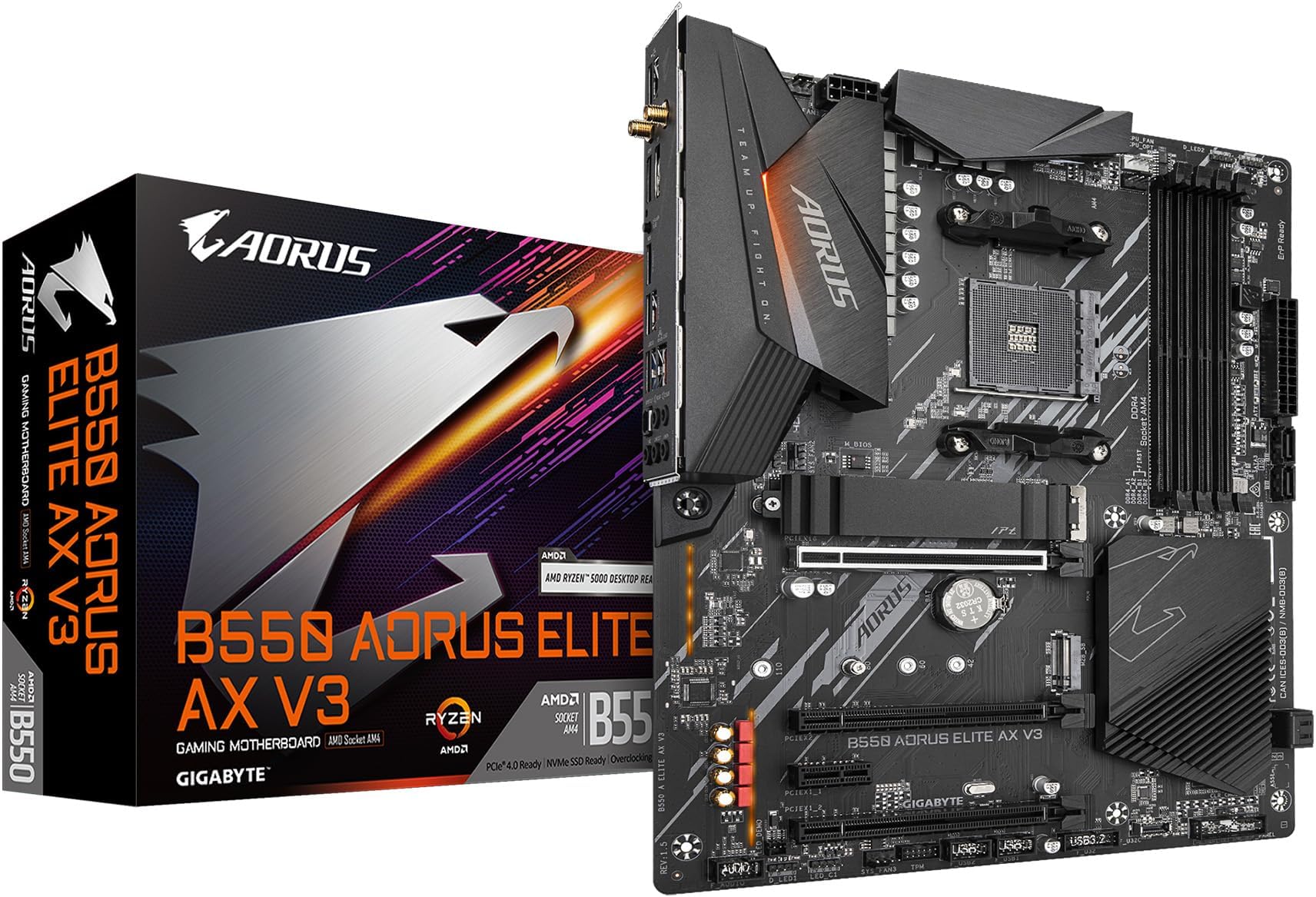
The B550 AORUS Elite AX V3 is a feature-packed ATX motherboard designed for AMD Ryzen 3000 to 5000 series processors. It boasts a premium 12+2 digital power phase design for stable performance, dual M.2 slots with PCIe 4.0 for ultra-fast storage, and advanced connectivity including WiFi 6 and 2.5 GbE LAN. With Q-Flash Plus BIOS update capability and customizable RGB Fusion lighting, it offers a perfect blend of cutting-edge tech and user-friendly features for professional PC builders seeking high performance on a budget.


| ASIN | B0D8WH9NG3 |
| Best Sellers Rank | #16 in Computer Motherboards |
| Brand | GIGABYTE |
| CPU Model | Ryzen 5 |
| CPU Socket | Socket AM4 |
| Chipset Type | AMD B550 |
| Compatible Devices | Personal Computer |
| Compatible Processors | AMD Ryzen 3000 Series , AMD Ryzen 4000 Series, AMD Ryzen 5000 Series |
| Customer Reviews | 4.2 out of 5 stars 92 Reviews |
| Graphics Card Interface | PCI Express 4.0 |
| Item Weight | 2 kg |
| Main Power Connector Type | 24-Pin |
| Manufacturer | GIGABYTE |
| Memory Clock Speed | 3200 MHz |
| Memory Slots Available | 4 |
| Memory Storage Capacity | 128 GB |
| Mfr Part Number | B550 AORUS ELITE AX V3 |
| Model Name | B550 AORUS ELITE AX V3 |
| Model Number | B550 AORUS ELITE AX V3 |
| Number of Ethernet Ports | 1 |
| Number of Items | 1 |
| Number of Ports | 15 |
| Platform | Windows 11 |
| Processor Socket | Socket AM4 |
| RAM Memory Technology | DDR4 |
| Ram Memory Maximum Size | 128 GB |
| S/PDIF Connector Type | Optical |
| System Bus Standard Supported | SATA 3 |
| Total Number of HDMI Ports | 1 |
| Total PCIe Ports | 5 |
| Total SATA Ports | 2 |
| Total Usb Ports | 11 |
| UPC | 889523044018 |
| USB 2.0 | 2 |
| Warranty Description | 3 Years Manufacturer |
C**T
A Strong Budget Pick But a Few Minor Issues
This motherboard delivers a great set of features for the price, but with a few minor things worth pointing out. The RAM slots are very close to the CPU socket, so be mindful of your cooler choice and orientation. I learned that lesson the hard way - after installing my cooler, one side of the fan shroud protruded just enough to block a RAM slot, so I had to remove the cooler, clean/reapply thermal paste, and reverse the fan orientation to make it fit. If you need to remove the stock mounting brackets for a different cooler mounting style, keep in mind that the backplate is not attached to the board. It stays in place as long as you don’t move the board, but I lifted my board while working and suddenly found myself wondering where the cooler mounting screws had disappeared to, not realizing the bracket got left behind. There were some minor quality control issues. The M.2 screws were over-tightened, so I nearly stripped them trying to remove them. There was also a USB 3.2 header issue in that the plastic socket for the USB 3.2 header came loose when I needed to unplug the cable. I was able to fit it back onto the pins just fine, but this shouldn't happen. My only real disappointment is with the M.2 slots. The board features two, but only the first one (nearest the CPU) supports PCIe 4.0 speeds. The second slot is PCIe 3.0 only, which wasn't obvious in the product description. This won’t matter for many users, but if you were planning a RAID setup like I was, it’s important to note that both drives won’t run at the same speed. I loved Q-Flash! Being able to flash the BIOS without needing a CPU installed is an awesome feature. After flashing, the BIOS handled everything in my build flawlessly - I only had to enable XMP and I was good-to-go. If you’re using a newer Ryzen CPU, be sure to check if a BIOS update is required before installation. For lighting, the board has two main LED zones - one near the I/O shield, and another with 2 LED strips and backlighting near the PCIe slots. These were individually addressable using OpenRGB in Linux. I haven’t tested RGB control in Windows yet, but Gigabyte’s software is likely needed for full customization. Overall, this is a feature-rich board for the price and Q-Flash alone makes it a great choice for Ryzen users. If you need a solid, budget-friendly AM4 motherboard that's easy to work with, this is a great choice.
D**D
Solid mid-range board.
Far better layout than my ASRock X470 that this replaced. Everything plugs in where it should with no interference issues. BIOS is easy to use and set up. I do wish it had more fan headers and USB ports though.. I'll be honest... I think that what everyone says about every board. XD
S**S
your HDMI may no longer be used for audio
the audio would not work using HDMI and it wouldn't even show up in settings.. i tried drivers bios and all but then through trial and error this was my solution: no there was no sound at all from HDMI.. on the GIGABYTE B550 AORUS Elite AX V3 Motherboard you need to use the provided audio 3.5mm "aux" ports and use an "aux" to red/white cord then go into settings on the selected TV/monitor go to audio settings and select the audio input being used
L**K
Good motherboard for AMD AM4 build.
It has multiple IO with Wi-Fi 6 inclusive. The build was fairly easy as the choice of the case was great this board supports multiple fan, pump and rgb connections. The build quality is robust and it looks very good inside the black case with the Aorus accent on the fans.
S**X
BIOS Troubles? WARNING BEFORE BUYING
It’s a really solid motherboard from what it seems, as I’ve been using it with my ryzen 9 5950x for a little bit… but the initial set up was HORRENDOUS. To actually get into the BIOS I had to Flash the latest BIOS onto a FAT32 usb into the motherboard , which could’ve screwed over the average joe before they did enough research (luckily I’m in a family with many computers to download stuff from) but either way could’ve ended in disaster. Gigabyte please do better.
J**Z
Pretty good
Excellent performance, a few years with it without problems
K**U
Don't buy this.
It doesn't work. As soon as the drivers are installed, I get a blank screen. I had to reload an old copy of my system profile to regain control of my PC. NVIDIA is aware of the problem but has yet to reproduce the problem and hasn't fixed it. For as much as they charged me, I expected better of them. They should be upfront about the issue and let people know they haven't fixed the driver for it. Don't buy this expensive, useless brick. I can be disappointed for far less money than I paid for this. I've used their products for years and this was a huge letdown.
R**L
Excelente
Excelente
J**R
Una excelente opción por el precio
La tengo desde hace 2 meses y no me ha presentado ningún problema, llegó en perfecto estado y tiene todos los puertos y conectividad necesarios que por el precio me parece una muy buena opción en comparacion con otras
L**Z
Entrega rápida
Excelente produto
Trustpilot
2 days ago
4 days ago