Buy anything from 5,000+ international stores. One checkout price. No surprise fees. Join 2M+ shoppers on Desertcart.
Desertcart purchases this item on your behalf and handles shipping, customs, and support to Croatia.
⚡ Switch Fast, Work Smart, Stay Powered!
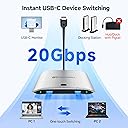
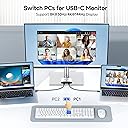
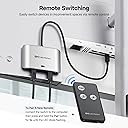
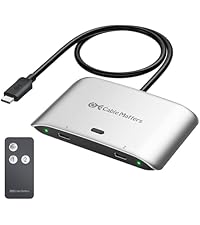
The Cable Matters 20Gbps USB C Switch enables professional users to share a single USB-C or Thunderbolt 4 monitor or dock between two computers with ultra-fast 20Gbps data transfer, 8K video support, and 140W power delivery. Designed for seamless multitasking, it includes an RF remote for effortless switching and comes with all necessary cables and mounting accessories, making it an essential tool for dual-computer productivity setups.


| ASIN | B0CLZ7WP1N |
| Best Sellers Rank | #27 in KVM Switches |
| Brand | Cable Matters |
| Built-In Media | 1x USB-C Switch; 2x 20Gbps USB4 cables (3.3ft); 1x Remote; 2x Hook-and-Loop Pad |
| Cable Type | USB |
| Color | Silver |
| Compatible Devices | Laptop, Personal Computer |
| Connector Type | Thunderbolt 4, Usb4 |
| Connector Type Used on Cable | Thunderbolt 4, Usb4 |
| Customer Reviews | 3.9 out of 5 stars 642 Reviews |
| Manufacturer | Cable Matters |
| Mfr Part Number | 201352 |
| Model Number | 201352 |
| Number of Ports | 3 |
| UPC | 810115183938 |
| Unit Count | 1.0 Count |
O**V
Awesome little switch, but think of the entire setup when buying.
I've had this for about a year in my home office for switching between my work (hp) and personal (mac) laptops. The setup is very simple, I have my laptops sitting in a 2-laptop stand, always plugged in, and the switch connects them to a USB-c on my HP monitor. I use the monitor itself as a hub for peripherals. My mouse and keyboard are plugged into it, and they switch to active laptop. I used to use dual-bluetooth features on both keyboard and mouse to connect to each laptop separately, but after using this laptop switch for a while it became obvious that just plugging the usb stick that came with both of them as a third connection option is just easier. I hate those things normally, but they are plugged into the back of my monitor, so I never had to touch them, and the switching is solid for both laptops. The only thing that remains on bluetooth is my wireless headset, and it can be hard to convince to switch to the right laptop. So, before buying, consider your setup, and whether you have a comfortable way to switch the peripherals. Word of caution - this only feeds power to the active laptop - so the other one will go to sleep eventually. Mac handles that better, but sometimes has issues waking up if it has not been used for long time, windows is here and there, sometimes it wakes up flawlessly for weeks, other times I have to open it several times a day to wake it up if I switched to another laptop even for a minute. Some of it may come from a known issue on HP monitor I have - it is the monitor that fails to wake up, and I have had this happen even without using the dongle, so I can't really say that it is the fault of the dongle itself. Remote works, nothing else I can say about it, but I rarely ever use it. In a nutshell, it is plug and play, works well, but beware of the limitations that your other equipment may have with this setup. It reduce the cable clutter I have on my desk extremely, I have not had to pull out a charger for either of my laptops from my travel bag for a year. I would honestly say the only downside is that it does not charge the laptop that is not connected, but oh well, i guess nothing is perfect.
T**I
Works with a single Dock for two computers
i have an HP work laptop and thunderbolt 5 Mac mini connected to an older (discontinued) thunderbolt 3 Mokin dock with Pebble usb speakers, mouse, keyboard, webcam, scanner and output to dual 2k monitors via displayport... and this switch works PERFECT. this is the WFH dream setup, and allows me to flip from laptop to the Mini for $60. the trade off is that i had to provide separate power to the laptop so that it keeps getting power from somewhere after i have switched away. I already had an Anker 240w charger for that. if you have a dock that works with two computers and you just need to change the ubc-c cord... this switch "should" work to make that dock switch to either computer with just a button push. then you just need to solve for constant power to each machine, because the power would switch too. i spent two months trying and returning 5 different KVM docks priced up to $500 and not a single one worked right, and this little beauty works for a fraction of that price!! im so impressed. piece of advice-- i tried a different (longer) thunderbolt 4 cord from the switch to the Mini and it did not work... it was a Silkland cord, perhaps those cords are not up to spec? but the shorter cords that came with this switch do work, so i had to rearrange my setup to make the short cable matters cord work (not a deal breaker for a mac mini, which is small enough to be moved around) i cant say this enough-- forget the KVM options out there. i spent probably 100 hours researching and never found one that worked for me, despite using chatGPT for tips and reading thousands of reviews from actual users and "Vine" reviews. KVM seems like such a simple idea... but they just dont work 100% for some reason. The mouse or keyboard drops out, flickering monitors, dropped handshake protocols... and issues came arise months after purchase. for that kind of money they need to work better. fortunately, this little switch did exactly what i need, for a dream price. Thank you Cable Matters!
E**D
Switch is inconsistent for Monitor but okay with Mouse, keyboard etc
The switch works ok with peripherals like keyboard and mouse but unstable with Display monitor. After several days of testing, configuration setups, and multiple attempts, I’ve concluded that the switch is not stable. Reached out to the seller as well, they couldn’t offer any material help but quick to blame it elsewhere. My setup consists of a MacBook Pro M series (Silicon chip) and a Windows 11 laptop connected to a Caldigit TS4 and monitor. The switch works with flipping the mouse, keyboard, but not stable with display monitors above 1080p even though seller described the switch as capable of supporting 4k. This issue occurs with both the MacBook and Windows 11 operating systems. In conclusion, this switch only works consistently to switch peripherals like the keyboard, not for the display or monitor.
R**.
Works Perfectly for Dual-Computer USB-C Display Setups — Great Value
The Cable Matters 20Gbps USB-C Switch turned out to be exactly what I needed for my dual-computer setup. I use both a Mac and a Windows work laptop, each with USB-C display output. I’ve got my keyboard, mouse, and desk light all plugged into a USB hub on the back of my monitor, and I simply velcroed this switch to the back. When I want to swap between my Mac and work laptop, I just reach over and press the button — it switches over in about three seconds, which is totally fine for me. The remote control works too, but since I’m sitting right in front of the monitor, I rarely use it (it might be perfect for other setups though). I originally bought this on a whim just to test my idea, and it turned out absolutely perfect. For the price, it beats a lot of expensive KVM switches. The good Seamless switching between Mac and Windows laptops Only a brief 3-second delay when switching Compact and easy to mount behind the monitor Works great with existing USB hubs and accessories Excellent value compared to full KVM switches Would be nice if it came with a small combo USB-C/USB-A hub included Overall If you have two computers with USB-C display output, this is an awesome little device. Clean, affordable, and works exactly as expected. Perfect for dual-computer with usb-c display output productivity setups.
N**.
So far...
So far so good. This switches two laptops sharing a single Lenovo thunderbolt 4 dock. The dock runs a single 4k monitor over DisplayPort, plus a second 4k monitor in PBP mode, so two 1920x2160 monitors, one over DP the other over USBC. For a bit I had it pushing a fourth monitor over HDMI running in portrait mode, but I switched that to something else. My biggest complaint is the time it takes to switch, well over 10 seconds, but I think 90% of that is the laptop syncing up everything. I've seen no issues, no glitching or anything so unless something pops up, it's good. EDIT: So now an issue. sometimes, and there seems to be no rhyme or reason, one of the machines doesn't recognize the signal right when I switch and the monitors go to sleep. Turning one of the monitors on and off seems to wake it back up, but this is a huge annoyance. I even reduced the number of monitors to two 4k, and still same issue. But then sometimes it works fine and wakes everything up. The other issue I have, is that I've only had this for a short time and already the remote is going out. But only on one button. Not the battery, I replaced that, and again only on one button.
J**E
Not compatible with Ugreen Thunderbolt 4 dock
Nice switch but didn’t quite work with my UGreen thunderbolt 4 dock. The thunderbolt 4 dock works well I just have to plug and unplug when I move from Mac to Work windows. I was hoping I could plug in this switch into the dock and it would solve the wear and tear of plug/unplug The search continues.
A**R
Good product. Build yourself the cheapest USB-c KVM with it
Very good product and works as expected an more. My primary goal was to have a USBc kvm for my 2 Laptops with both only having 1 usbc while travelling. This is the cheapest option on amazon for a manual kvm to share 1 monitor. That part was great. I works as expected with a slight delay of 3sec like others have mentioned. My problem was I did not want to buy a $100+ dock to use keyboard and mouse which Cable Matters recommends. They infact say that it will not work with dongled usb hubs. I took the chance and got lucky. I bought a Anker usb hub(~$17) with usbc dongle and a usb-c female to female adapter(~$5). I am happy to report that the solution works for me. PC1/PC2--> CM 20G Switch(This product) ->usbc female-female adapter ->Anker usbhub ->(HDMI port)-> Monitor
B**D
Key function doesn't work properly
For the most part, it gets the job done. It switches thunderbolt connections from one computer to another and back. I have it connected to a macbook I use for work and my personal mac mini. It's noted in the listing, but it's not capable of the full TB3 capabilities, let alone TB4. So if you expect high performance out of it, you might be disappointed. However, it should support basic TB capabilities, and not experience some of the harsh limitations of USB3 connectivity. The remote was among the major reasons I grabbed this one. And boy is it bad. It frequently loses pairing, and can be fiddly to pair it again. It's to the point that I'm now rethinking how I want to lay everything out, since the button on the switch appears to work reliably. To me, this is approaching "just return it" territory because a key function that pulled me to it doesn't work properly. I saw a review noting this uses proprietary cables. This is not true. It uses standard thunderbolt cables. The issue of the reviewer is user error. Thunderbolt cables have length limits in order to maintain performance and signal integrity. If your cable is longer than 3 feet, you should expect to start having difficulties and performance issues. 10 feet is about the limit (I think by spec, in fact), though many TB devices may struggle with this. If you have display issues, performance issues, etc, consider getting a high quality TB cable as a replacement, and use as short as you need. This is a high performance interface, and cheaply made out of spec cables are likely to show problems. This would likely solve a lot of the negative reviews that don't involve the remote.
A**N
Ideal para cambiar entre dos portátiles
RESUMEN: Funciona perfecto, ideal si quieres cambiar rápido entre dos portátiles. Funciona con vídeo y carga. Tengo un monitor que conectaba con un cable USB para cagar y tener video a la vez en mi portátil personal. Quería poder intercambiar fácil entre mi portátil y el del trabajo sin tener que cambiar el cable. Ahora tengo ambos portátiles conectados al aparato, y éste conectado al monitor, con un click en el botón físico (o los botones del mando) me cambio rápidamente de uno a otro. Tarda alrededor de unos 5 segundos cambiar de uno a otro, nada dramático ni para bien ni para mal. Creo que solamente carga el portátil activo, pero no he hecho pruebas para corroborarlo.
J**P
Parfait pour partager un écran Apple Studio Display et 2 macs
Fonctionne parfaitement avec deux Macbook (Perso et Pro) sur un Apple Studio Display. La commutation est assez rapide. Il est impératif d’utiliser les câbles fournis, car le câble Apple pour l’Apple Display ne fonctionnait pas sur l’un des Mac.
A**E
Best USB-C Switch for Mac
The Cable Matters 20Gbps USB4 USB C Switch is the most reliable option I found after trying multiple USB-C switches. - Seamless switching between two MacBooks - Supports 4K monitor and multiple peripherals (keyboards, mouse, auth key) - Charging capability for the connected laptop Compact design (2 inches) for easy mounting - After a month of use, it has worked flawlessly every time they've switched between computers.
"**"
Good product
Great product - beware the telco is Ghz band not 3-400Mhz thus non servable by rf commanders in the commerce
C**D
Didn’t Work as Expected
Unfortunately, it didn’t work with one of my laptops. I was expecting a plug and play experience, but that wasn’t the case. I’m returning it for that reason. That said, it does seem well built.
Trustpilot
1 week ago
1 month ago