Desertcart purchases this item on your behalf and handles shipping, customs, and support to Croatia.
🚀 Triple your screen, triple your impact — work smarter, not harder!
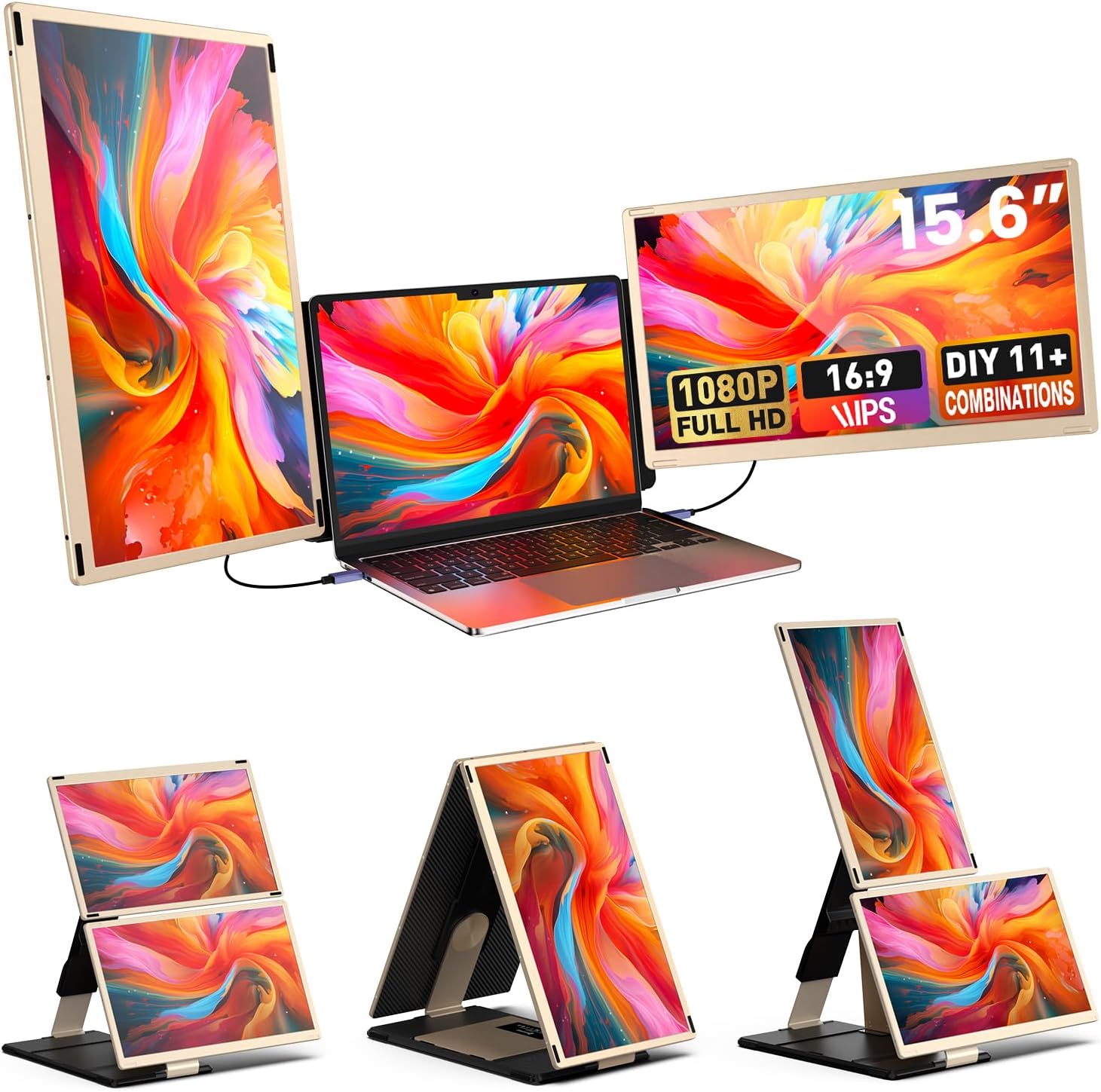
The Laptop Extender 15.6-inch is a premium portable dual-monitor setup featuring FHD 1080p resolution, 120% sRGB color accuracy, and a versatile 235° rotation with detachable magnetic screens. Designed for professionals craving enhanced productivity, it supports Windows, Mac, Chrome, and Dex systems with plug-and-play ease. Crafted from durable aluminum alloy, it folds compactly into a carry bag, making it the ultimate triple-screen workstation for dynamic multitasking anywhere.


| ASIN | B0D9LZ86H1 |
| Additional Features | 0.3-inch ultra-thin screen, 11+DIY Combination ldeas, 15.6-inch monitor, Built-In Speakers |
| Aspect Ratio | 16:9 |
| Best Sellers Rank | #45,878 in Electronics ( See Top 100 in Electronics ) #1,179 in Computer Monitors |
| Brand | UK BONITOYS |
| Brightness | 300 cd |
| Color | 15.6" GOLD |
| Color Gamut | 80 |
| Compatible Devices | Desktop, Laptop, Smartphone, Tablet |
| Connectivity Technology | HDMI, USB Type A, USB Type C |
| Contrast Ratio | 1000:1 |
| Customer Reviews | 4.2 out of 5 stars 237 Reviews |
| Display Resolution Maximum | 1920 x 1080 mp |
| Display Technology | IPS |
| Display Type | LED |
| Hardware Connectivity | USB Type C |
| Image Contrast Ratio | 1000:1 |
| Included Components | H5 Hub to TYPE-C cable, HDMI to TYPE-C cable, TYPE-C to UTYPE-C cable, USB A to TYPE-C cable, laptop screen extender |
| Item Dimensions D x W x H | 0.98"D x 14.17"W x 8.54"H |
| Item Weight | 9.2 pounds |
| Manufacturer | VargaoliDeal |
| Model Name | S6 |
| Model Number | S6 |
| Mounting Type | Desk Mount |
| Native Resolution | 1920x1080 |
| Number of Component Outputs | 1 |
| Picture Quality Enhancement Technology | Color Gamut Enhancement |
| Pixel Pitch | 0.18 |
| Processor Count | 1 |
| Refresh Rate | 60 hertz |
| Resolution | FHD 1080p |
| Response Time | 2 milliseconds |
| Screen Finish | Matte |
| Screen Size | 15.6 inches |
| Screen Surface Description | Matte |
| Shape | Rectangular |
| Specific Uses For Product | Business, Desktop, Entertainment |
| Total Number of HDMI Ports | 1 |
| Total Thunderbolt Ports | 2 |
| Total USB 2.0 Ports | 1 |
| Total Usb Ports | 1 |
| Viewing Angle | 235 degrees |
| Warranty Description | 1 year warranty |
| Warranty Type | 1 Year Manufacturer Warranty |
A**R
Laptop Screen Extender 15.6-inch
I primarily use my laptop for data management and presentations. Managing large spreadsheets on a single, limited screen often becomes tedious as it requires constant switching between windows to compile data tables. To solve this, I initially considered adding an external screen to my laptop. Then I came across this device, which offers two screens, and decided to give it a try to see if it would better meet my needs. This dual-screen setup features two slim 15.6” displays with very thin bezels. The screens can stick together magnetically, which makes them easy to carry and set up on the laptop. The overall weight of the device is comparable to a regular laptop, making it portable enough for my workflow. The display color is vivid with good contrast, enhancing visual clarity for spreadsheets and presentations. It also came with a convenient carrying bag and all the necessary connection cables. I tested the device with my ThinkPad Carbon X1, Lenovo Yoga, and Dell laptop, all of which have two USB-C outputs. The device worked smoothly with each of these PCs, with no noticeable lag or flickering. I haven’t had the chance to test it with a Mac, as I work solely on PCs. The screens come with built-in speakers, though their volume is limited due to the display's thinness. While it's a handy feature, the audio quality may not meet high expectations, so I wouldn’t rely on it for sound-heavy tasks. Overall, I’m very satisfied with this purchase. It allows me to work with multiple screens seamlessly, reducing the need to switch back and forth between windows. It’s been a significant productivity boost for data management tasks, making my workflow much smoother.
Y**T
Seamless Mac Integration – A Triple-Screen Game Changer
I recently bought this 15.6-inch laptop screen extender, and it’s been a total game changer for my workflow. I use it with my Mac (Pro chip), and everything worked perfectly right out of the box — no drivers needed, just plug and play. The screens are crisp and bright, and the 120% sRGB color quality really shines whether I'm multitasking or working on creative tasks. The 235° rotation allows for plenty of layout flexibility, and the magnetic connection makes the setup feel stable and professional. It doesn’t feel like a cheap add-on — the build quality is solid. What stood out most is how Mac-friendly this extender is. I was able to connect each screen with a single USB-C cable, which kept my desk clean and eliminated extra clutter. I’ve had zero compatibility or disconnection issues on my MacBook with a Pro chip, which is a huge plus. It also comes with a well-designed carrying case that fits the extender and all the cables. It’s a tight fit, but it makes travel and moving between work locations easy. Heads-up for Mac users: This extender is incompatible with M1, M2, or M3 base chips but works perfectly with Pro or Max versions. Overall, I highly recommend this if you're a Mac user who needs a portable, reliable, and high-quality triple-screen setup. It’s easy to use, performs flawlessly, and is a fantastic value for the price.
N**S
Triple Bang for Your Buck... The BEST Productivity Booster!
I recently purchased a new laptop (mainly) for video editing and quickly realized that my reduced screen size was negatively impacting my workflow. In dealing with so much media and multiple windows to compose an edit, I found myself having to shrink down my entire workspace just so everything could fit on one screen. This led to a lot of squinting, eye strain and general fatigue. I was becoming quite frustrated with having the "mobility" to work remotely, but (at the same time) dealing with a reduced workspace that's not ideal at all, when you're dealing in a visual medium. After watching a few YouTube reviews and searching Google, I came across this screen extender and couldn't pass it up. The main reason being, most screen extenders were around 10" to 12" but this one is over 15", which is the same size as my laptop! The idea of having 3 nearly exact screen sizes in HD (1920 x 108)0, was too good of a deal to pass up, and I'm so glad I made the purchase! Not only are the screen sizes and picture quality phenomenal, but the set up and multiple cables (for multiple configurations) gave me everything I needed in a single box to hit the ground running. Needless to say, I can't imagine leaving home with my new triple-screen setup. Being an entrepreneur, I'm always dealing with multiple PDFs and Excel docs as well, so being able to have one single workspace that allows me see everything at a glance has been a game-changer. The price also can't be beat, as I've found similar setups to easily be $200 or more. Can't recommend enough!
M**E
Great Choice
This are very good extenders. They work great when you need several screens to do work efficiently.
M**2
DONT WASTE YOUR MONEY!!!
DO NOT BUY!! I am not one to ever write a negative review but feel like it’s important to warn others. This is an absolute necessity for me to do my job and I do not have extra money just to purchase another one so please do not make too same mistake. The reason: Worked great for a while and now the left monitor is somewhat blurry with blue lines (often). The right monitor the cable will connect (sometimes) but when it does plug in it keeps flashing and turning black which creates all of my screens to turn black then it went come back on for a period of a random amount of time and if I leave it alone it will turn neck on and function for a small amount of unspecified random amount of time and then repeat the process. I have followed all of the suggested resolution steps, power outlets, unplugging, rebooting, even inflection each cable and port to ensure there are no broken pieces or dust-débris blocking them to still having the same problem. AND of course there is NO actual phone number or email address to get assistance with issues. Please don’t make my mistake and waste your hard earned money.
A**R
Value for money and productivity
I recently purchased the 14-inch Portable Monitor Laptop Screen Extender, and it has truly transformed my workflow! The 1080P FHD resolution provides stunning clarity, making my work documents, videos, and games look incredibly vibrant and sharp. The ability to switch between mirroring and extending modes runs smoothly and efficiently. This monitor is compatible with a wide range of devices, making it super versatile. The plug-and-play feature requires no driver installation, making it easy to set up. It works seamlessly with my laptop, and the upgraded alloy stand is stable and does not put any pressure on the screens. I definitely recommend it for work and travel.
D**N
Perfect Portable Monitor Setup – Boosts Productivity and Travel-Friendly
These monitors are exactly what I needed to upgrade my workflow on the go. Setup was fast and simple, thanks to detailed instructions. The mounting options are very flexible, and they work seamlessly with my MacBook Pro—no compatibility issues at all. The picture quality is sharp, and the lightweight design makes them ideal for travel. I especially love the magnetic folding feature—it keeps the screens protected from scratches when stored. The carrying case is a great bonus. The only small downside is that adjusting brightness and resolution takes a bit of trial and error, but it’s manageable. Overall, a fantastic purchase that I would absolutely recommend for professionals or remote workers.
Z**Z
Nice screen, Man Waranty good!
The Good Like the screen! Qsceuality is nice image is nice brightness good (use the monitor setting from scroll wheel button in back). Had these before 6 months ago , one went out on me and the Amazon credited me back. Bought them again!. Ive used them attached to screen and stacked next to. both work great and rotate etc. All cables and adapters come in the box for plug and play. You will wan to use thunderbolt / USbc for power and display. If not you will need to use the added power cable to power up units. I use just the two USBc thunderbolt power display cable. The bad! They don't quite work like the show. If you slide them down over your monitor and lock them in by sliding in the sides. They drop very low and rest on the cable out the back of laptop. Which is an issue for power and USBc cables. I think they just designed it to lean back on its kick stand and you slide our laptop against it. The fix. I made a bracket that just hooks over the top of the laptop and supports the extenders to the right height and off my cables in the back . I did them from stainless (its in our shop) but will be making a 3d printed bracket for potability.
Trustpilot
1 month ago
2 weeks ago