Desertcart purchases this item on your behalf and handles shipping, customs, and support to Croatia.
🖨️ Upgrade your home office game with speed, security, and sustainability!
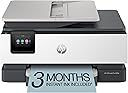
The HP OfficeJet Pro 8135e is a compact, wireless all-in-one inkjet printer designed for home offices. It delivers fast, professional-quality color and black-and-white prints up to 20 ppm, supports duplex printing and scanning, and features a 2.7-inch touchscreen for easy navigation. With dual-band Wi-Fi and the HP Smart App, it enables seamless mobile printing and scanning. Built with 45% recycled plastic and fortified with HP Wolf Essential Security, it offers a sustainable and secure printing solution. Includes 3 months of Instant Ink subscription for hassle-free ink delivery.


| ASIN | B0CFM7BTW8 |
| Additional Printer Functions | All In One |
| B&W Pages per Minute | 20 ppm |
| Best Sellers Rank | #130,309 in Computers ( See Top 100 in Computers ) #234 in Ink Tank Printers |
| Brand | HP |
| Built-In Media | HP 923 Setup Black Ink Cartridge; HP 923 Setup Cyan Ink Cartridge; HP 923 Setup Magenta Ink Cartridge; HP 923 Setup Yellow Ink Cartridge; Power Cord; Regulatory Flyer; Ink Caution Flyer; Setup Poster; Reference Guide |
| Color | Light Cement |
| Color Depth | 24 bits_per_pixel |
| Color Pages per Minute | 10 ppm |
| Colour | Light Cement |
| Compatible Cartridge | HP branded cartridges with original HP chips or circuitry |
| Compatible Devices | Smartphones |
| Connectivity technology | Wireless |
| Control Method | Touch |
| Controller Type | Android |
| Customer Reviews | 3.8 out of 5 stars 3,566 Reviews |
| Dual-sided printing | Yes |
| Duplex | Automatic |
| Hardware Interface | Ethernet, USB |
| Initial Page Print Time | 18 Seconds |
| Ink Color | Black, Cyan, Magenta, Yellow |
| Item Dimensions D x W x H | 33.8D x 46W x 23.3H centimeters |
| Item Weight | 19 Pounds |
| Manufacturer | HP |
| Maximum Copies Per Run | Up to 99 copies |
| Maximum Copy Resolution Black and White | 1200 x 1200 dpi |
| Maximum Copy Resolution Color | Up to 4800 x 1200 dpi |
| Maximum Copy Speed Black and White | 12 ppm |
| Maximum Media Size | 8.5 x 11.7 in |
| Maximum Print Resolution Black and White | 1200 x 1200 rendered dpi Dots Per Inch |
| Maximum Sheet Capacity | 225 |
| Maximum print Resolution Color | 4800 x 1200 |
| Model Name | New Version |
| Model Number | 40Q35A#B1H |
| Model Series | OfficeJet Pro 8130 |
| Model name | New Version |
| Number of Drivers | 2 |
| Number of Ethernet Ports | 1 |
| Number of Trays | 1 |
| Other Special Features of the Product | Auto Document Feeder |
| Output sheet capacity | 60.0 |
| Paper Size | 8.5 x 11;8.27 x 11.7;8.5 x 14;7.16 x 10.12; Inches |
| Power Consumption | 4.45 Watts |
| Print media | Paper (plain) |
| Printer Connectivity Type | Wireless |
| Printer Output Type | Color |
| Printer Type | Inkjet |
| Printing technology | Inkjet |
| Processor Count | 1 |
| Resolution | 4800 x 1200 |
| Scanner Type | Sheetfed |
| Series Number | 8130 |
| Special features | Auto Document Feeder |
| Specific Uses For Product | Office |
| Total USB 2.0 Ports | 2 |
| Total Usb Ports | 2 |
| UPC | 196337163942 |
| Unit Count | 1 Count |
| Wattage | 100 watts |
B**Z
Great multi-function printer
I was given the opportunity to use and evaluate the HP OfficeJet Pro 8135e printer, and I am impressed with the functionality of this printer. Here’s a detailed review based on my experience so far: Setup and Usability - The design is sleek and professional, fitting well in any home office setting. It has a compact footprint considering its features. The printer was very easy to setup and add to my wireless network. After following the instructions and setting up the printer, I was printing from my phone within minutes. With many devices in the house, it is critical that anyone can printer whenever they need. Whether it be for school, work, or just a fun, this capability is critical. Performance - The printer delivers high-quality prints with great color and sharp text, making it ideal for all my needs. This thing prints fast, around 20 pages per minute for black and white and only slightly slower for color. Even though I would never need to print that much so fast, it is great to know it can if the need arises. Features - The OfficeJet Pro 8135e comes equipped with a variety of features that enhance its usability. The automatic document feeder and double-sided printing save time and reduce paper, which is a big plus. The touchscreen interface is intuitive and responsive, allowing for quick navigation through settings and print options. Connectivity options are robust, with support for Wi-Fi, Ethernet, and USB connections. With the HP Smart app you can print remotely from smartphones and tablets. The integration with various cloud services using the Smart app makes accessing any file a breeze. Overall value - The HP OfficeJet Pro 8135e is an excellent multifunction printer that balances performance and functionality. With its competitive pricing in the all-in-one printer market, it offers great value for small to medium-sized businesses or home offices. Whether you need it for casual printing or more demanding workloads, the 8135e is a reliable choice. This HP OfficeJet Pro is both a versatile and efficient printer. If you are in the market for a new multi-function printer, this one is a solid investment. I would highly recommend the HP OfficeJet Pro 8135e to anyone seeking a new printer.
W**N
A great printer/works well
Came quickly. Was fairly easy to set up. Good value.
N**S
Terrible - DO NOT BUY
This is a TERRIBLE printer. First, the plastic is so thin that I thought I was going to break it when I opened it to load the ink. Second, when it prints, it is L-O-U-D! My experience: Right out of the box, I used the app (God, I wish manufacturers would stop requiring an app for every setup) to set it up. When it tried to print a test sheet, the paper jammed. I cleared that and tried again, and again and again (6x total) before I got it to successfully feed a sheet. When it did, nothing printed, and it gave me "paper tray is open" error (it wasn't). Cleared it all again, and on the fourth attempt, it finally printed... but again, "paper tray is open" error again. Then I tried to print from my computer - paper jam... FML. I connected it to my laptop via a USB cable, but it wouldn't recognize the connection and kept trying to connect via WiFi (way less reliable). That was enough! I couldn't return this thing fast enough. What a PoS. DO NOT BUY THIS PRINTER. I replaced it with a Brother printer that worked seamlessly right out of the box. I used to be an HP loyalist, but they have simply devolved to producing cheap crap. I will never by HP again.
N**L
Outdoes all other printers!
I’m really impressed with this printer! It can print from anywhere in the house, which is super convenient. The installation process was quick and easy, and it fits well in compact spaces — it's small but not too small, which is perfect for my setup. The only downside is that the paper tray is a bit shallow. If you print often, you’ll need to refill the paper more frequently than I’d like. Other than that, it’s a fantastic printer that does everything I need. Highly recommend this printer — especially for those looking for space-saving options and seamless printing from anywhere in the house!
T**.
Useless
Just awful. Took forever to connect and set up, 2 hours later it finally printed a test page and I was able to use it for some light printing same day. A week later, it only printed blank pages. No amount of diagnostics (said all was fine), testing, setting, reconnecting, unplugging, adjusting, printer head cleaning, rebooting modem, HP Smart app etc would get it to print a page with black or colour ink. I even got disconnected from the chat bot people on line while trying to get this resolved. Printer was a week old, inks were brand new and full. Eventually got an open door error - which it wasn't. Have to return this. Shame really.
Trustpilot
1 week ago
3 weeks ago