



Desertcart purchases this item on your behalf and handles shipping, customs, and support to Croatia.
🌬️ Take control of your comfort—because your home deserves smart airflow.
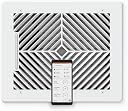
The Flair Smart Register Supply Vent 8x10 is a white AC vent cover designed for walls and ceilings that integrates with your smart home HVAC system. It automatically modulates airflow based on temperature sensors and smart thermostat data to optimize room temperatures. Installation is simple with no wiring required, and the system is controlled via a dedicated app compatible with voice assistants. While it requires a Flair Bridge and temperature sensors (sold separately) for full functionality, it offers customizable scheduling and remote control to enhance home comfort and energy efficiency.


| ASIN | B0CTRX37GF |
| Batteries | 2 C batteries required. (included) |
| Battery Cell Type | Alkaline |
| Best Sellers Rank | #57,214 in Tools & Home Improvement ( See Top 100 in Tools & Home Improvement ) #386 in Registers, Grilles & Vents |
| Color | White |
| Customer Reviews | 3.8 3.8 out of 5 stars (530) |
| Date First Available | January 31, 2024 |
| Finish | Finished |
| Item Weight | 3.21 pounds |
| Manufacturer | Flair |
| Product Dimensions | 12.2 x 10.2 x 0.2 inches |
| Size | 8x10 Inch |
G**S
Reliable Programmable Controlled HVAC Register
Excellent product, it performs as expected. It requires a little effort to program, but it delivers as promised. I would definitely recommend it.
D**C
I really wanted this to work...
I really, really, really, wanted this product to work. I’ve got a 2 story house, with a single zone central heating and cooling system. Upstairs is always too hot, and downstairs is always too cold. I was so excited to see this system and hoped it would fix my issues. I read up on it, and was ready to spend the $2000 to do up my entire house. I started reading the reviews, and got a little worried, so I decided to start one room at a time. After just a few days it was clear it wasn’t working out. I’m taking time to write this review, in the hope that the issues will be addressed by Flair, hopefully one day, making this a useable system. I’m sure like many before me, I read the negative reviews, and figured these were not “tech savvy” people. I’d have no issues. After all, I’m geek, and not easily put off by technology, I get a paycheck from working with computers. Sadly, this wasn’t the case. This is a great idea, but (in my opinion) just implemented very poorly, and needs a lot of polish. To start off with the vents themselves. You plug in the batteries, and sometimes nothing happens, and sometimes the louvers cycle, and a light comes on. Sometimes they don’t cycle, and a light comes on, sometimes the light doesn’t come on at all, it’s totally random what happens. The light is used for pairing. It’s a light bar, and when the light is at a certain point on that bar, it’s supposed to identify it. Sometimes though the light moves. Sometimes I knew it was the correct vent, but the light didn’t match up to what the app said sit was. Long story short, it’s very inconsistent. Why not just give it a pairing name/number and do it that way? Seems overly complicated to me. Continuing with the vents, a portion of the airflow is cut off by the motors, and the battery pack. By my math, a little over 16% of the area for air flow is blocked. To be fair, I don’t know what the solution to this would be. It needs the battery for power, and the motor to move the louvers, and there’s not a lot of room to put them anywhere else. But, this just happens to leave less area for air flow. On top of that, you add the cover. It has another layer of very small fixed vent holes restricting air flow even more. The openings are very small and restrict airflow pretty drastically compared to the vents I had before. For heat I don’t know if this is a big issue, but for air conditioning, I think it could be a noticeable difference, as it takes more air to cool than heat. The vent cover is an absolute PAIN to line up and screw on. It’s got two tiny screws that need to line up perfectly, and while working over your head on a ladder, this is very frustrating. Then we move on to how it’s all connected. In order for the vents to be used, they have to connect to the “puck” which connects to your Wi-Fi. You then control all this from an app on your smartphone. Somewhere in the instructions I recall reading the puck has better/longer range reception for the vents than your home Wi-Fi system does for Wi-Fi devices. Not true. Not even close to true. The range on the pucks is abysmal. So, if you’re doing an entire house, you’ll need more than one puck set up as a gateway. Like me, I’m sure many people have taken steps to make sure their home has got a good Wi-Fi signal throughout. Smaller house maybe you boosted the signal from your SoHo router. Larger homes, maybe a repeater? Maybe a mesh system? Or if you’re in the uber geek category like me, Wi-Fi access points with a dedicated controller. So what I don’t get, is why the vents can’t connect directly to your Wi-Fi. First you have to get a “Puck” and set it up as a “gateway” Then the vents all have to connect to that puck. This method reminds me of a very dated wireless surveillance camera system I had (Arlo). Years ago it was the same thing, you had to connect the gateway to your router, then connect the cameras to the gateway. However as time has moved on, you can now buy cameras (Ring) that connect directly to your Wi-Fi. However, if the puck you set up as a gateway doesn’t have enough range (which again, is abysmal) to connect to all your vents (which mine didn’t), you need to buy another puck… overly complicated, and it gets expensive. So I bought another puck. The vents on one side of the house wanted to connect to the puck furthest away and vice versa. Many hours of troubleshooting this, resetting, re-pairing, and it was just madness. What it came down to is I think two gateway pucks fight with each other. Or maybe they were fighting my access points. I could never get them to work nicely together. Again, why not just let the vents connect directly to my Wi-Fi like so many other IOT devices? BTW, the app has a nice RSSI meter for the devices. However, all that lead to was confusion and disappointment. A vent in the same room as the gateway-puck had an RSSI of over -90. Headscratcher there. Incidentally, the puck is also a thermostat you can set up control individual zones/rooms. It is the most expensive piece of equipment in this setup, at $120. So, if you just want to use it as a thermostat (not as a gateway), it seems like you’re paying more money, for features you just don’t use. Why not sell thermostat only, non-gateway puck for less money? The pucks themselves look ok, but feel like cheap plastic. The LCD screen seems like a screen from a Casio wristwatch from the 80’s. It’s a rotational dial that cycles a menu, and there’s a noticeable lag when you turn it, so you’re always going past the selection you want. Also, no backlight, so no temperature adjustments at night, or in darker rooms. Think about that $120, and no light, really? When the puck is in “gateway” mode you have to power it with the provided micro USB plug. Flairs’ idea is that you mount it on the wall with the cord hanging down the wall. Ugly. I thought maybe keep it on a nightstand or dresser. But then the screen is upside down, and you can’t change the orientation of the screen. The app that is supposed to integrate and control all this is very clumsy and not very intuitive. When given commands to open or close the vents, it has a lag of at least one minute. Doesn’t seem like much, but when you’ve spent the hours I have troubleshooting these things, it adds up very quickly. And sometimes the vents just choose not to respond. And you don’t know unless you physically go look at the vents. They worked perfect for a few days, and then ignored, or missed, signals to open and close about 50% of the time after that. Other reviews have complained about the lag and stated when you tell the system to do something, it phones home to the Flair servers, and then issues the command back to your system. If true, that just seems… inefficient, and overly complicated. And what’s going to happen if those servers go down? There’s many more little things, but those are the big ones, and ultimately why I ended up returning this product. I was sad to do so, because as I stated above, I really wanted this to work. Flair if your still reading, I look forward to the day you fix all this and I can reliably use your product, or a competitor beats you to it.
J**M
9 Month Review
The Flair vents are sick—in the best way. Upstairs, I’ve got three bedrooms on their own HVAC unit. It was like a Goldilocks story up there: one room was too hot, one was too cold, and one was juuust right. To fix this, I installed three Flair smart vents (8x8, 10x10, and 6x14). I already had a Honeywell T9 thermostat, but I leveled up by adding smart room sensors for each bedroom. To tie everything together, I got a Flair puck, which acts as the hub and the middleman between the vents and the internet. The puck lives in the hallway, diligently managing the system. My goal was simple: when Bedroom 1 hits its target temp, its vent closes. Same with Bedrooms 2 and 3. Flair works really well with the Honeywell sensors to make this happen. Now, about that guest bathroom vent. I left it unchanged because I worried about backflow pressure—if all the vents closed while the HVAC unit kept running, it could damage the system. Flair has an algorithm to prevent this by keeping vents open, but it wasn’t exactly what I needed. Flair’s default is to keep two vents open at all times, but I only wanted one. So...I lied to Flair (sorry, Flair). By telling it I had more vents, I got it to work the way I wanted. Play with that at your own risk. FYI, the guest bathroom vent is now the designated “always-open” vent, but flair always ensures that one of the flair vents are always open. I also set the system to fully open all vents when the unit switches to circulation mode (just moving air around, not heating or cooling). The result? Flawless. Seriously, I barely even notice it’s there—it just works. Once you’ve set it up to your liking, maintenance is practically nonexistent. It’s one of those systems you forget about because it’s doing its job so well. Buy them now before the HVAC contractors find a way to put them out of business. Far superior system in both terms of cost and efficiency than your standard HVAC approach. Eventually, I want to do the same thing downstairs, but that is going to be it's own animal to tackle. Highly recommend!
A**R
Great but finicky with ASUS wifi routers.
Love the product. 1 small but painful issue. Won't reconnect to wifi after a power outage / router reboot. They claim an incompatibility with the ASUS AC68U wifi router.
J**O
Just what I was looking for!
These smart vents and pucks were the perfect solution I was looking for for my older 2-story 3,000 sqft home with just one central heat/AC unit (my smart thermostat is located downstairs). The upstairs primary bedroom and 2 secondary bedrooms are always warmer than the downstairs room in the winter and summer. The high ceilings in my primary bedroom and office also makes those vents difficult to get to and adjust manually. These smart vents work flawlessly! I can set the desired temperature in each room with the app and the vents automatically open and close to help regulate the temperatures across all rooms. So far they have worked great this winter. Looking forward to see how they perform this summer.
Trustpilot
4 days ago
1 day ago