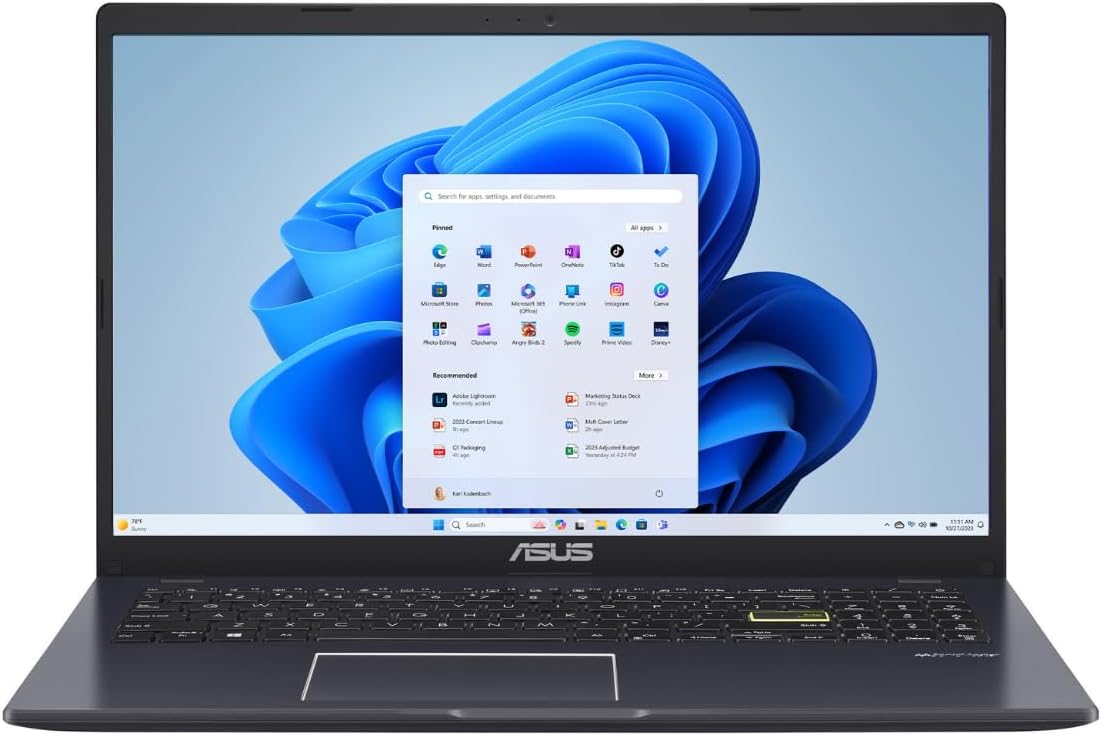
🚀 Elevate your everyday grind with sleek power and seamless style!
The ASUS Vivobook Go 15.6” laptop combines a sharp Full HD anti-glare display with an efficient Intel Celeron N4500 processor and 4GB DDR4 RAM, optimized for everyday tasks and video calls. Its 128GB SSD storage and Windows 11 in S Mode provide fast, secure performance, while a 42Wh battery with fast USB-C charging keeps you productive all day. Lightweight and equipped with Wi-Fi 5, Bluetooth 5.1, and a backlit keyboard, it’s designed for professionals seeking affordable, reliable mobility without compromise.


| ASIN | B0CRDCW3Q3 |
| Audio Output Type | Speakers |
| Automatic Backup Software Included | Windows 11 HOME IN S MODE |
| Available M2 Slot Count | 1 |
| Battery Cell Type | Lithium Ion |
| Battery Life | 8 Hours |
| Bluetooth Version | 5.1 |
| Bluetooth support? | Yes |
| Brand | ASUS |
| Built-In Media | L510KA-ES04 |
| CPU Codename | Jasper Lake |
| CPU Model Generation | 4th Generation |
| CPU Model Number | Intel Celeron N4500 |
| CPU Model Speed Maximum | 2.8 GHz |
| CPU model | Celeron |
| Camera Description | HD 720p |
| Chipset Type | GL86/GL96/GL6x |
| Color | Star Black |
| Colour | Star Black |
| Compatible Devices | External displays, mice, keyboards, storage devices, printers, and other accessories with USB, HDMI, or Bluetooth connectivity |
| Connectivity Technology | Bluetooth |
| Control Method | Touch |
| Customer Reviews | 3.9 out of 5 stars 731 Reviews |
| Display Resolution Maximum | 1920x1080 |
| Display Technology | LED |
| Display Type | LED |
| Form Factor | Conventional |
| Graphics Coprocessor | Intel HD Graphics |
| Graphics Description | Integrated |
| Graphics Ram Type | DDR4 SDRAM |
| Hard Disk Description | SSD |
| Hard Disk Interface | USB-C |
| Hard disk size | 128 GB |
| Hard-Drive Size | 128 GB |
| Hardware Interface | USB Type C |
| Has Color Screen | Yes |
| Human-Interface Input | Keyboard |
| Item Dimensions L x W x Thickness | 36L x 1.8W x 23.6Th centimeters |
| Item Weight | 1.57 kg |
| Keyboard Description | Backlit Chiclet Keyboard |
| Keyboard Layout | QZERTY |
| Lithium-Battery Energy Content | 42 Watt Hours |
| Manufacturer | ASUS |
| Maximum Display Brightness | 220 Nit |
| Memory Speed | 2933 MHz |
| Microphone Form Factor | Integrated |
| Model Name | L510KA-ES04 |
| Model Number | L510KA-ES04 |
| Model Year | 2024 |
| Model name | L510KA-ES04 |
| Native Resolution | 1920 x 1080 pixels |
| Number of Ports | 1 |
| Operating System | Windows 11 Home |
| Optical Storage Device | No Drive |
| Other Special Features of the Product | Lightweight |
| Power Device | USB-C and battery |
| Processor Brand | Intel |
| Processor Count | 2 |
| Processor Series | Celeron |
| Processor Speed | 2.8 GHz |
| RAM Memory Installed | 4 GB |
| RAM Memory Slot Total Count | 1 |
| RAM Memory Technology | DDR4 |
| RAM Type | DDR4 SDRAM |
| Ram Memory Maximum Size | 4 GB |
| Refresh Rate | 60 Hz |
| Resolution | 1920 x 1080 |
| Screen Finish | matte with anti-glare |
| Screen Size | 15.6 Inches |
| Screen size | 15.6 Inches |
| Speaker Description | Integrated speakers with Sonicmaster and Next-gen Super Linear technology for powerful, crystal-clear sound. |
| Specific Uses For Product | Personal |
| Total Number of HDMI Ports | 1 |
| Total Usb Ports | 1 |
| Touch Screen Type | No Touchscreen |
| UPC | 197105359079 |
| Unit Count | 1 Count |
| Video Output | DisplayPort |
| Video Processor | Intel |
| Voltage | 12 Volts |
| Webcam Capability | Yes |
| Wi-Fi Generation | Wifi 5 |
| Wireless Compability | 802.11ac, Bluetooth |
| Wireless Technology | Bluetooth |
C**A
Facilidad
Wow! M fasino es excelente calidad y buen precio
P**E
Priced like a Chromebook, but is instead a fully functional PC.
If you are looking for an inexpensive laptop, this one definitely works as such. It's priced like Chromebook, but it is just a normal, inexpensive PC. Some of the laptop's specs are expectedly minimal, having tiny storage space and minimal memory. It does sport a full 1920x1080 screen but the screen is not particularly bright or clear. I find the screen useable, particularly when using "dark mode" settings, but it's clearly not a highlight of the machine's hardware. It has a reasonable keyboard. It has two USB A slots, one USB C slot, one HDMI port, and a traditional audio port; its battery charge seems to be good for about 9 hours of light use. The wireless works reasonably well. The speakers are lackluster in sound quality, but are sufficiently loud to hear clearly. Music sent out via the audio port is surprisingly good quality. The processor is a good compromise, offering a reasonable amount of value for a very small price. I find the overall weight for the laptop good. The laptop doesn't dissipate heat as well some laptops, but it's not unpleasant to hold. If you are using Linux, all of the hardware works well with a modern distro. You wouldn't want to compile a full, traditional Gentoo system on this machine, but any of the modern mainstream binary distros should be fine.
R**P
W
So far this product has performed well. It was easy to set it up and thanks to my backup drive I was able to reconnect with all my accounts.
T**L
Unusable
REALLY wanted to like this laptop. My main is another ACER and it is great. However, I thought I must have gotten a defective unit until I saw reviews similar to what I'm seeing. This is not slow. It is SLOOOOOOW. I've got a 5 year old chromebook that is lightning compared to this thing. As someone else stated, even from the jump to update Windows took a few hours. JUST to update windows. I thought that it was slow because it was just updating things and would smooth out, but been using it for a week now and it seems to be getting worse. Just tried it this morning and the cursor is gone. Had to do a hard reset. After an almost 10 minute boot-up, still no cursor. I was thinking of trying to exchange thinking it can't possibly be this bad - I MUST have a defective unit - but it looks like this is just the performance. The screen: functional, but no matter what I do it looks washed out. WIFI - not much range, and keeps cutting out unless I'm in the room with the wireless router. Even then, don't try to move while downloading. Size: it's a nice size and weight - I'll give it that. Keyboard: As others have mentioned, no backlighting. In 2025 I was astounded that this wasn't included ON A LAPTOP. made it very hard to use at night, especially since half the time I was waiting on the computer to catch up to my typing. Battery - probably okay. Honestly, I couldn't use it very long at a time because it is just so frustrating. I did notice though that it arrived completely drained, which was unusual. Every laptop i have purchased online has always arrived with SOME battery life. Going to try to reboot one more time and see if I get a cursor again: Update - after 20 minutes I think it is fully booted, but hard to say. No cursor. It WAS there at the log in screen, but disappeared as soon as Windows started coming up. Got Task Manager open. Memory staying at 85% with no programs running (although Dropbox is loaded and taking up a good chunck). Windows Defender is eating up most of the memory by far. Disk bounces between 0 and 100%, CPU from 35 to 100%. Again, I haven't actually opened ANYTHING yet. I tried the suggested fix of rebooting the video drivers, but still no cursor. This is completely unusable to me as is.
K**I
Set up, performance and speed
I was excited to try this ASUS laptop, but setup took almost two hours which was longer than I expected for a new device. After everything was installed, the performance was slower than it should be, even with simple tasks like browsing and opening apps. The build quality is nice and the design looks good, but overall the speed and initial setup experience left me a bit disappointed. I’m hoping performance improves with updates.
Trustpilot
1 week ago
3 weeks ago