Buy anything from 5,000+ international stores. One checkout price. No surprise fees. Join 2M+ shoppers on Desertcart.
Desertcart purchases this item on your behalf and handles shipping, customs, and support to Croatia.
โจ๏ธ Elevate your typing game with comfort and style โ donโt get left in the dark!
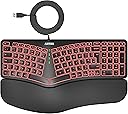
The Arteck Ergonomic USB Wired Keyboard features a natural split design and cushioned wrist rest to minimize typing fatigue. It offers 7 backlit color options with adjustable brightness for a personalized workspace ambiance. With a 6-foot USB cable, it ensures easy plug-and-play compatibility with Windows PCs and laptops, backed by a 24-month warranty for reliable performance.


| ASIN | B0CGL8X4H6 |
| Antenna Location | Business, Education, Everyday Use, Gaming, Multimedia, Personal, Programming, Student |
| Best Sellers Rank | 7,989 in Computers & Accessories ( See Top 100 in Computers & Accessories ) 117 in Keyboards (Computers & Accessories) |
| Box Contents | USB Cable |
| Brand | Arteck |
| Brand Name | Arteck |
| Button Quantity | 104 |
| Colour | black or gray |
| Compatible Devices | Desktop, Laptop, PC |
| Compatible Operating System Family | Windows |
| Compatible Tablet Computer Models | AAUB P30 |
| Compatible devices | Desktop, Laptop, PC |
| Connectivity Technology | USB |
| Connectivity technology | USB |
| Country of Origin | China |
| Customer Reviews | 4.4 out of 5 stars 1,088 Reviews |
| Enclosure Material | Plastic Silicone Rubber |
| Hand Orientation | Ambidextrous |
| Is Electric | Yes |
| Keyboard Backlighting Color Support | RGB |
| Keyboard Description | Ergonomic, Backlit, Wired, Low-Profile Keys |
| Keyboard Layout | QWERTY |
| Keyboard description | Ergonomic, Backlit, Wired, Low-Profile Keys |
| Manufacturer | Arteck |
| Manufacturer Part Number | HA315B |
| Mechanical Keyboard Switch Model | Interruptor de tijera |
| Minimum Required Operating System Version | Windows 10 |
| Model Number | HA315B |
| Number of Keys | 101 |
| Number of Sections | 1 |
| Power Source | USB |
| Product Features | Backlit, Ergonomic, Low-Profile Key, Split Keyset Design |
| Product Warranty | 2 Year Limited Warranty |
| Recommended uses for product | Business, Education, Everyday Use, Gaming, Multimedia, Personal, Programming, Student |
| Special feature | Backlit, Ergonomic, Low-Profile Key, Split Keyset Design |
| Style Name | Modern |
| Switch Type | Scissor-Switch |
| Theme | Ergonomics & Lighting |
| Unit Count | 1.0 count |
| Water Resistance Level | Not Water Resistant |
N**Y
Good erganomic keyboard
Very pleased with this keyboard. I've had tennis elbow (apparently now sometimes called "mouse elbow" in some circles) which has been very painful when working with a standard mouse and keyboard. As my job requires pretty much full time use of both (I'm a programmer), I needed to find something that would reduce the pressure on my elbow/wrist/tendon. I did a bit of research and eventually found and bought this keyboard and a Protoarc upright mouse (which I've also reviewed positively). I was never sure about erganomic keyboards before, but with the pain that I was having, I needed to try something to reduce the pressure on my elbow. This has been pleasantly surprising. It's a well built keyboard with a surprisingly very nice feel to the keys, which are well spaced and have a decent amount of travel. It has a really comfortable (non removable) padded palm/wrist rest and has legs on both the front and the back of the keyboard so you can angle it away from you as well as tilting it toward you, or raise the keyboard slightly, as I do. This makes (for me, anyway) a very comfortable typing position. If you've not used one before, having a split keyboard might be a little different for you for a short while, but I've found that I've lost no accuracy or speed and can touch type as well as I could before. The keyboard has several built in macros on the function keys for things like media: volume, skip forward/backward, search - accessible using the Fn key. This can be toggled using the function lock key to either have the Fn keys or macros in use full time with the Fn key performing the "opposite" function. There are also several other macro keys - lock session, calculator, plus a couple of keyboard specific keys for the backlight. The backlight is quite good- there are 7 colours (including white) with 3 brightness levels and although I never really used a backlit keyboard prior to this, during the darker months working from home, it does provide a nice even glow across the whole keyboard. Connectivity, really simple - it's plug and play, no drivers required, just plug in the USB and go In all, I'd recommend this.
A**Y
High quality, comfortable and great design
If you are in the market for a well-rounded, budget-friendly ergonomic keyboard that offers a comfortable typing experience, the Arteck Ergonomic Wired Keyboard is a top contender. Here's why: 1. Design and Build Quality (5/5) The Arteck keyboard boasts a sleek and modern design that stands out in its price range. The build quality is impressive, featuring a robust structure that doesnโt feel flimsy or cheap. Its ergonomic shape immediately catches the eye, with a slight curvature that ensures your wrists are at a comfortable angle while typing. Iโve found this to be especially helpful during long work sessions. 2. Ergonomics and Comfort (5/5) The standout feature of this keyboard is its ergonomic design. It provides excellent wrist support with a gentle slope and a soft, cushioned wrist rest. This helps reduce strain on your hands and wrists, making it ideal for people who type for extended periods. The keys are also well-spaced and have a satisfying tactile feel, making typing a pleasure. The adjustable stand at the back allows you to raise the keyboard to your preferred angle, which further enhances the comfort and reduces the risk of repetitive strain injury. After using it for a week, I noticed less fatigue compared to my previous flat keyboard. 3. Typing Experience (4.7/5) Typing on this keyboard is smooth and comfortable. The keys have a nice bounce to them, and the low travel distance means you don't have to press down too hard. This makes typing faster and more accurate. Additionally, the keys are quiet, so it's perfect for shared office spaces or if you prefer a quieter working environment. One minor downside is that it may take a bit of time to adjust to the layout if you're coming from a traditional keyboard. However, once you're used to it, the typing experience is significantly improved. The backlit keys, which are adjustable for brightness, are a nice touch, especially when working in low-light conditions. 4. Backlighting (4.5/5) The Arteck keyboard comes with adjustable backlighting that enhances both the aesthetic appeal and the functionality, particularly in dimly lit environments. You can adjust the brightness to your liking, and the illumination is evenly distributed across the keys, ensuring each key is clearly visible. While the back light works well, it offers limited customization colors or fancy lighting modes, which might be a deal-breaker for those looking for something more dynamic. However, for most users who need functional lighting, this is more than enough. 5. Connectivity and Setup (5/5) Being a wired keyboard, the Arteck is incredibly simple to set up. Itโs plug-and-playโno need to install drivers or software. Just connect it to your PC or laptop, and youโre good to go. The cable is long enough to accommodate various setups, whether youโre using it for a desktop or laptop. 6. Durability and Longevity (4.8/5) After weeks of heavy use, the Arteck keyboard shows no signs of wear. The keys feel just as responsive as they did on day one. The materials used in the build are durable, ensuring this keyboard can handle regular usage without losing its quality. 7. Value for Money (5/5) At its price point, the Arteck Ergonomic Wired Keyboard offers incredible value for money. It packs features youโd expect from higher-end modelsโlike adjustable backlighting and ergonomic supportโinto a much more affordable package. Whether youโre working from home, gaming, or just want a more comfortable typing experience, this keyboard is a great investment. Final Verdict: Pros: Excellent ergonomic design with wrist support Quiet, responsive keys Adjustable backlighting Durable build quality Plug-and-play setup Cons: Limited backlight customization May require a short adjustment period for some users In conclusion, the Arteck Ergonomic Wired Keyboard is a great product for anyone looking for an affordable yet high-quality typing experience. Its ergonomic design, quiet keys, and backlighting make it ideal for both work and leisure. I highly recommend this to anyone in need of a reliable, comfortable keyboard for everyday use. Would definitely buy again!
V**L
Slim. strong and comfortable!
I used the Microsoft ergonomic keyboard for years until it died. I really liked the ergonomic design, but it was big and clunky, and a bit old fashioned. I have used the Arteck HW315 at home for a while and loved it so chose the Arteck HA315B for work. This keyboard is essentially the same as the HW315 except it is wired and has multiple colour choice backlighting. I have been using this keyboard every day for over a month (as well as the HW315 at home for longer) and absolutely love it! It is comfortable with a padded but firm hand rest and four retractable feet. The ergonomic design is great for typing smoothly but Arteck have managed to do this whilst keeping the overall size slim and neat โ it uses much less desk space than my old MS keyboard. The lead is a slim but sturdy braided design with good length. The keys are responsive and positive, but shorter and smoother than a traditional keyboard. The backlit colour and brightness are adjusted easily with two buttons above the number pad - it is fun choosing my colour of the day and it looks great at night with the lights out. It also has a keyboard shortcut for the calculator which is so handy. The function buttons double up as volume/brightness etc like a laptop, with a function lock button to switch between the two modes. I have can also vouch for Arteck's after sales service as a leg broke on my wireless keyboard. After a single email, a replacement was sent out very quickly. Overall an excellent choice and very reasonable priced.
J**.
Good but not perfect replacement for MS Ergonomic 400 keyboard
Slightly mixed opinion. I very much like the feel of the keys, the backlighting and the small size. I don't like the Home, PgUp, PgDn and End keys being accessed by having to press Function + arrow key. You loose the ability to select a set of contiguous cells in Excel by pressing Shift + end + down (or Shift + end + right) or jump to the end of a word. I have yet to get to grips with the position of the delete and backspace keys - I keep missing them. No doubt due to muscle memory from years of using the MS Ergonomic 400 keyboard. So on balance it is a good replacement for my defunct keyboard, but not perfect
A**Y
I am happy once again!
I stopped leaving reviews at one point, simply because of all the mundane things I buy from Amazon, it gets overwhelming! Anyway, back to the point. I had a keyboard like this years ago & absolutely loved typing on it. This I can say is no disappointment! They take some getting used to sure, but it just feels so natural. Because of the cost of things like Logitech, I ended up using a standard keyboard for too many years. I was given some Amazon vouchers for Christmas & one of the items I bought was this keyboard. I am really happy with the quality of the build, it feels premium, as does the wrist rest. Apologies if I missed any typos, I am still trying to kill the old habit of using both hands for the whole keyboard! I love the backlighting, which unlike so many others actually shows through the letters. So many backlit keyboards just shine around the letters, but this is much clearer. I also use a KVM switch, which gets powered off at night but this keyboard actually remembers my light preferences & the fact I like having function lock engaged. It is these silly little things that really make an experience. It is very comfortable to type on & whilst I wouldn't say the keys are the quietest they are very pleasant to use. To me the the sound is quite nice. Key travel is good & seems just right. I got so fed up with other basic keyboards that |I used to 'put up with'. Now, I still have to try to get used to the way I used to type, but I'm sure the brain will kick in before long with how it used to be. On the minus side, it is quite big & no good for small desks. Also, some of the keys are on the small side, but not main keys, only things like cursor arrows, which feel a little cramped. These are pretty small niggles though & overall I am very happy. The two year guarantee was just an added bonus.
T**)
Well built, smooth action and great customer service. Highly Recommended seller from me.
This keyboard is lovely to use, well built very comfortable to use and very smooth keystroke action. Features many options for backlit LED colours and intensities selectable from the keyboard it's self. Plug and play no setup required, tested on both windows 10 and Linux. No plastic, frustration free packaging, great for ecologically conscious people. Customer service were amazing very friendly and professional, as a matter of fact the level customer service I received from the seller has been the best I have ever experienced on Amazon or anywhere else (on or offline) for that matter. I highly recommend this keyboard and I'm truly grateful for the amazing customer service.
H**S
Home, End, Page Down and Page Up keys not easily accessible
Nice, reliable and comfortable to use. Keys are little noisy but not terrible. My only serious grip is the the Home, End, Page Up and Page Down keys not having their own keys in the usual place. Instead they are secondary functions of the arrow keys. As software developer, I use these keys alot to navigate and select blocks of code quickly, can having to use them with the Fn key and not be in the normal location is a serious design flaw.
J**F
LED lit ergonimic keyboard that works well
Great piece of kit, really responsive and comfortable. I've had ergonimic keyboards in the past and this is well worth the outlay. The easily adjustable LED lighting makes it easy to use in the dark too. I've attached a video so you can hear the sounds of the keys (important to some). The feel is like a decent laptop keyboard, in terms of the press and recoil.
C**A
Bonito, macio para digitar e cores da luz variadas para nรฃo enjoar.
รtimo!
A**R
Precisely What I Was Looking For
I've used this keyboard daily for 3 months now, and it has been a great experience so far. It's my first time purchasing an Arteck keyboard, so I wasn't sure what to expect, but I had heard their brand is reputable for making solid, reliable devices, and thus far I would agree with that. I was looking for a very specific set of features in a keyboard, and this was literally the only one that checked all of the boxes on Amazon at the time of purchasing. Features I was looking for that it had: Ergonomic split key style with a padded wrist rest. Scissor-style key press mechanism (feels like a laptop keyboard when typing) Backlit keys with multiple color choices, including white A full sized number pad on the right side Wired, rather than wireless (although in hindsight, either would have been fine.) There are a few things about the keyboard that are relatively minor, not anything that makes it a bad experience, but that if I could have everything perfect in a single keyboard, I would prefer they were slightly different. The half-sized Up/Down arrow buttons, while functional, I would prefer full size ones like the right and left arrows. They feel a bit cramped to use. The delete key being about 3/4 sized is not that strange, but its position above and right-aligned to the backspace key is just awkward for me. I'm used to it being underneath, or off to the right side. Very often I will blind-press either the "FN Lock" (Function Lock) key to the left of it by mistake, thinking it is the Delete key, either that or the Calculator key (which works great in Linux by the way) to the right of it. 3 months in and I'm still not used to its size or placement unfortunately. Similarly, I'd rather the top row of keys on the number pad were positioned elsewhere, (or mainly just the color change button for the backlight not being above the - key) but I do understand that there are limitations to the amount of space they can work with, and appreciate that they managed to pack a bunch of extra feature keys. I'd prefer the print screen feature to have its own dedicated key, rather than being a toggle ON/OFF via the function lock. For example, to switch between the ability to take a screenshot, and the ability to refresh a webpage via the F5 key, you have to press the function lock key in between to toggle the functionality. Most of the functions controlled by FN Lock are used sparingly (volume controls, media playback controls, brightness settings, scroll lock and the insert key) but print screen is one of those that's pretty common for me, and would have been more helpful having its own key instead. Two more minor things related to the lights... if I had it all my way... By the way, at the time of writing, there was a discrepancy in the product description in regards to the backlighting colors so, for those who are wondering, the key colors on the HA315B model are: yellow, purple, cyan, white, red, green, and indigo (blue.) The first one is just a personal preference. I've surprised myself by gravitating to the yellow color lights. I wish the yellow color was more to the orange/red side, like a golden color. Instead it is closer to a yellow-green, which is fine, I would have just preferred something a bit more gold if I could pick. Not a big deal at all. I like that it has a lot of color choices! The other "issue" was just that the green lights in the center of the keyboard that tell you what buttons are ON/OFF for capslock, function lock, numlock, and so on, are SUPER bright. Way too unnecessarily bright. It looks great when you're using the green color on the backlight, since it matches well, but for everything else it's too intense and visually distracting, especially in a darker room. But, I got some old solid black electrical tape I had laying around, and cut little tiny squares of out it, and covered about 75-90% of the visible lights with that, drastically reducing their brightness to a more sane and tolerable level, while also being careful not to completely cover the lights, so I can still tell when they are on or off in general. It's a simple, low-tech fix, and again not a huge deal, but for future keyboard designs I would highly suggest putting a much dimmer and more subtle light in for those. All in all, it may sound like I have a lot of complaints, but honestly none of them are all that big of a deal. Almost every keyboard I've ever used has at least a few aspects that feel are a bit less than ideal compared to what I would prefer, and none of these things are detrimental enough to feel like a disservice to the experience. It's a very enjoyable keyboard to use and I'm quite pleased with it. The pros far outweigh the cons, in other words. I would definitely recommend this keyboard if you are looking for these very specific combination of features, like I was, and I'm pleased with my purchase for sure. If everything continues to go this well throughout the rest of the year, I'd safely be able to recommend Arteck, or at least this specific product, to anyone interested.
D**G
After years of trying different keyboards this is it: Ergonomic, and illuminated and no blue tooth
I have nothing against blue tooth, but I don't want any more of it around. It's a nuisance, drops connections, needs charging, etc, etc. In my hunt for a usb wired ergonomic keyboard I've tried (and have) most of them, since I'm an editor/writer, but even though I love the old Microsoft, and I really like my old mechanical ergonmics, I really wanted -- as my eyesight get's worse with age -- illuminated keys. I don't need it for wordsmithing, but for numbers and special characters, especially today with keyboards moving things around when they feel like it (i.e. there's a standard folks! Keep it!) I needed that light, especially at my desk. I don't like to flood my desk with light as I work on keyboard and monitor all day. Finally, after endless hunting, and many keyboards I found one both Ergonomic (and that means full sized keys!, not just wrist supports and angles) and USB with LED-lit keys. I didn't order for awhile, as it was pricey for what I thought was an unknown brand (I don't know it, myself, anyway), but finally, when I didn't find alternates I ordered. No regrets. It may be an unknown sleeper, but it's comfortable, quiet, easy to type on all day, USB plugin (yeah, no more charging!! Is there anything dumber than having to charge a keyboard and mouse? I'm already charging laptop, phone, ereader, tablet and a dozen other things. Why would I want to both with charging keyboards and mice?) Am I lazy? Maybe, but anyway Arteck built the lazy-man's keyboard, ergonimic with lights and no batteries. Amazing how the small things matter. (The leather-ish wrist wrest is nice, too). One small nit is the up/down/left/right arrows are small keys when everyting else is full size.
R**H
A wired keyboard with backlit keys that works very well
this is an excellent keyboard for a desktop PC. I selected it because I wanted a desktop keyboard that has keys that light up. All of the other such keyboards that I considered were wireless and would need to be recharged after 1-2 days. This one is wired so that is not an issue. The keys light up nicely (choice of colors and brightness) and be seen well with low ambient light. The keys are responsive to light touch and the palm pad is quite comfortable. I had to contact customer support to find out how to get the PgUp, PgDn, Home, and End functions to work (need to hold down Fn key and then tap them) and they were very responsive. I have now purchased a second keyboard for another PC I have.
K**A
Great keyboard but it's used and some damage
First of all, this is a used keyboard not new and I find the price a bit high but it is a good keyboard, great quality and very comfortable on your hands, other that I recommend it.
Trustpilot
1 week ago
2 weeks ago