


🚀 Elevate Your WiFi Game — Never Miss a Signal!
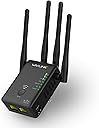
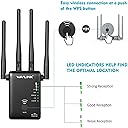
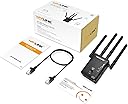
The WAVLINK AC1200 WiFi Extender Booster delivers up to 1200 Mbps dual-band speeds with 4 external antennas, eliminating dead zones and enhancing coverage. Featuring 3 operation modes—Repeater, Router, and Access Point—it adapts to diverse network setups. Easy WPS and browser-based installation make setup a breeze, while dual Ethernet ports support wired devices. Robust security protocols keep your home network protected, making it the perfect upgrade for millennial professionals craving reliable, high-speed connectivity everywhere.




| ASIN | B078H9DWMB |
| Best Sellers Rank | 62,805 in Computers & Accessories ( See Top 100 in Computers & Accessories ) 501 in Network Repeaters |
| Box Contents | WAVLINK |
| Brand | WAVLINK |
| Brand Name | WAVLINK |
| Colour | Black |
| Compatible Devices | Router |
| Connector Type | RJ45 |
| Customer Reviews | 3.8 out of 5 stars 583 Reviews |
| Data Transfer Rate | 300 Megabits Per Second |
| Data transfer rate | 300 Megabits Per Second |
| Frequency Band Class | Dual-Band |
| Frequency Bands Supported | 2.4 GHz, 5 GHz |
| Frequency band class | Dual-Band |
| Item Weight | 5 Grams |
| Manufacturer | wavlink |
| Manufacturer Part Number | wifi repeater |
| Model Number | wifi repeater |
| Range | 1200 megabits_per_second |
| Smart Home Compatibility | Smart Home Compatible |
| Special Features | Access Point Mode, LED Indicator |
| Special feature | Access Point Mode, LED Indicator |
| UPC | 695536205601 |
| Wireless Compability | 802.11ac |
| Wireless communication standard | 802.11ac |
L**Y
Use a mobile and don't plug anything in before you have it configured!
Worked for me. I'm using as a WiFi access point plugged into my wired router and it has much better 5ghz signal strength than the previous AP Use a mobile to set it up. Put the switch for on (hard to see. so the lights are on. The three signal lights will eventually switch on to show it is ready for connection) Set switch for repeater on device Do NOT plug anything in the device yet Use mobile WiFi to connect to WavLink N(it will warn that there is no internet) Go to WiFi.wavlink.com in your mobile browser and log in to the page with the password of admin Configure password to access config page in the browser. (It will reset and probably your mobile will connect to another wifi that it can see) Reconnect WiFi on mobile to wavlink n (n is 2.4ghz AC is 5 GHz) Visit WiFi.wavlink.com again in your browser You should be able to use the password that you just set previously (you cannot use admin again, it has to be something else) Configure the rest of the settings like DNS and dynamic IP and WiFi settings to your existing WiFi if you're using as an extender in the browser page If you're going to use LAN, make sure to choose an IP range that is compatible with your current network. Eg 192.168.1.130 if your current router is accessed with 192.168.1.254 or other 192.168.1.x number The light above the power light should switch on if a LAN connection is used Once you're in the browser page on your mobile you can configure it as a bridge or repeater . Make sure the IP address has the same first 3 groups of numbers that you normally use or your pc or Mac will get confused which is the correct network. Eg 192.168.0.x or 192.168.1.x they're the usual IP address ranges that router use Once it is connected to the LAN, you can access the config page with the IP that you set. (Luckily it already used an IP that was in my home network range 192.168.1.0 - 192.168.1.254) If you're lucky and using it as a repeater, it might just automatically work if there aren't many WiFi signals about Be sure to change the access password for security.
B**R
Excellent booster
Easy to install
A**R
Awesome product
Using this to boost my signal into the garden, it's gone through the outside wall and to the back of my garden, simple to set up. All I'd say is you need to connect to the booster signal, which comes up as a separate WiFi and use your normal password
S**B
Faulty firmware, do not touch
Does not work as an access point? The DHCP page is disabled, but it is still acting as a DHCP server, overriding the router and giving out IP addresses in the wrong range, so my devices randomly stop working. UPDATE1: Wavlink support is non-existent. Their response: Send us your invoice number and vendor, and we'll get them to contact you. Which I have done twice. I haven't had any further contact on the issue. UPDATE2: Wifi now stops working after about a day of use, I've noticed it is red hot. Powering it off/on resolves the problem for another 24 hours.... I've now unplugged it.
A**R
Its ok as a range extender BUT dont expect fast speeeds.
Its good as a range extender but don't expect fast speeds as a repeater. (That will be the same for most cheap repeaters). If you want fast speeds I recommend running a CAT 8 cable from you router to upstairs, then plug the WAVLINK into the CAT 8 LAN cable and run it in AP (Access point) mode. (SEE BIT BELOW TO GET YOU STARTED) REPEATER MODE It connects to the router with either 2.4 or 5G not both, over Wi-Fi then the WAVLINK generates a 2.4G ext and 5G ext signal from that. I know its a bit tricky setting it up, Set switch on the WAVLINK to repeater, plug it into ther mains and switch it on (power switch on WAVLINK) Disconnect any LAN cables going to your PC or LAPTOP Use your PC or LAPTOP to find the WAVLINK-N Wi-Fi signal and connect to it Now your connected via Wi-Fi to the WAVLINK unit. Open a Web brouser on your PC, CHROME, FireFox, whatever enter wifi.wavlink.com You should get the LOGIN page (this is a web page inside the WAVLINK) Use admin as the password for the first and ONLY time The system setup window should apear CHANGE YOUR LOGIN PASSWORD!!! (use your SKY password to keep it simple) You may have a different router BT, VIRGIN, but im using a SKY router in this example. I kept the region as GLOBAL. Type your NEW password into the Login Password box at the bottom and press next Mine went straight to the REPEATER WIZARD ,(My switch was set to repeater rember) At the bottom should be a list of all the WI-Fi signals it found, Select with a DOT your SKY router (select you router WI-Fi SSID) Above are five boxes "Repeater mode" leave as gateway "Wi-Fi connect to "type in your sky WI-Fi SKY 907X this is the SSID name "Wi-Fi password" type in your SKY Wi-Fi password to keep it simple press connect Your ready to run it as a repeater now, power down the WAVLINK , move it to its new location (upstairs or near the garden0. plug it in and power it up. You should see a 2.4G EXT and a 5G EXT Wi-Fi (so you know what your connecting to The password is the same as your SKY box to keep it simple. You should now have extra Wi-Fi coverage but not super fast. Only run it in AP (Access Point) mode if you know what you are doing. This involves running a CAT 8 cable from your router to the WAVLINK (upstairs or near garden) Lets say your router sits at 192.168.0.1 SKY Router IP address on your network Lets say your PC or Laptop sits at 192.168.20 (on a LAN cable to your router) You want your WAVLINK to be set on the same subnet address range-------- (what did he just say?? WHAT!) i.e the 192.168.0. bit must be the same The WAVLINK you could set to 192.168.0.200 or 192.168.254 I have not done this bit yet as im waiting for a long CAT8 LAN cable to arive But you get the general idear. (i hope its easy to do) You can use different passwords but using the same as the router just makes things simple. In theory If I get download=33Mbsec on my living room PC connected via LAN to my router, the WAVLINK connected via CAT 8 cable (good for 2000mbsec) should get nearly the same speed,( say 30mbs download). The WAVLINK then has a 30Mbsec (download speed) feed via LAN cable, which it can use to generate its 2.4G EXT and 5G EXT Wi-Fi signal. (Rember Wi-Fi is a bit slower so dont expect 30mbs)
M**7
Wavlink WIFI Range Extender
The Wavlink AC1200 is a WIFI range extender, access point and wireless router all in one. This is a dual band 2.4GHz 300Mbps and 5GHz 867Mbps device with four External Antennas, two Ethernet Ports and WPS. This is a good quality device. It’s a bit smaller than I expected but still perform just as well. It’s easy to setup and use straight away. Overall i’m happy with this product and would recommend it. If this review was helpful please click the yes button below.
P**X
EXTREMELY Disappointed
Worked fine after initial installation was finally figured out from the very poor user guide. Unit got worryingly hot while in use and then started acting up after about three months. At first, the speeds dropped very low and then it stopped altogether. Tried various things to restart it - no success. Tried logging in to website - no success. Couldn’t even get past the initial log-in page. Tried using the QR code support page - no success. Had a look at the company Facebook page and find that lots of other people have had similar issues too. I’m going to throw my device out as soon as I’ve smashed it to bits with a large hammer. I can’t waste hours of my life on stuff like this.
C**S
Great Wi-fi extender
I needed to extend the Wi-fi to my summer house, so I bought a couple of plug extenders, however those didn’t do Wi-fi. So I bought this and set it up in Access Point mode. So pleased with it! Easy to set up, but most important I’m so happy with the coverage. My garden is terraced and always had issues with Wi-fi coverage. Not anymore, this is so good. Only downside, had to wait a week to have it delivered. No issues with the product though, it’s great!
R**O
Mise en route trés simple
Parfait pour pour moi pour étendre mon réseau de la maison au jardin pour installer une caméra, il est plus puissant que celui que j avais. Je le capte à plus de 20 m de la maison. J en commande un deuxieme pour un autre endroit. Seul défaut, je trouve qu il chauffe beaucoup.
C**S
Repetidor wifi
Lo compré para tener mas señal wifi y me ha hecho el papel perfectamente y eso que el router está en el sotano,saludos
A**E
Ich habe bereits 3 Geräte im Betrieb
Ich bin mit den WAVLINK sehr zufrieden. Es ist zwar etwas Geduld bei der Einrichtung erforderlich. Dafür sind die WAVLINKS sehr zuferlässig, Empfehlenswert.
D**S
Réseau instable
Passez votre chemin se répéteur wi-fi n'est pas génial car le réseau est instable on passe de dix mégabits à quarante mégabitet vint ces vers sans discontinuer
M**O
Bueno
Era para ampliar un poco la cobertura en una zona que no tenia, alguna vez puntual a tenido alguna desconexion. La velocidad podria ser mejorable pero estoy contento con el
Trustpilot
2 days ago
2 weeks ago