Buy anything from 5,000+ international stores. One checkout price. No surprise fees. Join 2M+ shoppers on Desertcart.
Desertcart purchases this item on your behalf and handles shipping, customs, and support to Croatia.
🚀 Elevate Your Wi-Fi Game — Stay Connected, Stay Ahead!
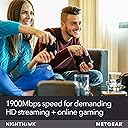
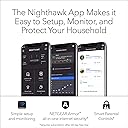
The NETGEAR Nighthawk R6900P AC1900 Smart Wi-Fi Router delivers blazing dual-band speeds up to 1900 Mbps, robust coverage for medium-sized homes up to 1800 sq ft, and supports up to 30 devices simultaneously. Equipped with 4 gigabit Ethernet ports and a USB 3.0 port, it ensures versatile wired connectivity. Advanced features like MU-MIMO, Beamforming+, Dynamic QoS, and NETGEAR Armor security provide optimized performance and enterprise-grade protection. Voice control compatibility with Alexa and Google Assistant plus smart parental controls make it a future-ready router designed for seamless, secure, and smart home networking.


| ASIN | B07C65K9H9 |
| Antenna Location | Security |
| Antenna Type | Fixed |
| Best Sellers Rank | #9,476 in Computers & Accessories ( See Top 100 in Computers & Accessories ) #343 in Computer Routers |
| Brand | NETGEAR |
| Built-In Media | Nighthawk AC1900 Smart WiFi Router^Three (3) detachable antennas^Ethernet cable^Quick install guide^Power adapter |
| Color | black |
| Compatible Devices | Phone, Mac, PC, Wireless Devices, Media Streaming Devices, Laptops, Computers, Tablets |
| Connectivity Protocol | ethernet, wi-fi |
| Connectivity Range | 1800 Square Feet |
| Connectivity Technology | Ethernet, Wi-Fi |
| Control Method | Voice |
| Controller Type | amazon_alexa, android, ios, vera |
| Coverage | Medium-sized home |
| Customer Reviews | 4.3 out of 5 stars 5,160 Reviews |
| Data Transfer Rate | 1300 Megabits Per Second |
| Frequency | 1 GHz |
| Frequency Band Class | Dual-Band |
| Global Trade Identification Number | 00606449118223 |
| Has Internet Connectivity | Yes |
| Has Security Updates | Yes |
| Is Electric | Yes |
| Is Modem Compatible | No |
| Item Dimensions L x W x H | 13.7"L x 10.08"W x 3.11"H |
| Item Type Name | Netgear R6900P-100NAS Nighthawk AC1900 Smart Wi-Fi Router – MU-MIMO Dual Band Gigabit |
| Item Weight | 750 Grams |
| LAN Port Bandwidth | 1 gigabits per second |
| Manufacturer | NETGEAR |
| Maximum Upstream Data Transfer Rate | 950 Megabits Per Second |
| Mfr Part Number | R6900P-100NAS |
| Model Name | R6900P-100NAS |
| Model Number | R6900P-100NAS |
| Number of Ports | 4 |
| Operating System | Microsoft Windows 7, 8, 10, Vista, XP, 2000, Mac OS, UNIX, or Linux |
| Other Special Features of the Product | QoS, WPS |
| RAM Memory Installed | 256 MB |
| Router Firewall Security Level | High |
| Router Network Type | wireless |
| Security Protocol | WPA2-PSK |
| Smart Home Compatibility | Smart Home Compatible |
| Special Feature | QoS , WPS |
| UPC | 606449118223 |
| Unit Count | 1.0 Count |
| Voltage | 120240 Volts |
| Warranty Description | 1 Year Warranty |
| Wi-Fi Generation | WiFi 5 |
| Wireless Communication Standard | 802.11ac |
| Wireless Compability | 802.11ac |
J**.
You could get a higher priced router, but why?
Works great; setup wasnt terribly complicated...ATT Uverse/Fiber users will need to turn off the radio signals (2.4 AND 5ghz signals) as well as configure the ATT supplied gateway to bridge or IP passthrough in order to make your router function properly. The GUI works great and is very intuitive; I was able to use advanced functions by simply nosing around the tabs for the different functions. The MU-MIMO technology is a godsend, and I now have 11 devices in my house utilizing the same connection, and none interfere with the other. I can game, my wife watches netflix in HD, and my daughter can watch her favorite youtube vines, and we do it all at the same time with no issues..for power users if you absolutely have to divert bandwidth allocation this router can do it. But my personal favorite function as a parent is the ability to use parent controls from the network map to make sure my daughter follows the rules we set. We can even block any device with the touch of one button. Also, if you are a social bug you can configure a guest connection with encryption if you want to stay on the safe side. All and all a quality router at a very affordable price.
M**E
Super quick set up - Super fast speeds!
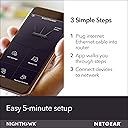
Let me start by saying that I have been using my cable company's combination modem/router for wifi in my home. In my house it's me, my husband, an 11-year old and a 3-year old. The 11-year old has electronics that connect to the internet and my 3-year old LOVES Disney+ so we are constantly streaming and on multiple devices throughout the house at one time. Someone was always getting booted off, so I finally decided to spring for a separate router. There are so many routers out there, I really didn't know where to start, but someone at Best Buy once suggested the Netgear Nighthawk with the MU-MIMO technology. I wasn't totally sold at first because of the price, but now that I have it - I WILL NOT GO BACK. I literally set it up while taking a phone call (yes - it was easy enough to multi-task without issues)! My internet has never been this fast. You could tell the difference the second I connected my devices to it. I have probably about 10 devices set up to it so far, and no issues. I will say that the lights on the router are super bright, so try to make sure it's not in a room you sleep in if lights bother you. My only regret is not getting a protection plan on it... I would hate to see something happen to it. I'm too attached already, LOL. All in all it's a fantastic product, and I would 100% recommend it to anyone.
S**M
Great range and fast speeds
I purchased this router because my old router of 8 years was just not cutting it anymore. I was having issues with my internet connectivity and range in my house. I selected this router for the range capabilities and because it claims to be for multiple devices streaming. When I received it, it was quite a bit larger than I had anticipated, about 4 times bigger than my previous router. It was very easy to setup with the Nighthawk app, and I was up and running in no time. I noticed quicker speeds almost immediately with this router, and the range difference was night and day. We recently purchased a significantly larger house than we had in the past and this router will allow wifi connectivity from anywhere in the house, and even outside as well! I would recommend this product for those who are looking for a router that is a high quality, with easy setup and user interface, and quick connectivity speeds. Also, for those looking for a large range for their space. Our home is around 4,000 sq feet and it will reach anywhere in the house easily.
S**3
Pretty Good.
I've been using this router for 5 months already and it has worked pretty well. With a very large Wifi signal feeding two apartments and having a stable connection. The Configuration was a breeze, I did it through the pc and by default it setups a GUEST network that I removed immediately but all good. I can see metrics about usage and can see which devices are connected to it and block them in case I need it. I haven't had any problem requiring Tech Support so I can't talk about it. The UI of the desktop app is not very beautiful. It's clear but not for the app standards we have today, that could be improved. Also the mobile app is useful too. I can check similar metrics on it like on the pc and also can activate and deactivate several configurations or setup the whole router from it. Overall it is a good router.
T**E
Excellent Router!
I bought this one because of a couple of friends recommended it. I was sharing a modem with a family of 5, three of which are gamers like me. Lag was the number one problem followed by disconnections from our gaming servers. I was constantly resetting the modem, but when I bought this router, all my problems went away! Lag is gone and I haven’t been kicked from the server since! This thing is super easy to install. It’s probably the most user friendly router you could buy. Just download the Netgear Nighthawk app and its self explanatory from there. It gives you step by step instructions and completely dummy proof. You don’t have to be a computer geek to install this thing. I would say the range can be rather difficult to evenly distribute so you will need to buy a longer Ethernet cable to centralize the router in your home so that all rooms will get even connections to the internet. Hope my review helps!
N**S
Absolute garbage.... don’t waste your time or money....
Updated review: ONE STAR FOR THIS PIECE OF GARBAGE! Zero if it were possible. Just don’t. Don’t buy this router. My initial review details all the bugs I dealt with. After a third-party helped me get it up and running, it completely died a couple months later. The router worked great for a couple months. Once its armor trial expired, it went south. Took it to third party and they confirmed that it’s a very flawed product and was essentially dead. Going to try to send back to Netgear since I can’t return it to Amazon. I don’t even want my money back, I just never want to see it ever again. Will never purchase another Netgear product after this headache. Previous review: This router is great! Exactly what I needed! I purchased it new, HOWEVER, when I initially went through the install using my laptop, every time I tried to update its firmware, it failed. Operating it without updated firmware resulted in slow internet speeds and getting flagged as a freaking bot by Google--not good. Tried to update firmware through the app and even though the firmware downloaded successfully (hooray), the router couldn't find the internet (though the lights indicated otherwise) or could then not find itself (rescind hooray)--existential crisis? Took the router to a local IT store and they were able to download firmware successfully and remove 47 bugs the router came with. It's been a journey. In the end, I'm happy with it. Just wish it would have operated exactly like this without needing a third party's assistance. I'm fairly tech savvy but ended up with a good headache after my first two setup attempts. Oh, and tech support was not easy to access--I watched Netgear's videos and read the FAQ but couldn't find anything about firmware not downloading successfully. Registered product to access tech support, logged in, computer said product wasn't registered, tried to register again, computer said product has already been registered... logged in, it worked. Filed ticket, obtained tech support number, called and they couldn't hear me or I couldn't hear them. At this point, I did box it up and prepared to return it to Amazon, when my boyfriend decided we should try to seek an independent tech support solution. Glad we did. Because in the end, I do really like this router. So 4-stars it is...
A**T
This NETGEAR Nighthawk R6900P is working great!
It was super easy to swap this router with my old one. I just copied all of our same passkey & router name info, including No SSID Broadcasting as I always set previous routers, all of which was an option in the Setup process, to make the transition smooth for all of our connected devices, including the Ring® doorbell & NETGEAR Extender downstairs and it went very well! (I always disable SSID Broadcasting for added security......it does NOT prevent devices from connecting wirelessly if the correct SSID & passkey is entered and saved on the device.....by disabling the SSID Broadcast, our neighbors can't see our router's name or that it even exists). This NETGEAR NightHawk R6900P is using both 2.4GHz & 5GHz simultaneously, something that our Linksys E3000 was supposed to do, but never really did (I could tell on the admin screen for the E3000 that it was always broadcasting 5G, which it should still do, even if no devices are connecting through it). The only small issue I noticed with this router is logging into the router's settings, all of my previous routers over the last 20+ years, I've been able to assign the router's User Name and Password, but with the NightHawk, I can only change the router's password, I cannot change the User Name from "admin", which seems odd to me. Otherwise, since installing this router 24 hours ago, I'm completely impressed, however, if anything changes, I will update my review. Note: in one of the two photos, you'll see the fourth LED from the right is orange/amber......that was indicating that one of the PCs I have hooked up to the router via ethernet was at 100Mbps vs 1000Mbps or gigabit......that PC was not powered on and hadn't been since installing the Nighthawk, but as soon as I powered it up, it went to white.
T**Y
Awesome router!!!
I love this router. I am a former high voltage/low voltage electrician and use to wire high end custom homes in central Florida, so I have knowledge of this equipment. I’ve had several home routers in the past from big brand competitors and none were as good as this router. My wife and I entertain a lot and being able to provide quality WiFi to 15 plus people, play my Xbox, and stream music all at the same time is awesome. I now have an unrestricted WiFi network that can support our life style. No more “hey guys can you turn off your WiFi so the music will play. My wife also works from home so being able to put her on one band while keeping guests and other devices on the other band ensures that she doesn’t have to worry about having any connection issues while working. I have wanted a home network like the one I have now for years and the Nighthawk AC1900 has given me that restriction free network at a very affordable price. In my opinion this is the best option for a home network router.
M**R
Would not buy again
I do not recommend this product. We lose internet almost daily and are forced to restart the router. The problem started after 1 month. The compagnies customer service was no help.
E**)
NETGEAR Nighthawk Smart WiFi Router (R6900P)
Good router for your money.
Trustpilot
2 months ago
1 week ago