Buy anything from 5,000+ international stores. One checkout price. No surprise fees. Join 2M+ shoppers on Desertcart.
Desertcart purchases this item on your behalf and handles shipping, customs, and support to Croatia.
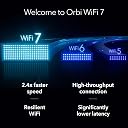
๐ Elevate your home network to WiFi 7 โ because buffering is so last decade!
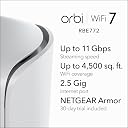
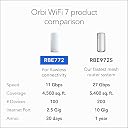
The NETGEAR Orbi 770 Series WiFi 7 Mesh System delivers ultra-fast 11 Gbps speeds and expansive 5,500 sq. ft. coverage, supporting up to 100 devices simultaneously. Featuring tri-band technology with enhanced backhaul, advanced security with NETGEAR Armor, and multi-gig Ethernet ports, itโs designed for seamless, high-performance connectivity across your entire home.


| ASIN | B01EL4CVVQ |
| Antenna Location | Home, Work from Home, Video Streaming, Online Games |
| Antenna Type | Internal |
| Best Sellers Rank | 5,124 in Computers & Accessories ( See Top 100 in Computers & Accessories ) 22 in Whole Home & Mesh Wi-Fi Systems |
| Box Contents | Router, 1 satellite, Bedienungsanleitung |
| Brand | NETGEAR |
| Brand Name | NETGEAR |
| Colour | white |
| Compatible Devices | Game Console, Tablet, Security Camera, Printer, Personal Computer, Smartphone, Smart Television, Smart Thermostat |
| Compatible devices | Game Console, Tablet, Security Camera, Printer, Personal Computer, Smartphone, Smart Television, Smart Thermostat Compatible devices Game Console, Tablet, Security Camera, Printer, Personal Computer, Smartphone, Smart Television, Smart Thermostat See more |
| Connectivity Protocol | Wi-Fi |
| Connectivity Range | 5500 Square Feet |
| Connectivity Technology | Wi-Fi |
| Control Method | App |
| Controller Type | App Control |
| Country of Origin | Vietnam |
| Coverage | 360 mยฒ |
| Customer Reviews | 3.5 out of 5 stars 55 Reviews |
| Data Transfer Rate | 11 Gigabits Per Second |
| Frequency | 5 GHz |
| Frequency Band Class | Tri-Band |
| Frequency band class | Tri-Band |
| Is Modem Compatible | No |
| Item Weight | 3.59 Kilograms |
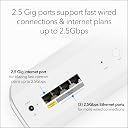
| LAN Port Bandwidth | 2500 Mbps |
| Manufacturer | Netgear |
| Manufacturer Part Number | RBE772-100EUS |
| Maximum Upstream Data Transfer Rate | 2500 Megabits Per Second |
| Model Name | RBE772-100EUS |
| Model Number | RBE772-100EUS |
| Model name | RBE772-100EUS |
| Number of Antennas | 2 |
| Number of Ports | 5 |
| Operating System | Linux |
| Other Special Features of the Product | Access Point Mode |
| Security Protocol | WPA2-PSK, WPA2-Enterprise, WPA3 |
| Special feature | Access Point Mode |
| UPC | 606449172003 |
| Unit Count | 2.0 count |
| Wi-Fi Generation | Wi-Fi 7 |
| Wireless Compability | 802.11.be |
| Wireless communication standard | 802.11.be |
L**R
Great product and easy setup
Title: Great start Description: I purchased the Netgear Orbi 770 2-pack to replace a 2 year old Linksys mesh system that just wasn't working correctly anymore. To be honest, I actually tried the Amazon Eero product first as the review I'd read said is was easier to set up with a better app. However, the Eero would not work with my Nokia ONT box for some reason so went back and I replaced it with the Orbi. The Orbi units are a funny shape. They look round from the front but are teardrop shaped tapering off at the back. This meant they only just fit on the shelves where I need them but that's a minor thing. The setup was incredibly easy and everything worked first time. The app is very good and on a par with the Eero one, so the reviews I'd read must have been before this app was released. I also like the fact that there is an advanced setup option if you access the router through a web browser. Overall, the Orbi system has made a good start in the house and the speed increase and stability improvements over my old Linksys system are very noticeable.
R**T
Buggy app
Setting up was a little tricky it wasnโt straightforward. After useing Orbi for a few months now my option has changed it should connect you to the closest one but it doesnโt which is annoying. The app is very buggy upload and down is good. I have decided to move to the eero 7 pro
D**N
Removed, returned replaced. Reliability restored. Relief.
Iโve spent too much time trying to get the excellent performance to last a whole day without time wasting router reboots. Iโve lost data using a CMS online when the page would not save. Fortunately my online storage successfully synchronised after the required reboots. I felt part of the Netgear development team following their support. Ongoing investigations and reporting back. Some kind words from Netgear support after many days of trying. No fix. Tried: Factory rebuilds, firmware updates. Numerous lists of suggestions for Orbi routers from others online. Temporarily removed security software. Bought new Ethernet cables. New 2.5G switch. Different settings. No difference. Modem mode bridge and wired backhaul from day 1. Before purchase investigate intermittent issues with Orbi internet. A 1G low-cost replacement router works perfectly without daily reboots. It seems you might get lucky using an Orbi but intermittent internet has been an issue for some Orbi users for years. I had problems with various PCs. Apple M1, Intel Nuc 13, Microsoft Surface and HP laptop. Orbi provided over 1000 Mbps when working -then no internet for PCs at all. Frequent frustrating failures finished now itโs gone. My medical TBI fatigue met technical timeouts. Expensive exhausting experience and absolutely alliterating. Wi-Fi 7 and 2.5G ethernet from TP-Link Deco or Amazon eero to get back full speed from ISP? Pondering.
B**K
Works very well
Had the Orbi for a week and it's going well. Much easier to set up than the old one. Did not take long to set up, and the speed is outstanding and fast. Very impressed so far, would recommend.
M**S
Spoilt by connection problem
What should have been a good system was spoilt by my unable to get it to connect to internet
D**H
Good buy WiFi!!
Excellent. Easy to set up, gives better coverage and download speeds than my previous 3 year old mesh routers.
P**S
Fast but has quirks
It works well speedwise apart from niggles with it taking ages to recognise new devices in the App and worse it doesn't seem to have the intelligence to connect a device to the strongest node? Quite happy for my mobile for example to be running at 25Mbps on the furthest way node. If I switch the phone off wait a few minutes and reconnect it picks the strongest node. Also it displays the backhaul nodes as if they can be connected to! Should be invisible
J**S
Unstable, Unreliable, Underperforms.
I really really wanted this to be good. The setup was typical Netgear, took too long, but was reliable. It failed to connect to my internet port (LAN port to ISP equipment) at the desired speed. It would only negotiate 100mbps, the Nighthawk I have always negotiated 1000mbps. If I piggy backed on my Nighthawk, or placed a 1gbps switch in between the router and the wall socket it was fine on negotiated speed. Then discovered if I used a cat 6 cable (itโs provided with a 5e) it worked. Then the next issue become apparently, unstable connections. I would get intermittent freezes on the network, as if sessions were being disconnected or packets being dropped. I returned the first device, the second one behaved exactly the same. I spent hours on the phone with Netgear support and had a case raised to Level 3 engineering but there was no resolution even after 6 weeks. I could tell this device had potential though, the UI was quicker than most routers Iโve ever used and the features were really good. Until Netgear get a much better version of the software these things are basically useless.
Trustpilot
2 weeks ago
1 month ago