🚀 Unlock the Future of WiFi — Stay Ahead, Stay Connected!
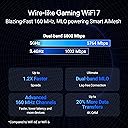
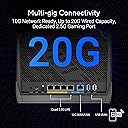
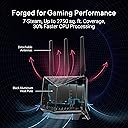
The ASUS RT-BE86U is a cutting-edge WiFi 7 dual-band router delivering up to 6800 Mbps wireless speeds and a combined 20G wired network capacity via a 10G WAN/LAN port and multiple 2.5G LAN ports. Featuring AI WAN detection, subscription-free network security, and advanced guest network segmentation, it ensures seamless, reliable connectivity for demanding home and professional environments. Powered by a 2.6 GHz quad-core CPU, it supports extensive device ecosystems with rock-solid stability and easy setup.


| ASIN | B0DGZZJ996 |
| Best Sellers Rank | #8,153 in Electronics ( See Top 100 in Electronics ) #52 in Computer Routers |
| Customer Reviews | 3.9 3.9 out of 5 stars (169) |
| Date First Available | September 18, 2024 |
| Item Weight | 1.9 pounds |
| Item model number | RT-BE86U |
| Manufacturer | ASUS |
| Product Dimensions | 12.4 x 9.3 x 3.5 inches |
T**E
WIFI works again! No thanks to Xfinity!
Unbelievable router! I plugged mine in last week. Hooked it up to Comcast crap XB8 "Gateway". Their new gateway got an update at the beginning of the year... made it a "smart" router. I kept getting dropped from wifi! Every night! Bought this... Hooked it up to the Gateway bridge mode, ai did the rest! Virtually no setup, easy peazy! Not 1 dropped signal. Every device is connected and STAYS CONNECTED. I bypassed Xfinity. Now it works. I run a small business out of my home with 600 mbps thru Comcast with this router and it is perfect. STRONGER SIGNAL!! Spend the money... it is worth it.
M**.
Excellent Standalone Performance — Rock Solid and Reliable
I’ve been really impressed with the ASUS RT-BE86U. I’ve deployed several of these in single-router setups (no nodes yet), and every one has been completely stable and dependable. Setup was straightforward. I always update to the latest firmware right away, and each install has gone perfectly — no connection drops, slowdowns, or random issues. Most of these homes have around 20–30 devices connected, including phones, TVs, Google smart devices, and the occasional gaming PC. The RT-BE86U handles everything effortlessly with solid speed and coverage throughout the house. The only small change I’ve noticed compared to the AX86U Pro is the rearranged GUI — some of the Wi-Fi settings have been moved under the “Network” section. It’s a bit different and took a minute to get used to, but once you know where everything is, it’s not a big deal. Overall, the RT-BE86U has been flawless as a standalone router. It’s fast, reliable, and a great upgrade for anyone wanting top-tier Wi-Fi 7 performance without headaches.
R**R
Horrible product from the start!
I'm giving this thing one star for now because I just spent an hour and a half working on it to get it back up and running after its first firmware update. After the initial update, half of my devices wouldn't see the wifi network. Rebooting didn't help. Which, btw, rebooting doesn't just reboot the product once. It has to reboot 3-5 times whenever it says it's rebooting. Then, when it comes back online, the wifi network has to disappear and reappear and reconnect 3-5 times as well before I can even get to an admin page or have the app connect to it. After an hour and a half of troubleshooting: saving settings, factory reset, reboot reboot reboot reboot reboot, restore settings, all 3-4 times, the same issue was occurring. I finally figured out that the admin password requirements changed with the firmware update. My original password didn't meet them. Well I thought obviously the admin password wouldn't affect the ability for devices to see the wifi network because, well, why would it? I reset the admin password to align with the new password requirements, then reboot reboot reboot reboot reboot, and lo and behold everything connected again. It goes without saying the admin password should not have anything to do with devices seeing the wifi network, but here we are. I will update the one-star review if I never have to go through all this b.s. again! Update: Well it's been 20 minutes and guess what. Half my devices can no longer see the wifi network AGAIN, and they disconnected. I think it may have rebooted AGAIN, but I wasn't monitoring it to notice. I don't even know if I'll waste my time getting a replacement. Update: Turning off wifi-7 seems to have fixed the wifi network not showing for many of my devices. All the devices that did connect when the issue was occurring appeared to be using the 5gHz band. Final update: Wifi networks disappeared again. So I factory reset it one last time and configured it from scratch instead of restoring from saved settings. After an hour the issue occurred again. I'm done! And get this. There isn't even an option to replace the device, only return it for a refund. ASUS doesn't even have enough confidence in their own devices to think maybe the problem could be just the one device. I won't buy their brand again.
W**S
Had it for a few months, I highly recommend it!
I'm really loving this new router! So I'm using Home Assistant, and needed a way to manage my internal and external network, as well as hard-coding IPs and 'turning off' internet access for certain devices. Now I'm totally not a network person, so there are probably other ways to do what I needed to do, but this router made it super straight-forward. On the connectivity side, I live in a 3 story 3500+sf house (way bigger than my old 1200 sf condo) and I've no issues at all reaching every single corner and even out into the yard. I have it set up in my office on the first floor, and it's not really central the office is in the corner, but again no issues. Back to my Home Assistant setup, I've found the stability and signal strength of the router to be perfect for my routines and the like as most of my stuff is connected through WiFi. I was originally looking at setting up a mesh in my home fearing that I'd have dead spots, but it's been perfectly fine! So, long story short, this was probably overkill for what I need it for as it has a LOT more advanced features that I don't use (my bad, as I said I'm not a networking gal), but I really wanted something solid that has a good interface and solid connectivity, and this fits the bill.
M**T
Quick & easy setup! Extremly fast!
This router is awesome as a replacement for my 5 year old Linksys router. I was completely operational after about 10 minutes of setup time. There are so many new features I did not have with the Linksys, I am still playing around with all if it. The speeds are incredible with my wired and wireless devices. I have over 48 devices hitting this thing and it is blazing fast with twice the range on wireless. It has been running for a week so I will update all this if anything stops working or slows down. So far I would highly recommend this router.
D**I
Unstable. Randomly drops WiFi connection
UPDATE: After returning for replacement, expert advice on setup and ASUS updating the firmware, this router has returned to the quality performance that I have been accustomed to from ASUS. It has been running for several days now without a single WIFI drop. I have updated to 4 stars. I won't give 5 stars because of all the hassle I have had to go through. The product should be good to go right out of the box. I had an ASUS RT-AC86U for 7 years that performed flawlessly for 7 years until I got up one day and it had died. Because of my past experience with Asus quality products I bought the ASUS RT-BE86U BE6800. It has been very disappointing. It constantly would drop WiFi connections over and over. I have spent the last week using ChatGPT to help configure and diagnose this unit but the best I could achieve was only dropping 2-4 times a day for 30-60 seconds before reconnecting. Results were: To rule out configuration or environmental factors, I have already performed: • Full factory reset • Full WPS-button hard reset with cold boot • Reconfiguration from scratch with minimal services • Operation in Router Mode and Access Point Mode • Manual static channel assignments (2.4 and 5 GHz) • Smart Connect disabled • OFDMA, roaming assistants, and advanced features disabled • WAN bypassed/isolated; issue persists with no WAN involvement • Manual device reconnections • Tested with a single client only • ISP modem/router stable with no WAN drops Wi-Fi failures occur regardless of load, time of day, or number of connected devices. Based on repeated WL subsystem crashes, DMA dumps, “dying gasp” deregistration, and full chip reinitialization, this unit appears to have a hardware-level defect (radio module, memory, or power subsystem). I am returning this one for another to see if it works any better. If not I will be buying something different. Not sure if it will be ASUS.
J**R
Upgraded from wifi 5 basic router
I upgraded to this from a Wifi 5 router that was limited to 1gb as I will be getting a 2gb fiber optic connection. I wanted certain features such as QoS, using my phones connection in case service goes out, among many others. This router was quick and easy to set up. I swapped out the old and had the new running in less then 15 minutes. I also like the fact that it tells you if a cable isn't performing as it should. I had to upgrade to a CAT 6 cable on a device. The con i suppose is it doesn't have a 6ghz connection. Only 2.4 and 5ghz. For me, not a big deal as the only thing that can take advantage of that are the phones. Highly recommended.
K**V
Didn't work for me. Ended up buying the RT-BE96U
I hate to leave a negative review for this product (RT-BE86U) because I love Asus and feel like this product should have worked perfectly. I "upgraded" from the RT-AX82U and that router was fantastic! However, this device would constantly crash and the wifi would go down. Interestingly the LAN ports would stay online. The SSID would just vanish and everything wireless went down. I had the latest firmware so I'm not sure why it was having issues. I tried turning off smart connect and wifi 7. Same issues. Unfortunately I had to return it. I've seen other reviews mentioning similar issues, so this router may be a gamble if you are thinking about purchasing. I reluctantly pulled the trigger on the RT-BE96U due to its high cost, but it has been absolutely flawless! It's hilariously big, but handles everything you throw at it. I have a good amount of features enabled. Tri-band wifi 7 with smart connect, second network with wifi 7 disabled for my IOT devices, Dual WAN, and VPN Fusion setup. So, you can gamble with the cheaper 86U or just suck it up and buy the fully decked out 96U.
Trustpilot
2 days ago
3 days ago