Desertcart purchases this item on your behalf and handles shipping, customs, and support to Croatia.
🚀 Power Your Next-Gen Rig with MSI’s Ultimate Ryzen Champion!
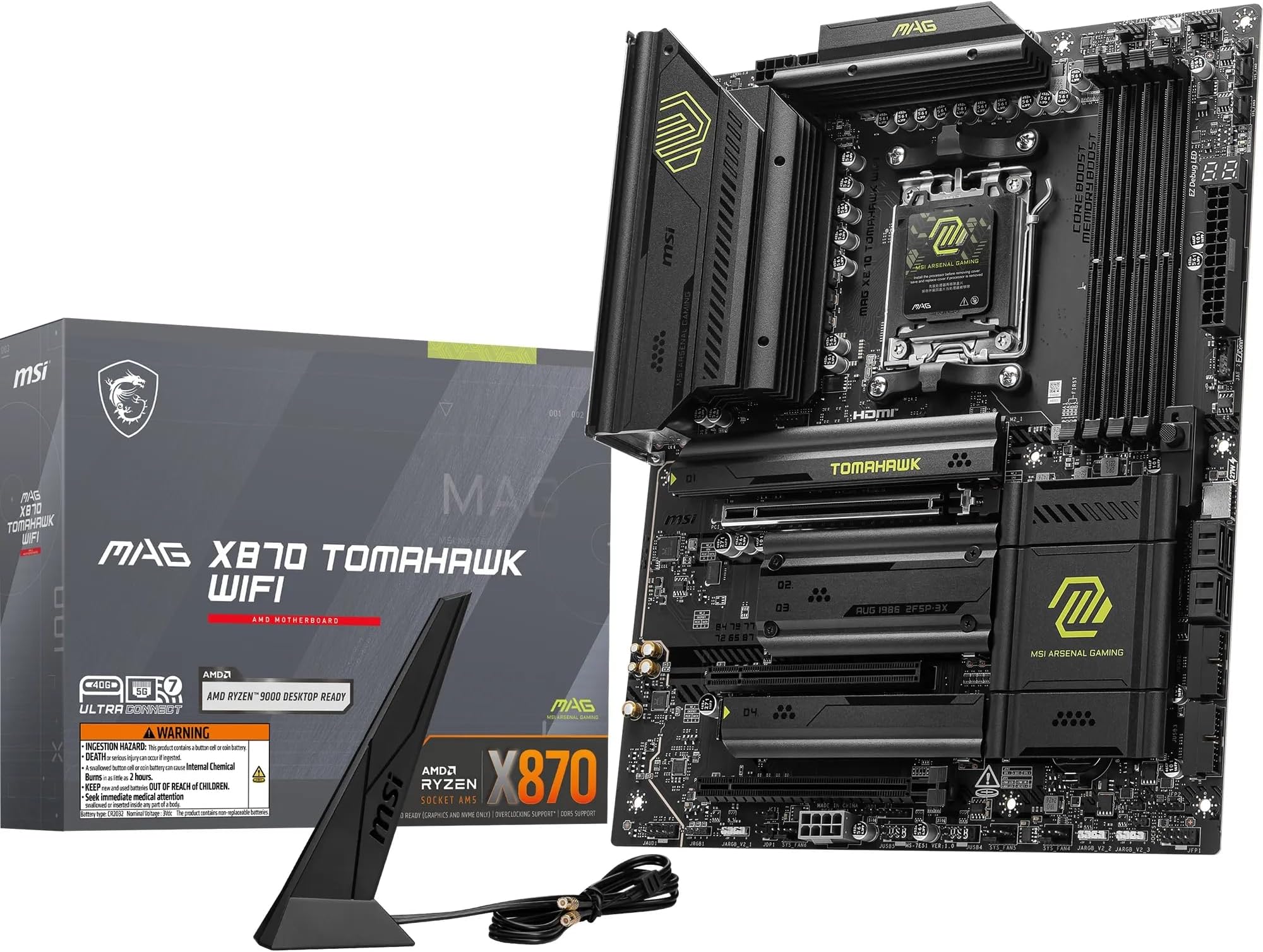
The MSI MAG X870 TOMAHAWK WIFI is a premium ATX motherboard designed for AMD Ryzen 9000/8000/7000 processors, featuring a robust 14 Duet Rail 80A SPS power system, DDR5 memory support up to 8400+ MT/s, PCIe 5.0 x16 slot, and advanced connectivity including Wi-Fi 7 and 5G LAN. Engineered for high performance, future-proof upgrades, and effortless DIY assembly, it delivers exceptional stability, blazing-fast data transfer, and next-gen networking for gamers and professionals alike.


| ASIN | B0DCVVXK8D |
| Available Memory Slots | 4 |
| Best Sellers Rank | 2,663 in Computers & Accessories ( See Top 100 in Computers & Accessories ) 11 in Motherboards |
| Brand | MSI |
| Brand Name | MSI |
| CPU Model | AMD Ryzen 7 |
| CPU socket | Socket AM5 |
| Chipset Family | AMD X870 |
| Chipset Type | AMD X870 |
| Chipset type | AMD X870 |
| Compatible Devices | Personal Computer |
| Compatible Processors | AMD Ryzen 9000, AMD Ryzen 8000, AMD Ryzen 7000 |
| Compatible devices | Personal Computer |
| Compatible processors | AMD Ryzen 9000, AMD Ryzen 8000, AMD Ryzen 7000 |
| Customer Reviews | 4.4 out of 5 stars 501 Reviews |
| Global Trade Identification Number | 04711377254557 |
| Graphics Card Interface | PCI-Express x16 |
| Item Dimensions L x W x H | 34L x 27W x 7H centimetres |
| Item Weight | 1000 Grams |
| Main Power Connector Type | 24-Pin |
| Manufacturer | MSI |
| Manufacturer Part Number | 7E51-001R |
| Memory Clock Speed | 8400 MHz |
| Memory Storage Capacity | 256 GB |
| Model Name | 7E51-001R |
| Model Number | 7E51-001R |
| Number of Ethernet Ports | 1 |
| Number of Ports | 15 |
| Platform | Windows |
| Processor Socket | Socket AM5 |
| Product Warranty | 3 year manufacturer |
| RAM Memory Technology | DDR5 |
| RAM memory technology | DDR5 |
| Ram Memory Maximum Size | 256 GB |
| S/PDIF Connector Type | USB |
| System Bus Standard Supported | PCIe 5.0 |
| Total HDMI Port | 1 |
| Total PCIe Ports | 1 |
| Total SATA Ports | 6 |
| Total USB Ports | 12 |
| Unit Count | 1.0 unité |
T**2
Exceptional Value and Future-Proofed Performance!
I've been using the MAG X870 TOMAHAWK WIFI motherboard, and it has exceeded my expectations in terms of both value and future-proofing. Here's why I’d highly recommend it: Pros: Solid Build Quality – This board feels sturdy, with high-quality components that inspire confidence. MSI clearly didn’t skimp on durability. Excellent Connectivity – The WiFi integration is reliable, fast, and easily meets the needs of modern connectivity standards. Paired with multiple USB ports and a well-thought-out layout, it makes connecting peripherals a breeze. Future-Proof Design – The X870 chipset provides ample headroom for future upgrades. It's equipped to handle current-gen and future CPUs, so I don’t need to worry about upgrading my motherboard anytime soon. User-Friendly BIOS – MSI’s BIOS is intuitive, making adjustments and optimizations accessible for beginners while still offering depth for seasoned users. Great Value for Money – For all the features packed in, it’s one of the most affordable high-performance boards out there. You get top-tier performance without breaking the bank. Cons: Limited RGB Customization – While it does have RGB, the options are relatively basic. Not a dealbreaker, but something to note if you’re big on customization. - I am not so fine here. In short, if you're looking for a reliable, high-performance motherboard that’s built to last, the MAG X870 TOMAHAWK WIFI is a fantastic choice.
G**T
MSI MAG X870 Tomahawk WiFi - High Performance, Premium Quality and Outstanding Value
Design & Build Quality: The MSI MAG X870 Tomahawk WiFi sports a sleek, matte black finish with tasteful, understated accents that give it a refined, military-inspired aesthetic. It avoids flashy RGB, which will appeal to users who prefer a more professional, no-nonsense look. Build quality is exceptional — from the reinforced PCIe 5.0 slot designed to handle the heft of modern GPUs, to the conveniently placed EZ PCIe release button for hassle-free installation and removal. Each M.2 slot includes its own heatsink, helping keep high-speed SSDs cool under load. The VRM and chipset are also equipped with efficient heatsinks, contributing to the board's stability and long-term durability. Speaking of which, MSI has opted for an 8-layer server-grade PCB, which further enhances reliability. Even the BIOS UI aligns nicely with the board’s visual identity, offering a cohesive and premium experience throughout. Features & Connectivity: Right out of the box, this motherboard supports the latest AMD Ryzen 9000 series processors. MSI has included robust AMD overclocking support, with a BIOS that is intuitive and user-friendly, making tweaking CPU and memory settings a breeze for both newcomers and enthusiasts. The X870 Tomahawk WiFi also delivers excellent storage and connectivity options: • Multiple M.2 slots, including two ultra-fast PCIe 5.0 x4 • 4x SATA 6G ports • Dual USB 4 Type-C (40Gbps) ports • A wide array of USB Type-A options (2.0, 5Gbps, and 10Gbps) • Built-in WiFi 7 and Bluetooth 5.4 for next-gen wireless performance • 5G LAN for ultra-fast wired networking Additionally, MSI includes several enthusiast-friendly features such as: • Multiple fan headers positioned intelligently around the board • A flash BIOS and clear CMOS button on the rear I/O • A debug code screen alongside four diagnostic LEDs for easy troubleshooting • EZ Conn connector for simplified cabling • 5.1/7.1 USB audio support • A surprisingly included PCIe 8-pin power connector — possibly in anticipation of future GPUs needing extra power What Could Be Improved: One of the few areas where MSI could have gone further is warranty coverage. While a standard 3-year warranty is included, a 5-year warranty would have aligned it with competitors like Gigabyte, offering buyers additional peace of mind for long-term use. Conclusion: The MSI MAG X870 Tomahawk WiFi is a stellar motherboard that strikes an impressive balance between value, performance, and premium features. Whether you’re building a high-end gaming rig or a productivity powerhouse, this board delivers on all fronts without breaking the bank. It's a future-ready, cost-effective option that doesn't compromise on quality or performance.
D**N
Love the board
I have been using the MSI MAG X870 motherboard for a while now, and it’s been nothing short of fantastic. Setting it up was a breeze, with the clearly labeled connections and comprehensive manual. The board feels solid and well-built, and the layout is thoughtfully designed, making cable management easier than expected. What really stands out are the features—it supports DDR5, PCIe 5.0, and has plenty of USB ports for all my peripherals. The BIOS interface is intuitive, even for fine-tuning overclocks. The RGB headers and customization options were a nice touch, adding personality to my build. It has handled my Ryzen 9 7950X3D and MSI RTX 4080 like a champ, with no performance hiccups. If you're building a high-end rig, this motherboard is definitely worth considering!
S**N
Very very good build and stable
Solid mobo Peripherals are press and unlock so very easy Placement of them is perfect Peak speed on SSD.. pcie5 compatible with dedicated lanes and max transfer speeds... WiFi is stable and powerful Very very good but Paired it with a 5070ti and 6000mhz ram and all stable Temperature is stable with liquid cooling Only annoying thing is cable power to the mobo is in the corner so may need cases to fit cables from that side
B**N
Impressive motherboard, but mine was plagued with issues
Leaving the original review below. After building my system and using it for a couple of days, I ran into a pretty common issue present on MSI’s forum - stuttering/PCIe downgrade after waking up from sleep. The PC stutters horribly and checking the PCIe link between GPU/MOBO, you’ll discover your GPU being stuck in a lower state, for the lack of a better way of explaining. In my case, my GPU wouldn’t switch to Pcie 4.0 x16 not even under full load, being stuck at pcie 1.1 and stuttering massively even on desktop. Not even updating/rolling back BIOSes helped, and it seems that it’s a pretty random issue. Some boards are fine, some aren’t. Original review: Coming from a B350 motherboard bought in 2017, this is a massive upgrade, my previous board feels extremely flimsy in comparison. Plenty of m.2 ports for your drives and the back I/O doesn't lack anything. The addition of the 2 USB 40Gbps ports, WiFi7, PCIE 5.0 means that this board is a solid choice for those looking for future proofing. Also, for the people getting confused at the AM5 lanes splitting- on this board, M.2_1 runs at PCIE 5.0 with no lane sharing, and M.2_4 runs at PCIE 4.0 speeds, again with no lane sharing.
R**D
Good Motherboard Overall
Good motherboard with enough USB ports, as well as audio in/out and wifi port. The only negative I have is when I first bought this product I had to get a replacement, as one of the screws that was holding in the m.2 shield was impossible to unscrew.
R**T
I love it! Feels very premium, definitely worth the money.
This motherboard had good reviews and I can see why. The layout is really well thought out and feels high quality. I really like the quick release NVMe heat sinks and the push button release for the GPU socket. Everything seems to be placed well at the edge of the board so I don't need cables running everywhere. The LED code display was really useful during first boot so I could see everything was working correctly. I chose this motherboard because it doesn't share any of the PCIe lanes of the GPU with other devices and it is still possible to utilise the NVMe slots. It also has 5GB Lan which could be useful in the future and full bandwidth Wi-Fi 7 (320 MHz) which many competitors don't have. I previously had the MSI B550M mortar AM4 motherboard so I knew MSI made quality products that work well for a long time. They also release timely BIOS updates which I like because I don't like waiting ages for new features. My system has been running for about a week now and I am still playing with all the different settings in the BIOS. The motherboard has some memory profiles and overclocking pre-sets to make everything faster. So far everything is stable and I am really happy with the motherboard.
K**.
Worth the money? I say yes.
I’ve been running my system on the MSI MAG X870 TOMAHAWK WIFI ATX board for a while now ,with my AMD 9070 XT, it’s been smooth sailing so far. Everything mounts solidly, and I’ve had zero issues with stability or crashes under heavy load. BIOS setup was easy enough, and the board automatically recognised CPU and RAM without fuss. One thing I can’t vouch for: I’ve not actually tried the WiFi capabilities, so I can’t comment on how good the built-in WiFi is (or isn’t). I use wired Ethernet, so that part’s just sitting there for now. That said, all the other features — I/O ports, M.2 slots, expansion slots, work perfectly. Not to mention the board came well protected in the packaging. All in all, if you’re building a rig with something beefy like a 9070 XT and want a solid, stable ATX motherboard that doesn’t cause drama, this MSI board has been really reliable and easy to live with.
P**.
Perfekt
Fungerar Perfekt inga problem
D**.
Extrem hochwertiges Mainboard starke Kühlung & top Bedienkomfort
ch nutze das MSI MAG X870 Tomahawk WiFi jetzt seit einiger Zeit und bin mega zufrieden. Schon beim Auspacken merkt man, wie hochwertig das Board verarbeitet ist – stabile Kühlkörper, saubere Lötstellen und ein insgesamt sehr robustes Layout. Ein großes Plus ist die SSD‑Kühlung: Die massiven Kühlkörper halten meine NVMe‑SSDs spürbar kühl, selbst unter längerer Last. Genau so muss das bei einem modernen AM5‑Board sein. Besonders praktisch finde ich den BIOS‑Flash per USB‑Stick. Einfach Stick einstecken, Knopf drücken, fertig – selbst ohne CPU. Das macht Updates extrem unkompliziert. Auch die Anschlüsse sind vielfältig: USB‑Ports ohne Ende, schnelles WiFi, 2.5G‑LAN, mehrere M.2‑Slots und ausreichend PCIe‑Optionen. Alles, was man für einen modernen Build braucht, ist vorhanden. Ein echtes Highlight ist der PCIe‑Release‑Button. Grafikkarte rausnehmen, ohne im Gehäuse rumzufummeln oder Angst zu haben, den Slot zu beschädigen einfach Knopf drücken und die Karte löst sich sauber. Das macht Upgrades und Wartung deutlich angenehmer. Für mich ist das MSI MAG X870 Tomahawk WiFi ein richtig starkes, hochwertiges und durchdachtes Mainboard, das sowohl beim Einbau als auch im täglichen Betrieb überzeugt.
D**S
Solid MB for the gaming build
The board feels well built and installation was easy. I especially liked the design of the M.2 slots, which makes installing drives quick and simple. It works smoothly with my 9800X3D and MSI 5070Ti Gaming TRIO X, and so far the system has been very stable. BIOS is clear and has enough options for adjustments without being complicated. The cooling on the VRM does its job well and I haven’t had any issues during longer gaming sessions. Overall, it’s a solid choice for a gaming setup.
G**A
Best board for the price range good buy
Top board am5 really pumps out frames It is well priced hopefully price stability stays the same I really have to mention the cmos button much user friendly 14 vrm awesome only downside a RGB header up top would be less cabling Good buy keep up the quality MSI
A**R
Title your review 😏
Kinda awkward to work with but all in all solid.
Trustpilot
2 weeks ago
1 month ago