Buy anything from 5,000+ international stores. One checkout price. No surprise fees. Join 2M+ shoppers on Desertcart.
Desertcart purchases this item on your behalf and handles shipping, customs, and support to Croatia.
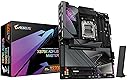
🚀 Power your next-gen rig with the ultimate AM5 motherboard experience!
The GIGABYTE X870E AORUS Master is a premium ATX motherboard designed for AMD Ryzen 7000, 8000, and 9000 series processors. Featuring a robust 16+2+2 phase 110A power design, support for up to 256GB DDR5 RAM at speeds up to 6000MT/s, and four M.2 slots with thermal guards, it delivers exceptional performance and reliability. Equipped with PCIe 5.0, dual USB4 ports, WiFi 7, and 5GbE LAN, it offers cutting-edge connectivity for professional and enthusiast builds. The EZ-Latch system simplifies installation, backed by a 5-year warranty for long-term confidence.


| ASIN | B0DGVSW4FD |
| Best Sellers Rank | #17 in Computer Motherboards |
| Brand | GIGABYTE |
| CPU Model | AMD Ryzen 7 |
| CPU Socket | Socket AM5 |
| Chipset Family | AMD X870 |
| Chipset Type | AMD X870E |
| Compatible Devices | Personal Computer |
| Compatible Processors | AMD Ryzen 7000 series , AMD Ryzen 8000 series, AMD Ryzen 9000 series |
| Customer Reviews | 4.1 out of 5 stars 123 Reviews |
| Graphics Card Interface | PCI Express |
| Item Dimensions L x W x H | 9.6"L x 5"W x 5.1"H |
| Item Weight | 5.7 Pounds |
| Main Power Connector Type | 24-Pin |
| Manufacturer | GIGABYTE |
| Memory Clock Speed | 5600 MHz |
| Memory Slots Available | 4 |
| Memory Storage Capacity | 256 GB |
| Mfr Part Number | X870E AORUS MASTER |
| Model Name | X870E AORUS MASTER |
| Model Number | X870E AORUS MASTER |
| Number of Ethernet Ports | 1 |
| Number of Ports | 14 |
| Platform | Windows 10, Windows 11 |
| Processor Socket | Socket AM5 |
| RAM Memory Technology | DDR5 |
| Ram Memory Maximum Size | 256 GB |
| System Bus Standard Supported | PCIe 5.0 |
| Total Number of HDMI Ports | 1 |
| Total PCIe Ports | 14 |
| Total SATA Ports | 4 |
| Total Usb Ports | 10 |
| UPC | 889523044803 |
| Warranty Description | 5 Year Manufacturer |
J**L
Surprising good motherboard
I took a risk on buying Gigabyte motherboard, it has been 15yrs since I last owned one. The past board was great & survived for over 10yrs when finally, I retired it. I mainly use ASUS, however since their recent problems, & my X670E Hero board having issues from day one, I tried ASRock, the board worked for a bit, then it started having issues, so I gave Gigabyte a chance, even though there has been security issues in the past. I was pleasantly surprised & the board has had no issues from day one, I updated the bios & all has been well. I will say that I still like ASUS bios setup better, it is easier to navigate the menus & you can use a large size thumb drive to run bios updates on. This Gigabyte board is like the ASRock as in you must use a very small size thumb drive to load bios updates from. Other than that small complaint, the board has been solid, I made sure to turn off the on board software update for their software & I also turned off the RGB, due to I do no trust their proprietary software, the last time I used it; it was horrible & I will just use other software to run the RGB, that isn't buggy. Another reason for me to want this board is that it has additional PCIe slots, I use an addon sound card, so this board accommodates that. I have had no memory issues, system boots fast runs cool, I would highly suggest anyone wanting to build on the AM5 platform to get this board. It has all major things you need, and when I purchased it, the price was cheaper than the other options. My build: Windows 11 Pro CORSAIR 7000D AIRFLOW Full-Tower ATX PC White Case GIGABYTE X870E AORUS Master AMD Ryzen 7 9800X3D overclocked to 5.25ghz all cores 1.18 volts Corsair Titanium Dominator RGB DDR5 64GB (2x32GB) 6000 MT/s CL30 Western Digital SN850X 8TB PCIe 4.0 x4 NVMe (main drive) NZXT Kraken Elite 420 AIO 2025 model with 2 sets of F420 Core fans setup in a push/pull configuration NZXT F420 Core fans as exhaust in top of case 1 Phanteks D30 140mm reverse blade fan as rear intake fan ASRock Phantom Gaming PG-1600G 1600W 80 PLUS GOLD & Cybenetics PLATINUM Full Modular Power Supply ATX3.1 & PCIe5.1 ASUS TUF Gaming GeForce RTX 4090 OC Edition Gaming Graphics Card Logitech Z906 5.1 Surround Sound Speaker System THX certified CORSAIR K70 RGB PRO Wired Mechanical Gaming Keyboard-Cherry MX RGB Red Linear Switches ASUS ROG Sapatha X wireless gaming mouse ASUS ROG Scabbard II Extended Gaming Mouse Pad Creative Sound BlasterX AE-5 Plus 32-bit 384 kHz PCI-e Interface Sound Card Samsung S90C 55” QD-OLED TV 4k UHD HDR 144hz Free sync Premium Pro (main monitor) LG OLED42C2PUA 4K evo OLED TV (2022) – (second monitor)
I**R
The best X870E board on my opinion
The best X870E upper mid range motherboard. Aorus Master. I have the ROG Strix X870E-E, Had and returned the MSI X870E Carbon wifi and finally I bought this Aorus Master X870E. The Strix is good, the MSI is trash, and this Aorus is fantastic. It includes all kinds of sensors, stability is rock solid and memory frequency is optimal. The Strix only manages to reach 5600MT/s with all Dimms populated. The MSI didn't post at any frequency even at 3600 with 4 Dimms. This Gigabyte Master works at 6000MT/s without any issue (you must configure the impedances on all boards to support 4 Dimms). The board is stable, the network is solid and the build construction is best in class. Only issue I have is with the context restore config on Bios that keeps getting auto-disabled when EXPO is enabled. That makes the boot times longer than expected at about 3 minutes with a 128 GB of RAM. Using the board with a 9950X as reference. Tha PBO setting works as expected in case you are interested on using this performance option. Hope Gigabyte solves the memory context restore when a new Bios gets released and that would make the board 10/10. The Strix doesn't have that issue but it can't reach the optimal memory frequency of 6000MT/s even after a long work of tunning the impedances and timmigs. The memory performance superiority on the Gigabyte is also reported on the hardware unboxed review video reaching up to 8200MT/s with two dimms. I recommend this board above all others...
M**.
I would avoid. Toast after 6 weeks.
Update: After just six weeks, the board is done. I’ve had intermittent issues since the start, which I originally thought were tied to the latest BIOS update. Now the system won’t POST at all, and Q-Flash Plus doesn’t work. Looks like I’ll have to go through Gigabyte’s RMA process. Original review: I’ve used many Gigabyte motherboards over the years, but this one is hands-down the best. The build quality is phenomenal...this thing feels like a tank, and it’s continued to impress me the longer I’ve used it. It looks premium in person too, without the cheesy design choices you see on a lot of high-end boards. The onboard NIC is next-level. It’s easily the best networking experience I’ve ever had on a mobo: fast, stable, and rock solid. My Gen 5 SSDs stay surprisingly cool thanks to the built-in heatsinks, and thermal performance across the board is excellent. Gigabyte didn’t cut any corners here. From high-end components to a stacked feature set, this board comes with everything you could possibly need, and then some. I could keep going, but the bottom line is: this board is fantastic. Gigabyte absolutely nailed it. The only downside? Some system stability issues when enabling PBO or EXPO, but that’s more a result of the platform being new. I’m running a 9950X3D, and these issues are happening across brands. As BIOS updates roll out, I fully expect this to smooth out.
A**O
Great for a first PC build
The motherboard is great and comes with everything you need. This was my first PC build and the design of most things when installing is fool-proof. The black/gunmetal finish matches my build perfectly. The package comes with everything you would need. I was usied 1-sided m2 SSDs and of course they have extra thermal tape to lift the level of it. The documentation that comes with the package is not sufficient unless you know what you are doing. Refer to the PDF manual on the gigabyte/aorus website. My first boot was seamless with no errors, and for my first build that was a sigh of relief. I also like the control panel app they provide, super intuitive. The lighting is a nice touch as well and of course everything is customizable. Using this with an AMD 9950x3d and nvidia 5080. I did have to switch things multiple times before i figured out all the connections so I'll say its a pretty rugged design too, good for beginners. If they could cut out an installation step they did, no tools necessary for installing most things as they have sort of ez-lock connections. All in all the new PC is very fast and I'm glad I chose this board.
A**I
Great board for 400$
Great board, but it could be better, I get Gigabyte is moving away from using a hardware eclk on their modern boards, but it does impact overclockers till the software advances. GCC installed flawlessly and the RGB control is far easier than ASUS’s Aura Sync. Boot speeds are about average, the board should have a backplate but DOESNT, bios update was easy & fast, the new bios isn’t as laggy as people had initially said, and the rainbow puke can be toggled to greyscale. The overclocking is fairly easy but I’d wager that memory overclocking is better on ASUS. It’s just simpler. Plus SPD setup seems to be non functional on am5 boards. Ultimately though gigabyte needs to focus on making the amd boards look more modern. Those intel Z boards look way better and it’s pretty obvious they’re being favored. Especially with the rgb, if they could make the vrms leds any dimmer they’d be invisible.
L**R
Some difficulties with Linux; But fixable
Works overall pretty well. Depending on your Linux distribution, it may be a challenge getting the network interface to work as expected. I did get mine working on Arch Linux after finding a driver in the AUR, I believe. It has a tasteful amount of RGB, and would still look nice without.
E**N
Quality Motherboard.
Has all the features you might need for a board you expect to keep for 5 years. This is my first AMD purchase since 2003 and I haven't been happier with a PC purchase in a long time. Great build quality, easy to setup and install, heatsinks are burly and work well, and the wifi antenna works well and easy to connect and disconnect.
J**N
good quality
replaced my Intel board after it died. This board works very good and boor faster than the intel counterpart. Has plenty of expansion ports to accommodate any modern user needs.
Z**I
Really loved it.
Using this board for a few weeks and it’s been solid so far. Installation was smooth, build quality is excellent, and performance with DDR5 and M.2 has been great. Nice touches like the push-button GPU release, armored slot, and extra RAM cooling fan make it stand out.
A**I
والله بطله من الاخر شكل ورجب واداء
جتني المذربورد وكرتونها مفتوح .. بس كامل اغراضها موجوده ولا يعيبها شي ابد
R**Z
Excelente compra
Todo en excelentes condiciones, cuenta con todos los componentes que se indican en la descripcion y todo perfectamente sellado.
自**ー
ARGBヘッダーが4つあります。
Ryzen 9 9900X RTX 5050 DDR5-6000 16GB x2 で運用していますが、超安定してます。 各ファンヘッダーの最大電流が24Wと大きめなのが決め手でした。 使用してるPCケースがクラマスのHAF 700 EVOっていう超デカイやつで、 17個のファンを安定して動作するためにファンヘッダーの最大電流が大きめなのを探していましたが、 AS〇Sは全部12Wで少ないし、 ASR〇ckはCPU用だけなぜか12Wだし、 MS〇はドラゴンが微妙だしで、 選択肢はほぼGIGABYTEしかなかったです。 初めて起動した時はGPUが認識されなかったり突然シャットダウンしたり電源つかなくなったりして超焦りましたが、BIOSアップデートで全て解決しました。 BIOSバージョンF9eを使ってる人は早めにアップデートした方がいいです。マジで。 初めての自作PCでこのハイエンドを選ぶとは思っていませんでしたが、これにしてほんと良かったです。
P**A
Placa linda entregou o que prometeu
Chegou em perfeitas condições
Trustpilot
2 months ago
1 week ago