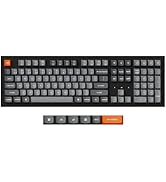
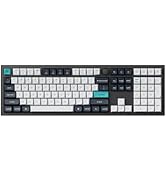
⌨️ Elevate your desk game with the ultra-slim, endlessly customizable Keychron B6 Pro!
The Keychron B6 Pro is a full-size, ultra-slim wireless keyboard designed for professionals who demand versatility and style. Featuring triple-mode connectivity (2.4GHz, Bluetooth 5.2, and wired USB-C), a remarkable 1200-hour battery life, and advanced ZMK customization via the Keychron Launcher, it seamlessly supports Mac and Windows environments. Its lightweight, quiet keys and protective silicone skin make it a durable, sleek companion for any workspace.


| ASIN | B0D5VC6PFR |
| Batteries | 1 Lithium Ion batteries required. (included) |
| Best Sellers Rank | #988 in Computer Keyboards |
| Customer Reviews | 4.2 4.2 out of 5 stars (46) |
| Date First Available | June 1, 2024 |
| Item Weight | 1.94 pounds |
| Item model number | B6P-K1 |
| Manufacturer | Keychron |
| Package Dimensions | 17.6 x 5.43 x 1.61 inches |
A**R
Good, minimalist yet highly functional keyboard
Exactly what I was looking for. I've had their Keychron K4 for several years. However, I stopped playing video games hardcore and mostly use that keyboard to edit videos, work, and just browse the web in general. As time went on, I also got annoyed with the click-clack sound of mechanical keyboard--I guess I'm just getting older. Anyway, I wanted something minimalist, no frills, but similar-ish functionality of the Keychron K4. Meet Keychron B6 Pro! I like everything about the keyboard from its looks as it matches my overall set-up including my white magic trackpad for my macbook. Functionality is the same as my K4 but without the click-clack noise. Love that it's slim and the keyboard quality seems really good based on just the overall feel and how tactile it is. Bluetooth connectivity is superb and I can easily connect and switch to 3 different devices just like my Keychron K4. There is, however, no LED lights so just beware of that hence why this is priced at an affordable price tag. However, the overall functionality, including the customization for the keys that I can do via their software, is definitely a good pick. Overall, very happy with this purchase!
M**S
Very Happy with this purchase
This keyboard is amazing, the feel is great, the touch is sleek, the same as the design, the quality is very good, and the connectivity works well. It’s very compatible with other flagship brands with the same proposed options, just with a major price deduction. It’s just hard to believe that the very same product (in terms of sleekness and or quality) is simply half the price… This is an item that is strongly recommended to all those in need of a slim, sleek, quiet design keyboard. The only downside I could complain about is the fact that it's only tilted at 3 degrees with no extendable footing option, while other brands offer a 5-degree tilt. Overall, I would rate this a 5-star! I can't wait to see how long the battery will last.
E**C
Nice Keyboard
This is a very good slim full size keyboard for wireless multi-device use. Looks and feels premium at a modest price point. Quick and easy to set up. I like the physical switches in the back to move instantly between devices and operating systems. Wired mode is also a plus. It was so good, my wife stole it from me. Ended up buying another one.
B**N
Works well overall, one minor complaint
Does a very good job of connecting across the multiple devices. Overall a very good keyboard, purchased for BT connectivity between PC/Mac devices. No lag, nice tactile feel, excellent battery life- use at work 8-5 M-F and have only charged 2 times. Only complaint is I do not like having to switch triggers as I switch devices. I have another brand of BT multi-device keyboard (compact) that does not require the triggering, it can get aggravating to remember the switch...if it could be on-the-fly (like the compact) it would be awesome.
P**R
good lower cost alternative to the MXKeys
I have had a MX Keys keyboard for a few years now for my primary PC and when my second PC's keyboard started to flake out, I wanted to get another MX Keys but was excided by the price. I went and looked around to find an alternative and stumbled on the B6 Pro. I was a bit skeptical about buying it since it was more than 50% cheaper than the MX Keys but decided to give it a try. I works just as expected and even though it does not come with all the additional Logi software it has the same feel and performance.
R**Y
Good Keyboard Held Back by Odd Design Choices
The Keychron B6 Pro is almost a great keyboard — but it has a few quirks that keep it from being one. Let’s start with the weirdest one: switching between Function and Multimedia keys. The key combo for that is so unintuitive that I’ve resorted to keeping the quick start guide permanently stored under the keyboard. Seriously, why not just make the Fn key togglable like Caps Lock if they wanted an Fn-lock feature? On the bright side, battery life has been solid so far, and the typing experience is decent — not mind-blowing, but comfortable. The weight feels good too; it stays put on my desk. The silicone dust cover does its job, but it feels a bit gummy to type on, so I usually remove it when I’m doing longer writing sessions. My biggest gripe, though, is the wireless setup. The tiny USB receiver for the B6 Pro is incompatible with Keychron’s own M6 mouse. So, I’m forced to sacrifice two USB ports just to use both. It really makes me appreciate Logitech’s unified receiver system. I’m past the return window, so I’ll be keeping it for now — but once my budget allows, I’ll be eyeing a Logitech combo again.
E**Y
Slim silent solution
I needed something that was more quiet than my mechanical keyboard for typing during sessions with my patients. It is slim, but still sturdy and with sufficient feedback for keystrokes to feel satisfying. It connects easily to two laptops via BT. I use a stand to tilt it slightly for comfort since it is so flat. It’s a bit long for my computer bag, but I still pack it back and forth when I work from home because it’s nice to work on.
E**T
Certain key combinations impossible
Typing “sound”, while naturally pressing and holding “sou” makes it impossible to press the next letter “n” when connected to Mac. I have to let go of the “sou” keys and then press “n” for it to register. Extremely disappointed.
J**D
Near perfect keyboard - especially if like me, you use it with 3 devices - two Windows devices and 1 MacBook Very quick switching between devices, charge lasts ages and easy to connect and pair.
A**H
Was looking for a keyboard for working when I travel as the client's office keyboards are not the best. The typing experience is fine for the price point. It feels like a £50 keyboard and it is, so the experience is what you will pay for. However, was expecting a UK ISO layout, not a US ANSI layout. This is an issue for some keys that are missing (the UK layout has an extra key for the `¦ and ¬ symbols, # ~ | and \ are in different locations, the enter key is a different size and there's not £ symbol on the US layout. It does support open source software for configuring of Macros (useful depending on applications) but it is something that I will continue to mull over or whether to go back to the drawing board and continue to look around elsewhere.
J**E
Not designed for the UK The battery life is very poor Regularly loses connection from less than 1m away Also the enter key is poorly positioned Latency is very high Very disappointing from a highly recommended brand
A**R
UPDATE: backspace key stopped working for no reason. I've had the dust covers on the whole time so there's nothing inside. After only a few months of use, this is unacceptable Very similar to mx keys but more affordable. Instead of dedicated buttons, you use FN+1/2/3 to switch bluetooth connections. Couple of issues: - Keys are in US layout, not UK layout. - Home key is wonky. It works, but it doesn't sit flat.
Trustpilot
1 month ago
3 weeks ago