Desertcart purchases this item on your behalf and handles shipping, customs, and support to Croatia.
🗓️ The Ultimate Family Command Center — Never Miss a Moment!
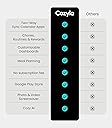
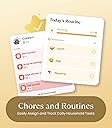
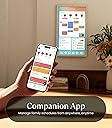
The Cozyla Calendar+ 2 is a 32-inch smart digital calendar with a high-definition touchscreen that mounts on your wall or desk. It offers two-way syncing with major calendar platforms and supports Google Play Store apps, transforming your home into a connected family hub. Featuring an integrated chore chart with rewards, meal planning tools, and customizable widgets, it streamlines family schedules and responsibilities while reducing stress and boosting engagement. Designed for modern UK homes, it includes a UK power adapter and a rotating mount, backed by 24/7 customer support and a 1-year warranty.


| ASIN | B0DHCF53R6 |
| Best Sellers Rank | 112,896 in Stationery & Office Supplies ( See Top 100 in Stationery & Office Supplies ) 4,434 in Wall Calendars (Stationery & Office Supplies) |
| Brand | Cozyla Mate |
| Brand Name | Cozyla Mate |
| Country of Origin | China |
| Customer Reviews | 4.6 out of 5 stars 441 Reviews |
| Format | Digital |
| Item Dimensions W x H | 73.3W x 43.2H centimetres |
| Manufacturer | Cozyla Mate |
| Material | Plastic |
| Model Number | CD-7V541F |
| Model Year | 2026 |
| Model year | 2026 |
| Mounting Type | Wall Mount/Desk Mount |
| Part Number | CLD-32-White-UK |
| Product dimensions | 73.3W x 43.2H centimetres |
| Size | 32 inch |
| UPC | 792105798042 |
A**L
A Smarter Way to Organize My Family Life
After using the Cozyla Mate Digital Calendar+ 2 for a while, I can honestly say it has changed the way my family and I stay organized. As the main person managing schedules at home, I really appreciate how convenient and intuitive this 24-inch wall-mounted touch screen is. The display is large enough that I can see everything clearly from across the room, and the touch response feels smooth and reliable. What impressed me most is the customizable dashboard. I was able to set it up exactly the way I wanted, combining family schedules, a chore chart, and a meal planner all in one place. From my personal experience, this has reduced misunderstandings and constant reminders, because everyone can simply check the screen themselves. I feel much less stressed knowing that plans and responsibilities are visible to everyone. The support for Google Play apps is another feature I personally love. I downloaded apps that fit my daily routine, which makes the device feel more like a smart family hub than just a calendar. Installation was easy, and the clean white design looks great on my wall. Overall, I feel the Cozyla Mate Digital Calendar+ 2 is a smart, practical investment that truly improves daily life and family coordination.
A**R
Buy this...not that! Has restored peace to our busy home
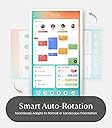
Christmas 2025 was the straw that broke the camel's back. The calendar on the fridge no longer cut it, demonstrated by missed commitments, double bookings and a lack of writing space for the *many* school, work, club dates. No one was paying it attention, other than me...and my blood pressure! The Boxing Day Gods started spamming my news feed with a competitor device and I started researching. It seemed too good to be true. A deep dive showed me that actually, the Cozyla matched our family needs far more accurately. It wasn't a restricted interface. The Google Play store was a game changer for our Android family. It felt like it would endure beyond other devices as it could grow with us. My husband was beyond cynical and resistant. I ordered it anyway, and lied about the cost. I was nervous as it was new to the UK market and only available at Amazon. I worried about after sales support and longevity. No understatement, it has been a game changer. Easy to set up our of the box, we bought a stand and it sits on the kitchen counter looking impressive, in landscape or portrait. It syncs (both ways) with our existing Google calendars. It reminds us through a giant calendar widget and pop ups. Meal planning, recipe storage, shopping lists...oh the shopping lists! Food waste is down, shopping costs controlled, we actually used a third party app for this as it suited us better. But Cozyla are non-propritary and that is a huge thing, it allows you choice. Everyone knows what's for dinner- because it's there - super visual and accessible through a home screen widget. Chores, tasks and routines. Our kids are motivated, they like collecting points and cashing them in - my nagging has reduced 75% (because one kid is Cozyla indoctrinated but the other needs some encouragement!) My husband, new convert, uses it for reading emails as it reduces the eye strain rather than his phone. He has all the news apps, we read and watch the news daily on this. From being so resistant about 'being controlled by a device' he uses it daily and had never been so proactive on completing a calendar. Ironically, we have named it The Command Centre. Also, we love the AI that means we can take a photo of a letter / newsletter / email and it turns it into an appointment - always pulling the right data. All your media apps are available meaning it doubles up as a TV / steaming service. My audible. Planner, notes. I even stream webinars and work calls. We've linked it to Google photos so it's a gorgeous photo frame in standby. My son and I use it to support with homework at the breakfast bar, we interact with it as a family - which sounds sad and cliched but is true. Browsing for days out and holidays on such a massive screen is a pleasure. Picture quality is very good. Especially for watching The Crown 😂 My concerns were unnecessary. There is a large unofficial product community on Facebook with so much advice and experience to share, and Cozyla engage there too. When I experienced a problem they reached out and helped resolve it in a timely and considerate way. The updates keep coming with slight tweaks and enhancements. Jury is out for me on the new AI assistant but like all things, I expect it will evolve. The pros: has.genuinely changed how we work, plan and shop as a family. We eat better and save money. Communication has hugely improved. The mental burden is no longer mine to own, it is shared and no one person feels overwhelmed. Photo pop ups genuinely spark conversation and happy memories. This is always with us thanks to the mobile app so I am never consulting a photo of the fridge on my phone. It does bring us joy and some peace. Cons: in the UK only the 32 inch was available with the android / play store capability. This meant we had to pay more than planned, I understand this is planned to change with new launches and to be honest, we are glad we have the size we do. I appreciate though that this makes it a big jump for first time investment in a new brand. We had to buy a stand as the wall mount wasn't practical for us, and probably for many UK homes navigating radiators and smaller wall spaces. Overall though this has genuinely been a game changer, we engage with it daily and it has made a huge difference to how I feel as the chief planner, I have headspace and we have routine and less drama as a family. Btw. We are family of 4, with kids 10 and 12.
B**N
A digital hub that brings the whole family together in a practical and enjoyable way
This Cozyla Mate Digital Calendar Plus 2 is one of the most useful smart displays I have used for family organisation and home automation. The 32 inch screen is large bright and perfect for family interaction whether checking schedules meal plans or using it as a digital noticeboard. The operating system is responsive and smooth and since it runs Google Play Store it allows downloading of all the popular apps such as YouTube Spotify Home Assistant and Google Calendar. I set mine up as a central home dashboard where I can view my CCTV feeds control smart lights and check weather updates all in one place via Home assistant dash board. The calendar and chore functions are fantastic for managing daily routines. I set reminders for my medication and even my kids get notified to remind me which keeps the whole family engaged. The chore tracking feature is fun for the children as it keeps score through the week and makes giving rewards at weekends easy. The display quality is excellent and touch response is fast which makes navigating apps effortless. It will soon be mounted in our hallway for quick access to home controls and reminders. Overall it is a high quality smart calendar and digital hub that brings the whole family together in a practical and enjoyable way.
S**H
Surprisingly Hardy - It makes life easier!
I’ve been using the digital calendar for over a month now, and honestly, I didn’t expect to like it this much. It’s super easy to set up and keeps me organised without any hassle. The screen is bright, clear, and easy to read from across the room, and I love how the design feels clean and modern. What really stands out for me is how organised I’ve become since using it. I can see my whole week at a glance, and the reminders actually keep me on track without being annoying it. It’s great for everyone in my family to know what’s happening and when. After a month of use, it has made my life surprisingly handy and much easier.
S**P
Happy with our new Home Hub and faux fireplace
We have been thinking about getting a digital photo frame for some time, but we didn't like the idea of buying a frame only to have to pay for a subscription. We're also a busy family, and I've been using a paper diary until now (yes, very old-school), and finally decided to take the plunge and use a digital diary so we can all input our activities and see them in one central place. The Cozyla Calendar +2 promised to do all that. But did it? Short answer: YES, it did. Which one? We decided to stretch ourselves and get the 24-inch model, and I'm so glad that we didn’t go for the smaller 15 SE one. Unboxing and installation. The device and accessories were really well presented (quite Apple-like packaging). It came with all the tools, templates and wall mounts to install it. It did come with wall fixings, but as we were mounting it on a plasterboard ‘dab and dot’ wall, we bought some heavier-duty screw-in fittings as the supplied ones didn’t work for our needs. Positioning. We use the Cozyla in landscape, but you can rotate it to portrait and back again as often as you like on the rotatable wall mount. WHAT WE LOVE… I hadn't quite realised how many features we were getting beyond a photo frame and digital calendar. It truly has become our one-stop home hub, and I can't imagine how we function without it, to be honest. I really hope it doesn't break, as there's no going back now! - We do have an iPad, but in a busy family, I love the fact that the Cozyla is physically attached to the wall, so no one can walk off with it or forget to charge it! - Displaying all our individual family members’ diaries in one place. You can even sync it with external calendars by adding the URL of the kids’ school Google Calendar. - Adding events to the calendar on the tablet itself is simple. When you're away from it, the Cozyla app on your phone is really helpful. Whatever events you enter into the built-in Cozyla Calendar (in the app or on the tablet) will appear in Google Calendars as well, and vice versa. You just have to make sure you set it up correctly to enable that function, and remember to tick the box below the person’s name each time you input a new event to enable it to sync with Google Calendar. - You can even take a photo of a birthday party invitation or screenshot of an email, and Cozyla will cleverly glean all the details (date, time, location, etc.) without having to type a thing! - A selection of built-in screensavers. Our favourite is having a roaring fireplace (with crackling sound effects). It makes the living space feel much more cosy (no pun intended). - Apps from the Google PlayStore can be added. Our particular favourites are using the device as a central music player - it links with our Amazon Music, Sonos and YouTube playlists. It’s great to have the Ocado app and add items to our shopping list as we need them. - Widgets can be added to the home screen. We start our day with the weather forecast updates from BBC Weather, motivational quote apps, daily to-do lists, etc. We have our Ring doorbell set up so that movement notifications pop up on screen and an audible doorbell chime plays when someone calls. - Chores list and meal planning/recipe saving feature hasn’t been used by us yet - not sure I have the energy for that right now. HURDLES - Time and patience needed for setting it all up - but worth it. The tablet itself is pretty intuitive if you've used tablets before. Like any new device, particularly one with lots of useful features, there was a commitment of time and patience required to set it up. I did a lot of research and found most of the answers and tips on the Cozyla Facebook Group (set up by users, I believe). I also emailed the Cozyla customer service desk. Both were equally helpful and gave speedy replies. It was a steep learning curve going from paper diaries to Google Calendars and the Cozyla all in one go, but if you're already using Google Calendars, you'll probably find it a lot easier to link the two. - The built-in SPEAKERS aren't amazing, but it's pretty simple to connect to a Bluetooth speaker which we have sat nearby. This works really well for us. - We were really disappointed that Amazon’s main app for shopping is not compatible with the Cozyla. At first, I cursed Cozyla, but it turns out Amazon no longer makes its app compatible with Android tablets, full stop. That said, you can just open a Google Chrome browser on the Cozyla, and it functions just like the app, so it's not a huge deal for us. - Our biggest frustration is the photo frame function. You can plug a USB stick in or use Google Photos, which is great, but whichever you choose, you can't get the photos to appear randomly because there's no shuffle feature. I think this is a real oversight, and it's really annoying for us because every time the screen is touched and goes back into screensaver mode, it restarts from the beginning, so you end up seeing the same photos over and over. Apparently, there is an external app you can download from the Google Play Store, but it seems like such an obvious and simple function to include if you're marketing it as having a photo frame. For us, we really didn't want our family photos to be accessed by some random app company. We're hoping that Cozyla will bring this feature at a later date. It's not a dealbreaker because the device has been so useful on all the other levels, but we found that niggle disappointing all the same.
G**O
Worth every penny for family sanity
The fridge door used to resemble a sticky-note scrapbook, but the Cozyla Mate has finally restored a bit of order. Its 32-inch touchscreen is so bright and crisp that even my 6 a.m. eyes have no trouble making sense of it. Fitting the unit was painless. The wall bracket and the correct drill bit were included, and once it was mounted the screen sat flush with the tiles, almost as if it had always been there. Switch it on, and Android appears with Cozyla’s own dashboard already waiting. My Google, Apple and Outlook calendars merged in under a minute, so every fixture, meeting and dentist check-up now lives on one neat grid. The chore list, complete with star rewards, has mysteriously transformed the children into dishwasher experts, and the meal planner is priceless: tap “Monday – shepherd’s pie” and the ingredients drop straight onto the shopping list. When nobody is poking it, the display glides through family photos or streams Spotify, and every swipe feels silk-smooth. A sharp screen, sturdy build and genuinely practical apps make this a first-rate organisational hub. Set-up took only moments and the whole house feels calmer already; for the sake of my sanity it is worth every penny.
�**�
Happy purchase!
Honestly, absolutely love this. It’s one of those things you didn’t realise you needed until it’s on the wall. The 24-inch screen is a really good size – big enough to see everything clearly, but not so big that it takes over the room. Installation was smooth and straightforward, no drama at all. We’ve mounted it in the kitchen, and it’s honestly the perfect spot. Day to day, it’s super handy: • Quick glance at family schedules while cooking • Chore chart for the kids, so less nagging (always a win) • Meal planning is much easier when it’s right in front of you You can download apps from Google Play, so it’s very flexible. When we’re not using it for planning, we’ll pop something on and use it like a small TV or play music in the background. Makes the kitchen feel much more alive. Small tip: Make sure your Wi-Fi is decent, and set up the apps you use most first – everything runs much more smoothly that way. All in all, it’s one of those “why didn’t we get this sooner?” purchases.
J**E
large screen
I’ve been using the Mate Digital Calendar for a couple of weeks, and it has quickly become the central hub of our household. The 32 inch touchscreen is large, bright, and easy to read from across the room, which makes it perfect for a family space like the kitchen or living room. Setting up the customizable dashboard was straightforward. I created separate chore charts for each family member, and the drag and drop interface makes updates simple. The ability to color-code tasks and events helps everyone see their responsibilities at a glance. My kids actually check it in the morning before school, which has made routines smoother. The smart calendar integration is another highlight. It syncs with our existing digital calendars, so appointments, reminders, and school events all appear in one place. I’ve found it especially useful for coordinating busy weeks—no more missed activities or double-bookings. The touchscreen is responsive, and the build quality feels solid. I like that it can be wall-mounted for a clean look, but it’s also slim enough to sit on a stand if needed. The interface is intuitive, even for less tech-savvy family members. Personally, I’ve noticed a big improvement in household organization. Instead of sticky notes and scattered reminders, everything is consolidated in one visible, interactive space. The chore chart feature has reduced arguments about who’s responsible for what, and the auto updating dashboard keeps everyone accountable. Overall, the Mate Digital Calendar 2 is more than just a calendar it’s a family management tool. It combines a large, clear display with smart features that genuinely make daily life easier. For households juggling multiple schedules and chores, it’s a practical and effective solution. Great gift value
S**I
No Power Adapter options
So far the only issue is that we had no option for a AUD power supply, because the transformer is within the power adapter we could not find a replacement. I contacted the seller and I have not had a reply, it's been a week.
S**N
An Absolute Game-Changer for Family Organization !
This Cozyla 22” smart Calendar has completely transformed how our family stays connected and organized ! As someone who juggles multiple schedules (work, kids activities , meal planning and household chores ) , this touchscreen marvel has become our family's command center . This seamless synchronization with all our calendar apps ( Google , Apple , Outlook ) is flawless-no more double entries or missed appoinments ! The kids especially love the chore chart feature with visual reminders , which has made responsibility-building fun . The meal planning section has been a weekly lifesaver , helping us reduce food waste and last -minute grocery runs . What really stands out : * Crystal-clear 22" touchscreen with ultra-responsive interface * Real-time updates across all family members' devices *Intuitive drag-and-drop task management *Customizable views ( daily/weekly/monthly ) * Minimalist design blends beautifully with our modern home decor Setup took less than 10 minutes , and the companion app works perfectly . The dry-erase notepad feature adds brilliant analog flexibility to this digital powerhouse . we've finally retired our scattered papper lists and cluttered fridge magnets ! While the price point is preminm , the value it delivers in saved time and reduced family stress makes it worth every penny . Cozyla's customer support even followed up to ensure we were maximizing all features . If you're serious about household efficiency , this smart calendar is your ultimate solution !
A**E
A Must Have for Organization and a beautiful wall piece!
If you’re looking to bring some serious organization and style to your home or office, this 32-inch digital calendar is a total game-changer! The huge, vibrant display makes it easy to see your entire schedule at a glance, and adding events or reminders is a breeze right. I love how it syncs seamlessly with my other devices, so my calendar, tasks, and meetings are up to date. I can check my emails and view the live weather right on the same dashboard. Since it is a giant android table running Nova Launcher, it allows unlimited customization options and goes beyond organization. Gone is the old stained white board and paper notes. The size is slim which looks great on the wall. Having everything in one place has honestly made my days so much less stressful. The calendar was well packaged. Setting up was a breeze with pictured instructructions and even came with a screw driver and mini leveler. If you want to stay organized and connected with minimal effort, this digital calendar is absolutely worth it!
T**V
A smart hub that opens up a world of possibilities!
I installed the Cozyla Calendar+ in my kitchen/dining area. The large 32" display enables a wide variety of applications that covers the whole room: -A calendar that displays upcoming events so family members can stay in sync. -A Google Tasks widget to capture to-do items which apply to the whole family. -A Google Keep widget with the current shopping list. -A stock ticker for a market watchlist. -Weather and time. The wall-mount installation was easy using the included mounting template, a 1/4" drill bit, and the supplied wall anchors. A Phillips-head screwdriver was included in the package which worked perfectly for the drywall screws and I/O panel cover. The digital calendar on the home page has upgraded my family's organization and made it so we should never miss an upcoming event. In addition, I created a second home page to display a full-month calendar and meal planner app, as well as a split-screen display of the Calendar and Chrome browser. The split-screen allows me to monitor the home's live camera feeds in the browser while keeping track of the shared calendar, which can be updated at this device or remotely from a tablet, phone, or computer. I paired a RF keyboard/trackpad with the hub to make it easy to enter calendar details and navigate the display from a distance. I also connected a USB webcam to enable video calls in Google Meet -- for this to work properly it was necessary to Disable USB Audio Routing in the Android developer options. The screen saver is currently set to kick on after 30 minutes of inactivity and display pics from our Google Photos collection. The pics look great and attract a lot of attention given the big, bright screen. The Google Assistant can be summoned anytime with a "Hey, Google" and is super handy for playing music and videos, adjusting the volume, and navigating back to the home screen. This digital calendar has totally transformed our kitchen/dining area and enabled more organization & fun for the whole family!
R**E
⭐⭐⭐⭐⭐ Cozyla 32" Wall Calendar – Clear, Versatile, and Surprisingly Easy
I’ve used a Cozyla wall calendar for over a year, and recently upgraded to the newer model. The setup was refreshingly simple—there was no need for me to transfer anything, which is why I didn’t need to use the flash drive or phone they recommend. It powered up quickly and was ready to go. The display is noticeably improved: crisp, easy to read in any lighting, and perfect for both planning and streaming. I love that it supports any app you’d use on an Android phone, which makes it incredibly versatile. The analog clock screensaver is a favorite—it adds a calm, classic touch to the room. The new placement of the power and volume buttons (now on the bottom instead of the back) makes it much easier to adjust. It’s wall-mounted in our space, and while they provide new brackets, I was able to reuse the ones from the previous version. It rotates smoothly on the wall, which is great for adjusting the viewing angle when streaming. I was without it for about a month before reaching out to support, and I didn’t realize how much I relied on it until it was gone. The replacement process was smooth and surprisingly quick—about a week to 10 days once I contacted them. The representative who helped me did a great job—professional, clear, and easy to work with. I had expected a software update, not a full replacement, so that was a pleasant surprise. There are a lot of features I’ve read about but haven’t explored yet, and I’m excited to dig into them. Based on my experience, I’d definitely recommend this product to others. It’s a great blend of functionality, design, and ease of use.
Trustpilot
1 month ago
3 weeks ago