


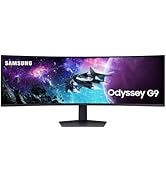
๐ฎ Dominate your digital realm with the Odyssey G9 โ where speed meets stunning immersion!
The Samsung Odyssey G9 (G95C) is a 49-inch ultrawide curved gaming monitor featuring a 1000R curve and Dual QHD (5120x1440) resolution. It boasts a blazing 240Hz refresh rate and 1ms (GtG) response time for ultra-smooth, lag-free gameplay. DisplayHDR 1000 and a 1,000,000:1 contrast ratio deliver vivid, high-contrast visuals. AMD FreeSync Premium Pro ensures tear-free gaming, while ergonomic adjustments and advanced eye comfort technologies support long sessions. CoreSync and Core Lighting+ enhance ambient immersion, making it a top-tier choice for competitive and immersive gaming setups.



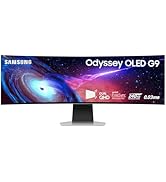




| ASIN | B0DHJBWY52 |
| Adaptive Sync | FreeSync Premium Pro |
| Additional Features | Curved, Ultrawide Screen |
| Aspect Ratio | 32:9 |
| Best Sellers Rank | #10,762 in Electronics ( See Top 100 in Electronics ) #357 in Computer Monitors |
| Brand | Samsung |
| Brightness | 1000 cd |
| Color | Black |
| Compatible Devices | Devices with HDMI, DisplayPort, USB, and FreeSync Premium Pro support |
| Connectivity Technology | HDMI |
| Contrast Ratio | 1000000:1 |
| Customer Reviews | 4.1 out of 5 stars 335 Reviews |
| Display Resolution Maximum | 5120x1440 pixels |
| Display Technology | VA |
| Display Type | QLED |
| Hardware Connectivity | DisplayPort, HDMI, USB 3.0 |
| Image Contrast Ratio | 1000000:1 |
| Included Components | DisplayPort Cable, Power Cable |
| Item Dimensions D x W x H | 16.6"D x 45.2"W x 22.4"H |
| Item Weight | 23.4 pounds |
| Manufacturer | Samsung |
| Model Name | G9CE |
| Model Number | LS49CG950ENXZA |
| Mounting Type | Wall Mount |
| Native Resolution | 5120x1440 |
| Picture Quality Enhancement Technology | CoreSync, Core Lighting+, Advanced eye comfort technology |
| Power Consumption | 120 watts |
| Refresh Rate | 240 hertz |
| Resolution | QHD Ultra Wide 1440p |
| Response Time | 1 milliseconds |
| Screen Finish | Curved |
| Screen Size | 49 inches |
| Screen Surface Description | Curved |
| Shape | Curved |
| Specific Uses For Product | Gaming |
| Total Number of HDMI Ports | 2 |
| Total USB 2.0 Ports | 2 |
| Total USB 3.0 Ports | 2 |
| Total Usb Ports | 2 |
| UPC | 887276792132 |
| Unit Count | 1 Count |
| Viewing Angle | 178 degrees |
| Voltage | 240 volts |
| Warranty Description | 1 year manufacturer |
| Warranty Type | 1 Year Manufacturer Warranty |
R**X
Very wide and very curved.
Its huge, way bigger then you think, its curved very obviously. Its heavy af. Here is my advice. For me at least it gave me a headache using the stand that comes with it. It was too close to my face. I got one one of those monitor arms and it made all the difference. Also it friggin huge, if you treat it as two monitors, have stuff on the left and right it feels better. If you have never had a monitor like this its gonna take some getting used to. Quality is good, picture is good but its bigger then you think it is.
R**.
A premium and quality monitor thatโs in itโs own class!
This monitor is awesome! The size and curve create an immersive experience like nothing else. Setup was easy and Iโm extremely happy that I didnโt need any tools or Allen wrenches. The image quality is amazing in games and the over performance of the screen exceeded my expectations. Itโs a lot to look at and can strain your eyes at first, but after adjusting to it I canโt imagine using anything else. Definitely worth the price if you have the hardware to run it at itโs full potential.
G**Y
Great monitor. The rest, Amazon should be ashamed!
When these went on sale it was like someone was listening. I had been using a 4K TV for the last year as an "Experiment" for my monitor. The problem with TVs are the font, it was very hard for me to see it. I ordered two since like 2 monitors for productivity. I received them yesterday and set one up. Great monitor. The resolution (font), quality and screen size are great. I woke up early to get the other one up and running and off to my office I went. Here is the reason for the one star. The second box was beat up, holes and LOTS of tape. I opened it and couldn't believe my eyes. The contents, stand etc. was on top of the monitor screen. Packing material was missing, booklets etc. It was obvious to me that this was a return, basically everything had been thrown into the box and taped up. Finally got through to someone at Amazon Support, Sorry to digress, but it sure seems that Amazon is trying as hard as possible to hide the ability to get support from a real person. Anyway I finally got a hold of someone, they issued a refund and sent a letter to the company that supplies the hardware. My question; you can obviously see the distressed box and with holes and things rattling inside. Nothing should be rattling in a monitor box. This SHOULD NEVER HAVE BEEN SHIPPED TO ME full stop! Very disappointed with Amazon!
C**S
Massive upgrade โ incredible screen space, clean setup, and unbeatable value at $699
The Samsung 49โ Odyssey G9 (G95C) has been a huge upgrade to my setup. The DQHD resolution and 240Hz refresh rate look fantastic, and the 1000R curve makes the entire screen feel natural to use whether Iโm gaming or multitasking. I picked it up for $699, which made it an easy choice since the 57โ 4K model is still priced much higher. I replaced a 34โ ultrawide and a 27โ monitor, and the difference in desk space is night and day. Two stands took up way too much room, but the G95Cโs flat stand design is wide and low enough that I can place my soundbar and a small touchscreen neatly in the gap between the screen and the base. It keeps the whole setup clean without sacrificing functionality. The screen real estate is the biggest win. With Windows Snap Layouts and Samsungโs display management, organizing windows is effortless. Not having bezels in the middle of my workspace is a massive improvement over running multiple monitors. Everything feels smoother, cleaner, and more immersive. If you want top-tier performance, a huge amount of usable screen space, and a cleaner desk setup without paying 57โ prices, the G95C is absolutely worth it.
B**E
Amazing and huge
Amazingly responsive, amazingly large, amazing. I upgraded from a 32โ curved monitor and a 27โ regular monitor to this beast as my solo monitor. Much better on my eyes and neck to have one big screen vs two screen looking back and forth. Great for work! For gaming, itโs very immersive but due to the large size it makes games that have huds or minimaps on the edges scale weird. Depends on the game to ensure wide screen compatibility. Highly recommend though do be warned, itโs very large and heavy. Honestly Iโm thinking 38-42โ is probably plenty. Also, for gaming, a second monitor is nice for discord/youtube, but split screening on one screen even though it has enough real estate just killed immersion or was too distancing. Be aware due to the size and curve you likely wonโt be able to have a second monitor on your desk or in an ergonomic position.
L**N
Good monitor
It works good. At first I thought the screen was messed up. I calibrated it and it fixed the issue its been fine since.
D**Y
Curved Ultrawide Convert - great monitor for many, perhaps not all
I've had decent gaming PC's before, always used a 1080p, 60hz monitor. Finally, in anticipation of Battlefield 6, I pulled the trigger on this product. I was debating on whether to go ultrawide, or get a 4k display, but ultimately decided to go with the G9. First and foremost, being able to see the extra FPS in my games is very satisfying. I'm running a relatively powerful rig, with a 4070ti, and I can finally appreciate the extra frames my rig is capable of. I'd say that the difference between 30fps and 60fps is obviously massive, but the difference between 60fps and 120fps is also pretty stark. Getting the full 240fps is harder in more demanding games, but in the games where I can see those frames, there is an smoothness that I can notice and I do appreciate. My panel does have some light leak spots on the edges, but it's something I rarely notice, unless the screen goes completely black, if you're sensitive to that kind of thing you might want try exchanging your product, but for me, its rarely noticeable and I think that the monitor looks great. I think that this product is worth a look, when on sale. Its a steeper price at MSRP, but I think a good value when marked down, which appears to happen relatively frequently. I also appreciate the ability to run multiple devices. I use my PC in the DisplayPort, and my M2 Mac Mini in the HDMI. Switching inputs is pretty easy, but a remote would've been a great addition, to more easily navigate the menu system. I'm giving it 4 stars, as I think that the light leak issue would annoy others perhaps more than myself, for such a premium-priced product. That being said, I rarely notice it and have been otherwise extremely impressed with the experience of using this monitor so far. You can also use both HDMI, and DisplayPort, into the same PC to simulate a dual monitor setup, which could be useful to some. I've yet to experiment with using this monitor in that way, but its a nice option. Most of the drawbacks you may experience are up to personal preference. This is a large monitor, and your desk setup will most likely need to accommodate that. For example, I no longer use multiple displays as there is just not enough room on my desk to fit them, without blocking my speakers. In the future, I may mount them above this monitor, to use for productivity, etc. I also wasn't convinced about curved monitors, until this product. It's a natural way to game and provides a slight enhancement to immersion, but isn't distracting, like I thought it might be. Ultimately, this monitor sold me on the value of curved ultrawides, and I don't see myself going back. If this product looks a little to big for your desk setup, or just too much for you, consider a 21:9 ultrawide, it may be the best of both worlds for you. I like the 31:9 because it feels like having two monitors during browsing, editing, etc, but when I game, I get the benefit of the whole screen, and no bezels. I also think that its easier to drive than a full 4k display, which is a benefit to FPS in games. When gaming it's almost like having a triple monitor setup, with a wide FOV. I'm excited to mount a TV above it on my wall, and use that for a second monitor/console gaming setup, and I think that is probably the best way to use multiple monitors in a setup like this. I think its a good product, you most likely won't regret it, just be extra vigilant in setup as it is a heavy product and breaking the panel would be extremely disappointing. I'd recommend designing your space with this product as the centerpiece, and going from there. It's even larger than I thought it would be, and i have plenty of desk space, but conversely, I now have much more screen space which is something I value a lot. I'd always have at least two, but preferably three monitors, and this one negates the need for that, in my opinion. Using my laptop for youtube/media is just as good and better in some ways because I'm not constantly Alt-Tab'ing out of games or using borderless windowed mode. It would still be nice to have a second monitor for OBS or discord, but like I said earlier, this monitor can act as two separate monitors with the addition of that extra HDMI. For me, I want a large TV overhead, and I would be satisfied with using that for those other programs I may want open during game sessions.
M**Z
An absolute beast!
I went from a 32" to this beast and it is amazing. Refresh rate is awesome, picture is beautiful. Gaming will never be the same for me!
Trustpilot
2 days ago
1 day ago