Desertcart purchases this item on your behalf and handles shipping, customs, and support to Croatia.
๐จ๏ธ Print smarter, save bigger, connect easier โ the ultimate all-in-one for the modern pro!
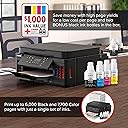
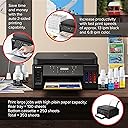
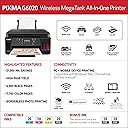
The Canon PIXMA G6020 is a wireless all-in-one Mega Tank printer designed for high-volume home or office use. It delivers up to 6,000 black-and-white and 7,700 color pages per ink set, saving users over $1,000 on ink costs. Featuring 4800 x 1200 dpi print resolution, auto duplex printing, and compatibility with mobile devices and Alexa voice commands, it combines professional-quality output with effortless connectivity and long-lasting ink supply.


| ASIN | B07SQZNSQY |
| Additional Printer Functions | Copy, Scan |
| B&W Pages per Minute | 13 ppm |
| Best Sellers Rank | 225,317 in Computers & Accessories ( See Top 100 in Computers & Accessories ) |
| Box Contents | Wireless MegaTank All-In-One Printer, 4โ x 6โ Photo Paper Sample Pack (3 Sheets GP-701), Setup CD, Manual, and other documentation, Full Set of Ink Bottles (PGBK, C, M, Y) + 2 Bonus Black, (PGBK) Ink Bottles, Black Print Head, Color Print Head, Power Cord |
| Brand | Canon |
| Brand Name | Canon |
| Color Depth | 24 bits_per_pixel |
| Color Pages per Minute | 6.8 ppm |
| Colour | Black |
| Compatible Devices | Laptops, PC, Smartphones |
| Connectivity technology | USB, wireless |
| Control Method | Voice |
| Controller Type | Amazon Alexa |
| Customer Reviews | 3.9 out of 5 stars 11,065 Reviews |
| Dual-sided printing | Yes |
| Duplex | simplex |
| EU Spare Part Availability Duration | 1 Years |
| Global Trade Identification Number | 00013803317824 |
| Hardware Interface | Ethernet |
| Ink Colour | Black |
| Is Electric | Yes |
| Item Dimensions D x W x H | 37.1D x 40.4W x 19.6H centimetres |
| Item Type Name | Inkjet Printer |
| Item Weight | 17.8 Pounds |
| Manufacturer | Canon |
| Maximum Copy Resolution Black and White | 4800 dpi |
| Maximum Copy Resolution Color | 4800 x 1200 dpi |
| Maximum Copy Speed Black and White | 13 ppm |
| Maximum Print Resolution Black and White | 4800 x 1200 dpi |
| Maximum Sheet Capacity | 350 |
| Maximum Supported Paper Size | Carta |
| Maximum print Resolution Color | 4800 x 1200 Dots Per Inch |
| Model Name | Canon PIXMA G6020 |
| Model Number | 3113C002 |
| Model Series | PIXMA |
| Model name | Canon PIXMA G6020 |
| Network Connectivity Technology | USB, wireless |
| Number of Drivers | 2 |
| Number of Ethernet Ports | 1 |
| Number of Trays | 3 |
| Other Special Features of the Product | wireless |
| Output sheet capacity | 250.0 |
| Paper Size | 3.5โ x 3.5โ, 4โ x 4โ, 4โ x 6โ, 5โ x 5โ, 5โ x 7โ, 7โ x 10โ, 8โ x 10โ, Letter, Legal, U.S.#10 Envelopes |
| Print media | Glossy photo paper |
| Printer Output Type | Colour |
| Printer Type | Inkjet |
| Printing technology | Inkjet |
| Processor Count | 1 |
| Resolution | 4800 x 1200 |
| Scanner Type | Flatbed |
| Special feature | wireless |
| Specific Uses For Product | business |
| Total USB 2.0 Ports | 1 |
| Total USB Ports | 1 |
| UPC | 013803317824 |
| Unit Count | 1.0 count |
| Warranty Type | limited warranty |
| Wattage | 15 watts |
R**N
Good Printer, Great Value
I needed to replace an old Canon PIXMA printer that had failed with a cryptic error. My criteria for a new printer were: "mega" tanks -- even though my ink cost wasn't terrible high, but the individual price of cartridges was irritating Both a front cassette and a rear feed for paper. It is a mistake to assume that a printer has both. Suggestions that envelopes and photo paper would be put in the cassette seemed ridiculous for my needs. A flatbed scanner. I own a separate autofeed scanner. WIFI connections, and compatability with Apple AirPrint, and Chromebook printing. The Canon G6020 had all of those items plus: Two sided printing, auto "off" with network wake up, a 250 sheet cassette, and USB and LAN cable connectors. It also seems to have sensors for everything; for example, when either the cassette is inserted, or paper is added to the rear feed, the printer prompts for paper size verification. (Fortunately, the prompt for paper size and type can be turned off.) The printer also comes with what must be an almost a lifetime's supply of black ink. Photo printing is very good, though slow on "best" photo mode. The printer has can present a net "home page" for many setup and status functions; the default password is its serial number. Cons: The LCD screen is tiny and dark. At the very least, it should have a back light. I found the LCD Menus are confusing. Setup can be a little confusing. I ended up using the manual mode for configuring the WIFI connection. (Thank goodness for WPS, entering a password on the LCD would have been problematic) There is a cautionary notice warning to transport the printer upright lest some ink were to spill. The tanks seem well capped, and probably wouldn't leak, but I am not about to test it. Summary, Once setup and connect, the printer is great. It is definitely fast enough for home use and all of the printing that I have done has been sharp and unbanded. The black ink is pigment based and seems to be waterproof; the color, dye based, and will bleed slightly when water is applied. A major consumer magazine down-rated this model compared to others costing significantly more, and oft times having fewer features; most of the magazine's quibbles seem simply wrong in this case. Replacement ink from Canon on Amazon seems extremely reasonably priced ($17 for 170ml / 5.75oz of black ink, $11 for the 70ml of color ink.) Added Note: Others had complained, and I encountered... I had an issues with the printer's wifi connection, which I believe that I have resolved. My router was set to use a "smart" choice between 2.4 & 5Ghz (both using the same SSID) for device communication. I suspect that this was causing problems with the printer's 2.4Ghz only network chip. The problem seemed to clear up when I disabled the "smart" feature on the router; nonetheless, I decided to run a cable from the router to the printer and change the printer's LAN setting to use that. I have had no problems since. Though I am not using a mesh router, I could see this being a problem with some of those too.
G**N
Great basic eco tank printer!
I really like the printer! While thereโs no on unit settings to adjust, there are plenty of features online through the app and printer drivers! No paper jams have occurred for me! Noise is typical for a printer, but has a quiet feature in the settings before it print. Itโs a good size for what it is! Black prints faster than color but thatโs in all printers! Overall I really like the Canon G3200! Just keep in mind it doesnโt print double sided automatically, but has a manual feature through the printer drivers! Also make sure if you want to print vivid pictures, that you adjust color saturations!
P**K
Good quality for the value, going strong even after 18 months
UPDATED Jan. 2022: I've now had this Canon Pixma 4210 printer for over 18 months. It has worked well overall for my purposes. It does a nice job of printing color photos on glossy photo paper, and does it so inexpensively when compared to ink-jet printers and their relatively expensive cartridges. I also use the Pixma 4210 when I print or copy stuff with lots of color graphics. While it does NOT print on both sides (no auto-duplex), and the LCD panel is hard to read without good light (we use a small flashlight kept next to the printer), I have yet to replace ANY of the inks (tanks are still over half full after 18 months). If I need fast color laser printing with auto-duplex, I print to my HP Color LaserJet Pro M252. But it costs over $400 each time I need to replace the 4 cartridges (with HP brand), and I've done that several times in the past 5 years! The HP is NOT a bargain--costing me about $1,300 more so far for a $200 printer, way less than the Canon which cost me about $300 new and still using the original ink in the 4 megatanks. Not only is the HP a lot more expensive to use, the PHOTO quality on the M252 is poor and unacceptable. Yes, the Canon uses more paper (because it prints only on one side), but paper is way cheaper than HP laser cartridges. As for reliability, the Canon needs a little more attention occasionally. The biggest issue I've found is that if it has not been used in a while (several weeks or more), the inkjet nozzles can dry out and clog, and eventually one of the colors stops working. However, using the Canon firmware that does printhead cleaning has solved the problem each time (though sometimes it takes several iterations). I've also had that same problem with ink-jet cartridge printers in the past, where the only solution was to replace the expensive cartridges or even buy new printheads (even more expensive). The HP Color LaserJet M252 has been super reliable, but very expensive to use for that convenience and speed. I'm considering replacement of the HP with a fast, black-and-white laser printer with duplexing, even though it has grayscale graphics. -------------------------------------------------------------------------- ORIGINAL REVIEW: I have a 10+ year old HP AiO printer that is no longer supported, and it is increasingly difficult and more expensive to get cartridge replacements. I also have a very good laser printer that is fast and prints on both sides of the paper, which I use for professional writing and proofing. However, the laser color photo quality is not satisfactory for making good quality prints on glossy photo paper. I was attracted to the Canon Pixma G4210 because of the Consumer Reports review, and bought it for the better photo quality when compared with most of the other inkjets reviewed, and especially for economy of use for refilling ink tanks. The real cost of inkjets is, of course, the long-term expense of replacing ink cartridges; and replacing the plastic cartridge housings every time is wasteful. I knew that the 4210 would print on one side only, and the LCD display was hard to read in poor lighting, but this printer is for light use and occasional photo printing where quality matters, and also for copying and scanning. That it does not do auto duplex was a trade off for better photo quality and low maintenance costs. I almost cancelled my order after reading many of the Amazon negative reviews, but I am giving the G4210 a try based on the Consumer Reports review. I have a variety of devices in the wi-fi network that I print from, including MacOS, Windows 10, Linux, iOS, and iPadOS. For me, the setup went very smoothly. I followed the job-aid, and it worked as it should right out of the box. I did not have any wi-fi issues, as some reviewers report. The only thing unexpected with the default settings was that the printer turned itself off after a few hours of non-use, and was no longer connected to my wi-fi network. I used the web interface to the printer, with the serial number for the admin password, which I changed to something different. Then I changed the energy settings so that auto power off was disabled, and auto power on enabled. You must click the OK button to save the changed settings. I would agree with Consumer Reports that photo print quality is very good on glossy photo paper, and sharpness of text printed is also excellent. Speed is so-so, but that was less important to me than quality and inexpensive ink replacement. To deal with the LCD display issue I've put a cheap LED flashlight next to the printer, since the area lighting is poor where the printer sits. I have had decades of experience with many different kinds of printers. With any mechanical device, it needs to be treated properly and maintained. Otherwise, trouble will eventually occur, whether it is cars, lawn mowers, dishwashers or printers. Only time will tell if the Pixma G4210 is a good value, and I'm willing to see how it goes in the long run. If this one lasts 10+ years as has my HP8500, then it will be an even better investment. This is my first foray with a Canon, but they have been around for many years and have a good reputation for quality for their better products. The G4210 was designed for economy overall. Lack of auto duplex and poor LCD are a good trade-off in my view. Most of the time, I do print jobs from apps on my devices and just go pick up the output, seldom using the buttons and display on the printer. If I want fast auto-duplex for text and fair quality graphics, I use a laser printer for economy.
J**S
Great printer
Bought this cuz I started doing homeschooling. I haven't had any issues with it in over 1.5 years.
D**R
Great printer once things are installed properly
The instructions on how to put the two ink cartridges did not cover all info on installation problems. Tech support was so so. First person was not as helpful as the second one. I figured it out after awhile and sent them an explanation of what Idid just in case anyone else had the same problem.
Trustpilot
2 weeks ago
1 day ago