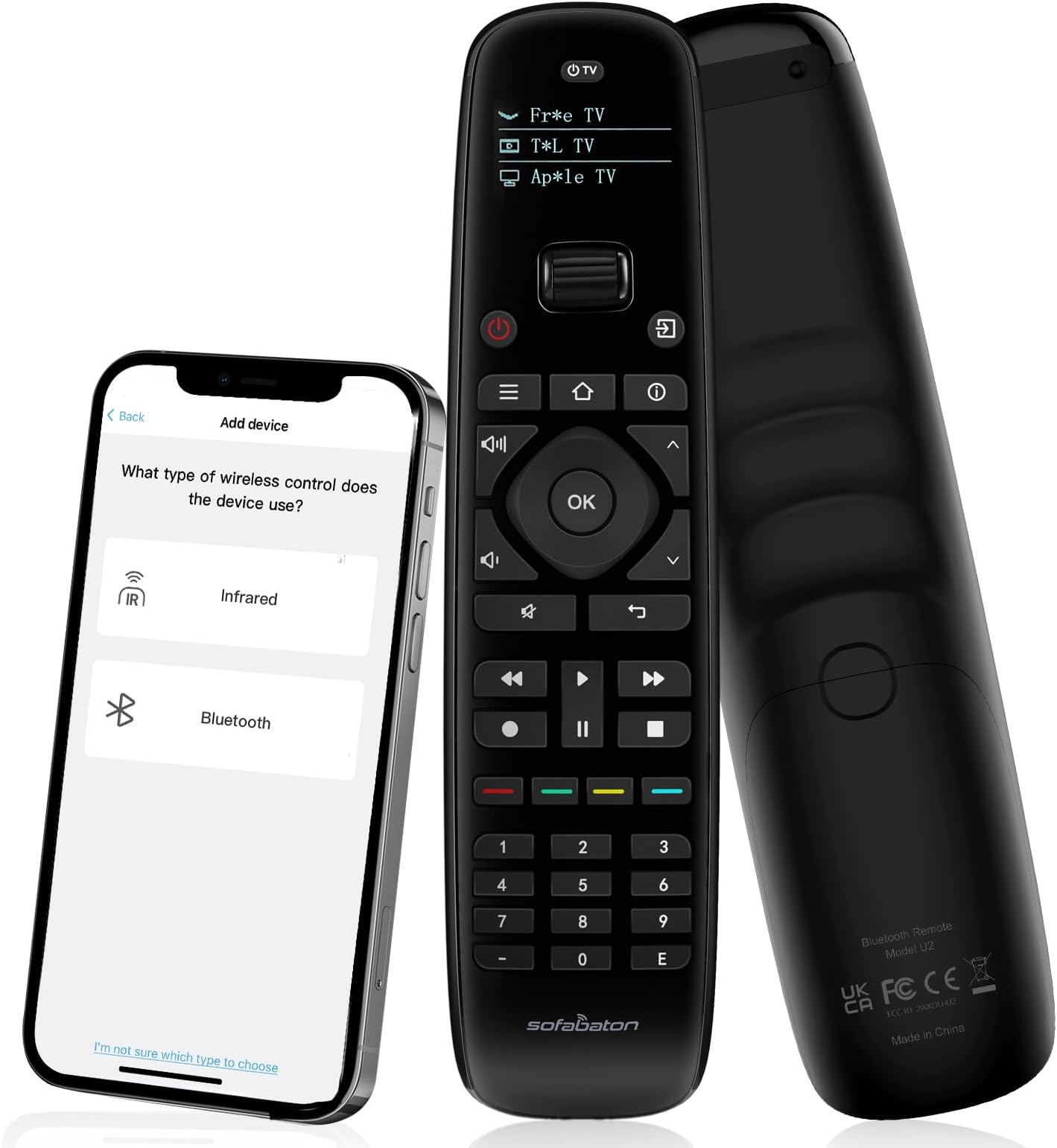
๐ฌ Master your media kingdom with SofaBaton U2 โ control thatโs as smart as you are.
The SofaBaton U2 Universal Remote is a professional-grade, all-in-one smart remote control designed for millennials who demand seamless entertainment management. Supporting over 6,000 brands and 500,000+ devices, it features backlit buttons, an OLED display, and an extended 35-foot infrared range. With customizable macros and a dedicated app for personalized setup and control, it transforms multiple remotes into one sleek, ergonomic deviceโperfect for simplifying your smart home theater experience.


| ASIN | B0DQSJN72G |
| Additional Features | Ergonomic, OLED Display, SofaBaton APP, Universal Remote Compatible, all-in-one universal remote |
| Battery Type | 2 AA Batteries Required |
| Best Sellers Rank | #29,915 in Electronics ( See Top 100 in Electronics ) #1,386 in Remote Controls (Electronics) |
| Brand | SofaBaton |
| Button Quantity | 39 |
| Color | Black |
| Compatible Devices | DVD/Blu-ray Player, Home Theater, Set Top Box, Streaming Device, Television |
| Connectivity Technology | Bluetooth, Infrared |
| Controller Type | Remote Control, SofaBaton APP Control |
| Customer Reviews | 3.6 out of 5 stars 409 Reviews |
| Item Dimensions L x W x H | 1.9"L x 1.1"W x 7.9"H |
| Item Weight | 4 Ounces |
| Manufacturer | SofaBaton |
| Max Number of Supported Devices | 15 |
| Maximum Number of Supported Devices | 15 |
| Maximum Range | 35 Feet |
| Model Name | U2 |
| Model Number | U2 |
| Number of Batteries | 2 AA batteries required. |
| UPC | 741421609853 |
| Warranty Description | 1 Year Manufacturer |
D**N
Excellent combi-controller
This is a pleasant upgrade to the already excellent Sofabaton U1. I especially like the lighted buttons on the new model -- much more usable in a dark A/V setting. This device consolidates a basket of other controllers, as well as offering the ability to create custom controllers with macros that control several devices. Disclaimer: Sofabaton offered me a full rebate on my U2. That's important for a reader to know. Also important is that the reason they did so was probably that I was happy with the U1 that I purchased four years ago. The U2 is even better. I found the setup intuitive, especially for the power and flexibility offered. I had an easy time downloading the data for my TV, Blue-ray, digital radio, Sonos, Apple TV 4k (3rd generation), and old Nakamichi receiver. The hardest part of that was tracking down the exact model numbers of some of my components. I didn't always meet with immediate success. For example, there were two models that seemed close to the model of my LG TV, and the first one had the volume up and down backwards for my TV. So I tried the other profile, and all was well. You can test the buttons in the phone app, and it's easy to download a different profile or customize individual buttons. When I bought my U1 about 4 years ago, some of my components didn't have entries in the Sofabaton database. But their customer support folks were very responsive and helpful, and immediately added the devices I needed. My old Nakamichi TA-3A receiver was recognized, but the buttons didn't all work correctly. It was a simple matter to customize those buttons. You get a layout of the Sofabaton's buttons displayed in the Sofabaton phone app; press the button in the app, and then select an option to set its function. You can either look up the selection from the database, or select the option to learn from the existing remote. Then point the remote at the Sofabaton, and press the button on the remote. I did that to set buttons for the main four inputs on the receiver, the tuner track up and down, and tuner seek back and forward. Works like a charm. You can also simply customize a button's function from the database, which might have been easier. I did that for some of the other functions I added. With about 30 seconds of playing around, I figured out how to create a macro. So I downloaded a second profile for my Oppo Blue-ray player, but named it OppoNakCD. Then I set the power button to be a macro to which I added actions to: power on the Nakamichi receiver, select the "CD" input on the receiver, and power on the Oppo Blue-ray player. I made another button into a macro to reset the receiver's input to "Video", power off the receiver, and power off the Blue-ray player. I also set the volume up / down buttons to control the receiver's volume, and I set the "input" button on the control to be the Oppo's disk eject button. When you add multiple commands to your macro (just hit the "+" and select the device and then the command to add), there's a default pause added between the commands. Just tap on that pause, and you can change the interval to whatever you want. I did this between my receiver's power-on and input selection, because it takes a couple seconds before it's ready. Very cool. Now it's as if I had a simple, all-in-one CD player with dedicated remote control. I just discovered a Sofabaton video explaining a lot of this, but it turned out I didn't need it. I think I'll want to review it anyway, because it seems to include tips beyond what I've been exploring tonight. In case it helps someone else, here's the link: https://www.youtube.com/watch?v=DQLT6MJQVDY
V**D
It works, with patience.
I bought this after finding that Logitech stopped making their stellar remote. Iโve only had it for a day and have found that itโs not as good as the Logitech, but it works if you mess with it enough. My video/audio setup is simple: Sony Bravia 3, Sony UBP-700 Bluray player, AppleTv 4k settop box. The remote is of good quality. Nice display and roll wheel lets you pick what device you want to control. The keys are backlit and light up when you grab the remote. Itโs big enough not to get lost and feels good in hand. Getting the remote to see the individual parts is fairly easy; use the phone app to add devices to the remote. The app does the heavy lifting. Unfortunately, thatโs when things get a bit tricky. My AppleTV is plugged into the earc hdmi port on the TV, the Bluray is on a standard hdmi port. I donโt have speakers set up yet. Turning on the tv defaults to whichever input you last used, so if you were watching Bluray and now want to watch something on AppleTV you have to jump through a few hoops. The easiest way is to turn on the tv, switch inputs, and either turn off or ignore the device you were using before. The Logitech remote would switch off the current device, switch on the one you want to now use, then switch the inputs to the tv. This remote is not so smart. My tv is not connected to wifi, neither is the Bluray Player (I recommend that you do the same if you value privacy), the only device connected for streaming in the AppleTV. AppleTV is a bit strange because it is still โonโ even when itโs off. The hdmi port is still active and the box is in a kinda suspended state. Because of that the earc port on the tv senses it and wants to default to it if i want to switch to Bluray. So, I turn on the tv, switch inputs to bluray. The TV senses the active earc port and switches back to AppleTV. I switch back to bluray and ignore the AppleTV. Not elegant, but it works. Turning stuff off is a pain too. You canโt use the power button to turn off AppleTV, if you are watching AppleTV you quick-tap the remote power button and that turns the tv and AppleTV off. A long press (2. -3 seconds) brings up a tv reset dialogue. Weird! While in AppleTV, if you want to go to the AppleTV Home Screen a long press (2-3 seconds) on the back-arrow button does the trick. None of this is explained anywhere, and none of it is logical. The SofaBaton remote does allow programming so you can get it to do what you want. I havenโt gotten that far into it yet. The remote will also learn from the original remote. That process is easy. You can also easily program or reassign buttons to act however you want. I had to do that the get the Bluray player to open and close the drawer. In all, itโs a decent remote. Not stellar. Be prepared to mess with it. Update: Iโve had it for a few days now and have added the Ugreen 3 port HDMI switcher to the mix. I got the this switcher because it can be remotely controlled. My arrangement now is this: the AppleTV and the Sony UBP-700 Bluray player are on post 1 and 2 of the switcher. The output of the switcher goes to a standard HDMI port of the TV ( not the earc port). I add the IR sensor to the switcher too. And Iโve added the switcher to the remote. Now things work better. Turning on either the Bluray Player or AppleTV will turn on that device and the TV ( the HDMI port on the tv has CEC enabled which turns on or off the device connected to it). If I want to switch devices I simply scroll down to the switch on the remote, select the device ( I have buttons 1 and 2 reprogrammed to to ugreen switch 1and 2 buttons respectively), scroll to the device Iโve selected on the switch and power it on. I can then select the previous device and power it off. I can then turn off everything by powering off the tv. This is not elegant, but it achieves the goal of reducing the number of remotes you have to deal with. Thereโs macros you can set up too. I havenโt gotten that far into it yet and may leave it as is because it works.
B**S
The Logitech Replacement for People Who Don't Mind a Fight
The SofaBaton U2 is the only affordable game in town once your Logitech Harmony dies, but be warned: the software is a disaster, the database is "community-built," and the manual is useless for complex setups. If you have a receiver, an HDMI matrix, and multiple activities, here are the fixes that actually work: 1. The "Ghosting" App Bug The app is notoriously buggy. Often, when you try to edit a button, the options simply wonโt appear. Donโt waste time troubleshooting; the fastest fix is to back out to the main device list, click a different device, and then go back into yours. This forces the app to refresh the connection. 2. The "Signal Length" Trap (Logitech Users Read This!) Logitech remotes were "smart" about signal timing; the U2 is a "raw" recorder. For skipping buttons (DirecTV Numbers/Arrows): Re-learn these using a "Quick Tap" on your original remote. If you hold it even a split second too long, the U2 records a "long" signal that causes triple entries (e.g., "1" becomes "111"). For stubborn gear (OREI/Denon): Re-learn these with a "Long Press" (2-3 seconds) to ensure the signal is "heavy" enough to be heard during a cold startup macro. 3. The "Black Dot" Mystery When you "learn" a custom command, it often appears in your macro list as a generic black dot. There is NO way to click it to see what the function is. If you have a 10-step macro, youโll just see a row of dots. You basically have to memorize your own sequence because the app is too incompetent to label them. 4. The Hardware "Handshake" Workaround HDMI Matrices (like OREI) are slow to wake up. To make macros reliable, I plugged my OREI into a switched outlet on my power conditioner (Monster Power) triggered by my Denon receiver. This ensures the matrix is powered before the macro even sends the "switch input" command. Also, use at least a 5-10 second delay after power-on before sending input commands. 5. Battery Life & Syncing Expect to burn through your first set of batteries in 2-3 weeks just during the initial setup and syncing. Once you stop tweaking the macros, it levels out, but high-quality rechargeables are a must. โ ๏ธ The "No-Safety-Net" Warning: No Backups This is the single biggest risk for long-term users. There is no way to back up your configuration or export your settings.The Risk: If your remote dies or you upgrade to a new model, you cannot just "download" your setup. You have to manually re-add every device and rebuild every 10-step macro from zero. The "Account" Trap: Even if you create a SofaBaton account, it only saves your basic info, not your actual button mapping or learned IR codes. Incompetence or Design?: This was a requested feature years ago, and as of now, the company still hasn't implemented it for the U-series. You are essentially one hardware failure away from losing hours of programming work. The SofaBaton X1S (their more expensive model) does have a backup feature, which makes the U2 feel like a "lite" version that punishes you for not spending more money. Verdict: It works once you stop relying on their database and manually "teach" the remote every single button using the right timing. If you want "plug and play," this isn't it. IMPORTANT UPDATE: The "Slidewipe" Macro Bug is Real (How to Fix It) I am updating my review because I finally figured out why my hardware macros were failing, and it is entirely due to a frustrating glitch inside the SofaBaton App interface. If you are programming macros with precise timing delays (like keeping a TV on a 5-second warmup or fusing commands with a 0.0-second delay), the app will secretly scramble your numbers anytime you reorder your list. The Slidewipe Bug: When you use the app's arrows to slide a command up or down the list, the app does not hold your custom delays in place. Instead, it wildly shuffles those delays onto completely different, random neighboring commands. For example, I slid an Orei switcher command to the top, and the app instantly stripped my 5.0-second delay off my Samsung TV and slapped it right onto my second Orei button press! The "Input Lockout" Glitch: If you try to change inputs on an Audio Receiver (like a Denon) or an HDMI matrix switcher right as it powers on, the hardware is still internally booting and will completely ignore a standard 0.5-second macro push. The Golden Rule to fix your macros: Arrange the names of your devices in the exact list order you want first. Do not change any numbers yet. Once your sequence order is completely finalized, go back from top to bottom and manually type in your custom delays (e.g., your 5.0-second TV warmup or your 0.0-second command-fusing long presses). Verify every single number visually on the screen, and hit SAVE immediately before exiting. If you don't watch it like a hawk after every single edit, the app will quietly break your setup!
N**S
Third Time's the Charm!
At last, my quest for a universal backlit remote that will work with my new Hisense 43" Fire TV is over! I picked up the new TV for my guest room during a Black Friday sale but with low light one needs a flashlight to see the remote buttons. I guess that's what you get for a cheap, no-frills TV, but I've had enough experience with third-party universal remotes to foolishly think, "no big deal - I can always pick up an inexpensive backlit multi-device remote to operate the TV, soundbar, and onn Android box." Boy, was I wrong! The first two remotes I tried, even though they said were compatible with Hisense TV, weren't, at least with my particular model. While it's not stated anywhere I could find, and I did spend a fair amount of time searching, apparently this particular TV, and possibly other Fire TVs as well, uses Bluetooth rather than IR or RF bands for the remote. I discovered this only after purchasing my SofaBaton U2 backlit remote and finding that like the previous models I'd tried, I could not set it up with IR, but switching over to the Bluetooth instructions where the remote actually communicates directly with the TV to get the proper device profile had me up and running with nearly all TV functions in a matter of minutes. From there, adding my older IR-based LG soundbar took another few minutes as the SofaBaton U2 already had a code set for that particular device, and reassigning the volume and mute buttons to use the soundbar functions regardless of source was pretty straightforward. Lastly, while it took a few tries, I was able to set up a macro to the very top button to turn on/off both TV and soundbar with one button. I now have a backlit remote that operates both the Hisense FIre TV and LG soundbar flawlessly. I have yet to add my onn Android TV box (much faster and more customizable than the Fire TV interface) but suspect that should be fairly easy now that I am more familiar with the U2 process. Everything is working together now and original remotes have now taken up residence in a nightstand drawer. The only thing I didn't like about programming the U2 in Bluetooth mode is that you need to keep switching the U2 back and forth between the Android phone app and the TV during the setup, which did cause some delays and confusion about which device the U2 was connected to at any given time. Also, apparently with Bluetooth one cannot use the learn function to copy a particular button from the original remote to the U2. I had wanted to add the TV button from the original remote to one of the colored buttons but was unable to do that because I could not locate that button in the original remote codes that were downloaded from the TV and could not learn it from the original remote. That said, there is a workaround to access the TV Guide from the Home screen, and from there select a specific channel, requiring additional button pushes and scrolling. Other than that, I found the U2 to be superior, in many ways to my two Harmony remotes which get little use since my home theater system runs mostly off the Samsung remote that came with the TV using HDMI eARC control. In short, the SofaBaton U2 offers both IR and Bluetooth control options, which make it more compatible, especially with newer devices, and once you figure out the connection, it's even faster setup than using a preset device profile since it gets all the commands directly from the device being controlled. I found the backlight buttons and LCD panel to be bright enough to see easily in a darkened room. I will be testing the onn Android box in a few days and update this review accordingly. Also contemplating adding a mini PC to the mix, which should be pretty simple and only requires changing the TV's HDMI input, but not sure at this point if I can directly choose a particular input or just have to rely on turning the PC on to switch the TV input as it does with the onn Android box. Overall I recommend the Sofa Baton U2 because of its enhanced compatibility over IR only remotes, relative ease of setup, customization options including macros, solid feel and good backlighting.
J**S
Great concept, works for most items needed, but not truly the best option out there.
Well, I really hoped for this to the the ONE remote to rule them all (LOL). You see cable boxes are so yesterday - actually our service provider has been weening us off the cable box and wants us to stream (UGH!) instead. No remotes with numbers when you stream - so I purchased the SofaBaton. But, my hopes have been slightly shattered. In short, not every remote can be replicated for some reason - even after trying multiple versions. So, nice form factor, feels weighed well and just fits in the hand with its lighted buttons at night is a breeze. Setup can be tricky but ONLY using the app on your mobile phone (which is needed to program this contraption) can eventually help in programming as the remote automatically will download the button layout. My TV was easy but my Roku and Xumo took several attempts at various versions until it got it. But still not totally perfect. You see, when you want to turn off, it will only turn off that listed device in the LCD. However, once I recently ordered the Xumo - guess what IT PERFECTLY matched my TV remote and Xumo - and when I hit the power button it turns them BOTH on or off. The Sofabaton can turn my TV and Zumo on; but when it comes to turning them off - it does not ONLY TURNS on what is listed in the LCD window on the remote. The Xumo remote has numbers to select channels and is able to change settings on my TV which handles various sources - including my sound bar and sub-woofer - ALL AT ONCE WITH ONE REMOTE (and you won't have to select each one individually). We'll keep the SofaBaton, but disappointed due to several limitations and yes, setup with remotes can take some time and be frustrating at times. The Xumo remote was WOW - easy one-step setup that automatically detected our devices without having to point remotes. Based on my experience, had I known and what I do know now, I'd go with the Xumo and their remote. P.S. don't pay for the Xumo through your subscriber for internet - just buy one out-right via the Xumo website and save the monthly recurring cost. Enjoy, the silence.
W**S
Not enough options to meet functionality.
Purchased the U2 to replace my Harmony remote, which I have used for seven years. Unfortunately, Harmony no longer makes these remotes. The pre-programmed information for the spectrum cable box 210 did not work. I did contact their support and they would look into the issue. Unfortunately, this remote just does not have enough options/buttons to provide the functionality needed when youโre operating a TV, cable box and receiver. The quality of this remote seems very good and should satisfy the needs for a person who needs very basic operations. Unfortunately at this time this will never replace a Harmony remote.
B**G
Great programmable remote for both novice and advanced users and all between.
This is a great programmable multi-device remote especially considering it's price. Over the years I have had several programable multi device remotes for $150 or more. This one outperforms all of them on ease of use, flexibility and price. It's great for just the causal user as well as the advanced experienced user with complex function needs. Easy for the beginner to program. Find your device in the extensive library, name it in the X2 remote and in 30 seconds or so it is installed and ready to use. Add all your devices and then the X2 becomes the one remote for all your devices. No scrambling to find that rarely use remote when needed. Just scroll to that device on the X2 and you quickly have its functions at your finger tips. There is practically no limit to the number of separate remotes you can include in the X2. For the advanced user wanting a more custom experience the X2 fits the bill. 1) If in the rare event the X2 library does not have a specific device or specific function for a downloaded device, you can "read it" in directly from another remote. 2) You can mix commands from different remotes onto a single X2 entry, e.g. you want to control volume from a different device than the video device. Instead of picking up another remote or even scrolling to another device, you can put them together. 3) You can create macros on a specific device and pull functions from multiple other remotes to perform any common but complex sequence of commands. 4) One available technique I use is to download all my remotes to X2, hide them on the X2 and then create a custom X2 device that pulls commands from any downloaded device. Instead of having to scroll to several devices, I can create task oriented commands or macros using any of my devices. Sweet! The X2 will satisfy the basic user and well as having the flexibility and functionality desired by the most advance uses. Of course, but rarely, the may be a command or device missing from the X2 library, but there customer service is responsive and very likely can soon add whatever missing to their library. The library is not set in stone but grows as device and their features expand.
G**D
Great universal remote for the price. Simple but effective solution to control multiple devices
I bought this remote with a low expectation but I am pleasantly surprised. I have been using harmony remote with hub on my living room sound system for years. And I had to buy another universal remote for my bedroom setup which only had two devices (TV and Android TV Stick). So I needed a remote that has both IR and Bluetooth and this U2 gets the job done. Hardware: The remote itself feels good in the hand and has a nice weight to it to feel solid. It uses 2 AA battery which is what I preferred . This also keeps the price lower . Buttons give great tactile response. The scroller which allows you to choose the device to control is easy to use but it doesn't have a click option (though the interface doesn't need a click action anyway). Backlight is bright enough in complete darkness and is very useful at night. Software: The app is simple yet very functional. You add the devices you want to control then you can customize the keys. For each key you can assigned any device's command to it you want. Also, you can assign macro (a combinations of commands for different device with configurable time delay in between). In practical use: While it doesn't have activities like that of the harmony remote and it doesn't have context based buttons (e.g. it knows in cinema mode, volume up controls speaker, and in TV mode Volume up controls TV sound volume ) you can still use macro to control multiple device in sequence. Another good thing about this remote is that it has a set of number pad keys (which the X1S, X2 don't have). With these extra number pad keys, I can map them to a different set of device. E.g. I can use the upper half set of direction keys to map to my Android TV stick controls and then for the number pad keys, I can map them to the directional keys of my TV. This way, I can control two devices instantly without needing to use the scroller to switch devices. This trick together with the macro key assignment, this can almost perform like the harmony remote. Of course, having context based activity is still more powerful. Technical support: I ran into an issue where the tv command sent from the U2 was very slow and unresponsive, after contacting the support, they updated my TV model's command library within hours. And this fixed the issue. Overall, this is a very powerful and flexible remote control. Software is simple but effective. With some creative thinking, you can use it to control a handful of devices. While it is not at harmony level, it is pretty close. Moreover, the price of this remote is very reasonable. There are many universal remote at this price point that can do both IR , bluetooh and have macro mode. This is for sure the most optimal solution for the price.
Trustpilot
3 weeks ago
2 days ago