Buy anything from 5,000+ international stores. One checkout price. No surprise fees. Join 2M+ shoppers on Desertcart.
Desertcart purchases this item on your behalf and handles shipping, customs, and support to Croatia.
🎉 Snap, Stick, Share — Make Every Moment Unforgettable!
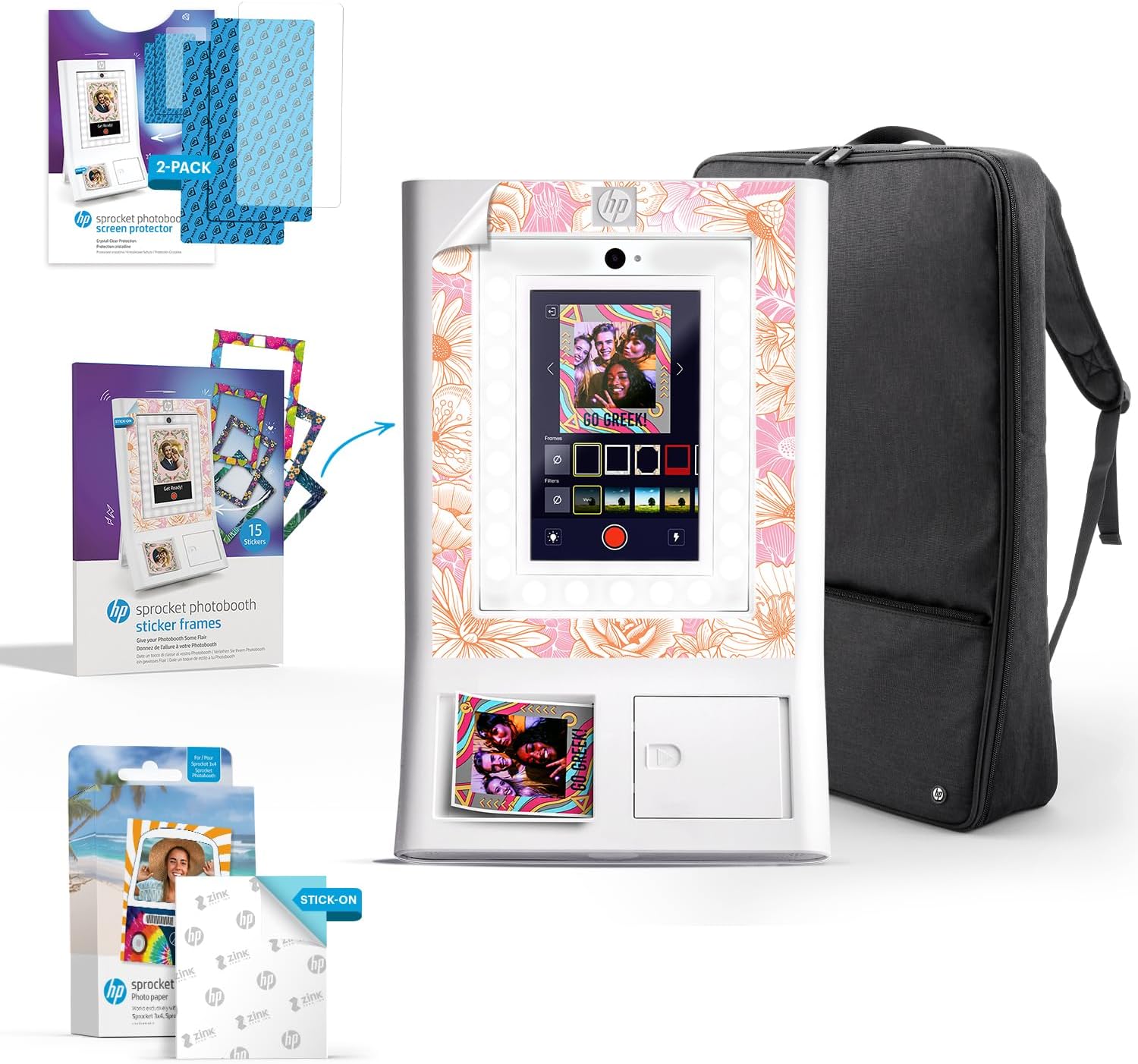
The HP Sprocket Photo Booth Machine is a portable, Wi-Fi-enabled instant color photo printer featuring a 10.1” LCD touchscreen, built-in LED ring light, and ZINK zero-ink technology. It prints vibrant, smudge-proof 3x4” adhesive photos on the spot, offers extensive customization with frames and filters, and supports easy digital sharing via QR codes and cloud storage. Perfect for event planners and social gatherings, it combines convenience, quality, and fun in a sleek, lightweight design.


| ASIN | B0DQ6KFBTF |
| Additional Printer Functions | Print Only |
| B&W Pages per Minute | 1 ppm |
| Best Sellers Rank | #6,601 in Electronics ( See Top 100 in Electronics ) #20 in Photo Studio Posing Props |
| Brand | HP |
| Built-In Media | Printer and accessories |
| Color | White |
| Color Pages per Minute | 1 ppm |
| Colour | White |
| Connectivity technology | Wi-Fi |
| Customer Reviews | 3.7 out of 5 stars 66 Reviews |
| Dual-sided printing | No |
| Duplex | Simplex |
| Ink Color | Color |
| Item Dimensions D x W x H | 5.1D x 35.6W x 53.3H centimeters |
| Item Type Name | HP Sprocket Photo Booth Machine Instant Color Photo Printer |
| Item Weight | 7.3 Pounds |
| Manufacturer | C&A Marketing Inc. |
| Maximum Copy Resolution Black and White | 300 dpi |
| Maximum Copy Resolution Color | 300 dpi |
| Maximum Copy Speed Black and White | 1 ppm |
| Maximum Media Size | 3x4 inches |
| Maximum Print Resolution Black and White | 300 x 300 |
| Maximum Sheet Capacity | 20 |
| Maximum print Resolution Color | 300 dpi |
| Model Name | HP Sprocket Photo Booth Machine Instant Color Photo Printer |
| Model Number | AMZHPSPPBK2W |
| Model Series | Sprocket |
| Model name | HP Sprocket Photo Booth Machine Instant Color Photo Printer |
| Number of Trays | 1 |
| Other Special Features of the Product | Display Screen, Lightweight, Portable |
| Output sheet capacity | 20.0 |
| Paper Size | 7.62 centimeters |
| Print media | Glossy photo paper |
| Printer Connectivity Type | Wi-Fi |
| Printer Output Type | Color |
| Printer Type | Zink Technology |
| Printing technology | Zink Technology |
| Resolution | 300 x 300 |
| Scanner Type | Photo |
| Special features | Display Screen, Lightweight, Portable |
| Specific Uses For Product | Event Photography, Event Planning, Photo Booths, Portable Events |
| UPC | 198869005271 |
M**D
Wow
Its amazing
A**I
Unable to update!
It is giving me a message that there is a new update and when I tap on update nothing happens ! I am unable to update and unable to custom the frames!!
M**A
Lagging
When i first got it was not printing and lagging on calibrating. Then i returned it and till now i didn't get a refund!
T**N
Software is waardeloos, direct retour
A**R
Eine wirklich coole Lösung. Wirklich easy in der Bedienung (auch Laien finden sich sofort zurecht), leicht, handlich, tolle und viele Layouts. Dazu eine zumindest vernünftige Fotoqualität, die man aber natürlich nicht mit der Bildqualität von Fotoboxen vergleichen darf, die eine Spiegelreflexkamera verbaut haben. Ist halt nur die Kamera von einem Tablet. Aber dafür wirklich in Ordnung, sowohl beim Ausdruck, als auch digital. Bis hierhin absolut klasse und ich war sofort "schockverliebt" in das Gerät! Es gibt aber auch ernsthafte Kritikpunkte. 1. Es schrieb hier auf englisch schon jemand, dass der QR Code zum Download nur bei gleichzeitigem Ausdruck erstellt wird, wobei HP die Box ja damit bewirbt, dass beides geht. Leider stimmt das. Tatsächlich geht im normalen Betrieb nur beides. Also Ausdruck UND QR Code zum Download. ODER geht nicht. Verlässt man dann den Fotomodus und geht in die Galerie, dann geht es tatsächlich auch, dass man für jedes Bild einen einzelnen QR Code erstellt. Das ist allerdings wirklich unpraktisch von HP gelöst. In der Praxis macht man das ja nicht, während die Photobooth läuft. Besser wäre, man hat sofort die Wahl, nachdem das Bild gemacht wurde, ob man nur Download, nur Druck oder eben beides möchte. Jeder wird also automatisch auf "Drucken" drücken. Ist dann kein Papier eingelegt, wird der Druck automatisch gespeichert und ist nicht löschbar. In der Sekunde, wo man dann wieder Papier einlegt, werden automatisch alle als Druck gespeicherten Bilder ausgedruckt, ob man sie nun haben will, oder nicht. Geld- und Ressourcenverschwendung. Klar, HP will am Papier, welches wirklich teuer ist, natürlich Geld verdienen. Aber das ist wirklich nicht gerade kundenfreundlich. 2. Und auch die Tatsache, dass es keinen klaren Hinweis nach Abschluss des Fotos gibt, wo man draufklicken muss, wenn man das Bild nur in der Galerie speichern möchte, ist unglücklich gelöst. Hier wäre ein klarer Reiter mit "nur speichern" oder ähnlichem gut. Gibt es aber nicht. Möchte man also nicht drucken und keinen QR Code erstellen, sondern nur das Bild speichern, um sich dann nach der Party einen gesammelten QR Code zum Download aller Bilder zu erstellen, muss man oben links auf dem Bildschirm das kleine x anklicken. Dann kommt man zurück und kann ein neues Bild machen und das vorherige Bild ist automatisch gespeichert. Aber da muss man erst einmal drauf kommen....leider umständlich und erklärungsbedürftig. 3. Ich habe es, trotz diverse Versuche, nicht geschafft, die App (Android) mit der Photobooth zu verbinden. Die App geht einfach an der Stelle nicht weiter, wo ich zur Verbindung den angezeigten QR Code auf der Photobooth scannen soll, um die Verbindung herzustellen. Ich habe alles versucht, inkl. 5x App wieder deinstalliert und neu geladen und diverse Neustarts. Klappt nicht. Ich hoffe, dass das bald funktioniert, da es schon recht nett wäre, in der App z.B. einen Überblick über den Papierstatus zu haben. 4. Dieser Punkt ist eigentlich nur eine halbe Kritik. Das Papier. Generell ist das Papier super und easy ins Fach zu legen. Die Tatsache, dass keine Tinte benutzt wird und das aufwendige Wechseln einer Fotorolle entfällt ist toll. Dazu die Möglichkeit, die Folie hinten abzuziehen und das Bild gleich irgendwo einzukleben - super! Aber der Preis ist halt wirklich happig. Einen knappen Euro pro Ausdruck ist zwar Kleingeld, aber in der Menge eben nicht mehr. 100 Ausdrucke oder mehr kommen schnell mal zusammen. Und dann ist es kein Kleingeld mehr. Außerdem dürften in der Papieraufnahme gerne mehr als 20 Blätter Platz finden. Ist zwar schnell nachgelegt (Sekunden), aber trotzdem wäre es schöner, gleich Platz für mindestens 50 Ausdrucke zu haben, um sich häufiges Nachlegen zu sparen. Trotz meiner Kritikpunkte gebe ich bewusst 5 Sterne, da mich das Gesamtkonzept und die Optik sehr überzeugt und ich den Preis für in Ordnung halte. Man kann sehr viel Spaß an dieser Photobooth haben und sie für kleinere Partys gut es "Gimmick" hinstellen. Für größere Partys ab vielleicht 70-80 Personen ist es aber eher nichts. Da kommt dann der Drucker nicht hinterher und außerdem wird es dann eben zu teuer, was die Ausdrucke betrifft. Über die allgemeine Zuverlässigkeit kann ich noch nichts sagen. Dafür habe ich sie erst zu kurz.
M**I
ha smesso di funzionare dopo un mese... per ora assistenza pessima
K**U
Probably want to know below before you buy: - requires special printing paper at ~$1.4 each. - you must print (so cost you a paper) before you can share the photo digitally by the guests. - camera quality is equivalent to a laptop webcam with 1.3 MP - printing quality is even worse but usable In conclusion, this isn't bad considering it's the cheapest option on the market. Do take into consideration the cost of paper. If you have the means, it's better if you download a photobooth app on your laptop/iPad and bring you own printer.
K**R
I just purchased the HP Sprocket Photobooth, and it has exceeded my expectations in every way. It’s the perfect combination of innovation, ease of use, and fun, making it a great addition to any event. Here are the standout features: Adjustable 10" HD Screen: The tilting screen is a game-changer, accommodating guests of all heights. Its HD resolution ensures crisp visuals and enhances the user experience. Intuitive Interface: The interface is incredibly user-friendly, allowing guests to navigate and operate the photobooth effortlessly. LED Ring Light and Flash: The adjustable brightness of the LED ring light ensures perfect lighting for every shot, while the flash adds that extra professional touch. High-Quality Prints: Using 3.5” x 4.25” ZINK Zero Ink paper, the photobooth delivers stunning, smudge-free prints that look professional and vibrant. Customizable Frames for Every Occasion: With over 250 fun frames to choose from, this photobooth caters to any event—from birthdays and holidays to unique themed parties. Versatile Setup Options: Whether you prefer it on a table, mounted on a door, or integrated into a wall, this photobooth adapts seamlessly to your needs. Smart Notification App: The photobooth integrates with a companion app that sends notifications during events. Whether it’s running low on paper or encountering a technical issue, you’ll be instantly alerted, ensuring smooth operation. WiFi Connectivity and QR Code Sharing: When connected to WiFi, you can enable a feature that generates a QR code on the screen for every photo taken. Guests can scan the QR code and instantly access their pictures digitally, adding a modern and convenient touch to any event. Additionally, at a price point of $599.99, the HP Sprocket Photobooth offers exceptional value compared to other photobooths on the market, which often cost over $1,500. It’s an affordable option without compromising on features or quality. If you're looking for a photobooth that’s versatile, stylish, and packed with innovative features, I highly recommend the HP Sprocket Photobooth. It’s a fantastic purchase that offers unmatched value.
Trustpilot
2 weeks ago
1 month ago