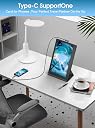
Maxfree 12'' FHD Portable Monitor for Laptop - USB-C/HDMI External Display, Travel Screen Extender With Smart Cover for Windows/Mac/Surface/Android/Switch


| Adaptive Sync | G-Sync Compatible |
| Asin | B0CRL2YNKR |
| Aspect Ratio | 16:9 |
| Brand Name | Maxfree |
| Colour | Black |
| Compatible Devices | [Multiple Devices & Systems] |
| Contrast Ratio | 1000:1 |
| Customer Reviews | 4.1 4.1 out of 5 stars (1,038) 4.1 out of 5 stars |
| Display Technology | LCD |
| Display Type | LCD |
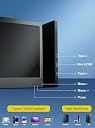
| Hardware Connectivity | USB Type C, mini HDMI |
| Has Color Screen | Yes |
| Image Brightness | 300 nit |
| Item Dimensions D X W X H | 18.3D x 29.3W x 1.3H centimetres |
| Item Weight | 590 g |
| Manufacturer | Maxfree |
| Maximum Display Resolution | 1366 x 768 Lines Per Inch |
| Model Name | S2 |
| Model Number | P1S |
| Mounting Type | Desk Mount |
| Native Resolution | 1366x768 |
| Network Connectivity Technology | HDMI |
| Picture Quality Enhancement Technology | blue light protection, g_sync_compatible, IPS panel |
| Pixel Pitch | 0.18 |
| Product Features | Portable |
| Refresh Rate | 60 hertz |
| Resolution | XGA Wide |
| Response Time | 1 Milliseconds |
| Screen Finish Type | Glossy |
| Screen Size | 12 Inches |
| Shape | Rectangular |
| Specific Uses For Product | Multimedia |
| Total Hdmi Port | 5 |
| Total Usb 3 0 Ports | 2 |
| Total Usb Ports | 2 |
| Total Video Out Ports | 2 |
| Unit Count | 1.0 count |
| Viewing Angle | 178 Degrees |
User
Maxfree Triple Laptop Screen Extender 14" - A good product for the right use case.
I purchased this Maxfree monitor extender last year to use with my laptop for work and leisure purposes.So far it has been a very good purchase and the extra screen real estate has proven to be a blessing for my workflow, as I often need to have multiple different documents and or applications up at once. This product avoids the need to tab back and forth between them on a single screen.It has a solid build quality, and the materials don't feel in any way cheap. The extension mechanism for opening the product out to attach it to the laptop display works smoothly and applies adequate clamping force to hold the extra screens in place, without being too tight and risking damage to the laptop display itself.Connectivity for the displays is interesting. There are two standard USB-C ports on the back of each monitor which support displayport video signals and can supply power to the monitors.There is also a third port labelled as "HDMI". This port is somewhat unique. Despite being labelled as an "HDMI" port, it is actually physically another USB-C connection, however it doesn't seem to carry displayport video signalling. Instead, this port seems custom designed to connect (via an included proprietary HDMI -> USB-C cable) to an HDMI output on the source device and carry an HDMI signal to the additional displays which I suspect is then converted inside the display itself. Its an interesting solution to allow for an HDMI connection.The displays reach a decent level of brightness, being usable in well lit rooms, although I will note that the colour gamut coverage of the displays is fairly basic and wouldn't be useful for anything requiring high levels of colour accuracy.Each display does include an onboard speaker output, but the level of volume achievable through these speakers is very low, and wouldn't be all that useful in most circumstances.The small kick stand provided is a little less robust than the remainder of the unit, it serves its purpose, but I have found it is only adequate to reach the desk and provide support if my laptop is set up as flat on the desk. If I have raised the laptop in any way to allow for better screen positioning or better airflow, then the stand no longer reaches the table. Despite this, my laptop screen seems like it has sufficient stiffness to support the additional monitors without need for the stand, so this hasn't been a problem for me.Maxfree has also been more than willing to engage and respond to my questions relating to the product, which is something I appreciate, as post sales assistance isn't always something that is forthcoming.On the whole, I can recommend this product for anyone with a similar use case to mine as the additional screen real estate is invaluable and enables a portable workstation setup that is very useful.
User
Buena calidad
Tiene buena resolución y ayuda a ser más hábil durante tu día laboral
User
Good clarity, stand is perfect
I recently purchased the F1 Laptop Screen Extender and it has exceeded my expectations in every way. Here are some key points based on my experience:**Design and Build Quality:**- **Portable and Lightweight:** The monitor is surprisingly light, making it easy to carry around with my laptop.- **Sleek Design:** The 360° rotation stand is a game-changer, offering flexibility in positioning the screen to suit any workspace setup.- **Durability:** The build quality feels robust and durable, giving me confidence in its longevity.**Display Quality:**- **FHD Resolution:** The 14" FHD display delivers crisp and clear visuals, perfect for both work and entertainment.- **Brightness and Color Accuracy:** The screen is bright with vibrant colors, making it a pleasure to use for photo editing and media consumption.**Ease of Use:**- **Plug & Play:** Setup was a breeze. It connected seamlessly to my Windows laptop without needing any additional drivers.- **Compatibility:** I tested it with various devices, including my MacBook, Android phone, and even a Nintendo Switch. It worked flawlessly with all of them.- **Versatility:** The extender is compatible with laptops ranging from 13-17", making it a versatile addition to any tech setup.**Performance:**- **Smooth Operation:** There were no lags or delays, even when extending my screen during intensive tasks.- **Power Efficiency:** It doesn't drain my laptop's battery excessively, which is a significant plus for long work sessions on the go.**Value for Money:**- **Affordable Price:** Given the features and performance, the F1 Laptop Screen Extender offers excellent value for money.- **Enhances Productivity:** The additional screen real estate has significantly boosted my productivity, allowing for efficient multitasking.Overall, the F1 Laptop Screen Extender is a fantastic investment for anyone looking to enhance their laptop setup. Whether for work, gaming, or multimedia, this portable monitor delivers outstanding performance and versatility. Highly recommended!
User
Terrible picture quality
Good design and easy connection yet picture quality and resolution is very bad
User
Good for multiple monitors
The Maxfree S2 Laptop Screen Extender is an innovative product for anyone needing a multi-monitor setup on the go. Here’s a closer look at how it performs in terms of design, functionality, and value for money:Design and Build QualityThe Maxfree S2 features two 14-inch Full HD (1080p) IPS displays that attach to your laptop, transforming it into a triple-monitor setup. The screens are housed in a sturdy frame with an adjustable hinge, making it easy to position the monitors at various angles. The build quality is solid and durable, though the extender adds noticeable weight and bulk to your laptop, which could impact portability. The foldable design, however, makes it easy to carry in a laptop bag or backpack.Display QualityThe screen quality is impressive, offering a clear and crisp 1920x1080 resolution. Colors are vibrant, and the brightness level is sufficient for most environments, even in well-lit areas. The screens handle multi-tasking efficiently, allowing you to keep several applications open side-by-side. This is especially beneficial for professionals who work with spreadsheets, designers, and coders who require extended screen space.Compatibility and SetupOne of the standout features of the Maxfree S2 is its plug-and-play functionality. Compatible with Windows, macOS, Surface, Android, and even Nintendo Switch, it requires no driver installation, which simplifies the setup process. The extender uses USB-C and Mini HDMI ports, so ensure your laptop has these ports (or adapters) for seamless connectivity. The included kickstand provides added stability, which helps keep your laptop steady during use.PerformancePerformance-wise, the Maxfree S2 does exactly what it promises. Users report smooth multitasking without significant lag, even when running multiple screens. However, with extended use, you may notice your laptop battery draining faster, especially if it’s not connected to a power source, as powering two additional screens consumes extra energy.Pros:• High-quality 1080p displays with good color accuracy• Easy to set up with plug-and-play functionality• Adjustable viewing angles for ergonomic setup• Compatible with multiple devices, making it versatile• Sturdy kickstand for added stabilityCons:• Adds weight and bulk to your laptop, reducing portability• Increased power consumption could be a concern for longer use• Limited to USB-C and Mini HDMI connectivity (may need adapters)Overall VerdictThe Maxfree S2 is a solid choice for users who need a portable multi-monitor solution. It’s ideal for traveling professionals, remote workers, and students looking for a productivity boost. While the added weight might be a drawback for some, the extender’s ease of use, high-quality display, and versatility make it a worthwhile investment for anyone who regularly multitasks.
Trustpilot
1 month ago
3 weeks ago