Buy anything from 5,000+ international stores. One checkout price. No surprise fees. Join 2M+ shoppers on Desertcart.
Desertcart purchases this item on your behalf and handles shipping, customs, and support to Croatia.
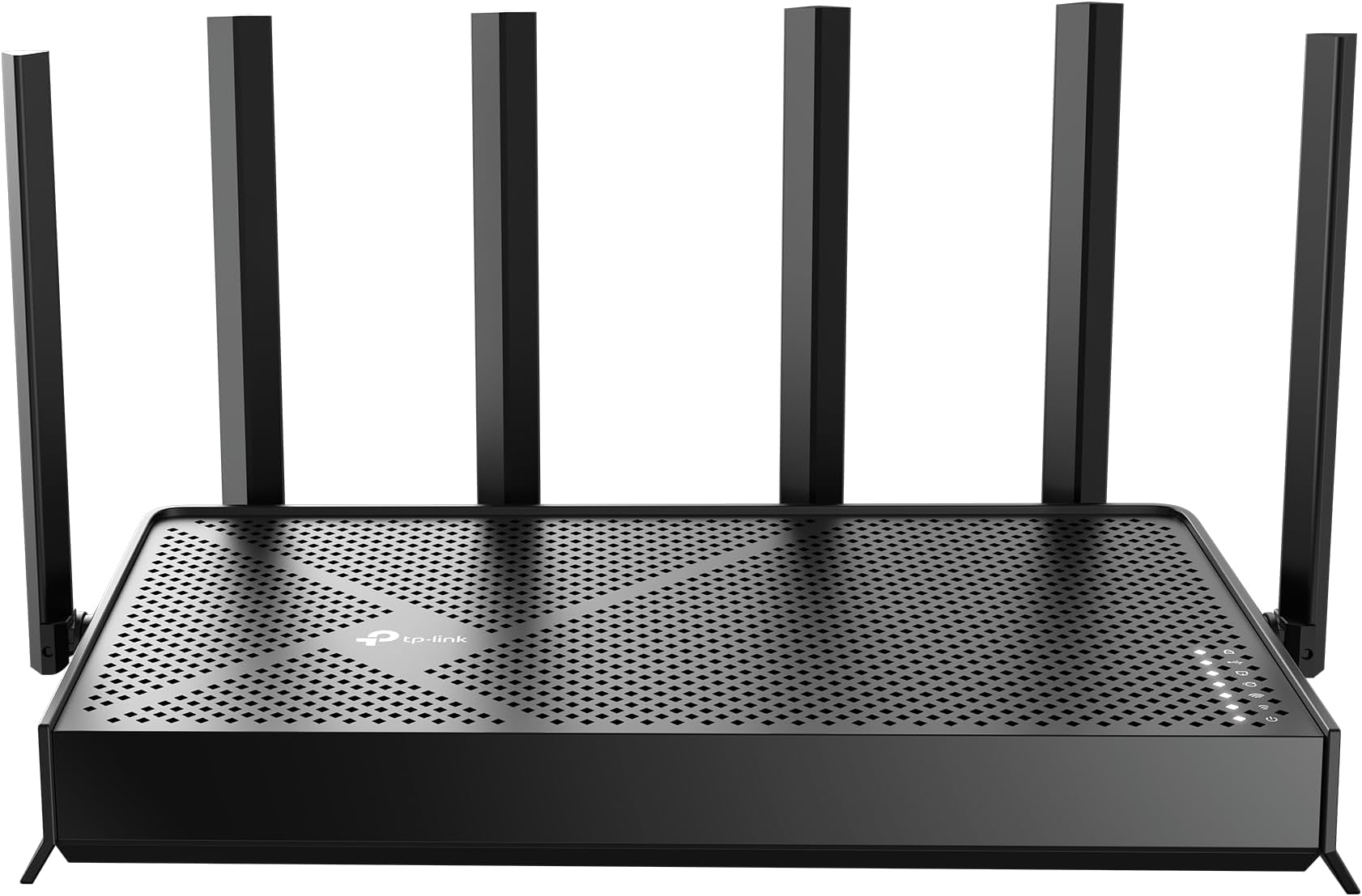
🚀 Future-Proof Your Home Network with TP-Link Archer BE400
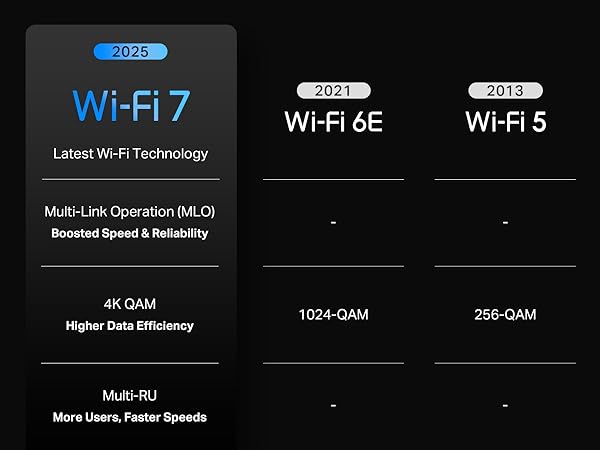
The TP-Link BE6500 Archer BE400 is a cutting-edge Wi-Fi 7 dual-band router delivering up to 6.5 Gbps total bandwidth, covering 2,400 sq. ft. and supporting 90 devices simultaneously. Equipped with a quad-core CPU, dual 2.5 Gbps ports, USB 3.0, and advanced security features like HomeShield and WPA3, it ensures ultra-fast, reliable, and secure connectivity. Easy to set up and compatible with voice assistants and EasyMesh, it’s designed for modern smart homes and demanding users.


| ASIN | B0DVBP5L6Y |
| Antenna Location | Home |
| Antenna Type | Fixed |
| Best Sellers Rank | #684 in Electronics ( See Top 100 in Electronics ) #8 in Computer Routers |
| Brand | TP-Link |
| Built-In Media | 1 * Power Adapter, 1 * QIG, 1 * RJ45 Ethernet Cable, Wi-Fi 7 Router Archer BE230 |
| Color | Black |
| Compatible Devices | Gaming Console, Personal Computer, Security Camera, Smart Television, Smartphone |
| Connectivity Protocol | Wi-Fi 7, Wi-Fi 6, Wi-Fi 5, Wi-Fi 4, Wi-Fi 3, Wi-Fi 2, Wi-Fi, Ethernet, USB |
| Connectivity Range | 2400 Square Feet |
| Connectivity Technology | Ethernet, USB, Wi-Fi |
| Control Method | App, Remote, Voice |
| Controller Type | App Control, Voice Control |
| Coverage | 2400 Square Feet |
| Customer Reviews | 4.4 out of 5 stars 1,083 Reviews |
| Data Transfer Rate | 2.5 Gigabits Per Second |
| Frequency | 5 GHz |
| Frequency Band Class | Dual-Band |
| Has Internet Connectivity | Yes |
| Has Security Updates | Yes |
| Is Modem Compatible | Yes |
| Item Weight | 1.37 Pounds |
| LAN Port Bandwidth | 2.5G/1G |
| Manufacturer | TP-Link |
| Maximum Upstream Data Transfer Rate | 6452 Megabits Per Second |
| Mfr Part Number | Archer BE400 |
| Model Name | Archer BE400 |
| Model Number | Archer BE400 |
| Number of Antennas | 6 |
| Number of Ports | 5 |
| Operating System | Linux |
| Other Special Features of the Product | Access Point Mode, Guest Mode, Internet Security, Parental Control, QoS |
| RAM Memory Installed | 1 GB |
| Router Firewall Security Level | High |
| Router Network Type | dual-band |
| Security Protocol | WPA2-Enterprise, WPA2-PSK, WPA3 |
| Smart Home Compatibility | Smart Home Compatible |
| Special Feature | Access Point Mode, Guest Mode , Internet Security, Parental Control, QoS |
| UPC | 810142822220 |
| Unit Count | 1.0 Count |
| Voltage | 110 Volts (AC) |
| Warranty Description | 2 Year Manufacturer |
| Wi-Fi Generation | Wi-Fi 7 |
| Wireless Communication Standard | 802.11.be, 802.11ac, 802.11ax, 802.11g, 802.11n |
| Wireless Compability | 802.11.be, 802.11ac, 802.11ax, 802.11g, 802.11n |
I**H
Very good router
This router is incredibly powerful and works exceptionally well with WiFi7. I can easily achieve speeds of over 800 Mbps through WiFi. The setup process is straightforward, and the accompanying app is highly convenient. Considering its price, I highly recommend this router.
J**L
Noticeably Increased My Wi-Fi Speeds
I was half expecting to return this, because I didn't fully expect it to make much of a difference. But it was immediately apparent that our Wi-Fi Speeds were enhanced with this router. With my prior setup (including a Wi-Fi 6 router), I was getting roughly 300-400 Mbps on my Pixel 6a when testing in the same room as the router (on the 5 GHz band). With this new router, it usually tests between 1100 and 1400! I was pretty shocked at the difference. Upload speeds even increased a little bit, going from about 34 to 38 Mbps. Real-works differences aren't amazing, but I think web pages are loading more quickly, and video game downloads happen more quickly. I don't have any Wi-Fi 6 devices, which was partially why I wasn't expecting a huge difference. But this router doesn't utilize the 6 GHz band, which was another reason that I chose this one (not expecting to have any Wi-Fi 7 devices other than phones in the near future). Part of Wi-Fi 7 is the aggregation of all of the bands, which makes higher speeds possible. I was already using the tp-link tether app, and setup was pretty easy (though I had to go through all of my iot devices and re-add those, which was a bit annoying). There are no dead spots in my 2600-ish square feet home, even though the router is simply hanging on a wall behind the TV on the first floor (not in the center of the house, it hanging high on the wall). I'd say this is a no-brainer if you already need a new router and don't care about the 6 GHz band. Even if you don't need a new router, but want higher speeds, it is very compelling.
M**.
Awesome router for VPN and IPTV! A+
I purchased the BE6500 because I wanted to install NordVPN (Virtual Private Network) straight to the router, now anything connected to my router is protected. I was concerned I would loose speed for my IPTV service, that's not the case, works beautiful. The 2400sqft coverage is legit, very strong signal. My home is 2000sqft and I get full speed anywhere in my one story home.
H**H
Perfect for an easymesh 3 bedroom floor.
Update June/25/2025 I bought a dual 120mm fan usb 5V, placed underneath the router, it does help tons with the performance and never disconnects, i think when it’s overheating, the router disconnects from the main router wifi, so highly recommended to buy a cooling fan Why did you pick this product vs others?: I am using it for an easymesh wireless backhaul connected to my main router Tp link ge800 which is very expensive and advanced router with 5 gigabytes fiber optic speed. The be400 is a perfect choice for easymesh. If you have 2-3 bedroom apartment, with few phones, tvs, laptops and a ring doorbell 10-15 clients you should be fine. Where i live (2 floors house) , i have 25-30 clients connected to WiFi, i dont think be400 by itself can handle that much. The range is perfect for 2-3 bedroom, not ideal for gaming since it doesn’t have any gaming features. It has 2.5gbs wan and lan ports, it’s perfect for who have 1-2 gigabytes speed. I recommend BE400 over BE230 since it has lower speed and less antennas to cover. Signal strength: It covers 3 bedrooms floor, and ideally 2-3 bedrooms. Ease of setup: It took 5 mins to set it up, very easy and convenient Reliability: i have noticed it that it gets disconnected for few mins and it comes back, but that happened few times nothing really concerns me so far Wifi signal: Since it is connected to my main router i get 700mb next to router to 250mb to the farthest spot on the same floor.
Z**Z
Solid purchase.
Purchased to replace a Netgear Nighthawk router that was being phased out. I was skeptical about the TP-Link, but two IT folks praised their performance. Wasn't sure that the TP-Link would have the same reach. I have about 2500 sq. ft home and it reaches all corners including a 3-season room about 60 feet away, the basement and outdoor cameras. Also reaches the front and back patios without a glitch. All that considering the unit sits on an open shelf in the bottom of the TV stand at the far end of the house. I'm an average user, so the WiFi 7 upgrade was a bit more than we needed. I have been pleased with its perfomance since purchasing 4 months ago. The set up was easy as is the Tether app. I was able to set up dedicated 2.4 and 5 GHz and select the band for each device, as well as a dedicated guest network. Happy with the purchase.
J**K
Easy set up and very good WiFi coverage
The router I had was 10 years old and no longer supported. Our household also has so many more WiFi devices than we had 10 years ago, so it was time for an upgrade. I did some research and TP-Link kept popping up as a recommended router. I found the BE6500 to be easier to set up than I expected. I connected directly to my laptop, and in about 45 minutes I had configured the router's IP address and WiFi settings to be the same as my existing router. I choose to configure it through a web browser, but there is also a phone app that can be used. Once the router was configured, I simply replaced it with the existing router and all my devices seamlessly connected to the new TP-Link router. The range, quality, and speed of the connections to the TP-link is much improved over our old router. I also found the EasyMesh support of this router to be a benefit. I paired this router with an EasyMesh compatible range extender (BE3200 Wi-Fi 7) and was able to extend high speed WiFi to my upstairs bedrooms with very little extra effort.
K**A
Critical Wi-Fi Speed Drop on MacBooks – TP-Link Wi-Fi 7 Router
I purchased this TP-Link Wi-Fi 7 router during the Thanksgiving sale. Having had excellent, reliable experiences with TP-Link equipment in the past (including for my startup’s network setup), I chose this model specifically to handle my 1 Gbps fiber connection. I work from home full-time and rely on this network for Zoom meetings, building and publishing Docker images, downloading large machine learning models (7GB+), plus standard web browsing and email. While the router’s range and baseline speeds are excellent across Windows PCs, Linux servers, and mobile devices, I’ve encountered a critical issue with MacBooks (running macOS Sequoia and Tahoe). During Zoom calls or after downloading large files, the Wi-Fi speed on my Macs drops to nearly zero (bytes per second). This occurs on two different MacBooks. Disconnecting and reconnecting to Wi-Fi temporarily restores normal speeds. The issue does not affect any other devices in my home. Unfortunately, switching to a different Mac isn’t a viable option for my workflow. As a workaround, I’ve had to revert to my older ASUS RT-AC68 router, which provides a reliable connection despite being 10 years old. I contacted TP-Link support and provided all requested details. However, they requested I install TeamViewer for remote troubleshooting, which I declined due to security concerns. I initially noticed the issue shortly after purchase but overlooked it until it became unmanageable during important meetings like job interview Recommendation: If you plan to buy this router, I strongly advise testing it with your Macs during the 30-day return window. I’ve spent far too much time troubleshooting a compatibility issue that shouldn’t exist. Save yourself the frustration and use the return policy if you rely on macOS.
J**.
Good router for what it offers
Works well, just keep it updated. I wish It had a bit more for me to see and control. My blink camera system wasn't working well with it at first
D**N
Una mejora muy grande en la distancia.
Este router fue fácil de configurar y funciona muy bien. Recuerda desactivar el router en tu módem de cable si se trata de un módem/router combinado.
J**A
Compra excelente
Excelente! Nunca mais problema de falha na comunicação, downloads e uploads aproveitando toda a largura de banda, maior área de cobertura e agora pega em todos os cômodos da casa com sinal forte.
J**R
Wifi 7
Produto funcionando bem até agora, melhorou o sinal da casa.
A**0
Buena respuesta
Muy buen producto, respeta la velocidad a través de RJ45
D**R
better
seems better
Trustpilot
2 weeks ago
2 weeks ago