Desertcart purchases this item on your behalf and handles shipping, customs, and support to Croatia.
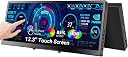
🚀 Elevate your workspace anywhere with the sleek 12.3" portable touchscreen monitor!
The 12.3-inch portable touchscreen monitor features a sharp 1920x720 IPS display with 10-point touch support, USB-C and HDMI connectivity, built-in speakers, and a foldable stand. Designed for professionals on the move, it offers vibrant visuals, seamless multi-device compatibility, and CNC-machined durability, making it ideal for multitasking, gaming dashboards, and real-time system monitoring with AIDA64 integration.


| ASIN | B0DRFFM66P |
| Additional Features | Portable |
| Aspect Ratio | 16:9 |
| Best Sellers Rank | #36,129 in Electronics ( See Top 100 in Electronics ) #986 in Computer Monitors |
| Brand | Prechen |
| Brightness | 450 cd |
| Color | Black |
| Connectivity Technology | USB Type C HDMI |
| Contrast Ratio | 1000:1 |
| Customer Reviews | 4.1 out of 5 stars 88 Reviews |
| Display Resolution Maximum | 1920x720 pixels |
| Display Technology | IPS |
| Display Type | LED |
| Hardware Connectivity | HDMI, USB Type C |
| Image Contrast Ratio | 1000:1 |
| Item Dimensions D x W x H | 0.59"D x 11.8"W x 5.1"H |
| Manufacturer | Shenzhen Kenowa Electronics Co., LTD |
| Model Name | HD-123 |
| Model Number | HD-123 |
| Native Resolution | 1920 x 720 |
| Number of Component Outputs | 2 |
| Picture Quality Enhancement Technology | IPS |
| Refresh Rate | 60 |
| Resolution | 1920x720 |
| Response Time | 3 milliseconds |
| Screen Finish | Glossy |
| Screen Size | 12.3 inches |
| Screen Surface Description | Glossy |
| Specific Uses For Product | Photo Video Editing Desktop Business |
| Total Number of HDMI Ports | 1 |
| Warranty Description | 1 |
R**W
Perfect little “dashboard” monitor for gaming setups
I picked up the 12.3-inch portable touchscreen (1920 × 720 IPS) to sit beneath my 34-inch ultrawide so I can keep Discord, Spotify, and hardware stats in sight while gaming—mission accomplished. One USB-C cable carries both power and video (HDMI is there if you need it), so my desk stays tidy. The CNC-machined shell feels solid, and the integrated folding stand lets me dial in just the right angle for quick glances. The 1920 × 720 resolution is perfect for a “heads-up display.” Windows recognized it instantly; I set scaling to 125 % so small text stays crisp. Colors match my main screen surprisingly well, and the back-light is bright enough to read even in daylight. Touch input is responsive, though I mostly use a mouse. I route all audio through my desktop speakers, so I haven’t bothered with the monitor’s built-in ones—can’t comment on sound quality. The only other quirk is the 75 mm-only VESA pattern, which is fine with the included stand but worth noting if you plan to arm-mount it. Bottom line: if you want a compact auxiliary screen that tucks neatly under (or above) your primary monitor and saves constant Alt-Tabbing, this monitor nails it. I’d buy it again without hesitation.
P**E
Worth the budget friendly(ish) price!
I wanna start off by saying i've only had this a week nor have I ever owned a touchscreen so theres some things I have to see if I can work out. This is a really good monitor for the price. I noticed setting this uo you have to be specific which cord goes where on the monior itsself or the touch still wont work. I use it for discord videos and music when i'm gaming. I still have to test multiplayer games but when playing sims i noticed it kept backing out of the game on my main screen when you touch the second monitor. Found out (so far at least) you have to play games in boarderless window, now it wont back out but it will mute the game. You also have to find a setting feature on your system (that you have to run a command for because its usually hidden?) to even have the monitor recognize it as a whole seperate display and the touch not reg. On the main screen. All this being said, im sure it's just a little stressful to setup if you've never had one before. For $100 while others were close to $200+ this is a great buy! I'd totally buy this all over again if I had a redo!
C**S
I guess "meh"?
I don't want to be super negative - I'm sure this is a great device for some. I've got an ultrawide monitor setup (primary is a Samsung 93SD), and purchased this to have a touch screen to navigate things like discord when I'm gaming, or actively using another screen. The resolution seems fine, it comes with an array of cords, and everything that you'd need to set up. The touch screen feature works as intended. The "but", comes from the things that started to happen with my other monitors. All of the sudden, I started to notice issues with watching videos on other monitors, knock out the color balance on my gaming monitor. I can't say for sure that it's this monitor (honestly, I'm not sure how to establish causality) - but when I don't have this plugged in, the issue stops. If my use case was different, or I had a different PC, this might make a great fit - I genuinely don't know. I just wouldn't recommend it to anyone who didn't have something real specific that they needed a smaller touch screen to navigate.
H**L
This impressive little monitor improves my productivity
I’ve been using this 12.3” portable touchscreen monitor for a couple months now, and honestly, I can’t believe I worked without it for so long. This thing has completely changed how I manage my workspace setup. I primarily use this as a dedicated display for system status monitoring and chat applications, and it’s absolutely perfect for that. Having all my monitoring tools, Discord, Slack, and other communication apps on this separate screen means my main monitor stays clean and focused on actual work. No more constantly alt-tabbing or having tiny windows cluttering up my primary display. The 12.3” size is exactly right - big enough to actually read everything clearly but small enough that it doesn’t dominate my desk space. It fits perfectly next to my main setup without feeling cramped or overwhelming. The screen real estate is surprisingly useful for what it is. I was skeptical about how useful the touchscreen would be, but it’s actually really handy for quick interactions. Dismissing notifications, scrolling through chat history, or tapping on system alerts feels natural and saves me from reaching for my mouse constantly. Getting it running was dead simple - just plug in the USB-C cable and it works immediately. No driver hunting or complicated setup. The fact that it’s portable is a nice bonus too. I’ve taken it to a couple client meetings where having an extra screen for reference materials was clutch. If you’re looking for a way to expand your workspace without going full dual-monitor setup, or if you want a dedicated screen for monitoring/communication tools, this is fantastic. It’s become an essential part of my daily workflow and I’d definitely buy another one.
B**D
Great device and a great price!
This device does exactly what it says. It is a touchscreen monitor that connects to Windows and automatically becomes touchscreen capable without the need to install any drivers or other software. The resolution is very sharp and the touchscreen is very responsive. All-in-all, it's an excellent device that did just what I needed it to do. It comes with all the cables you need for a typical install. It even comes with a power block if you need it, but the screen can be powered with the USB cable. Awesome product at a great price.
A**L
Great with minor setup!
This screen is something I have been looking at but was hesitant due to the lack of information out there. Quality is very impressive. Not a plastic casing and does support VESA. Comes with 1 power brick, 2 usb-a to usb-c cables, 1 hdmi & 1 usb-c to usb-c. My Use Case: Secondary touchscreen monitor in extended view setting to view discord and other applications while my main ultrawide is in use for gaming. Items to note: Touchscreen does work ONLY if plugged into computer along with power. I was not able to power and use it with one cable. Top usb-c port was for power only, regardless if its wall or pc. Second usb-c port was not working for me but not needed due to the hdmi. HDMI is full size and plugs into my graphics card. Touchscreen functionality tip: If this is the first touchscreen plugged into your windows device. It will most likely need to be configured in settings otherwise the touch goes to the wrong screen. To fix this, go to control panel, tablet pc settings. click setup and follow the prompt. Easy to do but required me to contact support and manufacturer before coming across a Youtube video.
C**C
Avoid this purchase!
I was so excited to have this monitor as an added addition to my setup. The touch screen was definitely a highlight. The monitor setup was easy, use for the first couple months was great. NOW, the touchscreen no longer works and the monitor has issues staying connected. The reviews were great guess I just got a dud. Save your money.
M**L
Can display squished or stretched video.
The image looks really good. But it didn't work for me and what I needed to do so I returned it. First - the version I had was the wide screen display, 1920x720. I was looking for a small HD monitor to mirror my iPhone and make it a little larger for in my car. I was using a USB C cable to power it and then either a USB-C right from my iPhone or an HDMI adapter to the monitor. Either way I got similar results. First problem is that when I plug the phone in it shows 1920x1080 on the screen. Probably the phone isn't reading the resolution of the monitor (in either connectivity mode). So the image is always squished or too wide. The iPhone's default orientation is portrait. So in that mode the phone was tiny on the screen and either squished horizontally, or stretched out wide. This would depend on the aspect ratio setting in the monitors menu. That setting has 3 options.. Wide, 4:3, and 5:4. Unfortunately there isn't a mode to fix what I think would be a very common problem of squishing 1080 pixels into 720 pixels. I'd call that a 16:9 mode. And it would be nice if it had a zoomed in 16:9 mode for widescreen movies. So that there's not a letter box and a pillar box happening at the same time. When the iPhone is playing video and is oriented landscape, the image is too wide if the aspect setting is on wide, and too narrow if it's on 4:3 or 5:4. So this monitor doesn't work for me. I shouldn't have attempted to use a wide aspect monitor (16:6). I thought it looked cool and if it had worked I would almost never be using the sides of the monitor. I'm sure it would work great on the Mac and the Mac would be able to read the aspect ratio of the monitor. But for my main use here I'll just look for a 1920x1080 monitor that is the same height but 16:9.
Trustpilot
2 weeks ago
2 weeks ago