Desertcart purchases this item on your behalf and handles shipping, customs, and support to Croatia.
🚀 Elevate your office game with A3 power and wireless freedom!
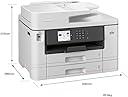
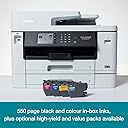
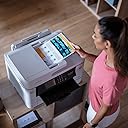
The Brother MFC-J5740DW is a robust all-in-one inkjet printer designed for busy professionals and small offices. It supports A3 printing with high-resolution output up to 1200 x 4800 dpi and fast print speeds of 28 pages per minute. Featuring an intuitive 8.8 cm color touchscreen and wireless connectivity via the Brother Mobile Connect app, it enables seamless printing from mobile devices. With automatic duplexing, a 50-sheet ADF, and high-yield ink cartridges, it maximizes productivity while minimizing downtime.
| ASIN | B0B2555B3D |
| Additional Printer Functions | All In One |
| B&W Pages per Minute | 28 |
| Brand | Brother |
| Built-In Media | MFC - J5740DW A3 Colour Inkjet MFP |
| Color | Black |
| Color Depth | 1 bpp |
| Color Pages per Minute | 28 ppm |
| Colour | Black |
| Compatible Cartridge | [Brand]: Brother |
| Compatible Devices | Smartphones |
| Connectivity technology | USB, Wi-Fi |
| Control Method | App |
| Controller Type | iOS |
| Customer Reviews | 4.4 out of 5 stars 187 Reviews |
| Display Type | LCD |
| Dual-sided printing | Yes |
| Duplex | Automatic |
| Hardware Interface | Ethernet, USB 2.0 |
| Ink Color | Black, Cyan, Magenta, Yellow |
| Item Dimensions D x W x H | 39.8D x 53W x 37.5H centimeters |
| Item Weight | 20500 Grams |
| Maximum Copies Per Run | 50 |
| Maximum Copy Resolution Black and White | 6000x1200 dpi or greater |
| Maximum Copy Resolution Color | 1200 x 4800 dpi |
| Maximum Copy Speed Black and White | 28 ppm |
| Maximum Media Size | A3 |
| Maximum Print Resolution Black and White | 1200 x 4800 dpi |
| Maximum Sheet Capacity | 250 sheets |
| Maximum print Resolution Color | 1200 x 4800 dpi |
| Model Name | MFC-J5740DW |
| Model Number | MFCJ5740DWZU1 |
| Model Series | MFC |
| Model name | MFC-J5740DW |
| Number of Trays | 4 |
| Other Special Features of the Product | Auto-Duplex |
| Output sheet capacity | 50 |
| Paper Size | A3 NA |
| Power Consumption | 36 Watts |
| Print media | Envelopes, Glossy photo paper, Paper (plain) |
| Printer Connectivity Type | USB, Wi-Fi |
| Printer Output Type | Color |
| Printer Type | Inkjet |
| Printing technology | Inkjet |
| Processor Count | 1 |
| Resolution | 6000x1200 dpi or greater |
| Scanner Type | Flatbed |
| Series Number | 5740 |
| Special features | Auto-Duplex |
| Specific Uses For Product | Office |
| Total USB 2.0 Ports | 1 |
| Total Usb Ports | 1 |
| Unit Count | 1 Count |
| Wattage | 36 watts |
D**D
Exelent produit
Parfait
A**R
Great A4/A3 printer
Loving this so far - easy to set up and gives me both A4 and A3 capacity (I've only had an A4 printer before)! Quality of printouts seems good - it's quick and everything is easy to access.
G**U
Très bonne qualité prix
Très rapide facile à installer
A**R
A great workhorse for small businesses or the more demanding home user.
I have been using an earlier version (MFC-J5370DW) of this printer for over 3 years and really loved it . . . until recently when it developed an ‘unblockable’ blocked Black ink jet., perhaps due to the inexpensive compatible cartridges I had been using throughout (advertised as “Will not affect your warrantee”). As I was in the middle of quite a large print run that needed to be completed I immediately ordered a replacement – at £279 it was easier than sending it back to Amazon and trying to reclaim on something that could be considered my fault. Next day the shiny, white replacement arrived (the MFC-J5740DW) and, so far, I’m loving it just as much as its predecessor. Apart from the colour I can’t see much difference between the two – except that, of course, the new one won’t accept my stock of cartridges that were used in the old one. I won’t list all the features that the printer possesses - they’re all in the product description – but the ones that stand out for me are: The rear feed which is very accessible and handles anything from envelopes, 6”x4” glossy print paper up to A3. The two paper drawers which save messing about when I switch from cheap, everyday paper to quality colour print paper. The fact that it has automatic 2-sided printing and scanning. The latter feature is great if you want to save old documents on a drive rather than in a box file. You just put the pile of documents into the very smooth automatic feeder and get a digital copy of both sides saved as separated pages in the right order. The supplied software that handles this includes outputs in pdf, png, and OCR formats. I belong to a club for which I produce an occasional newsletter. I design this in Publisher on A4 pages then tell the printer to turn into an 8 page A5 colour booklet. The first time I did this it was accompanied by a bit of swearing before all the pages were correctly ordered and orientated but having saved the print instructions I’ve used the same ones year in year out and just sit by while the printer churns out the required copies. Setting up the new printer was just as easy as for the old one. There is a decent screen which tells you what to do initially and also shows what to do if there is a (rare) paper jam. Connection to WiFi happened very simply once iI entered the router password. If the printer has a fault for home-office use it is that is quite large and heavy so you need to be sure you have somewhere to put it and also allow up to an extra 6” or so for the rear feed which angles out from the back when in use. In summary, this is a great workhorse for small businesses or the more demanding home user.
R**.
Great printer
Love it!!!
Trustpilot
2 weeks ago
2 weeks ago