
Desertcart purchases this item on your behalf and handles shipping, customs, and support to Croatia.
🚀 Triple your screens, triple your productivity—dock like a pro!
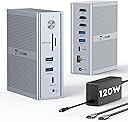
The TobenONE USB C Laptop Docking Station transforms your laptop into a professional-grade workstation by supporting three monitors (one 4K@30Hz + two 1920x1200@60Hz) via DisplayLink technology, overcoming Mac and PC display limits. It delivers robust 100W laptop charging through a 120W power adapter, includes 5 USB ports for peripherals, and a Gigabit Ethernet port for reliable high-speed internet. Compatible with the latest MacBook M1-M5 series, Windows, and USB-C Thunderbolt devices, it’s designed for multitasking pros seeking a clutter-free, high-performance setup backed by a 2-year warranty and lifetime support.
| ASIN | B0DSP9K3QR |
| Best Sellers Rank | #6,456 in Computers & Accessories ( See Top 100 in Computers & Accessories ) #428 in Laptop Docking Stations |
| Brand | Tobenone |
| Color | Grey |
| Compatible Devices | MacBook Neo/Mac mini M4, Windows 10 / 11 & macOS 10.15.x and later, ChromeOS 100.x. Thunderbolt 5/ Thunderbolt 4/ Thunderbolt 3/ USB4.0/ full-featured USB-C Microsoft Surface line/HP Spectre x360 series, Dell XPS 13 / XPS 15 / Latitude series, Lenovo Thinkpad T series. Such as Microsoft Surface Book 2, Surface Go, Surface Laptop 3, Surface Pro 7; Dell XPS 13/XPS 15 9300/ 9310/ 9350/ 9360/ 9370/ 9380/ 9550/ 9560/ 9570/ 7390 +more) / Latitude 5310/ 5580/ 7490 +more); HP Spectre x360 13t, Specter x369, Elitebook 840 G5 series, Elitebook X2, Elitebook x360 1030 G3, Elitebook 745 G6, Elitebook 830 G6, 2018 HP Elite 800 G4, Envy x360 Laptop (15z-ds100), Zbook 17 G4; Lenovo Yoga 730/ Yoga 910/ Yoga 920/ Yoga 930, Yoga15 Thinkpad Ultrabook Pro, Thinkpad E590/ Thinkpad P72, Thinkpad T470/ T480/ T490; Thinkpad X1 Carbon; Legion Y530, Lenovo C930/ T480s; Huawei Macbook Mate10 or later; Google Slate (2019); Pixel book go 2019/2020, LG Gram, Samsung Galaxy TabPro S, Apple M1/M2/M3/M4 and Intel Macs (MacBook Pro, MacBook Air with macOS 10.14 or later), such as MacBook Air Retina 12" (2016, Intel chip), MacBook Air Retina 13" (2018/2019/2020, Intel chip), MacBook Pro 13" (2016/2017/2018/2019/2020, Intel chip), MacBook Pro 14" (2021, M1 Pro or M1 Max chip), MacBook Pro 14" (2023, M2 Pro or M2 Max chip), MacBook Pro 14" (2023, M3 Pro or M3 Max chip), MacBook Pro 14" (2024, M4 Pro or M4 Max chip), MacBook Pro 14" (2024, M4 chip), MacBook Pro 15" (2016/2017/2018/2019, Intel chip), MacBook Pro 16" (2019, Intel chip), MacBook Pro 16" (2021, M1 Pro or M1 Max chip), MacBook Pro 16" (2023, M2 Pro or M2 Max chip), MacBook Pro 16" (2023, M3 Pro or M3 Max chip), MacBook Pro 16" (2024, M4 Pro or M4 Max chip), MacBook Pro 16" (2024, M4 chip), MacBook Air 13" (2020/2021, M1 chip), MacBook Pro 13" (2020, M1 chip), MacBook Air 13" (2022/2023, M2 chip), MacBook Pro 13" (2022, M2 chip), MacBook Pro 14" (2023, M3 chip), MacBook Air 15" (2023, M2 chip), MacBook Air 13" and 15" M4 chip Compatible Devices MacBook Neo/Mac mini M4, Windows 10 / 11 & macOS 10.15.x and later, ChromeOS 100.x. Thunderbolt 5/ Thunderbolt 4/ Thunderbolt 3/ USB4.0/ full-featured USB-C Microsoft Surface line/HP Spectre x360 series, Dell XPS 13 / XPS 15 / Latitude series, Lenovo Thinkpad T series. Such as Microsoft Surface Book 2, Surface Go, Surface Laptop 3, Surface Pro 7; Dell XPS 13/XPS 15 9300/ 9310/ 9350/ 9360/ 9370/ 9380/ 9550/ 9560/ 9570/ 7390 +more) / Latitude 5310/ 5580/ 7490 +more); HP Spectre x360 13t, Specter x369, Elitebook 840 G5 series, Elitebook X2, Elitebook x360 1030 G3, Elitebook 745 G6, Elitebook 830 G6, 2018 HP Elite 800 G4, Envy x360 Laptop (15z-ds100), Zbook 17 G4; Lenovo Yoga 730/ Yoga 910/ Yoga 920/ Yoga 930, Yoga15 Thinkpad Ultrabook Pro, Thinkpad E590/ Thinkpad P72, Thinkpad T470/ T480/ T490; Thinkpad X1 Carbon; Legion Y530, Lenovo C930/ T480s; Huawei Macbook Mate10 or later; Google Slate (2019); Pixel book go 2019/2020, LG Gram, Samsung Galaxy TabPro S, Apple M1/M2/M3/M4 and Intel Macs (MacBook Pro, MacBook Air with macOS 10.14 or later), such as MacBook Air Retina 12" (2016, Intel chip), MacBook Air Retina 13" (2018/2019/2020, Intel chip), MacBook Pro 13" (2016/2017/2018/2019/2020, Intel chip), MacBook Pro 14" (2021, M1 Pro or M1 Max chip), MacBook Pro 14" (2023, M2 Pro or M2 Max chip), MacBook Pro 14" (2023, M3 Pro or M3 Max chip), MacBook Pro 14" (2024, M4 Pro or M4 Max chip), MacBook Pro 14" (2024, M4 chip), MacBook Pro 15" (2016/2017/2018/2019, Intel chip), MacBook Pro 16" (2019, Intel chip), MacBook Pro 16" (2021, M1 Pro or M1 Max chip), MacBook Pro 16" (2023, M2 Pro or M2 Max chip), MacBook Pro 16" (2023, M3 Pro or M3 Max chip), MacBook Pro 16" (2024, M4 Pro or M4 Max chip), MacBook Pro 16" (2024, M4 chip), MacBook Air 13" (2020/2021, M1 chip), MacBook Pro 13" (2020, M1 chip), MacBook Air 13" (2022/2023, M2 chip), MacBook Pro 13" (2022, M2 chip), MacBook Pro 14" (2023, M3 chip), MacBook Air 15" (2023, M2 chip), MacBook Air 13" and 15" M4 chip See more |
| Customer Reviews | 4.2 out of 5 stars 329 Reviews |
| Hardware Interface | Ethernet, HDMI , USB 3.0 Type A, USB 3.0 Type C |
| Input Voltage | 120 volts_of_alternating_current |
| Item Dimensions L x W x H | 1.5"L x 4.26"W x 4.3"H |
| Item Highlight | 120W Power Adapter, 3X HDMI, 5X USB, Gigabit Etherne, for MacBook M1-M5/Windows Owners,Professional Multitasking,Home Office |
| Manufacturer | Shenzhen KailiYuan Technology Co., Ltd. TobenONE |
| Mfr Part Number | UDS046 |
| Model Number | K1211-2006000D |
| Number of Items | 1 |
| Number of Ports | 14 |
| Product Dimensions | 1.5"L x 4.26"W x 4.3"H |
| Total Number of HDMI Ports | 3 |
| Total USB Ports | 5 |
| Total Usb Ports | 5 |
| Warranty Description | 2 Year Warranty |
| Wattage | 100 |
B**N
A Perfect Pairing for Apple M1/M2 Macs: TOBENONE UDS020P
The TOBENONE UDS020P is a game-changer for Apple M1/M2 Mac users like myself. This sleek and powerful docking station has seamlessly integrated into my workflow, enhancing my productivity and expanding the capabilities of my Mac. The compatibility with Apple's M1/M2 chips is outstanding. The UDS020P effortlessly taps into the true potential of these processors, providing lightning-fast data transfer speeds and seamless multitasking capabilities. Whether I'm editing large files, running resource-intensive applications, or simply browsing the web, this docking station ensures a smooth and lag-free experience. One of the standout features of the UDS020P is its impressive range of ports. With a plethora of USB-A and USB-C ports, HDMI, and an SD card slot, this docking station has become the central hub of my workspace. Connecting peripherals, external displays, and storage devices has never been easier, making it an essential tool for professionals who demand versatility and efficiency from their setup. The build quality of the UDS020P is exceptional. Its robust aluminum casing not only exudes a premium feel but also ensures durability for long-term use. The compact design complements my Mac seamlessly, and it occupies minimal desk space, which is a huge plus for those of us with limited room to spare. One of the most impressive aspects of this docking station is its ability to charge my MacBook at full speed while connected to multiple peripherals. This not only simplifies cable management but also ensures that I'm always powered up and ready to go. In terms of value for money, the UDS020P is a clear winner. It provides a feature-rich solution at a competitive price point, offering a level of performance and compatibility that far exceeds its cost. In conclusion, the TOBENONE UDS020P has proven to be an invaluable addition to my workspace. Its seamless integration with Apple M1/M2 Macs, extensive port selection, build quality, and effortless setup have exceeded my expectations. If you're a Mac user looking to supercharge your productivity, the UDS020P is an investment you won't regret.
V**A
Exceptional Quality and Performance
I recently purchased the TOBENONE USB-C Docking Station. The model 14-in-1 UDS020P. I wanted to wait a couple of months before reviewing the product to be able to write a fair and accurate review. Well, after 3 months, I can safely say it has completely simplified the way I connect my dual monitor set up and all my devices! If you are connecting 2 or 3 monitors from your laptop for work or leisure, this little powerhouse is the way to go. The build quality of the hub is exceptional. It feels sturdy and durable, and the sleek design seamlessly complements my laptop. The compact size allows it to tuck into the corner of my desk and I can even store my connected laptop in it and simply run the two large 4K monitors. The variety of ports on this hub is impressive. With MicroSD, VGA, USB-C, Ethernet, HDMI, and USB 2.0 and 3.0 ports, HDMI, I can connect all my peripherals and accessories simultaneously. The USB-C Power Delivery allows my laptop to stay charged while I'm using the hub, eliminating the need for multiple chargers or cables. The data transfer speeds are fast, and I've experienced no lag or delays when transferring large files between devices. The HDMI ports support 4K resolution, delivering crystal-clear visuals for my external monitor, and the audio output is crisp and clear. The Laptop Stand/Hub has enhanced my productivity. It has simplified my workflow, allowing me to connect and use all my devices effortlessly. I also appreciate the reliable performance and stability of the USB-C hub. I've had no issues with overheating, screen flickering, or connectivity problems. It just works seamlessly every time sit at the desk, and I can focus on my work without about technical glitches. This USB-C Hub/Laptop Stand is a game-changer if you need a reliable and versatile connectivity solution. The build quality, variety of ports, fast data transfer speeds, and overall performance make it a top-tier accessory. I recommend this product to anyone in need of a high-quality USB-C hub. It's worth every penny!
A**L
Thank you, TobenONE, for setting the standard!
This docking station delivers exactly what it promises—seamless triple monitor support for my MacBook. The 120W power supply keeps my laptop charged while I work, and the abundance of ports (5 USB, Ethernet, SD/Micro SD) means I never have to hunt for adapters. Setup was a breeze, and the DisplayLink technology works flawlessly with my M-series Mac. Productivity has never been smoother! The Customer Support – Truly World-Class! Here's where TobenONE truly shines. When my dock unexpectedly stopped working, I reached out to their support team expecting the usual runaround. Instead, I was met with a prompt, professional, and genuinely caring response. Within ONE DAY, they not only honored the warranty but went above and beyond by sending me an upgraded replacement unit! No hassle, no endless back-and-forth emails—just exceptional service that restored my faith in customer care. The Bottom Line: TobenONE doesn't just make great products—they stand behind them with integrity and speed. Whether you're a professional managing multiple workflows or someone who simply wants a reliable docking solution, I highly recommend this docking station and this company without hesitation! Thank you, TobenONE, for setting the standard!
J**N
Troublesome Headache
Purchased to evaluate as alternative to our Plugable docking stations which are pretty reliable but sometimes don't recognize both monitors without a power off/on. Right out of the gate, the TobenONE was disappointing -- I had to install a driver for Win 11 to get anything to work (the Plugable is literally plug in for Windows & Chrome OS. Mac does require a driver). After the driver, the Toben worked well for a single day. The next day, I docked & got images on both screens but mouse & keyboard didn't work. I turned it off & on a few times & then got mouse & keyboard but not the 2nd monitor. If i undocked/redocked repeatedly, I would sometimes get external mouse, keyboard and my monitors but a few minutes later my mouse & keyboard would stop working. I lived with the Toben for a total of 1 day and half before putting my old Plugable dock back in its place. Very glad I used myself as the test case for this docking station before putting it in classroom for my teachers to fight with.
L**A
Needs instruction manual. Other than that. GREAT!
Updated Review: From a 1 to a 5. The GOOD: Customer service with this company is amazing. After trying two different dock variations (neither of which I could get to work with my BenQ monitor) customer support contacted me and literally gave me a free $170 docking station that they claimed would work with my computer. The good thing is that my desktop is way more efficient and clean, with a lot fewer cords coming out of everywhere. Also, the ability to jack into the provided ethernet port on the dock is a huge plus, as my internet speeds went up dramatically. The product feels very sturdy and has that solid construction one looks for with expensive products. Overall, I'm very happy. But the few glaring issues really made me have to give these products a 3.5 out of 5. If we make a few adjustments, these products would be absolutely amazing. That's my honest review and take. I have only 2 issue with this item is that the product doesn't come with any instructions. Zero (except for a little card that tells you to download their software (more about this later). It makes absolutely no sense to me; if they spent just a tiny bit of money on printing out a quick start guide, they'd probably have a lot fewer returns, especially for folks who are not tech-savvy. I can't be the first and only person to run into these issues with installation. Now, issue number 2. The software. You have to download the software DisplayLink Manager in order to even use the docking system. "Okay," I thought. "No biggie." And it really isn't an issue setting that up. However, the problems begin to arise should you want to watch a show on Prime, Netflix, Hulu, or any other streaming service. Your data is being recorded through this app, so they can't apparently let you stream copyright material (even though they claim the data belongs to you and doesn't go anywhere). This isn't a major issue for me since I use my computer mostly for work and I can still watch YouTube. However, I don't know why it's necessary to have to download software to use this. There has to be a better solution. I did not know I would lose some internet freedoms by having a dock. So that's a pretty big negative.
B**.
Excellent docking station! (Even better support!)
I run 3 computers as input to this TobenONE docking station. 2 Dell PCs and media server mounted to one of the monitors. Additionally my daughter has used it from time to time. I have had it for about a year and a half. And it has given us access to two multi-terabyte drives and two additional monitors and 2 DVD ROM drives. Never had a problem and always impressed with the throughput. My monitors are two off brands that were each purchased at different times as sales presesented opportunities. You should be aware that when you set up the TobenONE docking station that it does not do anything until you download and install the free driver files. After that just let it update as the updates come along. Recently I began having irregular instances of both or one monitor not responding at all. And the condition even seemed to cause trouble with just one of the computers while working fine with the others. And then the next day different computer had the problem while others were OK. I contacted TobenONE support on evening and they responded first thing in the morning. They asked for some basic information, reminded me the the product is warranted for 2 years, and assured me that they would sort thru the issue with me and either get things working, replace the dock, or refund my money. I was impressed by their commitment! While I was collecting the requested information, I noticed that I was having IoT devices randomly connect and disconnect from my WIFI network. Since I had seen this problem before, I addressed it first. I rebooted my WIFI Access Points. And that took care of my IoT issues. Going back to my TobenONE issue, I discovered that my docking station now worked perfectly stable! So the fault WASN'T the TobenONE docking station at all. I happily informed TobenONE Support. They didn't throw digital rocks at me or anything! They wished me a good day and reminded me that I still have a 1/2 year of warranty support available. FIVE STAR PRODUCT AND EXPERIENCE!
G**A
Workhorse docking station
This docking station has worked fine for me. My only reservation is that the OEM one I had before knew enough to turn on the computer when the power strip is turned on. For this one I have to open the laptop, press the on switch and then close it before the monitors light up. I highly recommend the multitude of connectors that it has (microSD, SD, loads of USB and USB-C. LAN, speakers, etc. Good value. It will handle 3 monitors, just not with full video all at the same time.
P**X
Clean Desk, Triple Display, One Cable – Perfection!
I’m very picky about my desk setup, especially when it comes to cable management and performance—and this docking station absolutely delivers. I’m using it with my MacBook Pro (lid closed) and running three external monitors without a hitch. Why I love it: One Cable Wonder: Just a single USB-C cable to my MacBook Pro handles all displays, data, and power. It’s a dream for a clean setup. Plenty of Ports: Tons of USB-A and USB-C ports, plus Ethernet, SD/microSD, and 3 HDMI outputs. Everything I need, all in one place. DisplayLink Software: Yes, you need to install it—but it’s super easy and works flawlessly. Professional Look: Keeps my workspace tidy and efficient, exactly how I like it. If you’re looking to simplify your desk, power multiple monitors, and eliminate cable chaos, this dock is a no-brainer. Highly recommend for Mac users, especially those with M1–M4 chips who want full multi-display support.
J**S
Vale cada real investido!
Tenho MacBook Air m3 e o setup ficou: LG ultrawide + arzopa + MacBook … 3 telas, carregamento direto do Mac pelo TobenONE.
A**R
Great Product
The product is absolutely functioning fine. But I am unable to register for warranty as it returns error ""you can't find your order ID" 🥺
M**S
Not Suitable for Two 4K Monitors
This docking station does not support two 4K monitors at full 4K resolution simultaneously. I connected two 4K monitors, but only one displayed at 3840 × 2160 (4K), while the second was limited to 2560 × 1440 (2K). The three HDMI ports do not offer the same capabilities. * HDMI 1 supports up to 4K 60Hz and uses native plug-and-play video output. * HDMI 2 supports only up to 2K 60Hz and uses the DisplayLink driver. * HDMI 3 supports only up to 2K 60Hz and uses the DisplayLink driver. If you’re planning to use two or more 4K monitors at full 4K resolution, I would not recommend this docking station.
E**O
Cumpre com o prometido
Resolveu o meu problema de compartilhamento com duas telas, muito bom mesmo.
R**A
TobenONE Display
Excelente produto. Estou muito satisfeita. Tem várias portas e é resistente , pequeno e bem bonito.
Trustpilot
3 weeks ago
1 month ago