Desertcart purchases this item on your behalf and handles shipping, customs, and support to Croatia.
🚀 Unlock the future of fast—wherever you are!
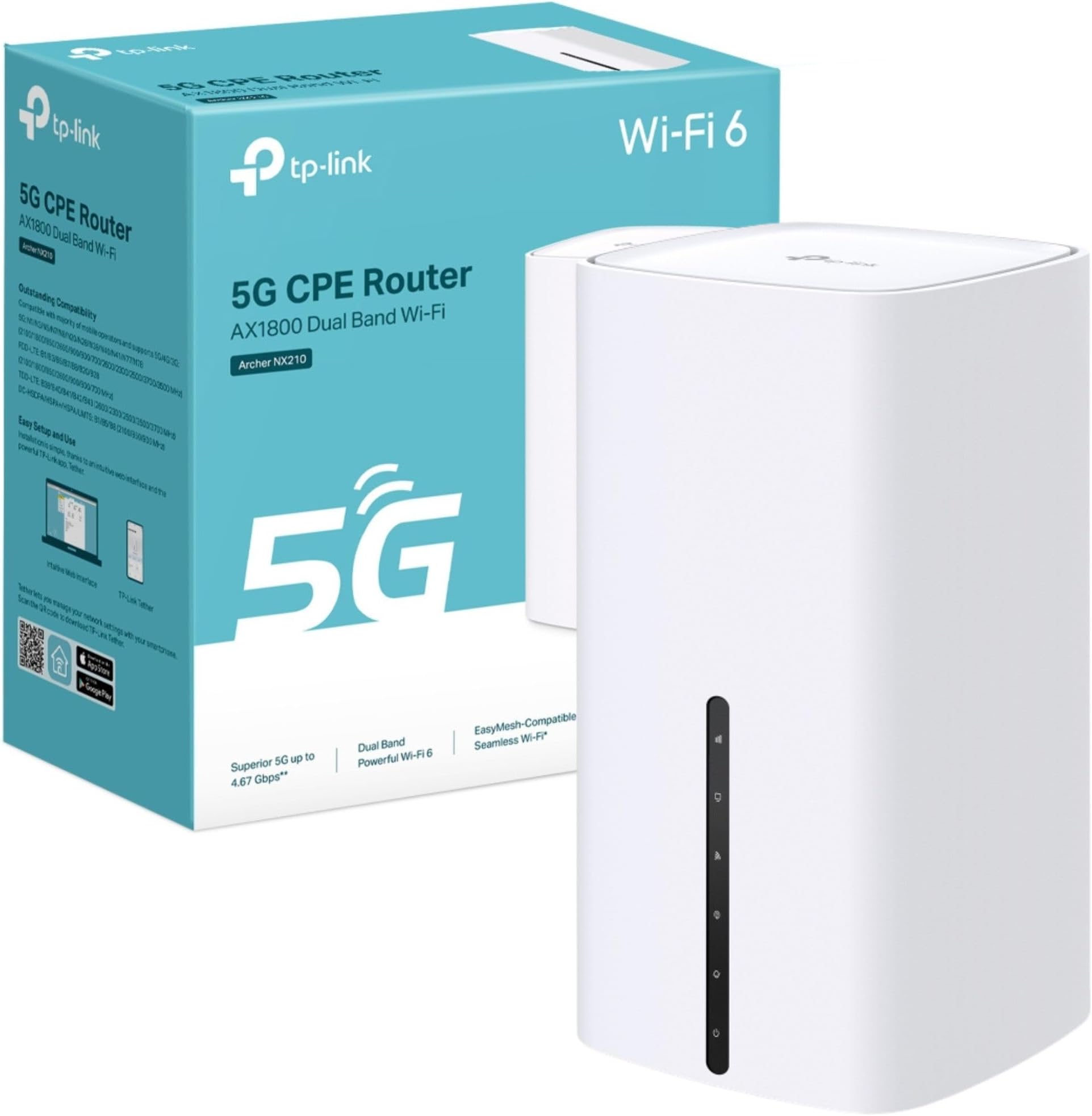
The TP-Link Archer NX210 is a cutting-edge 5G router featuring ultra-fast download speeds up to 4.67 Gbps and AX1800 dual-band Wi-Fi 6 technology. Designed for effortless plug & play with a SIM slot, it supports seamless whole-home coverage via EasyMesh and versatile gigabit WAN/LAN ports for traditional broadband compatibility. Ideal for professionals seeking reliable, high-speed internet with flexible deployment and smart app control.


| Antenna Location | Business, Home |
| Antenna Type | Internal |
| Asin | B0F2TCB3R4 |
| Best Sellers Rank | 1,227 in Computers & Accessories (See Top 100 in Computers & Accessories) 5 in Routers |
| Box Contents | 5G AX1800 Wireless Dual Band Gigabit Router Archer NX210|RJ45 Ethernet Cable|Power Adapter|Quick Installation Guide |
| Brand Name | TP-Link |
| Colour | White |
| Compatible Devices | Gaming Console, Personal Computer, Printer, Security Camera, Smart Television, Smart Thermostat, Smartphone, Tablet |
| Connectivity Protocol | Wi-Fi, Ethernet, 5G, IPv4, IPv6 |
| Connectivity Technology | 5G, Ethernet, Wi-Fi |
| Control Method | App, Touch |
| Controller Type | App Control, Push Button |
| Country Of Origin | China |
| Coverage | Home Network |
| Customer Reviews | 4.2 4.2 out of 5 stars (6,213) 4.2 out of 5 stars |
| Data Transfer Rate | 1201 Megabits Per Second |
| Frequency | 5 GHz |
| Frequency Band Class | Dual-Band |
| Has Internet Connectivity | Yes |
| Is Modem Compatible | No |
| Item Dimensions L X W X H | 9.9L x 9.9W x 19H centimetres |
| Item Weight | 0.61 Kilograms |
| Lan Port Bandwidth | 1000 [NO] |
| Manufacturer | TP-Link |
| Manufacturer Part Number | Archer NX210 |
| Maximum Upstream Data Transfer Rate | 1201 Megabits Per Second |
| Model Name | AX1800 Wireless Dual Band Gigabit Router |
| Model Number | Archer NX210 |
| Number Of Antennas | 10 |
| Number Of Ports | 6 |
| Operating System | Linux |
| Other Special Features Of The Product | Beamforming, Guest Mode, Plug & Play, QoS |
| Product Warranty | 3 Years Manufacturer |
| Router Network Type | hybrid |
| Security Protocol | WPA-PSK, WPA2-PSK, WPA3 |
| Voltage | 12 Volts |
| Wi Fi Generation | Wi-Fi 6 |
| Wireless Compability | 802.11ax |
User
Fab
Needed something to tide me over until BT got their act together and fixed my internet connection. I did a bit of googling and found I could get a data sim and put it in a mobile data router and use that with an ethernet cable for the pc. The download speeds aren't great but its better than no internet, and its not the fault of the router because that can only give me the speeds that exist on the mobile data network in my area. Extremely easy to set up...you literally connect the antenna, put in a nano sim and off you go. There are 2 sockets for ethernet cables which is handy for the pc and TV services as well. I am very pleased with my purchase.
User
Seems like a decent 5g router
Totally fine - good 5g speeds, adequate range and stability. I haven’t had any issues with connectivity.
User
Good all round 5G router.
I have had this for a couple of weeks to replace a Zytel MC888 Ultra that failed after just over a year so I decided to try a different make. It performs well inside in the very strong signal area I live in giving a download speed of around 400Mb/s and up to 650Mb/s at quiet periods during the night. It is very sensitive to small movements in its position and you can add or lose 50-100Mb/s by moving the router less than a couple of millimetres. Feature wise it has the full range of settings you would expect of a router at this price level and more than the Zytel although things like port forwarding (or virtual servers as TP-Link call it) is of little use behind the CG-NAT used by most 5G providers. I changed the IP Address range to match that of the ZYtel (from the default 192.168.1.xx to 192.168.0,xx to enable it to be just connected to my existing devices without having to change the static IPs I had set in the devices. I have had a couple of issues with the DHCP server allocating dynamic IP addresses that have already been fixed in some devices and causing a conflict and having to switch one device off whilst manually changing the other device’s IP address. There is a setting to program an automatic reboot at regular intervals and I would recommend that this is done once a day, perhaps in the middle of the night when no one is likely to be using the internet as after a few days without a reboot the router it no longer delivers internet although devices can still talk to each other on the local network e.g. I can still access the drives on my Asustor NAS devices that are mapped on my PC and my Alexas still work and I can still give instructions to turn lights on and off etc which means there must be some connection to the internet or the echo devices wouldn’t work at all. But internet speed measured on my PC drops to zero. Rebooting restores it to normal speed and doing this as a precaution once a day appears to prevent loss of internet access. I tried attaching a dual cabled external antenna to the connectors on the router but it actually reduced the speed I was getting and the unit performs best without it. This could be just because I live in a very strong 5G signal area and it may make more of a difference if the signal levels indoors are lower. I switched the wi-fi off as I use four Mercusys mesh devices string my home, all connected via Ethernet. I only use one of the three RJ45 sockets on the rear of the router to connect the main mesh device and then take two cables from the mesh device to two switches and from there to all my devices to three more mesh units set as access points or connect devices by Ethernet. The router appears to handle the 64+ devices connected to the network without any difficult except for the occasional allocation of an IP address I have already allocated as a static address. However, I learned that the router allocates IP addresses in order starting at 2 so if I set the static IP addresses at 100 or more, there is no risk of the DHCP issuing one of the static addresses and this seems to have solved the problem. There are lots of things in the NAT forwarding settings that you can switch off and if you use VOIP you will want to disable the SIP ALG at least as it caused my VOIP phones to cease to work at all. You may also want to disable the RSTP ALG as well although this didn’t make much difference for me. Most of the other settings you are not likely to need to change although it depends exactly how you are going to use it. Overall, I am quite happy with the router. It doesn’t quite get the speed the Zytel did and having to reboot it regularly is a bit of a pain but I would recommend this device if you live in a good 5G signal area and can’t get fibre.
User
Easy setup, good signal, seems reliable so far.
Bought this to replace an M1 Nighthawk used with a large 2X2 MIO panel antenna. This new router, without the external antenna, gets higher gain and a better SNR then the old setup with the antenna. I can also connect to cell towers I couldn't previously. Only using LTE as I don't have sight of any 5G cells. I've only had it about two months but so far, it seems to be good buy.
User
Stream, surf and make calls all at the same time
Would highly recommend, so far it has been brilliant on 4g,i can't say about 5g because the network has been under maintenance, what I can say is you can make and receive calls via landline rj11 port and stream and surf the Web at the same time.
User
Don't buy not a good product
This product is awful I like TP-Link generally but this is so bad, I have 100MB download speed on (100mb download limit from EE) but when used with multiple TV boxes, laptops etc it completely falls over and can not handle multiple devices being connected to it. My iPhone works so much better, I have to connect my laptop to iPhone instead.Returning item for such poor performance.
User
Great 5g router
Great 5g router easy to setup great speeds with three 5g sim would recommend
User
Requires a settings tweek before use with EE SIM.
I have been suffering from a slower-than-ideal-speed Internet connection via ADSL2 for many years. Although we are finally on the list for FTTP, this could still take up to 2 years.So I decided to take up Plusnet's offer of a £20 per month EE SIM card giving unlimited data at up to 100Mbps (symmetrical), saving me £8 or so per month. I just had to purchase my own router - and I chose this one from TP-Link. I'm in a 4G area, but decided to buy a 5G router just in case we got lucky with 5G.In practice speeds have improved from about 30Mbps down and 5Mbps up to about 100Mbps down and 40Mbps up (not very symmetrical, but a big improvement in upload speed.The router turned out to be a version 2 unit manufactured in 2024 (I believe version 3 is the latest), but I don't know if this has any disadvantages. The main issue I had was the same as that experienced by many others: TP-Link routers don't seem to play nicely with EE SIMs. The solution involves changing from IPv4/IPv6 to IPv4 only, but this isn't a simple edit; instead you have to create a new profile, copying all the parameters from the default profile, except for the IPv4 only setting. It's quite straightforward once you have trawled the Internet for the remedy, but shouldn't be necessary, or should at least be included in the documentation.
User
Prise UK
Attention, livré avec une prise UK, ne fonctionne pas en France
User
Kaliteli ve pratik
Nano sim kartla çalışan en yeni versiyonı v.5 geldi. Sinyali En iyi çektiği bir pencere kenarına konumlandırdık 30 mbit download hızı 27 mbit upload gördük, şimdilik yeterli 4g ve 3g arasında otomatik kendi geçebiliyor. İsterseniz sabitleyebiliyorsunuz da. Kurulumu tether üzerinden kolayca yapılıyor, modemi de yine aynı uygulama üzerinden güncelledim. Mersin kırsaldaki İki katlı orta boyutlu yazlık bir evde alt ve üst katlarda kesintisiz internet ve telefon görüşmesi sağladı ki normalde alt katlarda telefon ve internet çekmezdi. Turkcell data hattı ile kullanıyoruz.
User
Solider 4G-Router für einfachen Internetzugang
Der TP-Link TL-MR110 lässt sich sehr einfach einrichten. SIM-Karte einlegen, einschalten und nach kurzer Zeit ist das WLAN verfügbar. Die Verbindung ist stabil und reicht für Surfen, Streaming und normale Alltagsnutzung völlig aus. Die Geschwindigkeit ist in Ordnung, auch wenn man keine Höchstleistungen erwarten sollte. Verarbeitung wirkt solide und zuverlässig.Für Zuhause, unterwegs oder als Ersatzlösung bei fehlendem Festnetz eine gute Wahl.
User
Una vez instalado va muy bien
Lo que más: Rendimiento y estabilidadLo que menos: La instalación no es difícil, pero no tan fácil como se publicita. Si se utliliza un duplicado de tarjeta, hay que validarla antes con el operador con un movil. Una vez validada puede introducirse en el equipo y creará la red wifi. El nombre de la red y la clave de acceso vienen en la etiqueta situada en la base del equipo. Si se quiere personalizar el nombre de la red o la clave de acceso hay que conectar el equipo a un ordenador con el cable de red. Una vez hecho este proceso se puede desplazar el equipo a otra vivienda donde se pondrá en marcha automáticamente tras conectar la alimentación a la red
User
Très bien !
Très pratique !J'ai acheté ce routeur pour ça connectivité en 4G qui plus tard ce transformera en point Wi-Fi connecté en RJ45 depuis ma box.UTILISATION TYPE ⬇️Actuellement je rénove une maison dans ça totalité, il me fallait un système de caméra sur enregistreur/serveur que je puisse accéder à distance et recevoir des notifications en temps réels (je ne vis pas sur place, et la maison ce trouve dans un hameau peu fréquenté), ainsi que quelques éléments connectés comme des prises connectées pour des éclairages de dissuasion, et un point Wi-fi pour mon père possédant un forfait 4G très limité. J'ai un doublon de ma carte SIM que je vais mettre dans cette box pour pouvoir avoir Internet pendant les travaux sans souscrire à un abonnement fibre (sachant qu'il ne reste que les quatre murs de la maison, donc difficile de faire intervenir un technicien fibre pour me l'installer)Lorsque cette maison sera rénovée, ce routeur sera dans ma dépendance/atelier et servira comme point wi-fi (le bâtiment est trop loin de ma future box internet et les murs de la maison sont épais), il y aura un câble RJ45 sous terre qui partira de ma box Internet dans ma maison, et qui sera branché sur ce routeur dans la dépendance, me permettant ainsi de ne plus utiliser le doublon de ma carte SIM, mais de pouvoir à la place ce connecter via un câble RJ45 partant de ma box fibre !RESSENTI SUR LE PRODUIT ⬇️Personnellement, la box fonctionne bien, là où je rénove ma maison la 4G est bonne, mais pas incroyable, et pourtant je n'ai pas de problème à voir mes caméras à distance, pas de problème à activer mes prises connectées, le signal est fluide, il n'y a pas de perte de réseau, dans les paramètres du routeur, j'ai programmé un redémarrage tous les jours vers midi, un redémarrage prends environ 2 minutes, je suis plutôt bluffé et satisfait !
Trustpilot
1 month ago
1 week ago