

Desertcart purchases this item on your behalf and handles shipping, customs, and support to Croatia.
๐ Elevate your laptopโs power with PCIe 4.0 speed and Oculink versatility!
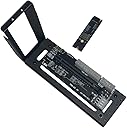
The JMT M.2 M-Key to PCIe 4.0 x4 adapter bracket enables high-speed external GPU and PCIe card expansion via Oculink and M.2 NVMe ports. Designed for laptops and compact hosts, it supports Gen4 bandwidth, multiple PCIe card types, and requires a 500W+ power supply. Ideal for professionals seeking to boost graphics and connectivity without compromise.
| ASIN | B0CRR7HMX5 |
| Amazon ๅฃฒใ็ญใฉใณใญใณใฐ | ใใฝใณใณใปๅจ่พบๆฉๅจ - 88,230ไฝ ( ใใฝใณใณใปๅจ่พบๆฉๅจใฎๅฃฒใ็ญใฉใณใญใณใฐใ่ฆใ ) ใฐใฉใใฃใใฏใใผใ - 317ไฝ |
| GTIN (Global Trade Identification Number) | 00783798005388 |
| UPC | 783798005388 078379800538 |
| ใใใใๅบฆ | 4.4 5ใคๆใฎใใก4.4 (58) var |
| ใซใฉใผ | ใใฉใใฏ |
| ใใฉใณใๅ | JMT |
| ใกใผใซใผๅ | JMT |
| ใกใผใซใผๅ็ช | F51620 |
| ใฆใใใๆฐ | 1.0 ๅ |
| ใฌใณใบใใฆใณใใฎ็จฎ้ก | ใใผใใซใใใใใฆใณใ |
| ไบๆใใใคใน | ใใผใใใฝใณใณ |
| ไฟ่จผๅ ๅฎน | 1 |
| ๅ็ฃๅฝ | ไธญๅฝ |
| ๅๅใฎ่ฟฝๅ ่ชฌๆ1 | ็ฌ่ชใฎในใฟใผใ/ในใใใๆฉ่ฝใ |
| ๅๅใฎ้้ | 0.32 ใญใญใฐใฉใ |
| ๅๅๅค่ฃ ็ด ๆ | ้ๅฑใจใใฉในใใใฏใ |
| ๅ็ช | F51620 |
R**.
Fantastico
Works great. Magnetic bottom is a nice touch for setting on metal rack shelving. No issues at all been running a couple weeks now.
T**6
Was apprehensive but it works well
Was initially a little apprehensive about this - I needed more vram for diffusion models, and didn't have a fortune to spend on a new gaming pc (I have a not so old MSI Raider GE76 12UH, but with only 8gb of vram). I'd only read about epgu's, and managed to snag a second hand RTX 3090 at a reasonable price. I decided to take the plunge. I plugged it all together, and turned on with always on switch on (I should note I was using a different m2 oculink card in my laptop) and booted up. Immediately device manager sees a generic windows display adapter. Reinstalled drivers, now device manager sees a RTX 3090, but stopped with error 43. Did some googling, and found and ran the error 43 fixer - did it's thing, but still reported the same error. Uninstalled and reinstalled the driver cleanly - still no luck. Went back to basics - tried swapping out my old m2 card with the one supplied in the kit. Booted up, and voilร ! RTX 3090 installed and working! Don't know if it was the card, the error fixer or a combination of both, but it now works flawlessly. I shut everything down, tried flipping the switch to auto power on when it detects power from laptop and guess what? that worked too! It might be cheap and cheerful, but I can testify it works, and am immensely relieved that it does as it saved me a fortune needing a new pc, or being stuck with a graphics card I can't use. Hooking it up together was simple - just connect the atx24 pin power connected to the board, your oculink cable in the relevant port, and your GPU into the PCI slot. Hook power up to your GPU directly. Not had a chance to test performance with games, but I'm sure people have already done that - I'm not using it for gaming, so the performance loss should be minimal and so far using flux it's a huge improvement on my own board 3080. It's a shame the kit doesn't provide a cable too, but the one shown in "people also bought this" section for another 20 quid worked just fine.
A**I
Fa il suo mestiere
Fa il suo mestiere. Su schede modeste come 4060Ti non crea neppure particolari colli di bottiglia. 3dMark ottiene punteggi pari al bus gen4 8X nativo
G**K
It is actually far better than expected
Replaced a PCI-e 3.0 dock with this one to be able to run an RTX 3060 Ti. The other dock had a very cheap plastic main plate and only some extended screws for support. This one has far better build quality and is much more stable. The magnetic legs add the cherry on top. Put some metal plate underneath and it will stick there like being glued to the ground. The 3060 runs without issues reaching benchmark scores comparable or superior to desktop builds. The cabling of the 3.0 dock caused some WiFi intereference which yielded poor results (20-50Mbs on a 250Mbs WiFi card), the oculink cable doesn't cause anything like that. The only thing that I could mention as negative that the oculink cable's plastic cover is quite big and to be able to put it the backplate of the laptop back properly I had to remove it.
D**S
bench van 4048 da net een desktoppresatie super tevreden ermee!
Waauw voor dat geld heb ik me die M.2 eGPU heb en compatiebel met mijn NOC 11 MINI PC i7 en op de eGPU een RTX3060 CUDA Ampere v2en bench score van 4048 da net een desktoppresatie super tevreden ermee!
Trustpilot
2 months ago
2 weeks ago