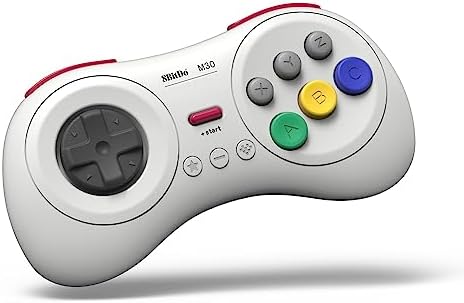


🎮 Level up your retro gaming with wireless freedom!
The 8Bitdo M30 Bluetooth Gaming Controller is a sleek, white 6-button gamepad designed for seamless wireless play across multiple platforms including Nintendo Switch, Windows, Android, macOS, Steam, and Raspberry Pi. Featuring a rechargeable battery, turbo function, and upgradable firmware, it delivers classic SEGA-style precision with modern convenience.


| ASIN | B0C6MW2748 |
| Amazon Bestseller | #671 in Video Games ( See Top 100 in Video Games ) #28 in Nintendo Switch 2 Controllers |
| Batteries | 1 Lithium Polymer batteries required. (included) |
| Country of Origin | China |
| Customer Reviews | 4.2 4.2 out of 5 stars (3,392) |
| Item model number | 6922621504023 |
| Language | English |
| Rated | Suitable for all ages |
A**ー
想像以上に使いやすい
十字キー入力がしやすい。 十字キーが滑りやすいから左手の親指が痛くなりにくい。 ボタン同時押しもしやすい。 ブルートゥース接続できるので邪魔なコードがなくなってスッキリする。 連射機能もついている。
み**や
使い勝手よし
反応も良く、使い勝手良いです。 ボタン設定で思った通りのボタン設定ができず、そこはやや難ありかな。
1**2
十字キーの受け付け入力が神!
十字キーがすごくいい! Switch2のスト6用に買いましたが、技が出しやすいです! しかも前面6ボタンなので攻撃ボタン押しやすいです。 あとコントローラー軽くて長時間でも遊びやすいです。 中指から手のひらの付け根まで17センチある大きい手で持っても、ボタン押しにくいとか技出しにくいとかはありませんでした。 KOFや餓狼もやりましたがこちらも快適に遊べました。 スマブラだけは、右のスティックがないので、強攻撃をやりにくいのが残念です。
べ**る
使いやすい
Nintendo Switch2のストリートファイター6で使用してます。セッティングも簡単で重宝してます。
H**U
品質に問題なし。使いやすいかは人による。
東方Project原作(紅魔郷)に使用しました。 PCには問題なく認識され、全てのボタンは正常に反応します。 上部ボタン(L,R)は少し固めでストロークも短い為、押しにくさを感じました。長押しには不向きです。 十字キーはとても良いと思います。 また、手の大きい人は持ちにくいと思います。
N**A
良い
レトロ格闘ゲームで使用した感じとしてはすごく良い
M**I
初代Switch 格ゲー
SwitchでMARVEL vs. CAPCOM ファイティングコレクション アーケードクラシックスをやりたくって買いました!最初は4ボタンだけのプロコン使ってましたが、使いにくいのでこちらを購入。無事にSwitchで読み取り出来ました。ただボタンの設定やコントローラーの連動に少し面倒で評価はマイナス1。まー少しラグもありますね。腕も鈍ってるwwあとはゲージ使う必殺技も2個同時押ししてもラグがあり、パンチの弱、中でダメだったら弱、強、ダメなら中、強みたいにやっていきました。これはあらかじめ設定しとくと楽かも。それでもなんとかゲームクリアしたので満足!!Switch1だとこんな感じです。出来ないこともない。ただ当時は中々強かったので、、、このゲームでこのコントローラーとSwitch1には正直におすすめはあんまりしません。出来ない事もないだけで本格的な人や完璧求める方にはおすすめはしない。Switch1の初期での感想です。 あとは大きさですかね?私は男性でも小柄なので気持ち小さく感じました。手がでかい人などには不向きかもしれません。ただSwitch2や他のゲーム、ハード、PCの場合は他の方を参考にしてください
も**ん
SFC風でコンパクトで手に馴染む
他の社外品ゲームパッド(ロジクールF310使用)が、カチャカチャうるさく、保持に無駄な力が必要で指が痛くなっていたので買い換えて正解です。 Bluetoothも低遅延で格闘系でも、コマンド入力がしやすいのが◎です。 (上面にボタン×6もポイント) 勿論、USB-Cポートを無駄に取らないためAndroid端末とエミュレータでレトロゲームする人にはマジ推奨します。
S**M
A must have for shoot-em-ups on the Nintendo Switch.
So from what I've been reading, a vintage Japanese Sega Saturn controller is considered the ultimate gamepad for shoot-em-ups. Some people prefer the arcade stick, but I think the Saturn controller is more popular in the SHMUP community. It's also considered the best gamepad for retro fighting games, though an arcade stick is favored over the traditional gamepad for fighting games. However, there aren't any adapters that will let you use a real Saturn controller on the Nintendo Switch, so I decided to give this a try. Well, my SHMUP skills shot through the roof as soon as I tried out this pad. I never got seriously into the genre, but I'm now starting to since I have the proper equipment for it. I found modern analog sticks terrible for SHMUPS. There are many instances where you'll need to slowly move in one direction with the bullet patterns(or in some games like Radiant Silvergun or Ikaruga, to get through tight corridors), and this can only be accomplished on an analog stick by tapping the stick to one side over and over again, which works horribly because it's an analog stick, not a button. The Sony/Microsoft/Nintendo d-pads work for moving slowl, but they're still bad for SHMUPS since it's hard to move diagonally or in a circle. However, the 8-direction Sega-style d-pad is perfect. You can move slowly to one side by clicking the d-pad repeatedly and easily move in 8 directions. I wish I could compare this to a vintage Saturn controller or the officially licensed Retro-bit Saturn controller for Switch, but I haven't used either. I can't say if those are better or worse than those. All I know is that this blows away trying to play SHMUPS on a a DS4, Xbox One controller, or Switch Joy-cons(some people do actually like the DS2 for SHMUPS though, try if if you want :Þ). Games I've tested on it include Radiant Silvergun in Retroarch, DoDonPachi Dai-Ou-Jou in Retroarch, Ikaruga on PC, Touhou 16 on PC, Danmaku Unlimited 3 on Switch, Gunbird 2 on Switch, and Aero Fighters 2 on Switch. All controlled beautifully. A few things to note. For Retroarch I had to put it into Android mode(start+B). Windows mode(start+X) had a glitch where the R-button was just a duplicate of the Z-button and L wasn't recognized at all. For Touhou I had to put it into Windows mode and to use Joy2Key, since Joy2Key would not recognize Android mode. Both Android and Windows mode work with Steam, however, in Windows mode LB is mapped to L on the gamepad, LT to R, RB to Z, and RT to C. With Android mode it's mapped like it is on the Switch where L is LB and R is RB, which makes way more sense. But the bottom line is, if Windows mode is not working right on PC then use Android mode, Windows will recognize either(note that I do not know if Android mode works in wired mode, I tested with bluetooth mode). Apparently one is Xinput and one is Dinput, hence the different compatibility. And of course, Joy2Key is always an option for games that refuse to recognize the gamepad like Touhou. I had no issues with it on Switch since the Switch let's you remap controls now. However, the manual doesn't tell you how to change the D-pad from emulating the left analog stick to emulating the D-pad, even though it does have that feature. It's so typical of retro stuff to put features in and not tell you they exist. The pad also worked great in the Sega Genesis classic collection on Switch with Sonic 2 and Streets of Rage 3, and it worked well with Sonic Mania. I'll have to try it with Streets of Rage 4 soon. So bottom line, I can't compare it to the officially licensed Retro-bit controllers for the Nintendo Switch, I just know this a really good gamepad on it's own. And of course a vintage Saturn controller and an adapter is probably superior if you're serious about PC SHMUPS, but they won't work on Switch and will cost you more than this gamepad and lack bluetooth and the extra buttons. Also, while Retroarch, Steam, Joy2Key, and Switch all worked perfectly with this gamepad in the end, it did take some trial and error(that is the norm for anything other than Xbox controller/Windows and pro controller/Switch). I'll just say if you want a gamepad for PC and Switch that's great for SHMUPS and fighting games and classic Sega games, this works great.
L**S
Control de buena calidad
El control es de buena calidad. Los botones tienen buen tacto. Muy buenos materiales y buena manufactura. A pesar de ser bluetooth no tiene lag.
D**O
Why is Mortal Kombat 3 on PC not responding to this Controller?
This star rating is merely out of frustration. Why is this pad none responsive and not working with my Mortal Kombat 3 installed game on my Laptop?? I already purchased the other Nintendo type 8bit SN 30 and it is working well with games like "Gaurdian Legend" and Super Mario Bros 2.
W**T
Der Beste Controller
Für mich der beste Controller den ich bisher in der Hand hatte. Ein perfekter kontroller nicht nur für retro gaming. Gute Arbeit 8 bit do. !!! Die Verarbeitung ist auch für den Preis sehr gelungen.
W**L
Bluetooth Version not compatible with Ultimate Software X
The build quality is great, but I wouldn't recommend the Bluetooth version. I have been trying for hours to get the "Ultimate Software X" to even RECOGNISE my device so that I can customise my controller inputs. I have had it plugged in and still says "Please connect an Xbox licensed 8BitDo device" I managed to update the firmware, which seemed to recognise it was plugged in, but not the worthless software they supply? Sorry, but if I am spending money on a controller like this, I think I deserve it to function like all the other products. I found there is another app they have for their higher-end controllers, and that doesn't recognise my device either. I suggest combining the two software and removing the Ultimate Software X from the Microsoft App Store, as it often freezes and fails to launch. It's honestly such a shame. I really wanted to enjoy this controller, but in the current state of the program side of things, I'd say it's best to steer clear of this brand, as I doubt they will last much longer if this is how they handle things.
Trustpilot
2 weeks ago
2 weeks ago