Buy anything from 5,000+ international stores. One checkout price. No surprise fees. Join 2M+ shoppers on Desertcart.
Desertcart purchases this item on your behalf and handles shipping, customs, and support to Croatia.
🚀 Elevate your data game with UGREEN’s powerhouse NAS — speed, scale, and smarts in one sleek desktop hub!
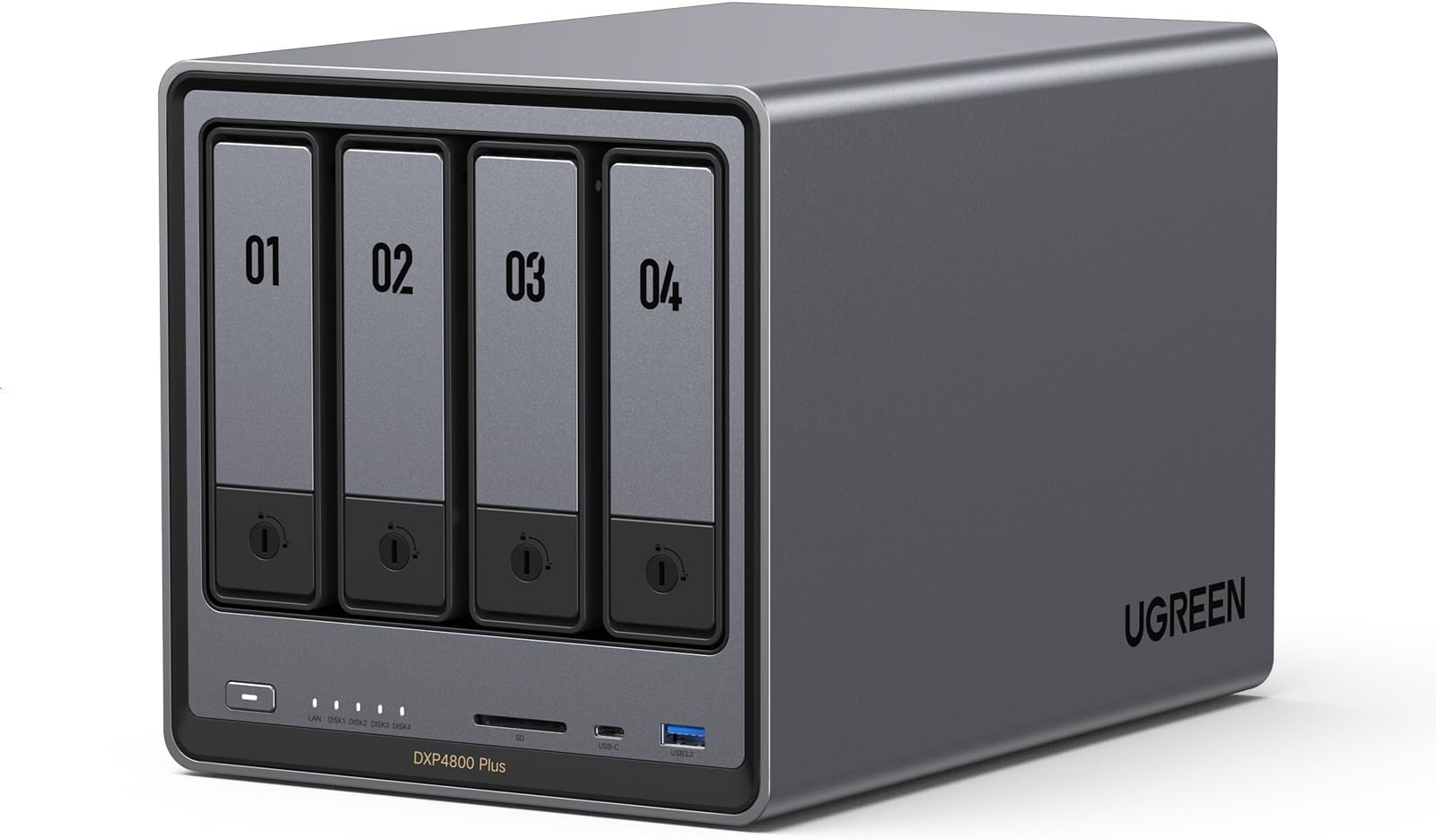
The UGREEN NAS DXP4800 Plus is a high-performance 4-bay desktop NAS featuring an Intel Pentium Gold 5-core CPU, 8GB DDR5 RAM, and a built-in 128GB SSD. It supports ultra-fast 10GbE and 2.5GbE networking for blazing transfer speeds, up to 144TB scalable storage with 22 M.2 NVMe slots, and advanced features like Docker, virtual machines, AI photo management, and robust encryption. Designed for professionals and small offices, it offers seamless multi-device compatibility and secure, centralized data management.


| ASIN | B0D22JRHZB |
| EUスペアパーツの入手可能期間 | 2 年 |
| HDD容量 | 144 TB |
| おすすめ度 | 5つ星のうち4.6 542 レビュー |
| カラー | グレー |
| デジタルストレージの容量の測定単位 | 144 TB |
| デジタルストレージ容量 | 144 TB |
| データ転送速度 | 1250 メガバイト毎秒 |
| ハードウェアインターフェイス | SATA 6.0 Gb/s, USB, イーサネット |
| ハードディスク 種類 | メカニカルハードデイスク |
| ハードディスクのフォームファクター | 3.5 インチ |
| ハードディスクインターフェイス | Serial ATA |
| ハードディスクフォームファクタ | 3.5 インチ |
| ハードディスク回転数(rpm) | 7200 RPM |
| フォームファクター | 2.5インチ、3.5インチ。 |
| ブランド | UGREEN |
| ブランド名 | UGREEN |
| メーカー名 | UGREEN |
| メーカー型番 | DXP4800 Plus, 4-Bay |
| 互換デバイス | スマートフォン, タブレット, デスクトップ, ノートパソコン |
| 付属品総数 | 1 |
| 取り付けのタイプ | 内蔵ハードドライブ |
| 同梱商品 | USBケーブル, クイックスタートガイド, クイックスタートガイド。, スクリュードライバーキット, ドライバーキット。, 電源アダプター(100~240V)。 |
| 商品の用途 | パーソナル, ビジネス、オフィス。, マルチメディア、ホーム。 |
| 商品の追加説明1 | Intel 5コア 8505 CPU、8GB DDR5 RAM、1x 10GbE、1x 2.5GbEイーサネット、128G SSD、4K HDMI、SD 3.0。 |
| 商品の重量 | 3.79 キログラム |
| 商品外装素材 | 金属 |
| 型番 | DXP4800 Plus,4-Bay (Diskless) |
| 接続技術 | HDMI, SATA, USB, イーサネット |
| 特徴 | Intel 5コア 8505 CPU、8GB DDR5 RAM、1x 10GbE、1x 2.5GbEイーサネット、128G SSD、4K HDMI、SD 3.0。 |
| 読み込み速度 | 1250 メガバイト毎秒 |
| 通信・接続インターフェース | HDMI, SATA, USB, イーサネット |
K**O
導入簡単、安心。楽しい。
初めてのファイルサーバーでしたが、導入は非常に簡単でした。 win / Mac / iPhoneからもアプリで軽快に動いていますし、win とはLANで直結して軽快にバックアップできています。(HDD→HDDで100-160MB/s程度 FastCopyを使用して2.5TBのバックアップに4時間程度) おかげで動画編集のストレージ環境の不安が払拭できました。 余っていた2.5HDDも積んでみましたが、少しネジ位置を変えたり、付属のネジで固定(短いプラスドライバーも同梱されています)すれば無事使えました。 こちらは家族用の共有フォルダとして使用していこうと思います。 独自のOSを積んでおり、PC環境からブラウザ経由で見ると仮想PCの様なウィンドウが開きます。 写真や動画のバックアップ、閲覧する機能も普通にアプリの様な形態で、違和感なく操作。 試しに、iPhoneの写真や動画をバックアップしてみましたが、自宅に要る時間だけ、バックグラウンドで動作させ続けたところ、35,000ファイル 1.3TBで3日かかりました。 iCloudからダウンロードしては転送し…みたいなことだったので、かなりしんどそうでしたが、バックアップが完了してみれば、純正アプリくらいの軽快さで動いています。(閲覧しにいくのがめんどくさいのでわざわざここをメインにはしませんが) 更にしまいこんでいた3.5HDDなども積んでみましたが、こちらはしっかりとステータスに『危険』と表示されたので、むしろ安心できました。 速く健全なHDDを沢山積んで、クラウドサービスからの脱却を進めていきたいと思います。 クイックリファレンス的なものだけで、詳しい説明書といったものはありませんでした。 日本サイトはまだクラウドファンディング色の強い、導入ページのみでしたので、LANの直結などはChatGPTに教えてもらってサクっと解決しました。 ChatGPT曰く「すごく良いマシン持ってますよ!」だそうです。 そのうちマイクラサーバーなど仲間内のゲームサーバーも立ててみたいです。
C**C
Excellent Plex NAS – Powerful, Flexible, And A Big Step Up From Synology
1) PLEX DOCKER SETUP: Using Docker with the most popular Plex container (linuxserver/plex) on the Ugreen NAS was straightforward. I pulled the container from the built‑in Docker interface, pointed config and media paths to my shared folders, set network mode to host, and left almost all defaults. Even with my custom usernames and permissions, everything just worked. No hacking, no odd workarounds. 2) STORAGE CONFIG: I’m running two Seagate IronWolf Pro 28TB Enterprise NAS drives (ST28000NT000) internally as Drive 1 and Drive 3 in a JBOD‑style setup (data on 1, backup on 3). For future expansion I’ll add Drive 2 as data and Drive 4 as backup. The IronWolf Pros have been flawless so far—quiet, cool enough, and fast for Plex streaming and backup. 3) INTERNAL VS USB BACKUP: I also tested one of the 28TB Seagates in an OWC Mercury Elite Pro external enclosure (USB 3.2 Gen 1, 5Gb/s) as a backup drive connected to the Ugreen. The Seagate fit perfectly, the enclosure worked well, and performance was fine. In the end, though, keeping everything internal (all drives inside the Ugreen) was more efficient and cleaner for my backup scheme. 4) UGREEN VS SYNOLOGY (DS220+): I own a Synology DS220+ and originally used it as my Plex server. I eventually retired it from Plex duty because: (a) Synology was picky about third‑party drives and didn’t officially support large Seagate IronWolf Pro capacities the way I wanted; (b) memory expansion on the DS220+ is very limited; and (c) Docker/Plex on the Ugreen feels faster and less constrained. The Ugreen gives me more flexibility with drives, more headroom for RAM and containers, and overall better performance for a multi‑TB Plex library. 5) OVERALL EXPERIENCE & TIP: The Ugreen NAS has become my main Plex server and backup hub. Docker Plex runs smoothly, transcoding and library scans are snappy, and the hardware has handled large 28TB drives and backups without complaint. FINAL TIP: Use ChatGPT/AI during setup. I used an AI assistant heavily to walk through Docker, rsync backups, SMB mounts, IP changes, and cleaning up old Synology configs—saved a ton of time and guesswork.
A**N
Unmatched quality
Built like a tank. Incredible quality inside and out. This is as premium as it gets for the prosumer. It's unbelievable what ugreen offers at the same price point as the competition. Fast, reliable, and built to last. Beautiful unit. The OS is intuitive, polished, and has everything you need to get up and running in a home environment. These units from ugreen are the new standard now. There plastic box competition is going to have to up their game, or fall by the wayside. If you're looking for an Nas, look no further. Ugreen holds the crown.
T**Y
I Enjoy to use it!
Definitely a solid NAS. I bought it 6 months ago and used a lot to write a detailed review. Pros: +Good quality hardware. +NVME & HDD storage pool options. +Ultra High speed access/transfers with 10Gbit Ethernet on NVME Storage pools. I think this is the key reason I have chosen this NAS. I can easily reach over 1GBytes/sec. speeds over the 10 GBit network (even can go faster with 2 ethernet link aggregation). I almost stopped using my external NVME drives after having this NAS. (This is really Great!!) Before this NAS I was planning to have Synology DS923+ and 10 Gbps network upgrade. But NVME storage pool is not available unless you don't purchase Synology nvme drives which is even more expensive than MacBook SSD upgrades!!! Besides you cannot find any Synology NVME over 2TB!!! Go to hell Synology!!!! +Silent cooling. +Very fast in general and Very fast startup/shutdown. (Thanks to having a separate NVME drive for operating system) Previously with my old QNAP NAS, it takes ages to boot up so I was never shutting it down and the times I don't it was consuming power for nothing. Now I don't hesitate to Shut down, it boots up less then a minute!! +Compatible with all HDDs I have. +Freedom for using and OS you want. Actually I am using with stock Operation System (UGOS Pro). But I have plans to try TruNAS someday. Cons: -Original Operation System is good, fast and stable, But still needs improvements. For example; manually adjusting the fan speeds, Or conditional adjustments like QNAP has "if X drives goes over 40C increase the fan speed". There few more things that I don't see in the their software, so still there is room for improvement. But still at least faster than QNAP's slow QTS system. -NVME cooling is not efficient. Actually fan doesn't have any effect on SSD cooling. Initially I was using 4TB WD SN850X. Several times I heard the FAN speed up when I was writing on SSD. I checked the system if there is another reason, CPU was cool everything was cool but NVME was over 50 C. And due to fan has no effect on SSD compartment it doesn't cool the SSD down and it blows high for nothing during this write process. So you have to find a cool working SSD with this NAS. But it is kind of hard since it is a NAS and the SSD you choose should have DRAM and TLC Nands. Mostly you can find this combination in higher and drives which are generally get hot. Seagate firecuda 530 and Samsung 990 Pro or any other cooler working SSDs are better options for this NAS. - Similer issue with above SSD compartment is very slim and you cannot use SSDs with original heatsinks. I already had a 8TB WD SN850X (with original heatsink) and I couldn't use it as well. I didn't want to remove the heating cuz I know it will be hell hot. In general finding the perfect SSD for this NAS is really tricky. But there are some 3D print options on the web to make this compartment larger to use heatsink or even to attach another fan for SSD compartment, but in my opinion FAN is unnecessary, if you can install a proper heatsink, I believe all SSD will be fine.
J**N
Very nice product and can handle a lot of storage
Great product and performs very well. Easy to setup. Not noisy and able to have a lot of storage. I would recommend getting the UPS UGREEN sells as I did not at first. After the first power glitch I bought this and now it will shutdown safely and restart again on its own. I don’t have to worry about any data loss or damage to the system.
W**.
Well built, very good specs for the money, room to grow
I upgraded to this unit coming off a two-bay Synology. I wanted more room for expansion, a bit more headroom on compute capacity, and I was also interested in experimenting with different operating systems. This delivers. Even though it's advertised as four-bay, I would functionally call it a six-bay, because it has two nVME slots, on top of the four hard drive slots. It has relatively good specs (balancing power and energy efficiency, and keeping in mind that most things a NAS does are not compute intensive), has a premium metal case, and noise mostly isn’t an issue (the exception is the dust filter over the fan at the back, it sometimes rattles. I solved that with some double-sided tape to cushion the metal-on-metal contact). Right off the hop, I installed the TrueNAS operating system on this unit, and it was painless. This unit has an HDMI out (an underrated feature) that displays the boot menu when you plug in a bootable USB, and it comes with a writeable SSD drive to which you can install the OS, and keep it hived off from storage. When running TrueNAS, the HDMI out will display the current IP address of the NAS to access its web UI from another device (handy!), and it also has a terminal interface to run various operations with keyboard input. I can't comment on how TrueNAS compares to the UGreen OS (because I never used it), but comparing it with Synology, and having read up on other alternatives like Unraid, my impression is that they're all functionally very similar. Synology has some first-party apps that you won't get anywhere else, but they're not special, there's popular open source alternatives to all of them. Every OS has its library of stock-configured apps (Synology's is relatively small), but to get full utility out of a NAS, you're going to need to figure out how to use Docker (easy if you know what you're doing, immensely confusing *until* you know what you're doing), and every operating system integrates with Docker images in a similar kind of way.
Trustpilot
2 weeks ago
3 weeks ago