Buy anything from 5,000+ international stores. One checkout price. No surprise fees. Join 2M+ shoppers on Desertcart.
Desertcart purchases this item on your behalf and handles shipping, customs, and support to Croatia.
⚡ Power your smart home with speed and style — no compromises!
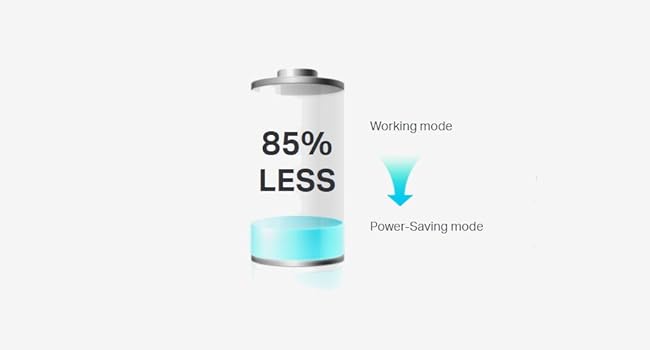
The TP-Link TL-PA8033PKIT AV1300 is a high-performance powerline adapter kit delivering up to 1300Mbps via 2x2 MIMO technology with beamforming for extended range and stable connections. Featuring three gigabit Ethernet ports and an integrated power passthrough socket, it offers seamless plug-and-play setup with no configuration needed. Its patented power-saving mode reduces energy consumption by up to 85%, making it an efficient and reliable solution for wired networking across your home.


| ASIN | B07GFHQXBP |
| Best Sellers Rank | 940 in Computers & Accessories ( See Top 100 in Computers & Accessories ) 6 in Powerline Network Adapters |
| Box Contents | 1 x Powerline Adapter TL-PA8010P, TL-PA8030P, 2 × 6. |
| Brand Name | TP-Link |
| Color | White |
| Compatible Devices | Desktop |
| Compatible Operating System Family | Linux, Windows |
| Country of Origin | China |
| Customer Reviews | 4.3 4.3 out of 5 stars (3,097) |
| Data Link Protocol | Ethernet, Gigabit Ethernet |
| Data Transfer Rate | 1300 Megabits Per Second |
| EU Spare Part Availability Duration | 3 Years |
| Hardware Interface | Ethernet |
| Item Dimensions L x W x H | 7.2L x 4.2W x 13.1H centimetres |
| Item Type Name | AV1300 3-Port Gigabit Passthrough Powerline Starter Kit |
| Item Weight | 500 g |
| Manufacturer | TP-Link |
| Manufacturer Part Number | TL-PA8033PKIT |
| Model Number | TL-PA8033PKIT |
| Product Warranty | 3 Years |
| Unit Count | 2.0 count |
M**R
Better than expected
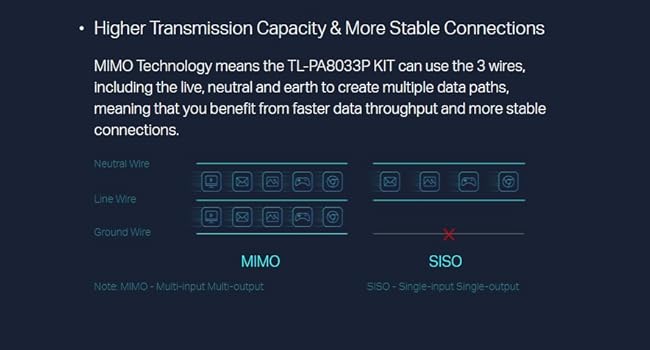
Review of TP-Link TL-PA8033PKIT. I purchased this powerline kit to use with my new Freely internet based TV located in an upstairs room. Having already tried a wi-fi extender with little success & not wanting the hassle of routing an ethernet cable between floors I decided powerline was the best option. As our house is an early 70's build & still using the original red & black wiring I wasn't sure how well powerline would work, but I'm pleased to say that it works a treat. My connection speeds are exactly the same through powerline as they are when plugged directly into my router & I can now enjoy my Freely TV without any picture freezing or connection dropout. As this version has three ethernet ports I now also have a wired connection for my PC & internet radio in the same room. Speeds will vary depending on the wiring in your home, I was lucky in getting a good result but others may find it doesn't work for them if they have split circuits between floors going to separate consumer units for example. It probably helps that this powerline device uses all 3 wires, Live, Neutral & Earth for its data path, lesser versions only use Live & Neutral, so it's worth the extra spend for this feature alone. My only criticism of this unit would be the location of the three ethernet ports exiting out of the top of the plug, it would have been far neater & more convenient if they'd been located at the bottom, they also get quite warm in use. Because these units are not wi-fi you cannot use the TP-Link Tether app to customise your settings, instead there is a Utility on the TP-Link website that you can download on to your PC which will let you access the device settings, I've only used it to turn off all the LED's on both plugs. Overall a great device that has given me a reliable & more secure wired connection vs wi-fi for my devices.
G**E
Thought these would be a gimmick. Happy to be proved wrong.
Never used these kinds of devices before, and after some research, I opted for the TP-Link TL-PA8033PKIT AV1300 model. I've been using it now for roughly 2 months, and have been pleasantly surprised by the result. The signal I'm getting, which unfortunately is capped by the adapter well below what you'd expect from Ethernet speeds direct from your router, is more than enough to play YouTube in high definition, and stream content from the likes of Netflix, Disney+, and the Sky Sports web browser app without buffering issues. I like to watch my shows when I do my long runs on the treadmill, and I can do so now without my videos pausing to buffer. Now, why powerline adapters? Because I researched a range of options before arriving at this one. Our house has solid brick walls coupled with layers of insulation, which is a nightmare for Wi-Fi signals. The hope was to get a decent Ethernet connection in a garden shed, and unfortunately, running an Ethernet cable from the house to the shed just wasn't feasible in our case. Too many holes needing to be drilled, through those aforementioned thick stone walls. And whilst our Wi-Fi signal reached the shed, it was patchy at best. Video streaming worked, but the quality was awful; I could barely watch Snooker on the BBC iPlayer, for example, without facing the dreaded spinning buffering wheel every minute or so. That's when I researched these 'powerline' adapters. And I’ll be honest: I thought they’d be a waste of time and money. Glad I was wrong. Mine works, doing all the things they suggest you not do when setting them up. The adapter connects to the main router using a Network Switch, I don't have a baldy notion if the house's electrical wiring causes interference, and the adapter that lives in the shed is plugged into a surge-protected gang socket. Setting them up was as easy as hitting 'Pair'. It hasn’t run hot, its signal hasn’t dipped once; it’s been a solid addition to the shed that has, more-or-less, solved whatever connectivity issues we had before. From this adapter, I'm running three Ethernet cables: a Wi-Fi range extender which has more-or-less fixed the stability issue of Wi-Fi in the shed and also extends our signal across the garden, a mini PC I use to watch my streaming services when I use the treadmill, and an Ethernet-to-USB C cable so I can hard-wire my phone and tablet. The pass-through plug has also been useful, and in it, I’ve got a plug with two USB 3.1A sockets and two USB-C sockets. One of the 3.1A sockets powers the TV’s Chromecast without issue, and the other provides a charging lead for an old phone my brother uses as a camera when he’s playing dart matches online. Now, hindsight is 20/20 as they say. At the time I bought this, the model that comes equipped with a Wi-Fi option was a little more expensive. I should have just gone with it. The Wi-Fi range booster I mentioned further up does the same thing, and ended up costing slightly less, but I should have just opted for the Wi-Fi model. You live and learn.
L**S
Works okay
Used to enhance download speed to Xbox. It didn’t pair the first time. Has improved speed to Xbox but doing a download speed test at the Xbox, not a significant increase.
A**F
Easy setup, good strong connection and well made….
I got this new TP-Link set as my old ones in my garage craft room were buzzing and constantly kept dropping the connection to my pc. These new ones connected within 2 minutes of being out of the box and my computer connects to the internet as if it’s right next to the router. I’m very happy and would highly recommend this set to anyone needing a connection in another space where you can’t use a cable. All that’s required is that the adapter is on the same electrical ring as your router, you then have to pair the two parts after connecting with the cable to the router, then once paired plug the adapter in to a socket in the room where you need a good connection. Easy setup and a very stable connection, I’m really happy….
L**P
Great when they work, but not reliable
Easy to set up, you can usually just plug and play with these and they'll give you good speeds out of the box. However after about a year they kept dropping connection to each other on a weekly basis, and the only solution was a full reset of both items via the TP Link app. After 2 years of use, one of the items has completely stopped working.
G**R
الفكرة جيدة انك تتخلص من التمديد والأسلاك ولكن.. لاحظت انه تنخفض سرعة الإنترنت على حسب استخدام الكهرباء في البيت يعني مثلا حطيته اسفل المفتاح حق لمبة الغرفة...اول ما افتح النور السرعة تنخفض للنصف طفي النور السرعة ترجع تطلع ...وهكذا
V**S
Bought this to upgrade from my old Netgear ethernet extender that was getting 350-400mbs, my Internet speed is 500mbs. The new TP-Link was only getting 40-50mbs which was a big disappointment for what money it is.
M**I
1 year and half working only... It's now not working and making a buzzy noise when we plug it...
أ**ي
فك ازمه عندي
K**.
Die TP-Link Powerline Adapter sind wirklich schnell eingerichtet und machen einen wertigen eindruck auch wenn ich finde das Sie recht groß sind. Es ist das GB Set somit nur in UK und Ireland etc. einsetzbar.
Trustpilot
3 days ago
1 month ago