Desertcart purchases this item on your behalf and handles shipping, customs, and support to Croatia.
🚀 Elevate your game and workspace with KOORUI’s ultra-smooth, vivid 27-inch powerhouse!
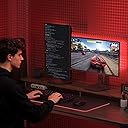
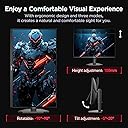
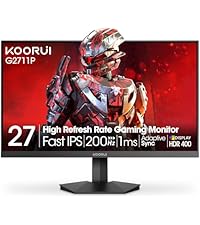
The KOORUI 27-Inch Gaming Monitor delivers a professional-grade QHD 2560x1440 resolution with a lightning-fast 200Hz refresh rate and 1ms response time, powered by a Fast IPS panel and HDR400 technology. Designed for gamers, creatives, and multitaskers, it features Adaptive Sync for tear-free visuals, versatile connectivity with dual HDMI and DisplayPort, and an ergonomic adjustable stand. Backed by a 3-year warranty, it’s the ultimate upgrade for immersive, smooth, and vibrant viewing experiences.


| ASIN | B0F4X7FBZN |
| Adaptive Sync | FreeSync, G-Sync |
| Additional Features | Adaptive Sync, Flicker-Free, Height Adjustment, Pivot Adjustment, Tilt Adjustment |
| Aspect Ratio | 16:9 |
| Best Sellers Rank | #2,499 in Electronics ( See Top 100 in Electronics ) #86 in Computer Monitors |
| Brand | KOORUI |
| Brightness | 350 candela_per_square_meter |
| Color | Black |
| Color Gamut | 99 |
| Compatible Devices | Desktop, Gaming Console, Laptop |
| Connectivity Technology | DisplayPort, HDMI |
| Contrast Ratio | 1000:1 |
| Customer Reviews | 4.4 out of 5 stars 14,340 Reviews |
| Display Resolution Maximum | 2560 x 1440 pixels |
| Display Technology | IPS |
| Display Type | IPS |
| Hardware Connectivity | 3.5mm Audio, DisplayPort, HDMI |
| Image Contrast Ratio | 1000:1 |
| Included Components | 27 inch monitor, Displayport cable, Power Adapter, User Manual |
| Item Dimensions D x W x H | 7.29"D x 24.15"W x 18.13"H |
| Item Weight | 6.71 kg |
| Manufacturer | KOORUI |
| Model Name | G2722P |
| Model Number | G2722P |
| Native Resolution | 2560x1440 |
| Number of Component Outputs | 3 |
| Picture Quality Enhancement Technology | HDR400 |
| Refresh Rate | 200 hertz |
| Resolution | QHD Wide 1440p |
| Response Time | 1 milliseconds |
| Screen Finish | Matte |
| Screen Size | 27 inches |
| Screen Surface Description | Matte |
| Shape | Flat |
| Specific Uses For Product | Business, Gaming, Photo Video Editing |
| Total Number of HDMI Ports | 2 |
| Unit Count | 1 Count |
| Viewing Angle | 178 degrees |
| Warranty Description | 3-year warranty service (display screen is backed for 1 year and other accessories for 3 years |
| Warranty Type | 3-year warranty service (display screen is backed for 1 year and other accessories for 3 years |
P**U
Excellent 4K Monitor for MacBook Pro M3
I bought this monitor to use with my MacBook Pro M3, and it works perfectly at 4K resolution with a 120Hz refresh rate. One thing I especially like due to my not perfect eyesight is using 200% scaling in macOS—it provides larger, crisp UI elements while still taking full advantage of the sharp 4K display, making it very comfortable for everyday work. The picture quality is excellent, with vibrant colors and sharp text. Setup was quick, and the monitor has a clean, modern design. My only minor complaint is that the dedicated button for switching to 240Hz is located very close to the main joystick/menu button, so it’s easy to press it by mistake when navigating the on-screen menu. Overall, it’s an excellent monitor that offers great image quality and outstanding value for the price.
S**T
I couldn't be happier with the quality of these monitors!!!
This is such a great monitor! It's so good, I now have two of them. One horizontal and one vertical. Being a QD MiniLED means i never have to worry about burn-in when gaming and especially doing engineering work. Being 4K, along with 1,400 nits of peak brightness, 300,000:1 contrast ratio and 1.07 billion colors means the text and imagery in general is bright and crystal clear. I might eventually buy a 3rd monitor but right now, I couldn't be happier with the quality of these monitors!!!
R**A
Amazing Product
This is a great Monitor. Video game displays and clarity is Top notch, and the price is very reasonable. 10/10 recommend.
P**R
The Koorui S2741LM is an excellent monitor
I have been using this monitor for several weeks now. My initial impressions are positive. I chose to go with an IPS Mini LED monitor, rather than a OLED, due to concerns about longevity and burn in, and because the mixed use I typically do leans heavily on the productivity end of the spectrum. Color accuracy and range is quite good, with satisfactory factory defaults. Switching from an expensive, but aging IPS monitor with excellent color accuracy, that was my biggest concern with the Koorui S2741LM. Fortunately this monitor delivers on the manufacturer's claims. The 160Hz refresh rate is huge step up from the 60Hz on my old monitor, and even in general productivity work it's a noticeable improvement. Using HDR while playing games or watching a movie is impressive. It's also possible to manually turn on local dimming and increase brightness without HDR, which is nice for apps that don't work consistantly in HDR mode (looking at you Plex windows app). I'm sure that a side-by-side comparison with an OLED would show the mini LED's shortcomings, but I don't regret the choice at all. I find the "low" setting works best for me, and benefits from increasing brightness significantly. This is where my primary complaint comes in. Windows has an HDR mode shortcut (win-alt-b), but to manually switch to local dimming requires diving into the OSD, and tweaking brightness settings. That's quite cumbersome. I will typically switch between productivity work where local dimming needs to be off, to full screen video and gaming, where local dimming shines, multiple times a day. Rather than having a dedicated button to switch screen resolutions, I would have preferred to have a button that could switch between two user customizable modes. I was a little disappointed to discover that the monitor comes with a large power brick. It would have been nice if the manufacturer integrated the DC inverter into the monitor. On the other hand, the monitor does come with a full assortment of cables, which was nice. Screws were also included for VESA mounting, so finding screws of the right depth was not necessary to get the monitor attached to my desk mount. Overall I've found the Koorui S2741LM to be an excellent monitor. Local dimming with over a 1000 dimming zones delivers the gaming and movie experience I was looking for, and monitor's the color accuracy and range are good enough for occasional image and media work.
T**I
Its a good monitor
I returned it soon after buying it but not cause it was bad. In the time I had it I enjoyed it a lot.
Z**Z
Ultra Smooth
I’ve been using this monitor for a bit and I’m really happy with my purchase. Going from 60hz to 180hz and 1080p to 1440p was an absolute game changer for me. Colors were also very vibrant and look great right out the box. I’ve had no problems with this monitor and it’s still going strong. Highly recommend if you want a high-refresh rate gaming monitor.
౨**!
DO NOT BUY. dead pixels or ghosting after barely a months use
i have used this monitor with my new pc setup for about two weeks. the monitor remained in the box for a while as i worked through technical difficulties with my new build. it was long enough for the return window to pass, unfortunately, and now that i've started using the monitor these lines have begun to develop on the screen. to be clear, this is not the result of burning onto the monitor. i don't leave my computer running while i'm away, i put it to sleep every night and the display turns off automatically after a few minutes, and i have been sure to turn the pc entirely off once a week to preserve it. despite my efforts these lines have showed up completely out of nowhere, and are only getting worse. the first photo is yesterday and the second photo is today. the different color is irrelevant, don't mind that, but you see what i mean. more lines have appeared. there are some in the center of the screen not pictured that there was one of yesterday and now there are two of today, and i can assume this will continue until the entire display has essentially become a sheet of paper. save your money for something better, because i am now out of a lot of money because of the seller's complete lack of quality control. if you're stubborn and still think you should buy it, allow me to give you a few more reasons not to; the strange shape of the monitor's outline prevents you from putting any kind of cover around it in a consistent way. it has no brightness controls on it's own. enjoy your eyes being constantly bombarded with blue light at max brightness! like i mentioned before, the display automatically turns off after a few minutes of inactivity. this would be a good feature if not for the fact it also forcibly disconnects random devices from your pc. i hear the little disconnect-reconnect sound with every mouse shake to revive it. in addition to that, it takes way too long to come back awake when that happens, and the pc is fully responsive too, leading you to click random stuff. which you will do, because it doesn't wake up from mouse movement. it has to be a click. for those of you this did work for, all the power to you. i just can't personally recover from the fact i am losing money for something that is entirely the fault of the seller. UPDATE 10/19/23 i have contacted customer support for the company and they proceeded to ignore me after giving one reply. the lines shown in the photos have consumed my entire screen are impossible to ignore. do not buy this, they have no quality control and will not take responsibility for their flaws. UPDATE 8/9/24 i thought you'd all like to know this is still the case. the entire screen is covered in these lines like a crt tv. customer service has been useless and does not care. they did not offer a replacement or product support of any kind, and merely suggested that it was some kind of video setting built into the monitor. obviously, the nature of their appearance makes it clear this is not the case. i strongly advise that you do not buy this monitor. it is simply not worth it.
B**R
Koorui 34E6UC (34" 3440×1440, 180 Hz, 1000R curved VA panel) — But Missing Info Buyers Should Know
Review: I purchased two of the Koorui 34‑inch curved ultrawide monitors for a dual‑monitor setup, and so far I’m very pleased with them. The picture quality is sharp, the brightness is solid, and the “Normal” color preset looks natural without any adjustments. For the price, these 34‑inch panels deliver very good performance. That said, there are a few important details the product listing and reviews don’t mention — and knowing them ahead of time would have saved me some stress during installation. 1. YES, the 34‑inch model DOES include stand‑offs (spacers) This is not mentioned anywhere in the listing, and even Amazon’s Rufus incorrectly says they are *not* included. They actually come in the small accessory packet with the manual. If you’re mounting these monitors, you will need those stand‑offs because of the recessed VESA pattern. They are already in the box — just not advertised. I rushed to order a separate spacer kit because the listing didn’t mention it, so I’m putting this here to help the next person avoid that. 2. One of my monitors flashed briefly until I disabled FreeSync On one of the two monitors, I noticed a quick bright “flash” when moving the mouse. Turning off Adaptive Sync / FreeSync in the monitor’s menu fixed it instantly. The other monitor didn’t have this issue, so it seems to vary by panel. Not a defect — just something to be aware of if you see flicker or brightness pops. 3. Color and brightness match well once set manually After setting both monitors to the same brightness, contrast, and color mode, they match very well side‑by‑side. The “Normal” color preset looks the most accurate on these VA panels. 4. Build quality and packaging are solid Both monitors arrived well‑protected, and the included cables work fine. The stand is basic, but I’m using monitor arms, so that wasn’t a factor for me. 5. Too early to comment on long‑term support or durability I’ve only had these monitors set up for a few hours, so I can’t speak yet to long‑term reliability or how responsive Koorui’s support is. I’ll update this review if anything changes over time. Bottom line: These 34‑inch Koorui ultrawides are excellent for the price, especially for gaming or a dual‑monitor setup. Just be aware that: - Stand‑offs ARE included (despite the listing not saying so) - FreeSync may need to be turned off on some units - Picture quality is great once you match settings manually - Long‑term support is still unknown If the listing had mentioned the included spacers, it would have saved me a last‑minute order — so I hope this review helps the next person.
K**O
Excelente Monitor
El monitor cumple su función pues da la resolución 1440p pero lo hace a 8 bits y es bueno. El panel es VA lo cual para algunos no les gusta sin embargo vale la pena comprarlo y más por el precio pues yo lo agarre en oferta un poco abajo de $4000. Este es el primer monitor que uso para jugar ocasionalmente y ver películas. El único inconveniente que no se si solo me suceda a mi es que a veces cuando veo algo en Netflix la pantalla corta una parte del video y despues de 1 o 2 segundos vuelve la imagen, normalmente donde van los subtítulos pero solo sucede con esa plataforma; PARA JUGAR VA DE MARAVILLA.
J**O
Sick
Nice
A**O
Excelente producto
Excelente producto funcionando a la perfección
F**O
Gran Tamaño y Buena Calidad
Es mi primera pantalla 4k que sea el doble de tamaño , por ahora no me a decepcionado
ゆ**み
価格
問題なく使えてます。 価格の割に優秀なモニターです。
Trustpilot
2 weeks ago
3 weeks ago